
English | 简体中文
m2w 2: Markdown to WordPress




:star2::star2::star2: Welcome m2w 2!
Tutorial: Docker系列 WordPress系列 WordPress上传或更新Markdown的最佳实践-m2w 2.0
Table of Contents
Background
m2w is an easy-to-use tool for automatical upload & update of markdown to WordPress, which has been frozen in v1.0.7. m2w 1.0 is powerful enough for most people, but not very friendly:
- You have to assign
legacyornewpath to store the blog markdowns, which means that you could not position your files as you like. - It's not convenient to manage multiple sites with exactly the same blog markdowns.
You can still find tutorials about m2w 1.0 (Zh/En), which is not maintained anymore. It's OK if you just use m2w 1.0, and It works very well.
=================
Now, more powerful m2w 2 comes and meet everyone! :star2: :star2: :star2:
m2w 2 has these features:
- Use
config/user.jsonto maintain the user information in a little different way comparing withm2w 1.0. - You can just keep your file structures locally as you like.
- You can manage lots of websites at the same time via multiple
legacy_*.json. - All you need to deal with is a single python script
m2w.pyinstead of two (update.pyandupload.pyinm2w 1.0). - Ignore repeated new markdown files for uploading (
v2.2.4+) - Stable and useful as
m2w 1.0.
Install
Miniconda is recommended to manage Python version and related dependencies.
Here is the dependency:
# Python 3.7.4 is the version I use m2w. I'm not sure whether it could work well in more advanced Python versions.
python_requires='>=3.7.4'

# Dependencies
install_requires=[
    "python-frontmatter>=1.0.0",
    "markdown>=3.3.6",
    "python-wordpress-xmlrpc>=2.3"
]
After 2022-12-10, m2w 2 was uploaded onto PyPi. To install m2w 2, just run pip install m2w in your shell/conda environment. You can also directly download m2w 2 from this repotory. The usage is exactly the same.
You can specify version or resource when installing m2w 2:
pip install -i https://pypi.org/simple m2w==2.2.10
Generally, the latest version of m2w is recommended.
Usage
- Install m2w from PyPi or this Github repotory.
- Build a
m2w.pyfile (or other names you like) in<path01>. Here is the demo. Create<path02>/config/user.jsonand setpath_m2was<path02>inm2w.py:
# Absolute path of m2w
path_m2w = '<path02>'
- Define
<path02>/config/user.json. You can add many websites likeweb01! Please go to the demo for more details. Here is some interpretations:
- domain, username, password: The information of your WordPress site and account.
- path_markdown: Add as much top folders as you want!
- post_metadata: Default category information.
- websites: Add as much accounts as you want!
- path_legacy_json: Just leave it alone and do not change anything!
"web01": {
        "domain": "https://domain-01.com",
        "username": "username-01",
        "password": "password-01",
        "path_markdown": [
            "E:/Github/m2w/@test/main",
            "E:/Github/m2w/@test/main2"
        ],
        "post_metadata": {
            "category": ["test"],
            "tag": ["test"],
            "status": "publish"
        },
        "path_legacy_json": "/config/legacy"
    }
- Run
m2w.pylike:
python <path01>/m2w.py
Demo
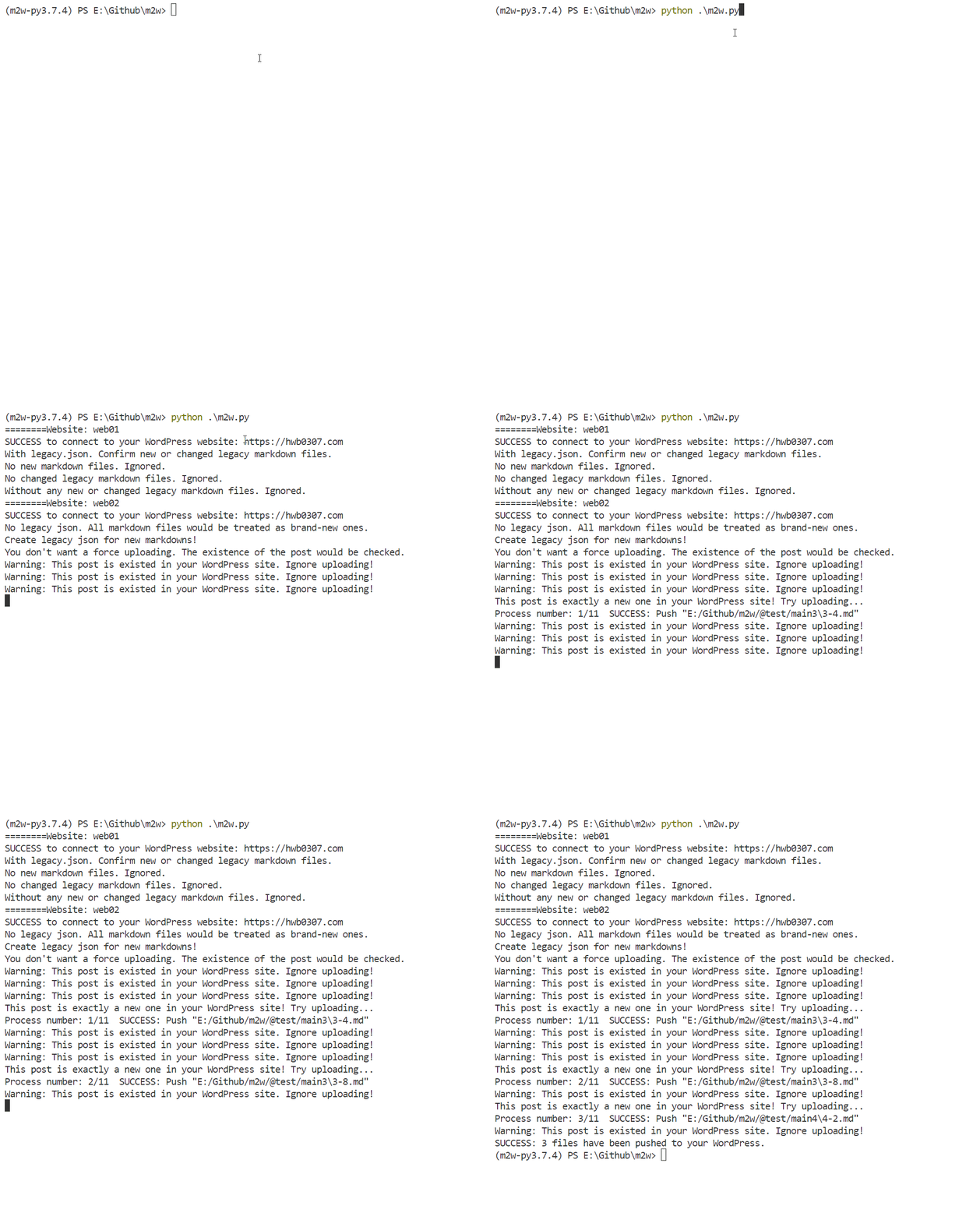
This demo is conducted in Win10 with VScode.
As shown in the following GIF, all changed or brand-new markdowns can be automatically updated/upload via just a simple command python m2w.py!
LOG
- 2022-12-10 :Upload
m2w 2to PyPi. You can installm2w 2with code (in Shell) likepip install -i https://pypi.org/simple m2w. The project url is https://pypi.org/project/m2w. - 2022-12-08 :Ignore repeated uploading of new markdown based on their file names. Update ot
m2w 2.2.4(Strongly recommended)! - 2022-12-06:Optimized parameter space of m2w, which make it more flexible. Update ot
m2w 2.2! - 2022-12-03:Brand-new m2w 2.0!
- 2022-11-13:Add error control for the
Clientfunction, which is helpful to avoid legacy bugs if the connection to the WordPress website is not available. - Before: Create
m2wproject.
TO-DO
- Nothing
Related Efforts
Maintainers
Contributing
Feel free to dive in! Open an issue or submit PRs.
m2w follows the Contributor Covenant Code of Conduct.
Contributors
Nobody yet.
License
This software depends on other packages that may be licensed under different open source licenses.
m2w is released under the MIT license. See LICENSE for details.
More
Applications similar to m2w
- WordPressXMLRPCTools: Manage WordPress posts in Hexo way.
- markpress: Write WordPress in Markdown in Your Favorite Text Editor
- wordpress-markdown-blog-loader: This utility loads markdown blogs into WordPress as a post. It allows you to work on your blog in your favorite editor and keeps all your blogs in git.
1 maintainer

Release files for m2w 2.2.11
For a detailed explanation of source distributions (sdists) and built distributions (wheels), please see the package formats documentation.
Source distribution (sdist)
| File | Size | Uploaded | |
|---|---|---|---|
| m2w-2.2.11.tar.gz | 14.6 kB | Details |
Built distribution (wheel)
| File | Interpreter | ABI | Platform | Reset |
|---|---|---|---|---|
| m2w-2.2.11-py3-none-any.whl | Python 3 | none | any | Details |
Total release size: 27.4 kB
Release files / m2w-2.2.11.tar.gz
| Download URL | m2w-2.2.11.tar.gz |
|---|---|
| Size | 14.6 kB |
| Tags | Source |
|
SHA-256 checksum How to use checksums |
305d2303ea4e339d41cf95b2f39dade8bbc1b756f97d7e27f4c3d87ea4935cd8
|
|
BLAKE2b-256 checksum How to use checksums |
23a2c2afaa6a38744b759c3e67565be75c6d19cd0ee00652cf90f7fb68fcdaf5
|
| Upload date | |
|
Uploaded using Trusted Publishing? What is trusted publishing? |
No |
| Uploaded via |
twine/4.0.2 CPython/3.10.0
|
Release files / m2w-2.2.11-py3-none-any.whl
| Download URL | m2w-2.2.11-py3-none-any.whl |
|---|---|
| Size | 12.8 kB |
| Tags | Python 3 |
|
SHA-256 checksum How to use checksums |
f4ee468fa7273f55e8f713f6379f97dea46a93443d5c8a63bdab3025171e7b8c
|
|
BLAKE2b-256 checksum How to use checksums |
6356789cf1879a2e474748e70fd66827bf0dbe6cb579af996890f8fb70847f53
|
| Upload date | |
|
Uploaded using Trusted Publishing? What is trusted publishing? |
No |
| Uploaded via |
twine/4.0.2 CPython/3.10.0
|














