
Local-first persistent memory for MCP agents — 73 tools, 89% LongMemEval, hybrid search, GDPR, zero cloud
Verified details
These details have been verified by PyPIProject links
GitHub Statistics
Maintainers

Project description
![M3 Memory]
M3 Memory
Persistent, local memory for MCP agents.
"Wait, you remember that?" — Stop re-explaining your project to your AI. Give it a long-term brain that stays 100% on your machine.
🚀 New to M3? Start here with our 5-minute "Human-First" guide.






Works with Claude Code, Gemini CLI, Aider, OpenCode, and any MCP-compatible agent. Quick one-line command to have your agent install chat log sub-system which saves verbatim chat log info, before compaction, with zero lag/latency and 100% retrieval recall. Just tell your AI agent "install m3-memory chat log sub-system" and your agent will automatically install it with all the proper hooks with some minimal customization questions from you (you can accept the default answers).
📦 Install
curl -fsSL https://raw.githubusercontent.com/skynetcmd/m3-memory/main/install.sh | bash
Installs on macOS or Linux with the single command above. Use this to install on Windows. Use this link to install manually and this to examine the script and what it does.
Claude Code users can also install as a plugin instead — gets you 15 /m3:* slash commands, a memory-curator subagent, and auto-wired hooks:
/plugin marketplace add skynetcmd/m3-memory
/plugin install m3@skynetcmd
Plugin reference · Claude.ai (web/desktop) connector
Add to your MCP config:
{
  "mcpServers": {
    "memory": { "command": "mcp-memory" }
  }
}
Requires a local embedding model. Ollama maybe the easiest:
ollama pull qwen3-embedding:0.6b && ollama serve
I personally use LM Studio for it's support for Apple's MLX. But, it's your preference.
Qwen3-Embedding-0.6B (1024-dim, Q8 quantized, ~639 MB) is the model M3 Memory is tuned for. But you can set and use other embedders as you wish. For example, you could use nomic-embed-text (768-dim) which also works (with minimal fidelity loss) — set EMBED_MODEL=nomic-embed-text in your environment.
As mentioned, you can use Ollama or LM Studio — load an embedding model and start its server.
Want auto-classification, summarization, and consolidation? Load a small chat model alongside the embedder (e.g. qwen2.5:0.5b via Ollama, or any 0.5–1B instruct GGUF in LM Studio / llama.cpp). M3 auto-selects it; embedding-only features work without it. See docs/QUICKSTART.md → Optional: load a small chat model.
Restart your agent. Done!
🔮 What happens next (benefits of use)
You're at a coffee shop on your MacBook, asking Claude to debug a deployment issue. It remembers the architecture decisions you made last week, the server configs you stored yesterday, and the troubleshooting steps that worked last time — all from local SQLite, no internet required.
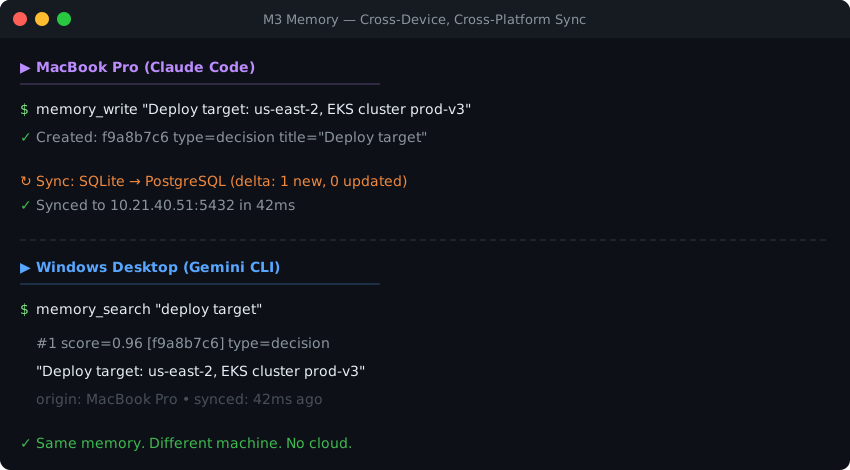
Later, you're at your Windows desktop at home with Gemini CLI, and it picks up exactly where you left off. Same memories, same context, same knowledge graph. You didn't copy files, didn't export anything, didn't push to someone else's cloud. Your PostgreSQL sync handled everything in the background the moment your laptop hit the local network.
💡 Why this exists
Most AI agents don't persist state between sessions. You re-paste context, re-explain architecture, re-correct mistakes. When facts change, the agent has no mechanism to update what it "knows."
M3 Memory gives agents a structured, persistent memory layer that handles this.
⚡ What it does
Autonomous cognitive loop — optional background worker (m3_cognitive_loop.py) that extracts facts, resolves contradictions, and links entities while you sleep. Turns raw chat logs into a refined knowledge graph without human intervention.
Persistent memory — facts, decisions, preferences survive across sessions. Stored in local SQLite.
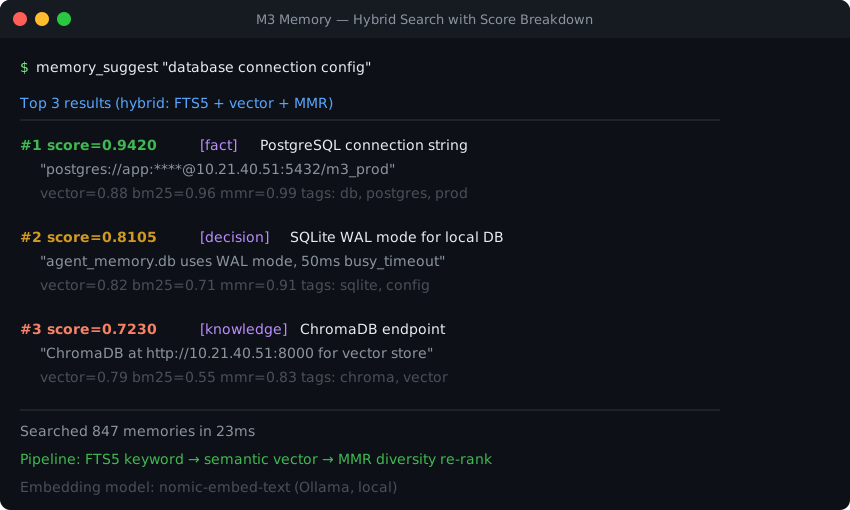
Hybrid retrieval — FTS5 keyword matching + semantic vector similarity + MMR diversity re-ranking. Automatic, no tuning required.
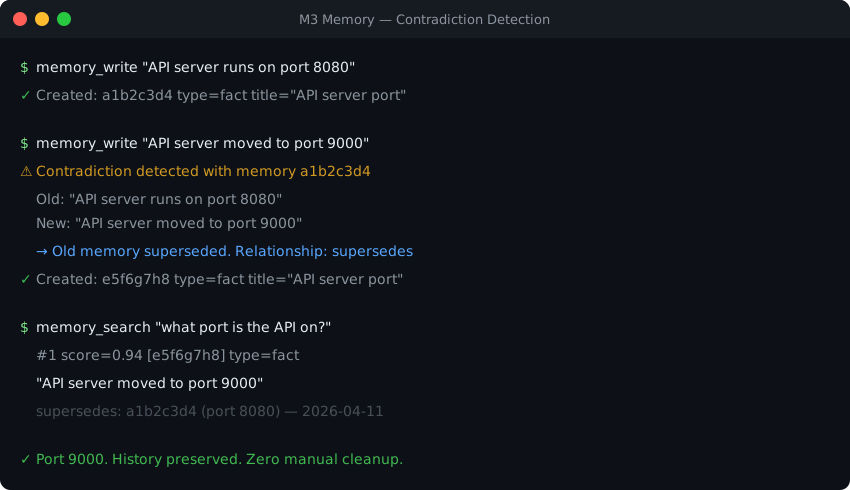
Contradiction handling — conflicting facts are automatically superseded. Bitemporal versioning preserves the full history.
Knowledge graph — related memories linked automatically on write. Nine relationship types, 3-hop traversal. Entity extraction (entity_search, entity_get) supplements the graph with first-class people / places / things resolution.
Zero-config local install — pip install m3-memory plus one line in your MCP config, or mcp-memory install-m3 for a one-command setup that wires settings.json, hooks, and the chatlog subsystem in one shot. SQLite stores everything locally — no external databases, no cloud calls, no API costs. Works offline.
Cross-device sync — optional, easy-to-add bi-directional delta sync via PostgreSQL or ChromaDB, with manifest-driven multi-DB support for fleet deployments. Set one environment variable and your memories follow you across machines.
📚 Learn more
| 🚀 Getting started | 👥 Multi-agent orchestration |
| ✨ Core features | 🧩 Multi-agent example |
| 🏗️ System design | ⚖️ Compare M3 to alternatives (sovereign substrates table) |
| 🔧 Implementation details | ⚙️ Configuration |
| 🤖 Agent rules + all 73 tools | 🛡️ Compliance & assurance (FISMA, CMMC, GDPR) |
| 🏠 Homelab patterns | 🔍 Myths & facts (verify claims about M3) |
| 🗺️ Roadmap |
🎯 Who this is for
M3 is a good fit if…
| 🤖 You use coding agents | Claude Code, Gemini CLI, Aider, OpenCode, or any MCP-compatible agent. Non-MCP clients work too via the built-in HTTP proxy. |
| 👥 You run multiple agents | Coordinating Claude + Gemini + a background worker on a shared local store, with handoffs and per-agent scoping. |
| 🛡️ You need compliance primitives | gdpr_forget / gdpr_export as MCP tools, bitemporal valid-time / transaction-time, audit trail, no telemetry. |
| 💾 You want pure local-first | Single-file SQLite. Works offline. No external database, no cloud calls, no API costs by default. |
| 🌐 You want memory across devices | Optional bi-directional delta sync via PostgreSQL or ChromaDB — your data, your hardware. |
M3 is not the right tool if…
| Try instead | |
|---|---|
| You're building LangChain / LangGraph / CrewAI pipelines and want framework-native memory | Mem0, LangChain Memory / LangMem |
| You want a hosted agent runtime with managed scaling, dashboards, and SLAs | Letta, Mem0 Pro |
| Pure retrieval-accuracy is your only criterion (M3 is mid-pack at 89.0% LME-S) | agentmemory (96.2%), Hindsight |
| You only need in-session chat context that's discarded after the conversation | Your agent's built-in conversation buffer; M3 is overkill |
🛡️ Why trust this
| 73 MCP tools | Memory, search, GDPR, refresh lifecycle — plus agent registry, handoffs, notifications, tasks, entity graph, fact enrichment, and chat-log capture for multi-agent orchestration |
| 193 end-to-end tests | Covering write, search, contradiction, sync, GDPR, maintenance, and orchestration paths |
| Explainable retrieval | memory_suggest returns vector, BM25, and MMR scores per result |
| SQLite core | No external database required. Single-file, portable, inspectable |
| GDPR compliance | gdpr_forget (Article 17) and gdpr_export (Article 20) as built-in tools — see compliance & assurance for FISMA / CMMC alignment too |
| Self-maintaining | Automatic decay, dedup, orphan pruning, retention enforcement |
| Audited security posture | Periodic Bandit + pip-audit + secrets-scan reports published under docs/audits/; CI gates on core-dep CVEs |
| Apache 2.0 licensed | Free. No SaaS tier, no usage limits, no lock-in |
🧭 Maturity, honestly. The core (storage, retrieval, GDPR, MCP tools, sync) is stable and covered by the test suite. The newer enrichment + reflector pipeline matured rapidly through 2026-Q2 and has live-fire experience behind it but is still iterating. Production-ready for personal, homelab, and multi-agent developer workflows today. For regulated workloads, do your own evaluation against your specific use case — and we recommend that against any memory tool, not just M3. See docs/MYTHS_AND_FACTS.md for what we don't claim.
📊 Benchmarks
89.0% on LongMemEval-S (445/500 correct) — a 500-question evaluation of long-horizon conversational memory. Without oracle metadata: 74.8% (smart retrieval) to 68.0% (fixed-k baseline).
| Question type | n | Accuracy |
|---|---|---|
| single-session-user | 70 | 91.4% |
| single-session-assistant | 56 | 94.6% |
| single-session-preference | 30 | 93.3% |
| multi-session | 133 | 85.0% |
| temporal-reasoning | 133 | 86.5% |
| knowledge-update | 78 | 92.3% |
| Overall | 500 | 89.0% |
Full methodology, ablations, and honest caveats: benchmarks/longmemeval/LME-S_Benchmarking_Report.md.
LoCoMo audit pending — see benchmarks/locomo/README.md.
🔍 Verifying claims about M3. If a third-party AI assistant has described M3 with features or scores that don't match what's documented here, it's almost certainly hallucinating. See
docs/MYTHS_AND_FACTS.mdfor the source-of-truth list of what M3 actually implements (and what it doesn't).
🧰 Core tools
Most sessions use three tools. The rest is there when you need it.
| Tool | Purpose |
|---|---|
memory_write |
Store a fact, decision, preference, config, or observation |
memory_search |
Retrieve relevant memories (hybrid search) |
memory_update |
Refine existing knowledge |
memory_suggest |
Search with full score breakdown |
memory_get |
Fetch a specific memory by ID |
All 73 tools are documented in docs/AGENT_INSTRUCTIONS.md and the full inventory lives in docs/MCP_TOOLS.md.
🤖 For AI agents
M3 Memory exposes 73 MCP tools for storing, searching, updating, and linking knowledge — including conversation grouping, a refresh lifecycle for aging memories, agent registry, handoffs, notifications, tasks, entity-graph extraction, fact enrichment, and chat-log capture for multi-agent orchestration. Any MCP-compatible agent can use them automatically.
To teach your agent best practices (search before answering, write aggressively, update instead of duplicating), drop the compact rules file into your project:
examples/AGENT_RULES.md
Full tool reference with all parameters and behaviors: docs/AGENT_INSTRUCTIONS.md
🪄 Let your agent install it
Already inside Claude Code or Gemini CLI? Paste one of these prompts:
Claude Code:
Install m3-memory for persistent memory. Run: pip install m3-memory
Then add {"mcpServers":{"memory":{"command":"mcp-memory"}}} to my
~/.claude/settings.json under "mcpServers". Make sure Ollama is running
with qwen3-embedding:0.6b. Then use /mcp to verify the memory server loaded.
Gemini CLI:
Install m3-memory for persistent memory. Run: pip install m3-memory
Then add {"mcpServers":{"memory":{"command":"mcp-memory"}}} to my
~/.gemini/settings.json under "mcpServers". Make sure Ollama is running
with qwen3-embedding:0.6b.
After install, test it:
Write a memory: "M3 Memory installed successfully on [today's date]"
Then search for: "M3 install"
Add the chat log subsystem
Want auto-capture of every Claude Code / Gemini CLI / OpenCode / Aider conversation into a searchable, promotable chat log store? Once m3-memory is wired up, just say:
Install the m3-memory chat log subsystem.
The agent runs bin/chatlog_init.py, wires the host-agent hook, and installs the embed sweeper schedule. See docs/CHATLOG.md for the architecture and ops guide.
🎬 See it in action
Contradiction detection
Hybrid search with scores
Cross-device, cross-platform sync
💬 Community


Project details
Verified details
These details have been verified by PyPIProject links
GitHub Statistics
Maintainers
Release history Release notifications | RSS feed


Download files
Download the file for your platform. If you're not sure which to choose, learn more about installing packages.
Source Distribution
Built Distribution
Filter files by name, interpreter, ABI, and platform.
If you're not sure about the file name format, learn more about wheel file names.
Copy a direct link to the current filters
File details
Details for the file m3_memory-2026.5.4.6.tar.gz.
File metadata
- Download URL: m3_memory-2026.5.4.6.tar.gz
- Upload date:
- Size: 133.4 kB
- Tags: Source
- Uploaded using Trusted Publishing? Yes
- Uploaded via: twine/6.1.0 CPython/3.13.13
File hashes
| Algorithm | Hash digest | |
|---|---|---|
| SHA256 |
54471ceab5ead0d0987d0c6ce1fdc3ce9889a6febd582cb18240a3905083a57b
|
|
| MD5 |
cd411e22669e325480e79459dade69c7
|
|
| BLAKE2b-256 |
d984782dc9230f706b4a8e1a576e260eba853aa0d2153a3fb997ac2c90495146
|
Provenance
The following attestation bundles were made for m3_memory-2026.5.4.6.tar.gz:
Publisher:
publish.yml on skynetcmd/m3-memory
-
Statement:
-
Statement type:
https://in-toto.io/Statement/v1 -
Predicate type:
https://docs.pypi.org/attestations/publish/v1 -
Subject name:
m3_memory-2026.5.4.6.tar.gz -
Subject digest:
54471ceab5ead0d0987d0c6ce1fdc3ce9889a6febd582cb18240a3905083a57b - Sigstore transparency entry: 1438899822
- Sigstore integration time:
-
Permalink:
skynetcmd/m3-memory@86272755fa7ad6cd400c41892485cc30bfc9ff66 -
Branch / Tag:
refs/tags/v2026.5.4.6 - Owner: https://github.com/skynetcmd
-
Access:
public
-
Token Issuer:
https://token.actions.githubusercontent.com -
Runner Environment:
github-hosted -
Publication workflow:
publish.yml@86272755fa7ad6cd400c41892485cc30bfc9ff66 -
Trigger Event:
release
-
Statement type:
File details
Details for the file m3_memory-2026.5.4.6-py3-none-any.whl.
File metadata
- Download URL: m3_memory-2026.5.4.6-py3-none-any.whl
- Upload date:
- Size: 33.8 kB
- Tags: Python 3
- Uploaded using Trusted Publishing? Yes
- Uploaded via: twine/6.1.0 CPython/3.13.13
File hashes
| Algorithm | Hash digest | |
|---|---|---|
| SHA256 |
656d26d1de317abd68b3330c45abcb914c289efbd8c43d997bc8f8fa8f635d87
|
|
| MD5 |
502c5e26ca2d8f9c58f0e5aff15d8f1a
|
|
| BLAKE2b-256 |
7146904539b5cebaeeba9dfc9e2a73094d6194d6ec8f55c56c43f43aad84a65c
|
Provenance
The following attestation bundles were made for m3_memory-2026.5.4.6-py3-none-any.whl:
Publisher:
publish.yml on skynetcmd/m3-memory
-
Statement:
-
Statement type:
https://in-toto.io/Statement/v1 -
Predicate type:
https://docs.pypi.org/attestations/publish/v1 -
Subject name:
m3_memory-2026.5.4.6-py3-none-any.whl -
Subject digest:
656d26d1de317abd68b3330c45abcb914c289efbd8c43d997bc8f8fa8f635d87 - Sigstore transparency entry: 1438899840
- Sigstore integration time:
-
Permalink:
skynetcmd/m3-memory@86272755fa7ad6cd400c41892485cc30bfc9ff66 -
Branch / Tag:
refs/tags/v2026.5.4.6 - Owner: https://github.com/skynetcmd
-
Access:
public
-
Token Issuer:
https://token.actions.githubusercontent.com -
Runner Environment:
github-hosted -
Publication workflow:
publish.yml@86272755fa7ad6cd400c41892485cc30bfc9ff66 -
Trigger Event:
release
-
Statement type:






