
M3WAL
Material 3 Wallpaper-based Color Scheme Generator
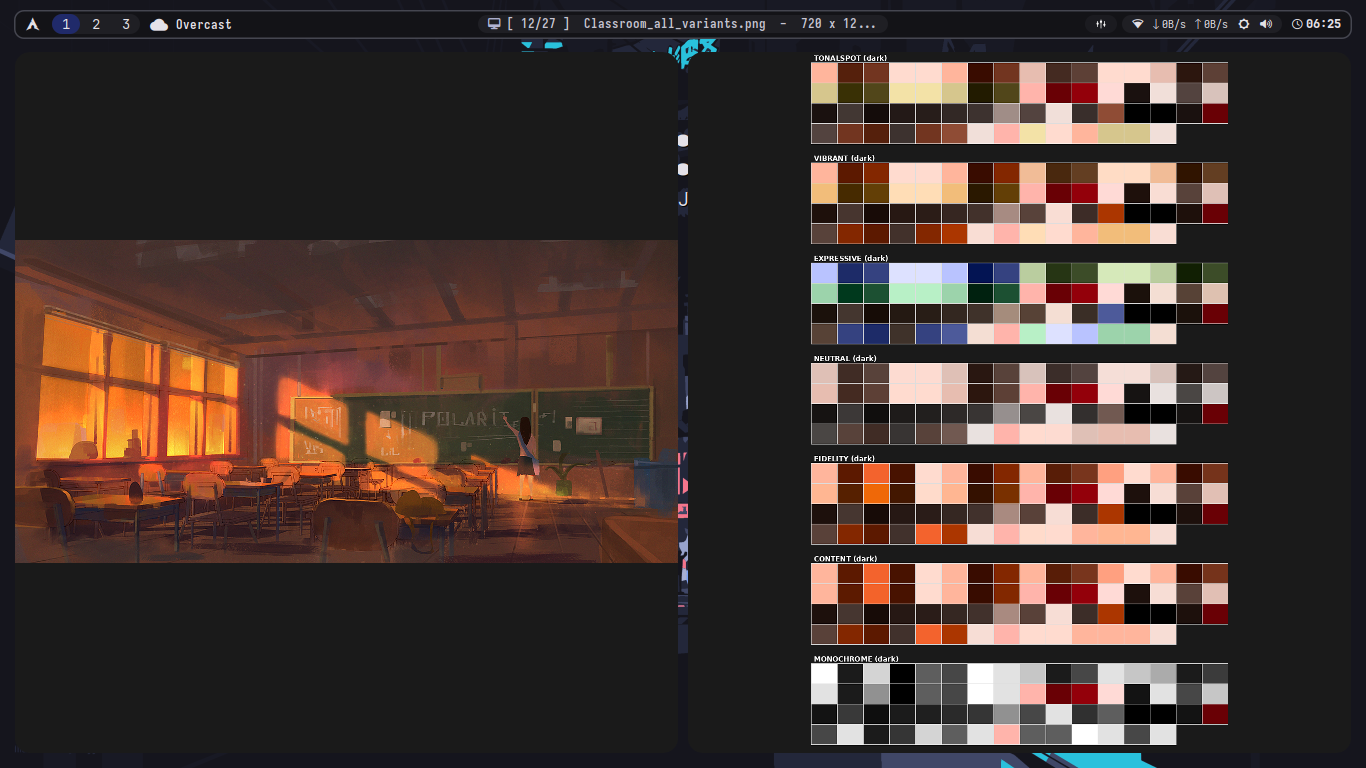
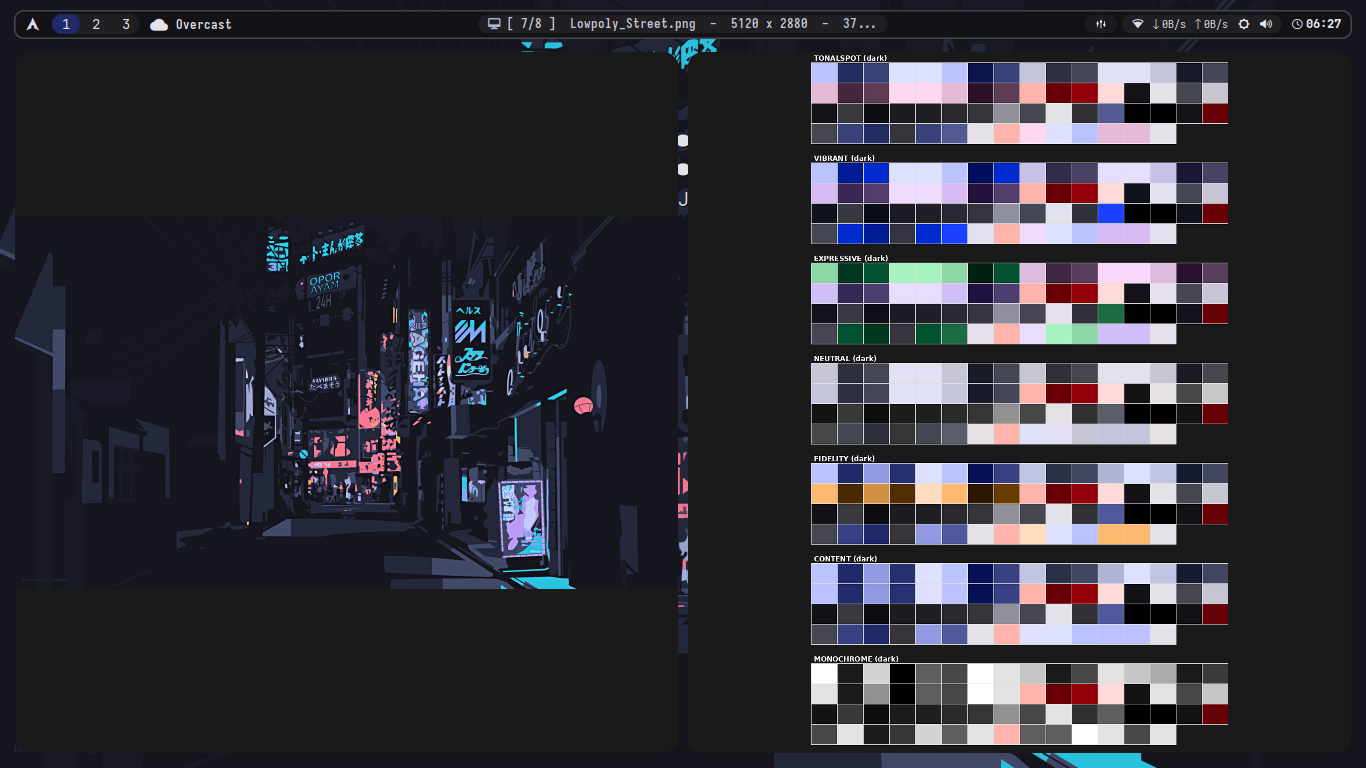
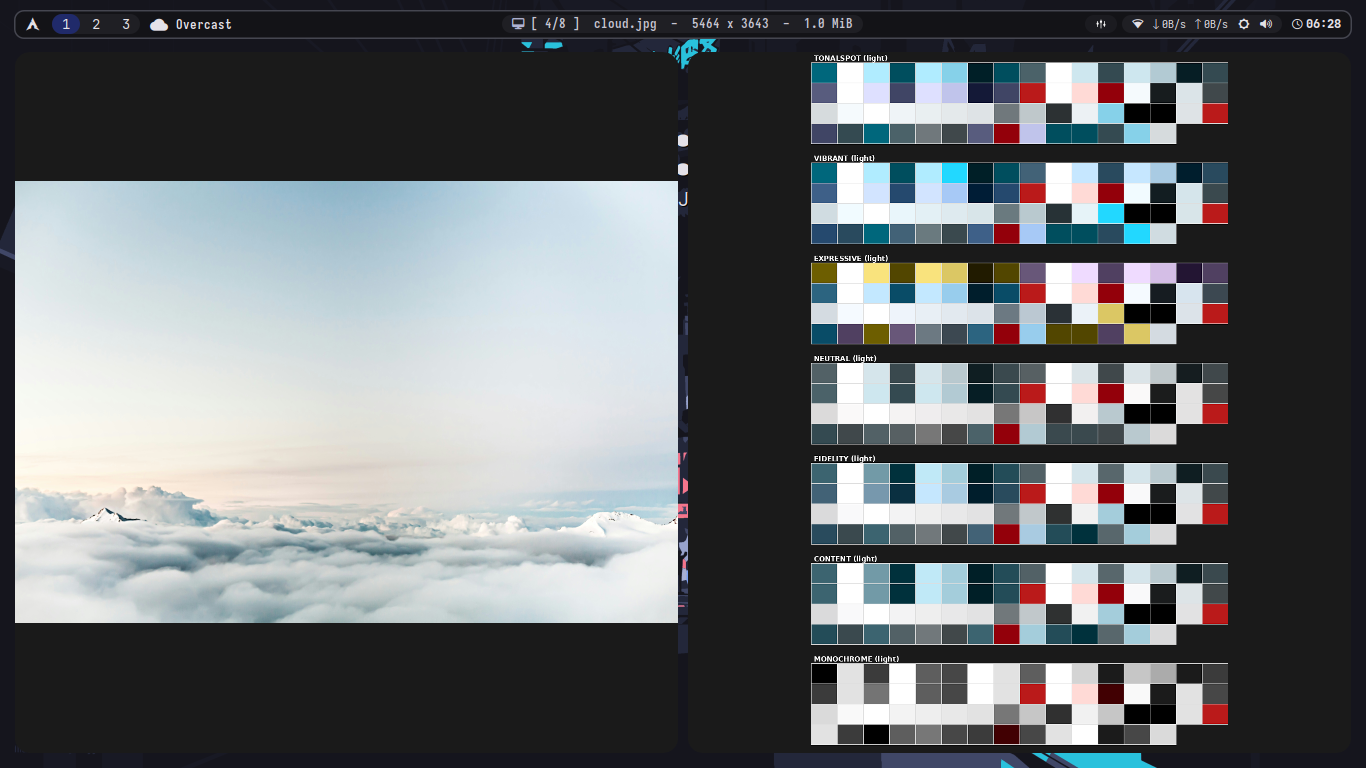
Generate beautiful Material 3 color schemes from your wallpapers and apply them system-wide to your Linux desktop.
Features
- Extract Material 3 color schemes from any wallpaper
- Auto-detect light/dark mode based on wallpaper brightness
- 7 Material Color Variants (Content, Vibrant, Expressive, etc.) + AUTO variant
- Export to multiple formats (JSON, CSS)
- Smart template system with bundled templates and custom override support
- Two operation modes: Generator-only or Full ricing mode
- Automatic wallpaper setting with
feh - Deploy configs to multiple applications automatically
- Parallel template processing for faster execution (ThreadPoolExecutor with 4 workers)
- RGB color format support for KDE and other applications
- Hook scripts system for custom actions with environment variables
- Improved terminal color contrast for light mode
- Flexible theme management via post scripts and hooks
Installation
From PyPI
pip install m3wal
From Source
git clone https://github.com/MDiaznf23/m3wal.git
cd m3wal
pip install -e .
Dependencies
pip install material-color-utilities Pillow
Optional system dependencies:
feh- for setting wallpapersxrdb- for applying Xresourcesxsettingsd- for GTK theme reloading (via post script)gsettings- for GNOME/GTK theme management (via post script)
Quick Start
# Basic usage (auto-detect mode, uses config default)
m3wal /path/to/wallpaper.jpg

# Generator-only mode (no system changes)
m3wal wallpaper.jpg --generator-only

# Full mode (apply all configurations)
m3wal wallpaper.jpg --full

# Auto-select best variant based on wallpaper
m3wal wallpaper.jpg --variant AUTO

# Specify mode and variant
m3wal wallpaper.jpg --mode dark --variant VIBRANT
Usage
Command Line
m3wal <wallpaper_path> [options]
Options:
| Option | Short | Description |
|---|---|---|
--mode |
-m |
Color scheme mode: light, dark, or auto |
--variant |
-v |
Material 3 variant (see below) |
--generator-only |
-g |
Only generate colors, skip ricing |
--full |
-f |
Apply all configurations (ricing mode) |
Variants:
AUTO- NEW! Automatically selects best variant based on wallpaper analysisCONTENT(default) - Based on wallpaper contentVIBRANT- More saturated colorsEXPRESSIVE- Maximum chromaNEUTRAL- Subdued, neutral colorsTONALSPOT- Single accent colorFIDELITY- Closest to source colorMONOCHROME- Grayscale palette
AUTO Variant Selection
The AUTO variant intelligently analyzes your wallpaper to select the best color variant:
m3wal wallpaper.jpg --variant AUTO
Selection Logic:
- MONOCHROME - For grayscale wallpapers (saturation < 0.10)
- NEUTRAL - For muted, consistent tones (saturation < 0.30, low variance)
- EXPRESSIVE - For diverse, colorful images (saturation > 0.40, high hue variety)
- FIDELITY - For natural color palettes (saturation 0.25-0.50, consistent)
- VIBRANT - For bold, saturated wallpapers (saturation > 0.60)
- CONTENT - Default safe choice for balanced images
The AUTO selection will print the chosen variant and reasoning:
[AUTO] Selected variant: VIBRANT
[AUTO] Reason: Bold colors (sat=0.68)
Operation Modes
M3WAL supports two operation modes:
1. Generator Mode (--generator-only or -g)
Only generates color schemes without applying them to your system:
- Analyzes wallpaper
- Generates color scheme
- Exports JSON and CSS files
- Creates palette preview
- No system modifications
Perfect for:
- Testing color schemes
- Generating colors for manual use
- CI/CD pipelines
- Color scheme preview
2. Full Mode (--full or -f)
Generates colors AND applies them system-wide:
- All generator mode features
- Applies colors to all templates
- Deploys configs to applications
- Runs hook scripts
- Applies Xresources
- Sets wallpaper with feh
- Creates wallpaper symlink
- Runs post scripts
Perfect for:
- Complete rice setup
- Automatic theming
- Daily wallpaper changes
Configuration
Config file: ~/.config/m3-colors/m3-colors.conf
[General]
mode = auto
variant = AUTO
brightness_threshold = 128
operation_mode = full  # 'generator' or 'full'

[Paths]
templates_dir = templates
cache_dir = ~/.cache/m3-colors
config_dir = ~/.config/m3-colors

[Features]
set_wallpaper = true
apply_xresources = true
generate_palette_preview = true
run_post_script = true
create_symlink = true

[PostScript]
script_path = m3wal-post.sh

[Hooks]
scripts_dir = ~/.config/m3-colors/hooks

[Hook.Scripts]
enabled = false
scripts = eww.sh
Configuration Options:
-
operation_mode: Default operation mode when no flag is specifiedgenerator: Only generate colorsfull: Generate and apply (default)
-
variant: Can now be set toAUTOfor automatic variant selection -
Hook Scripts: Custom scripts that run with color environment variables
- Enable with
[Hook.Scripts] enabled = true - Scripts receive all colors as environment variables (e.g.,
$M3_M3PRIMARY) - Access metadata:
$M3_MODE,$M3_WALLPAPER
- Enable with
Templates System
M3WAL now features a smart template system with bundled templates and custom override support.
Template Loading Priority:
- Bundled Templates (shipped with m3wal package) - loaded as fallback
- Custom Templates (
~/.config/m3-colors/templates/) - override bundled templates - Specified Directory (via
--templates-dirargument) - highest priority
How it works:
# Uses bundled templates + custom overrides
m3wal wallpaper.jpg --full

# Found 15 bundled template(s)
# Found 3 custom template(s)
# Using custom override: kitty.conf.template
# Using custom override: i3.config.template
Custom templates with the same name will override bundled templates, allowing you to:
- Use bundled templates out-of-the-box
- Customize only specific templates you need
- Keep your modifications while getting new bundled templates in updates
Creating Custom Templates
Create templates in ~/.config/m3-colors/templates/
Example template (myapp.conf.template):
background={{m3surface}}
foreground={{m3onSurface}}
primary={{m3primary}}
accent={{m3secondary}}

# RGB format (for KDE)
background_rgb={{m3surface_rgb}}

# Metadata
wallpaper={{wallpaper_path}}
mode={{mode}}
Available color variables:
Material 3 Colors:
- Primary:
m3primary,m3onPrimary,m3primaryContainer,m3onPrimaryContainer,m3primaryFixed,m3primaryFixedDim,m3onPrimaryFixed,m3onPrimaryFixedVariant - Secondary:
m3secondary,m3onSecondary,m3secondaryContainer,m3onSecondaryContainer,m3secondaryFixed,m3secondaryFixedDim,m3onSecondaryFixed,m3onSecondaryFixedVariant - Tertiary:
m3tertiary,m3onTertiary,m3tertiaryContainer,m3onTertiaryContainer,m3tertiaryFixed,m3tertiaryFixedDim,m3onTertiaryFixed,m3onTertiaryFixedVariant - Error:
m3error,m3onError,m3errorContainer,m3onErrorContainer - Surface:
m3surface,m3onSurface,m3surfaceVariant,m3onSurfaceVariant,m3surfaceDim,m3surfaceBright,m3surfaceContainerLowest,m3surfaceContainerLow,m3surfaceContainer,m3surfaceContainerHigh,m3surfaceContainerHighest - Outline:
m3outline,m3outlineVariant - Inverse:
m3inverseSurface,m3inverseOnSurface,m3inversePrimary - Other:
m3shadow,m3scrim
Terminal Colors: term0 to term15
RGB Format: Add _rgb suffix to any color (e.g., m3primary_rgb outputs 255,0,128)
Metadata: wallpaper_path, mode, source_color
Deployment
Configure deployment in ~/.config/m3-colors/deploy.json:
{
  "deployments": [
    {
      "source": "colors-nvim.lua",
      "destination": "~/.config/nvim/lua/themes/material3.lua"
    },
    {
      "source": "kitty.conf",
      "destination": "~/.config/kitty/colors.conf"
    },
    {
      "source": "gtkrc",
      "destination": "~/.local/share/themes/FlatColor/gtk-2.0/gtkrc"
    }
  ]
}
The source field refers to the output filename (template name without .template extension).
Hook Scripts
Create custom hook scripts in ~/.config/m3-colors/hooks/:
Example hook script (reload-apps.sh):
#!/bin/bash

# Colors are available as environment variables
echo "Primary color: $M3_M3PRIMARY"
echo "Mode: $M3_MODE"
echo "Wallpaper: $M3_WALLPAPER"

# Reload applications
killall -USR1 kitty
i3-msg reload
notify-send "Theme Updated" "Applied $M3_MODE mode"
Available environment variables in hook scripts:
M3_MODE- Current mode (light/dark)M3_WALLPAPER- Wallpaper pathM3_M3PRIMARY,M3_M3SECONDARY, etc. - All color values (uppercase)- All RGB values:
M3_M3PRIMARY_RGB, etc.
Enable hook scripts in config:
[Hook.Scripts]
enabled = true
scripts = reload-apps.sh, notify.sh

[Hooks]
scripts_dir = ~/.config/m3-colors/hooks
Post Script
Add custom actions in ~/.config/m3-colors/m3wal-post.sh:
#!/bin/bash

# Reload GTK theme (optional)
pkill xsettingsd
xsettingsd &

# Reload applications
killall -USR1 kitty
i3-msg reload

# Notify user
notify-send "Theme Applied" "M3WAL theme updated"
Difference between Hook Scripts and Post Script:
- Hook Scripts: Run with color environment variables, multiple scripts supported, enable/disable per script
- Post Script: Single script, runs at the end, no environment variables, good for simple reload commands
GTK Theme Management
M3WAL generates GTK theme configuration files, but leaves theme reloading to your post script for maximum flexibility. You can handle GTK theme reloading in m3wal-post.sh:
Example GTK reload in post script:
#!/bin/bash

# Method 1: Using xsettingsd (recommended)
pkill xsettingsd
xsettingsd &

# Method 2: Using gsettings (GNOME/GTK)
# Toggle theme to force reload
CURRENT_THEME=$(gsettings get org.gnome.desktop.interface gtk-theme)
gsettings set org.gnome.desktop.interface gtk-theme 'Adwaita'
gsettings set org.gnome.desktop.interface gtk-theme "$CURRENT_THEME"

# Method 3: Both methods
pkill xsettingsd
xsettingsd &
gsettings set org.gnome.desktop.interface gtk-theme 'FlatColor'
This approach allows you to customize the reload behavior based on your setup.
Output Files
Generated files are saved in multiple locations:
~/.config/m3-colors/output/
{wallpaper}_{variant}_scheme.json- Full color scheme in JSON{wallpaper}_{variant}_scheme.css- CSS variables for web projects
~/.config/m3-colors/sample/
{wallpaper}_{variant}_palette.png- Visual palette preview (16-column grid){wallpaper}_all_variants.png- NEW! Preview of all 7 variants in one image
~/.cache/m3-colors/
- Template-generated config files (output from templates)
- Deployed to applications via deploy.json
~/.config/m3-colors/
current_wallpaper- Symlink to currently active wallpaper
Supported Applications
Out-of-the-box bundled templates for:
- Terminals: Kitty, Alacritty, TTY
- WM/DE: i3, Polybar, Waybar, Dunst
- Editors: Neovim, Zathura
- Launchers: Rofi
- Music: RMPC
- Themes: GTK 2/3/4, KDE
- X11: Xresources
You can override any bundled template by creating a file with the same name in ~/.config/m3-colors/templates/.
Python API
from m3wal import M3WAL, M3Color

# Generator mode (M3Color class)
m3 = M3Color("wallpaper.jpg")
analysis = m3.analyze_wallpaper()

# Auto-select variant
variant, reason = m3.auto_select_variant()
print(f"Selected: {variant}, Reason: {reason}")

# Generate scheme
colors = m3.generate_scheme(mode="dark", variant="AUTO")
m3.export_json(variant="VIBRANT")
m3.export_css(variant="VIBRANT")
m3.generate_palette_preview()

# Generate all variants preview
m3.generate_all_variants_preview()

# Full mode (M3WAL class - extends M3Color)
m3wal = M3WAL("wallpaper.jpg")
m3wal.analyze_wallpaper()
m3wal.generate_scheme(mode="dark", variant="CONTENT")

# Apply to all templates (parallel processing with fallback system)
# Automatically uses bundled templates + custom overrides
generated_files = m3wal.apply_all_templates()

# Or specify custom templates directory
generated_files = m3wal.apply_all_templates(templates_dir="/path/to/templates")

# Deploy configs
m3wal.deploy_configs()

# Run hook scripts
m3wal.run_hook_scripts()

# Apply Xresources
m3wal.apply_xresources()

# Set wallpaper
m3wal.set_wallpaper()

# Create symlink
m3wal.create_wallpaper_symlink()

# Run post script
m3wal.run_post_script()
Examples
# Auto mode with AUTO variant (intelligent selection)
m3wal ~/Pictures/sunset.jpg --variant AUTO

# Generator-only mode (no system changes)
m3wal ~/Pictures/sunset.jpg -g

# Full mode with dark theme and auto-selected variant
m3wal ~/Pictures/landscape.jpg --full --mode dark --variant AUTO

# Light mode with expressive variant
m3wal ~/Pictures/abstract.jpg -f -m light -v EXPRESSIVE

# Auto-detect everything
m3wal ~/Pictures/wallpaper.jpg --full --variant AUTO
How It Works
Generator Mode Flow:
- Analyze wallpaper brightness to determine light/dark mode
- Auto-select variant (if
AUTOis specified) based on saturation, hue variety, and color characteristics - Extract dominant colors using Material Color Utilities
- Generate complete Material 3 color scheme (50+ colors + 16 terminal colors)
- Export JSON and CSS files to
~/.config/m3-colors/output/ - Create visual palette preview (16-column grid, dynamic rows)
Full Mode Flow:
- All generator mode steps
- Load templates with smart fallback system:
- Load bundled templates (from package)
- Load custom templates (override bundled if same name)
- Load from specified directory (highest priority)
- Apply colors to all templates (parallel processing with ThreadPoolExecutor, 4 workers)
- Deploy configs to target applications via deploy.json
- Execute hook scripts with color environment variables
- Apply Xresources with xrdb
- Set wallpaper with feh
- Create symlink to current wallpaper
- Run post script for additional actions (including GTK reload if configured)
Performance Improvements
- Parallel template processing: Uses ThreadPoolExecutor with 4 workers for I/O-bound tasks
- Smart template loading: Single pass through template directories with deduplication
- Single color extraction: Colors extracted once and reused across all operations
- Efficient RGB conversion: RGB values pre-calculated and cached with
_rgbsuffix - Optimized palette preview: 16-column grid layout with dynamic row calculation
- Bundled templates: No need to copy templates manually, works out-of-the-box
Template System Details
Bundled Templates
M3WAL ships with pre-configured templates for popular applications. These are loaded automatically from the package.
Custom Templates
Place your custom templates in ~/.config/m3-colors/templates/. Files with the same name as bundled templates will override them.
Template Discovery Flow:
1. Load bundled templates (fallback)
   └─> Found 15 bundled template(s)

2. Load custom templates (override)
   └─> Found 3 custom template(s)
   └─> Using custom override: kitty.conf.template

3. Load specified directory (highest priority)
   └─> Using specified directory: /path/to/templates
Benefits:
- Works out-of-the-box with bundled templates
- Customize only what you need
- Keep custom modifications across updates
- Easy to share custom templates
- No manual template copying required
Terminal Colors
Terminal color mapping optimized for both modes:
Dark Mode: High-contrast mapping for readability Light Mode: Enhanced visibility with proper contrast:
term0: Surface container (background)term1-6: Primary, secondary, tertiary variantsterm7: On surface variant (foreground)term8-15: Accent colors with adequate contrast
Troubleshooting
Templates not found
Solution: M3WAL now ships with bundled templates, so this should rarely occur. If you want custom templates, create them in ~/.config/m3-colors/templates/.
No templates loaded
Solution: Check if package is properly installed:
pip install --upgrade m3wal
Custom template not being used
Solution: Ensure the filename matches exactly (including .template extension). Check output:
Using custom override: kitty.conf.template
Wallpaper not setting
Solution: Check if feh is installed: which feh
GTK theme not applying
Solution:
- Ensure GTK theme files are generated in
~/.cache/m3-colors/ - Add GTK theme reload commands to your
m3wal-post.sh:pkill xsettingsd xsettingsd &
- Or use hook scripts for more control
- For GNOME/GTK, you can use gsettings:
gsettings set org.gnome.desktop.interface gtk-theme 'YourThemeName'
Hook scripts not running
Solution:
- Ensure scripts have execute permission:
chmod +x ~/.config/m3-colors/hooks/*.sh - Enable in config:
[Hook.Scripts] enabled = true - Check script paths in config
- Verify scripts are listed:
scripts = reload-apps.sh, notify.sh
AUTO variant not selecting expected variant
Solution: The AUTO selection is based on saturation and hue analysis. You can:
- Check the selection reason in output:
[AUTO] Reason: ... - Manually specify a variant if needed:
--variant VIBRANT - Adjust the wallpaper or try a different image
Operation mode confusion
Solution:
- Use
--generator-onlyfor color generation only - Use
--fullfor complete rice setup - Or set default in config:
operation_mode = generatororfull
Post script not executing
Solution:
- Check if script exists:
~/.config/m3-colors/m3wal-post.sh - Ensure it has execute permission:
chmod +x ~/.config/m3-colors/m3wal-post.sh - Verify
run_post_scriptis enabled in config - Check script path in config:
[PostScript] script_path = m3wal-post.sh
Contributing
Contributions welcome! Please feel free to submit a Pull Request.
Areas for contribution:
- New bundled templates for popular applications
- Improved AUTO variant selection algorithm
- Additional export formats
- Performance optimizations
- Documentation improvements
License
MIT License - see LICENSE file for details.
Credits
Built with material-color-utilities by Google.
Links
1 maintainer

Metadata
1 maintainer
Release files for m3wal 1.1.10
For a detailed explanation of source distributions (sdists) and built distributions (wheels), please see the package formats documentation.
Source distribution (sdist)
| File | Size | Uploaded | |
|---|---|---|---|
| m3wal-1.1.10.tar.gz | 44.3 kB | Details |
Built distribution (wheel)
| File | Interpreter | ABI | Platform | Reset |
|---|---|---|---|---|
| m3wal-1.1.10-py3-none-any.whl | Python 3 | none | any | Details |
Total release size: 88.0 kB
Release files / m3wal-1.1.10.tar.gz
| Download URL | m3wal-1.1.10.tar.gz |
|---|---|
| Size | 44.3 kB |
| Tags | Source |
|
SHA-256 checksum How to use checksums |
806f480839a1ff72482c6d2f1d392c6e90b2b6e609c902c85f17e31ce0c02ec4
|
|
BLAKE2b-256 checksum How to use checksums |
c09bf027f4a90c0fb2ffa01dc3c72b5c5875648e6f651a8b2e9012909ad94b7b
|
| Upload date | |
|
Uploaded using Trusted Publishing? What is trusted publishing? |
No |
| Uploaded via |
twine/6.2.0 CPython/3.14.3
|
Release files / m3wal-1.1.10-py3-none-any.whl
| Download URL | m3wal-1.1.10-py3-none-any.whl |
|---|---|
| Size | 43.7 kB |
| Tags | Python 3 |
|
SHA-256 checksum How to use checksums |
eed291f86a9963cb424a9fc39e5a69baa2c72bac19c68ac9758f7d4d68525f25
|
|
BLAKE2b-256 checksum How to use checksums |
2bb13d4e095abfae5f6d019dbe8d26ecf96f0682cb617f5cd34def51d78ea3da
|
| Upload date | |
|
Uploaded using Trusted Publishing? What is trusted publishing? |
No |
| Uploaded via |
twine/6.2.0 CPython/3.14.3
|














