
m97



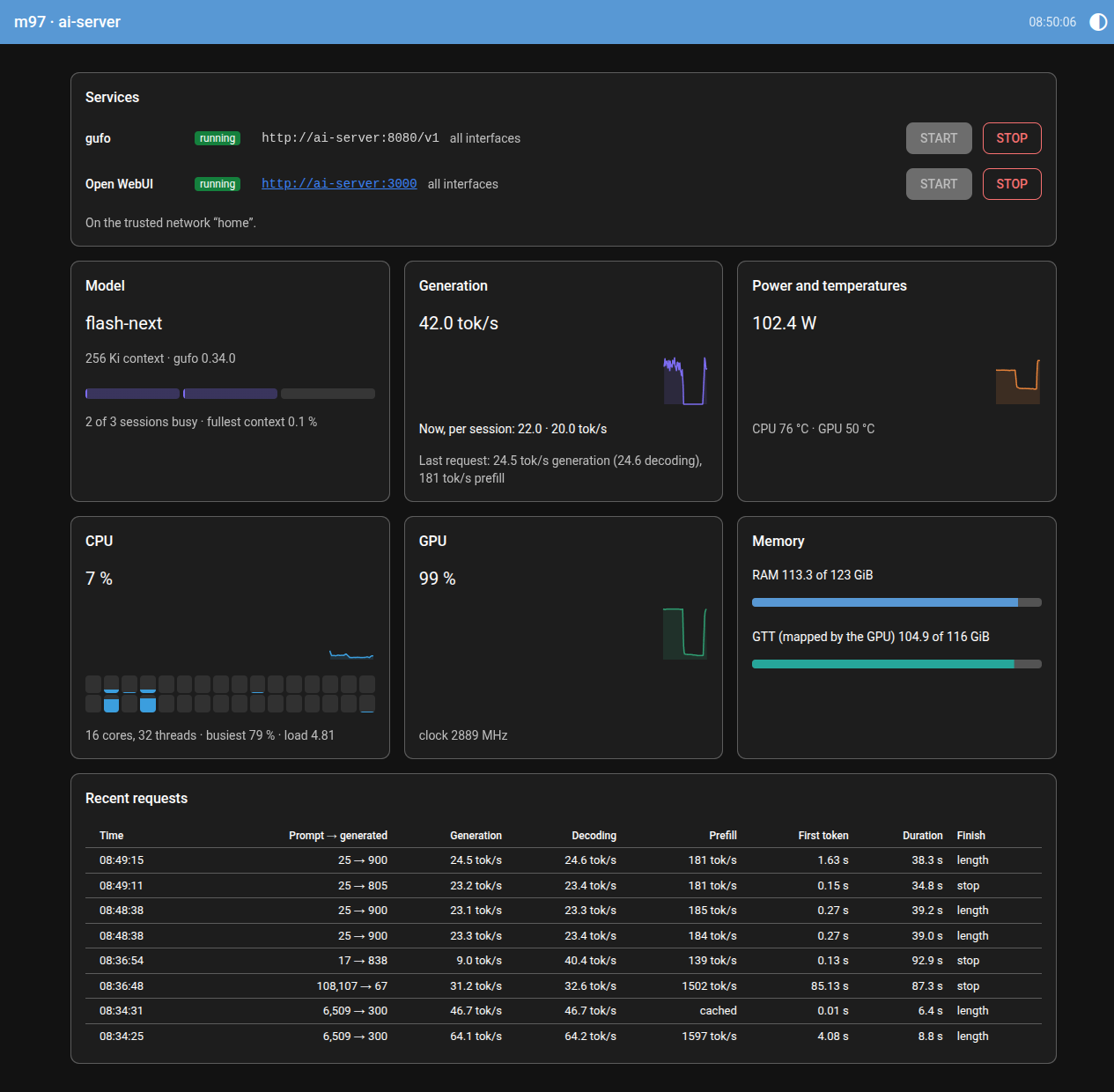
A web dashboard and control panel for a gufo LLM server on AMD Strix Halo: what the machine and the model are doing — power, temperatures, memory, GPU and CPU load, generation speed, recent requests — and buttons to start and stop gufo and Open WebUI, for the people in the household who never open a shell.
For my stance on AI contributions, see the collaboration guidelines.
Contents
- Requirements
- Install and uninstall
- Running it
- Opening the dashboard
- Configuration
- Who can press the buttons
- What it reads
- Development
- License
Requirements
- Linux, on an AMD APU with the
amdgpudriver. The sensors are read from sysfs; m97 was built on a Strix Halo machine (Radeon 8060S,gfx1151). - Rootless podman, with gufo's host preparation done as in gufo's
install guide: GPU device access, the GTT
size, unlimited locked memory. m97 runs gufo from its
gufo-runtimecontainer image. - The model files, in a directory on the host (
~/modelsby default). - Python 3.11 or newer, and pipx to install m97 in a virtualenv of its own.
- NetworkManager, to recognize trusted networks. Without it, m97 still runs, and treats every network as untrusted.
Install and uninstall
pipx install git+https://github.com/Technologicat/m97
That puts the m97 command on your PATH. To update, pipx upgrade m97, then m97 install again if you
run it as a service (see below), so the service picks up the new version.
To uninstall, remove the service first if you installed one, then the software:
m97 uninstall
pipx uninstall m97
Your settings file, ~/.config/m97/settings.toml, is left in place; delete it by hand if you no longer
want it.
Running it
As a service, which is the usual way on a headless server. m97 then starts at boot and restarts if it crashes:
m97 install          # install and enable the systemd user service, and start it
m97 status           # running or not, and the URL to open
m97 stop             # stop it
m97 start            # start it again
m97 logs [-f]        # its log (-f keeps following it)
m97 uninstall        # stop, disable and remove the service
The service serves the whole network. m97 install --local serves this machine only instead.
A systemd user service runs only while you are logged in, unless lingering is enabled for your user. For a server that should start m97 at boot, before anyone logs in, enable it once:
loginctl enable-linger "$USER"
Autostart. m97 remembers which services were running, and when it starts, say at boot, it starts them again. It waits for the network first, since a service started before the machine has joined a trusted network would listen on this machine only. gufo comes first, and Open WebUI once gufo is up.
- A service counts as wanted running once m97 sees it running, however it was started: from the page, or from a shell. It counts as wanted stopped once it has been down for half a minute while m97 runs.
- A service that stops by itself is reported on the page, with its exit code, its last log lines and what to do. m97 does not restart it, and does not start it at boot until it has run again. The report stays across a restart of m97.
- The state is kept in
~/.local/state/m97/state.json. To turn autostart off, setautostart = falseunder[server].
In the foreground, for trying it out or for debugging. Ctrl+C stops it:
m97 serve            # this machine only
m97 serve --lan      # the whole network
Opening the dashboard
Point a web browser at port 8097 of the machine m97 runs on:
http://<server-name>:8097
<server-name>is the machine's hostname, if your router resolves hostnames; otherwise its mDNS name,<hostname>.local, or its IP address.- On the server itself,
http://127.0.0.1:8097always works. m97 statusprints the address, and says whether m97 listens on all interfaces or on this machine only;m97 serveprints it at startup.
The port is a setting (port under [server], below). The page needs no login: viewing is open to anyone
who can reach it, and only the buttons are guarded (see who can press the buttons).
Configuration
m97 reads its settings from ~/.config/m97/settings.toml. The file is optional: without it, m97 runs
on its defaults, which are in m97/settings.toml, each with a comment saying what it
does.
Your file overrides the defaults key by key, so it only needs the keys you want to change. A table in your file merges into the default table of the same name; any other value, a list included, replaces the default whole. A key m97 does not know is reported in its log as a probable typo and ignored. A value of the wrong type stops m97 at startup with a message naming the key.
A typical file:
[access]
pin = "2468"                       # a string, so that leading zeros survive

[[access.trusted_networks]]
name = "home"
connections = ["…UUID of the home Wi-Fi profile…"]
subnet = "192.168.1.0/24"          # optional

[[access.trusted_networks]]
name = "cabin"
connections = ["…2.4 GHz profile…", "…5 GHz profile…"]

[gufo]
image = "ghcr.io/gufo-org/toolboxes/gufo-runtime:0.34.0"   # pin a gufo version
sessions = 3
context = 262144
The settings, by table:
[server]:port(8097), andautostart(on; see running it).[access]: thepin, and thetrusted_networks; see who can press the buttons.[gufo]: how m97 runs gufo.image;models_dir(mounted read-only at/modelsin the container);modelandmtp_model, as paths relative tomodels_dir(an emptymtp_modelturns speculative decoding off);served_name, the model ID clients ask for;sessionsandcontext(0 means gufo's own default);port;extra_args, a list appended to thegufo serve ... llmcommand line;container, the container's name;start_timeoutin seconds. The defaults serve Qwen3.8 Flash-Next as in gufo's quickstart.[openwebui]:image,volume(the podman volume that holds accounts and chats),port,container,start_timeout. Open WebUI is pointed at gufo's port.[history]:secondsthe graphs reach back (600), and the samplinginterval(1.0).
m97 recognizes a service by its container name, so a container started some other way, by hand or by a script, shows up on the page as long as the name matches.
Who can press the buttons
Viewing is always open. The start and stop buttons are open while the server is on a trusted network, and need the PIN on any other network. With no PIN set, off the trusted networks they stay locked, and the page says what to configure.
A trusted network is recognized by the UUID of the NetworkManager connection the server is using. List the saved connections and their UUIDs with:
nmcli -t -f NAME,UUID connection show
A network with several saved profiles, say one per Wi-Fi band, lists all of them under connections. The
optional subnet adds a second condition: the server's address must also be inside it. A network that
has never been joined has no saved profile, and so no UUID yet; join it once, then add it.
NetworkManager offers a saved Wi-Fi profile only to an access point with the same name and compatible security, so an open network that borrows a trusted network's name does not count as trusted. Anyone who knows the Wi-Fi password could still set up a look-alike.
Two more things follow from the network:
- Services started from the page listen on all interfaces only on a trusted network. Elsewhere they listen on this machine only, whoever pressed the button.
- The PIN travels unencrypted, since m97 serves plain HTTP. On an untrusted network, someone watching the traffic could read it. Wrong guesses are limited to five per five minutes for each client address.
What it reads
Everything without root:
- Host sensors from sysfs and procfs: socket power, CPU (Tctl) and GPU edge temperatures, GPU load and clock, CPU load, RAM, and GTT, the system memory the GPU has mapped. The sensors are found by driver name, since hwmon indices change between boots.
- gufo's HTTP endpoints, only while its container runs:
/ready,/props,/slots(which sessions are busy, and their live speed),/metrics(the total generation throughput). - gufo's log, for the recent requests: each finished chat request's token counts, speeds and timings.
- Container state from
podman events, and the network fromnmcli monitor, so m97 starts no processes periodically. It takes about 0.5 % of one CPU core, plus about 0.1 % per open page (measured on the server above).
Development
git clone https://github.com/Technologicat/m97
cd m97
pdm install          # creates .venv, installs m97 editable with the dev tools
pdm run pytest tests/
The design, and the decisions behind it, are in briefs/done/dashboard.md.
License
BSD 2-Clause, see LICENSE.md.
1 maintainer

Metadata
1 maintainer
Release files for m97 0.1.0
For a detailed explanation of source distributions (sdists) and built distributions (wheels), please see the package formats documentation.
Source distribution (sdist)
| File | Size | Uploaded | Provenance | Actions |
|---|---|---|---|---|
| m97-0.1.0.tar.gz | 51.9 kB | With provenance | Details for m97-0.1.0.tar.gz |
Built distribution (wheel)
| File | Interpreter | ABI | Platform | Actions Reset |
|---|---|---|---|---|
| m97-0.1.0-py3-none-any.whl | Python 3 | none | any | Details for m97-0.1.0-py3-none-any.whl |
Total release size: 92.0 kB
Release files / m97-0.1.0.tar.gz
| Download URL | m97-0.1.0.tar.gz |
|---|---|
| Size | 51.9 kB |
| Tags | Source |
|
SHA-256 checksum How to use checksums |
075ce04456503c63d2464b7cf16b5647f89e7a8dd99ee37f30da206bf937c07b
|
|
BLAKE2b-256 checksum How to use checksums |
2fd217b3b701a568dce031635ef0251dc0f05ab6d721270fa7ac074169922a32
|
| Upload date | |
|
Uploaded using Trusted Publishing? What is trusted publishing? |
Yes |
| Uploaded via |
twine/7.0.0 CPython/3.13.16
|
Provenance
Provenance describes where a file came from. On PyPI, provenance is shared via attestations, which provide a verifiable record of the build or publishing details. View details, limitations and caveats.


PyPI Publish Attestation
PyPI verified that this artifact, at this checksum, originated from the publisher listed below.
Signed by GitHub Actions, verified by PyPI on Nov 19, 2026.
Transparency logRelease files / m97-0.1.0-py3-none-any.whl
| Download URL | m97-0.1.0-py3-none-any.whl |
|---|---|
| Size | 40.1 kB |
| Tags | Python 3 |
|
SHA-256 checksum How to use checksums |
c3d2ca26190f1ce1710f96cf513b1058ef027bfff6a931f95904c2d830b15890
|
|
BLAKE2b-256 checksum How to use checksums |
301e606e042d618ea5a50a03f97d2170b198b45734a643b85f4618451950049a
|
| Upload date | |
|
Uploaded using Trusted Publishing? What is trusted publishing? |
Yes |
| Uploaded via |
twine/7.0.0 CPython/3.13.16
|
Provenance
Provenance describes where a file came from. On PyPI, provenance is shared via attestations, which provide a verifiable record of the build or publishing details. View details, limitations and caveats.
PyPI Publish Attestation
PyPI verified that this artifact, at this checksum, originated from the publisher listed below.
Signed by GitHub Actions, verified by PyPI on Nov 19, 2026.
Transparency logSecurity for m97 0.1.0
Provenance
Provenance describes where a file came from. On PyPI, provenance is shared via attestations, which provide a verifiable record of the build or publishing details. View details, limitations and caveats.
Full provenance
Both files in this release have been uploaded with provenance metadata.
Attestation for m97-0.1.0.tar.gz
PyPI Publish Attestation
PyPI verified that this artifact, at this checksum, originated from the publisher listed below.
Signed by GitHub Actions, verified by PyPI on Nov 19, 2026.
Transparency logA note on package security
PyPI is a repository for distributing packages, not a service for auditing them. While third-party security researchers and our staff do their best to detect and remove malicious packages, PyPI cannot guarantee the quality, security or suitability of any given package.
To learn more about protecting yourself from malicious actors, visit our package security documentation.














