
manish
WhatsApp has now opened up its API so you no longer have to go through a partner to send and receive WhatsApp messages! MaNish is an Unofficial python wrapper to WhatsApp Cloud API
Features supported
- Sending Messages
- Sending Media (images, audio, video and documents)
- Sending Stickers
- Sending Location
- Sending Contacts
- Sending Buttons
- Sending Template messages
- Parsing messages and media received (Webhook)
Components and Frameworks used in manish
Limitations
- 1000 free messages per month (Free tier)
- It is only possible to send messages other than templates after the target phone responds to an initial message (Unless you use Template messages)
- You can't send message to a group
Getting started
To get started with manish, you have to firstly install the libary either directly or using pip.
Installation from source
Use git to clone or you can also manually download the project repository just as shown below;
$ git clone https://github.com/t0mer/ma-nish/
$ cd ma-nish
ma-nish $ python setup.py install
Installing from PyPi
# For Windows

pip install  --upgrade ma-nish

#For Linux | MAC

pip3 install --upgrade ma-nish
Setting up the environment
Set Up Meta App
First you’ll need to follow the instructions on this page to:
- Register as a Meta Developer
- Enable two-factor authentication for your account
- Create a Meta App – you need to create a Business App for WhatsApp
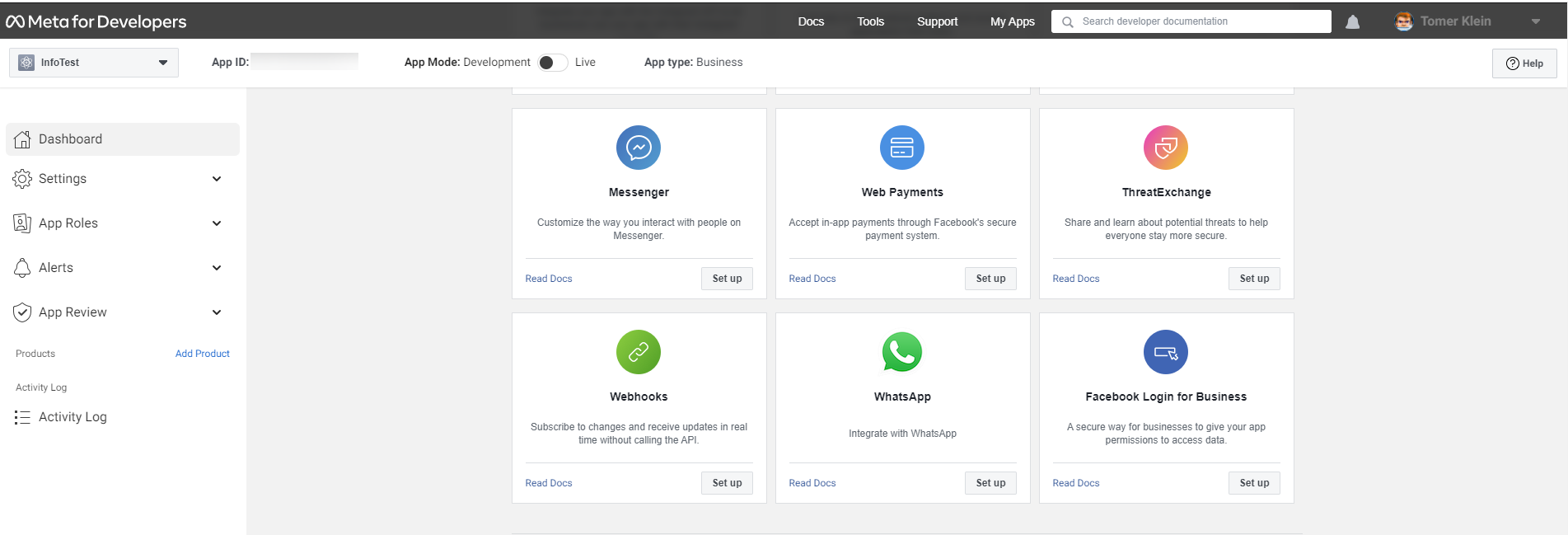
Once you’ve done that, go to your app and set up the WhatsApp product.
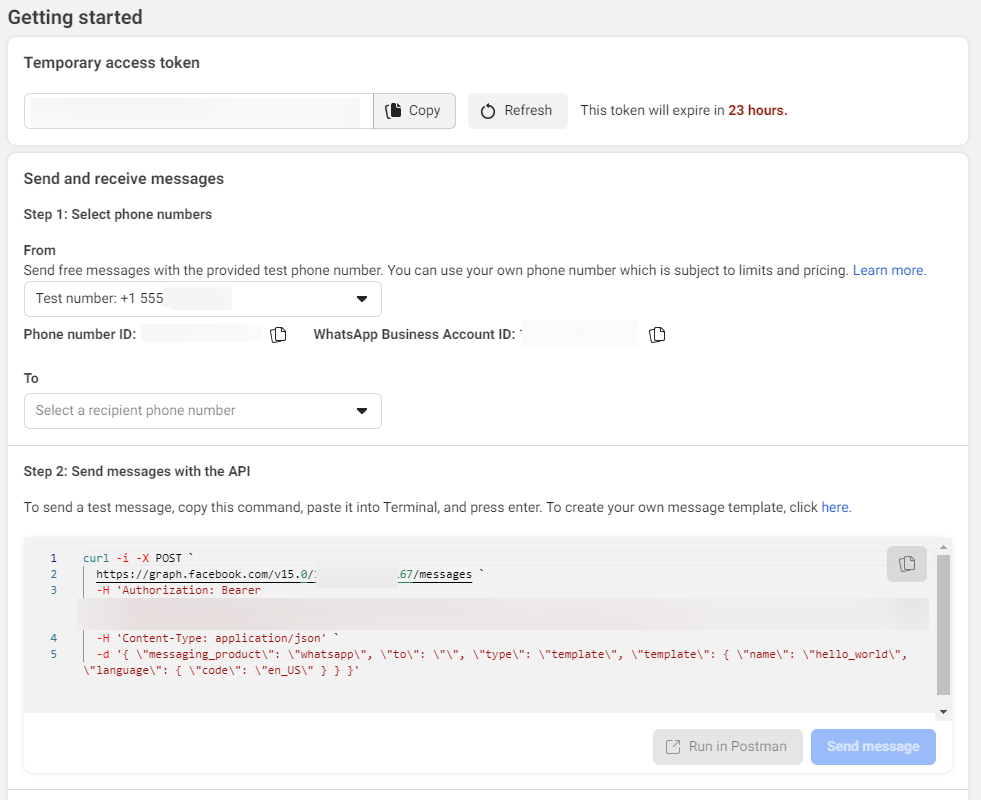
You’ll be given a temporary access token and a Phone Number ID, note these down as you’ll need them later. Set up your own phone number as a recipient and you can have a go at sending yourself a test message:
Set Up Message Template
In the test message above, you used the hello_world template. You’ll need to set up your own template for your own purposes. If you go to “Message Templates” in the WhatsApp manager you can build your own templates.
In the following example, i created a template for my smat home. The template header if fixed and so is the footer. in the body i added variable for dynamic text:
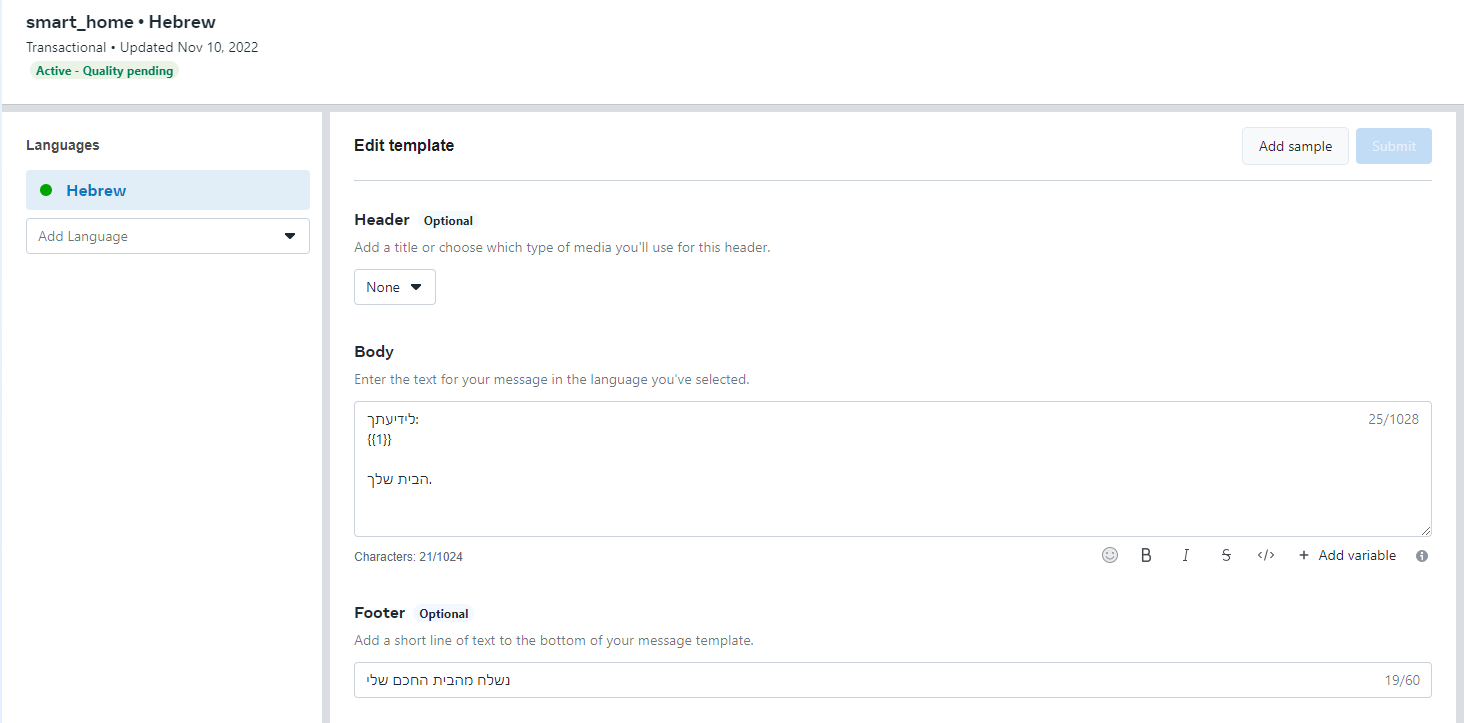
Once you're done with the above ,you're ready to start send messages using manish.
Authentication
Before you can send messages, you need to authenticate your application using the phone_number_id and Token of your test number.
>>> from manish import MaNish
>>> manish = MaNish('TOKEN',  phone_number_id='xxxxxxxxxx')
One your app is authenticated, you can start sending messages. As mentioned above, it is only possible to send messages other than templates after the target phone responds to an initial message.
Sending Messanges
This method can be used for sending simple text messages.
>>> manish.send_message(
        message='Your message',
        recipient_id='97250xxxxxxx'
     )
Mobile should include country code without the + symbol
Sending Media
When sending media:
- Images
- Video
- Audio
- Document
- Gif
You can either specify:
- URL for the media.
- Local file.
Sending Image
>>> manish.send_image(
        image="https://i.imgur.com/COXQuEz.jpeg",
        recipient_id="97250xxxxxxx",
    )
Sending Video
>>> manish.send_video(
        video="https://user-images.githubusercontent.com/4478920/200173402-8a8343c3-afc2-4341-86ea-c833bed98a9a.mp4",
        recipient_id="97250xxxxxxx",
    )
Sending Audio
>>> manish.send_audio(
        audio="https://www.soundhelix.com/examples/mp3/SoundHelix-Song-9.mp3",
        recipient_id="97250xxxxxxx",
    )
Sending Document
>>> messenger.send_document(
        document="https://www.africau.edu/images/default/sample.pdf",
        recipient_id="97250xxxxxxx",
    )
Sending Sticker
Cloud API: Static and animated third-party outbound stickers are supported in addition to all types of inbound stickers. A static sticker needs to be 512x512 pixels and cannot exceed 100 KB. An animated sticker must be 512x512 pixels and cannot exceed 500 KB.
When sending from local file, the app will automatically convert the image to the supported format.
>>> manish.send_sticker(
        image="https://i.imgur.com/COXQuEz.webp",
        recipient_id="97250xxxxxxx",
    )
Sending Location
The Location message object requires longitude and latitude, but you can also send real address and manish will translate the address to coordinates and send thr message.
>>> from manish.location import *
>>> location = Location(address="10 Hagalil street, raanana",name="Home")
>>> manish.send_location(location = location,recipient_id="97250xxxxxxx")
Sending Contact(s)
>>> from manish.contact import *
>>> phones = [Phone(phone="97250xxxxxxx",type="CELL")]
>>> name = Name(formatted_name="Tomer Klein", first_name="Tomer", last_name="Klein")
>>> addresses = [Address(street="Hagalil 10", city="Raanana", zip ="123456", country="Israel")]
>>> emails = [Email("jhon.c@gmail.com")]
>>> contact = Contact(name=name,addresses=addresses,emails=emails,phones=phones)
>>> data = ContactEncoder().encode([contact])
>>> manish.send_contacts(data,"97250xxxxxxx")
Sending Button(s)
>>> from manish.button import *
>>> rows = []
>>> rows.append(Row("row 1","Send Mony",""))
>>> rows.append(Row("row 2","Withdraw Mony",""))
>>> sections = []
>>> sections.append(Section("iBank",rows))
>>> action = Action("Button Testing",sections)
>>> button = Button("Header Testing", "Body Testing", "Footer Testing",action)
>>> data = ButtonEncoder().encode(button)
>>> manish.send_button(data,"97250xxxxxxx")
Sending Template Messages
This method allows you to send template based messages (and bypass the limitation of the ability to send message outside the 24 hours window).
Template messages can either be:
- Text Template (Can also include currency object)
- Media Template (Same as Text but with media in the header)
Sending simple text template
>>> from manish.template import *
>>> def send_template():
>>> parameter = Parameter(type="text",text = "Your Text Message")
>>> parameters = []
>>> parameters.append(parameter)
>>> body = Component(type="body",parameters=[parameter])
>>> manish.send_template(components=TemplateEncoder().encode([body]),recipient_id="97250xxxxxxx",template="smart_home_media",lang="he")
Sending media template
Media can only be attached to the header!
>>> parameter = Parameter(type="text",text = "Your Text Message")
>>> img = Media(link="https://raw.githubusercontent.com/t0mer/broadlinkmanager-docker/master/screenshots/Devices%20List.png")
>>> iparam = MediaParameter(type="image",image=img)
>>> parameters = []
>>> parameters.append(parameter)
>>> body = Component(type="body",parameters=[parameter])
>>> header = Component(type="header",parameters=[iparam])
>>> manish.send_template(components=TemplateEncoder().encode([body,header]),recipient_id="97250xxxxxxx",template="smart_home_media",lang="he")
Webhook
Well, untill now you were only able to send messages. but what if you need to respond to incoming messages? So i created webhook using FastAPI. Feel free to customize and change it to fit your needs.
With this webhook you can:
- Verify webhook (Whatsapp cloud api require webhook token verification)
- Get Senders Mobile Number
- Get Message Text from sender
- Get Location sent by sender
- Get Media (Image, Video, Audio, Document, File) sent by user
- Get Delivery status
Verify token example
>>> @app.get("/", include_in_schema=False)
>>> async def verify(request: Request):
>>>    if request.query_params.get('hub.mode') == "subscribe" and request.query_params.get("hub.challenge"):
>>>        if not request.query_params.get('hub.verify_token') == VERIFY_TOKEN: #os.environ["VERIFY_TOKEN"]:
>>>            return "Verification token mismatch", 403
>>>        return int(request.query_params.get('hub.challenge'))
>>>    return "Hello world", 200
Webhook usage example
>>> @app.post("/", include_in_schema=False)
>>> async def webhook(request: Request):
>>>     data = await request.json()
>>>     changed_field = manish.changed_field(data)
>>>     if changed_field == "messages":
>>>         new_message = manish.get_mobile(data)
>>>         if new_message:
>>>             mobile = manish.get_mobile(data)
>>>             name = manish.get_name(data)
>>>             message_type = manish.get_message_type(data)
>>>             logger.info(
>>>                 f"New Message; sender:{mobile} name:{name} type:{message_type}"
>>>             )
>>>             if message_type == "text":
>>>                 message = manish.get_message(data)
>>>                 name = manish.get_name(data)
>>>                 logger.info("Message: %s", message)
>>>                 manish.send_message(f"Hi {name}, nice to connect with you", mobile)
>>>             elif message_type == "interactive":
>>>                 message_response = manish.get_interactive_response(data)
>>>                 intractive_type = message_response.get("type")
>>>                 message_id = message_response[intractive_type]["id"]
>>>                 message_text = message_response[intractive_type]["title"]
>>>                 logger.info(f"Interactive Message; {message_id}: {message_text}")
>>>             elif message_type == "location":
>>>                 message_location = manish.get_location(data)
>>>                 message_latitude = message_location["latitude"]
>>>                 message_longitude = message_location["longitude"]
>>>                 logger.info("Location: %s, %s", message_latitude, message_longitude)
>>>             elif message_type == "image":
>>>                 image = manish.get_image(data)
>>>                 image_id, mime_type = image["id"], image["mime_type"]
>>>                 image_url = manish.query_media_url(image_id)
>>>                 image_filename = manish.download_media(image_url, mime_type)
>>>                 logger.info(f"{mobile} sent image {image_filename}")
>>>             elif message_type == "video":
>>>                 video = manish.get_video(data)
>>>                 video_id, mime_type = video["id"], video["mime_type"]
>>>                 video_url = manish.query_media_url(video_id)
>>>                 video_filename = manish.download_media(video_url, mime_type)
>>>                 logger.info(f"{mobile} sent video {video_filename}")
>>>             elif message_type == "audio":
>>>                 audio = manish.get_audio(data)
>>>                 audio_id, mime_type = audio["id"], audio["mime_type"]
>>>                 audio_url = manish.query_media_url(audio_id)
>>>                 audio_filename = manish.download_media(audio_url, mime_type)
>>>                 logger.info(f"{mobile} sent audio {audio_filename}")
>>>             elif message_type == "file":
>>>                 file = manish.get_file(data)
>>>                 file_id, mime_type = file["id"], file["mime_type"]
>>>                 file_url = manish.query_media_url(file_id)
>>>                 file_filename = manish.download_media(file_url, mime_type)
>>>                 logger.info(f"{mobile} sent file {file_filename}")
>>>             else:
>>>                 logger.info(f"{mobile} sent {message_type} ")
>>>                 logger.info(data)
>>>         else:
>>>             delivery = manish.get_delivery(data)
>>>             if delivery:
>>>                 logger.info(f"Message : {delivery}")
>>>             else:
>>>                 logger.info("No new message")
>>>     return "ok"
1 maintainer

Metadata
1 maintainer
Release files for ma-nish 1.3.2
For a detailed explanation of source distributions (sdists) and built distributions (wheels), please see the package formats documentation.
Source distribution (sdist)
| File | Size | Uploaded | |
|---|---|---|---|
| ma_nish-1.3.2.tar.gz | 13.9 kB | Details |
Built distribution (wheel)
| File | Interpreter | ABI | Platform | Reset |
|---|---|---|---|---|
| ma_nish-1.3.2-py3-none-any.whl | Python 3 | none | any | Details |
Total release size: 28.7 kB
Release files / ma_nish-1.3.2.tar.gz
| Download URL | ma_nish-1.3.2.tar.gz |
|---|---|
| Size | 13.9 kB |
| Tags | Source |
|
SHA-256 checksum How to use checksums |
d36adca37c73a9fedc6efea50ff2f8c54ea9147976212b80d8d3f67d10cea9e5
|
|
BLAKE2b-256 checksum How to use checksums |
984b9a55eb7882c75a51c6304ef2a204407d0a7689ec64e9bf18affdf02f6e2c
|
| Upload date | |
|
Uploaded using Trusted Publishing? What is trusted publishing? |
No |
| Uploaded via |
twine/6.0.1 CPython/3.9.20
|
Release files / ma_nish-1.3.2-py3-none-any.whl
| Download URL | ma_nish-1.3.2-py3-none-any.whl |
|---|---|
| Size | 14.8 kB |
| Tags | Python 3 |
|
SHA-256 checksum How to use checksums |
597fb2b5ad20a1a8d3b7dc05de55826f886d000e35b16e6827d90bde848235b6
|
|
BLAKE2b-256 checksum How to use checksums |
e2f18d1da0633b97efcae1ad904aeff8148c9fce2bde878b042b5e3c9cdf30e0
|
| Upload date | |
|
Uploaded using Trusted Publishing? What is trusted publishing? |
No |
| Uploaded via |
twine/6.0.1 CPython/3.9.20
|














