
🙏 MaaHelper v0.0.5
Advanced AI-Powered Coding Assistant with Real-time Analysis & Git Integration
Created by Meet Solanki (AIML Student)



✨ Features
🎯 Core Features
- 🎨 Rich CLI: Real-time streaming, beautiful panels, markdown/code rendering
- 🤖 Multi-Provider AI: OpenAI, Groq, Anthropic, Google, Ollama
- 📁 AI File Analysis:
file-search <filepath>for code/data/doc files - 🔐 Secure API Key Management: Local encrypted storage in
C:/Users/<username>/.maahelper/ - 💬 Interactive Chat: Persistent conversation history, context-aware
- 🚀 Async Performance: Fast streaming, low memory, instant startup
- 📊 Live Stats: Session, file, and model metrics
🆕 New in v0.0.5
- 🤖 Custom Agent Prompts (Vibecoding): Specialized AI workflows for coding tasks
- 🔍 Dynamic Model Discovery: Auto-fetch latest models from all providers
- 📊 Real-time Code Analysis: Live error detection and suggestions
- 🔧 Smart Git Integration: AI-powered commit messages and branch suggestions
- ⚡ Enhanced Performance: Rate limiting, memory management, and caching
🚀 Quick Start
Installation
pip install maahelper
📓 Complete Tutorial
NEW: Interactive Jupyter notebook with step-by-step guide!
# Download and run the complete tutorial
jupyter notebook MaaHelper_Getting_Started.ipynb
The notebook covers:
- ✅ Installation & API key setup
- ✅ Basic to advanced usage
- ✅ All new v0.0.5 features
- ✅ Pro tips and workflows
Usage
# Start the CLI
maahelper

# Try new v0.0.5 commands
> prompts             # 🆕 List custom AI agent prompts
> code-review         # 🆕 AI-powered code review
> bug-analysis        # 🆕 Deep bug analysis
> discover-models     # Auto-discover latest AI models
> analyze-start       # Start real-time code analysis
> git-commit          # AI-powered smart commits

# Or run via Python
python -m maahelper.cli.modern_enhanced_cli
API Key Setup
On first run, you'll be prompted to enter API keys for Groq, OpenAI, etc. These are securely stored in:
C:/Users/<username>/.maahelper/config.json
You can manage, edit, or delete keys via the Rich UI manager:
maahelper-keys
🎯 Core Commands
Basic
help— Show helpexit,quit,bye— Exitclear— Clear historystatus— Show config
File
file-search <filepath>— AI file analysisfiles— Show filesdir— Show directory
Config
providers— List providersmodels— List models
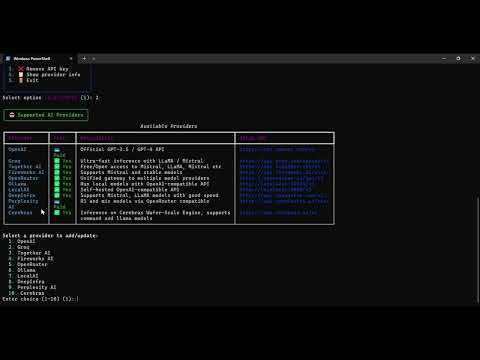
🤖 Supported AI Providers
| Provider | Models | Notes |
|---|---|---|
| Groq | Llama 3.1, Llama 3.2, Mixtral, Gemma | ⚡ Fastest & Free |
| OpenAI | GPT-4, GPT-3.5-turbo | 🧠 Most capable |
| Anthropic | Claude 3, Claude 2 | 📝 Great for analysis |
| Gemini Pro, Gemini Flash | 🔍 Multimodal support | |
| Ollama | Local models | 🏠 Privacy-focused |
📁 File Analysis Example
You: file-search src/main.py

🤖 AI Assistant
Analyzing your Python file...

File Analysis: src/main.py

File Type: Python Source Code
Size: 1.2KB
Language: Python 3.8+

### Key Components:
- Main Function: Entry point with argument parsing
- Error Handling: Comprehensive try-catch blocks
- Dependencies: requests, json, argparse

### Code Quality:
✅ Good Clean structure and readable code
⚠️ Suggestion: Add type hints for better maintainability
⚠️ Suggestion: Consider adding docstrings

### Recommendations:
1. Add input validation for user arguments
2. Implement logging for better debugging
3. Consider async/await for API calls
🎨 Rich CLI Features
- Live Streaming: See AI responses in real-time
- Syntax Highlighting: Code blocks with proper formatting
- Progress Indicators: Visual feedback for operations
- Interactive Menus: Beautiful provider and model selection
- Error Handling: Elegant error messages with helpful suggestions
🔧 Configuration
API Key Management
MaaHelper uses a secure local configuration system:
C:\Users\{username}\.maahelper\
├── config.json          # Encrypted API keys
├── conversation_history/ # Chat sessions
└── logs/                # Application logs
Environment Variables
# Recommended method
export GROQ_API_KEY="gsk_..."
export OPENAI_API_KEY="sk-..."
export ANTHROPIC_API_KEY="sk-ant-..."
export GOOGLE_API_KEY="AIza..."
📊 Performance
- Streaming Speed: Up to 500+ tokens/second with Groq
- Memory Usage: < 50MB typical usage
- Startup Time: < 2 seconds cold start
- File Analysis: Processes files up to 10MB
🛠️ Development
Requirements
- Python 3.8+
- Rich >= 13.0.0
- OpenAI >= 1.0.0
- Cryptography >= 3.4.0
Installation for Development
git clone https://github.com/AIMLDev726/maahelper.git
cd maahelper
pip install -e .
📝 Examples
Basic Chat
You: Explain async/await in Python

🤖 AI Assistant
# Async/Await in Python

**Async/await** is Python's way of handling asynchronous programming...
File Analysis
You: file-search requirements.txt

🤖 AI Assistant
## Dependency Analysis

Your project has **12 dependencies**:
- **Core**: openai, rich, cryptography
- **Optional**: anthropic, google-generativeai
- **Development**: pytest, black, flake8
Code Review
You: Review this function for bugs

🤖 AI Assistant
## Code Review Results

✅ **Good Practices**:
- Clear function naming
- Proper error handling

⚠️ **Issues Found**:
- Missing input validation on line 15
- Potential memory leak in loop (line 23)
Demo Video
📚 Documentation
📓 Getting Started
- MaaHelper_Getting_Started.ipynb - Complete interactive tutorial
- FEATURES_v0.0.5.md - Detailed feature documentation
- CHANGELOG.md - Version history and changes
🏗️ Development
- CODE_STRUCTURE.md - Complete architecture documentation
- CLEANUP_REPORT.md - Code quality improvements
🤝 Contributing
Contributions are welcome! Please feel free to submit a Pull Request.
- Fork the repository
- Create your feature branch (
git checkout -b feature/AmazingFeature) - Commit your changes (
git commit -m 'Add some AmazingFeature') - Push to the branch (
git push origin feature/AmazingFeature) - Open a Pull Request
🏗️ Development Setup
# Clone the repository
git clone https://github.com/AIMLDev726/maahelper.git
cd maahelper

# Install in development mode
pip install -e .

# Run tests
pytest tests/

# Check code structure
cat CODE_STRUCTURE.md
📄 License
This project is licensed under the MIT License - see the LICENSE file for details.
👨💻 Author
Created by Meet Solanki (AIML Student)
- GitHub: @AIMLDev726
- Email: aistudentlearn4@gmail.com
🙏 Acknowledgments
- Built with Rich for beautiful CLI
- Powered by OpenAI and multiple AI providers
- Thanks to the open-source Python community
⭐ Star this repository if you find it helpful!
1 maintainer

Metadata
1 maintainer
Release files for maahelper 0.0.5
For a detailed explanation of source distributions (sdists) and built distributions (wheels), please see the package formats documentation.
Source distribution (sdist)
| File | Size | Uploaded | Provenance | |
|---|---|---|---|---|
| maahelper-0.0.5.tar.gz | 108.9 kB | Without provenance | Details |
Built distribution (wheel)
| File | Interpreter | ABI | Platform | Reset |
|---|---|---|---|---|
| maahelper-0.0.5-py3-none-any.whl | Python 3 | none | any | Details |
Total release size: 226.0 kB
Release files / maahelper-0.0.5.tar.gz
| Download URL | maahelper-0.0.5.tar.gz |
|---|---|
| Size | 108.9 kB |
| Tags | Source |
|
SHA-256 checksum How to use checksums |
764b91e462357e7639ef658558820c2043a848a88c352c31c86cc00b7529e902
|
|
BLAKE2b-256 checksum How to use checksums |
b1105d78b87eb3e2b97f4a8446730dc66b590153005c8cd284c707132e40404a
|
| Upload date | |
|
Uploaded using Trusted Publishing? What is trusted publishing? |
No |
| Uploaded via |
twine/6.1.0 CPython/3.12.11
|
Release files / maahelper-0.0.5-py3-none-any.whl
| Download URL | maahelper-0.0.5-py3-none-any.whl |
|---|---|
| Size | 117.1 kB |
| Tags | Python 3 |
|
SHA-256 checksum How to use checksums |
3546206d36869f7698a766d4d3e2ecf4563cfe2412b70a86a28633a02a91c7a8
|
|
BLAKE2b-256 checksum How to use checksums |
8dae72add229e60ceccada3a909ffa872032bb16419f07aa405982cc6e806861
|
| Upload date | |
|
Uploaded using Trusted Publishing? What is trusted publishing? |
No |
| Uploaded via |
twine/6.1.0 CPython/3.12.11
|
Security for maahelper 0.0.5
Provenance
Provenance describes where a file came from. On PyPI, provenance is shared via attestations, which provide a verifiable record of the build or publishing details. View details, limitations and caveats.
No provenance found
None of the files in this release were uploaded with provenance metadata.
A note on package security
PyPI is a repository for distributing packages, not a service for auditing them. While third-party security researchers and our staff do their best to detect and remove malicious packages, PyPI cannot guarantee the quality, security or suitability of any given package.
To learn more about protecting yourself from malicious actors, visit our package security documentation.














