
mac-cleanup-py




🧹 Python cleanup script for macOS
mac-cleanup-py is a powerful cleanup script for macOS.
This project is a rewrite of the original mac-cleanup-sh rewritten in Python.
🚀 Features
mac-cleanup-py helps you:
- Empty Trash
- Delete unnecessary logs & files
- Clear cache
📦 Default Modules
adobe- Clears Adobe cache filesandroid- Clears Android cachesarc- Clears Arc Browser cachesbrew- Clears Homebrew cachebun- Clears Bun cachecacher- Clears Cacher logschrome- Clears Google Chrome cachechromium- Clears Chromium cache filescomposer- Clears composer cacheconan- Clears Conan cachedocker- Cleanup dangling Docker Images and stopped containersdns_cache- Clears DNS cachedropbox- Clears Dropbox cacheea- Clears EA App cache filesgem- Cleanup any old versions of Gemsgo- Clears Go cachegoogle_drive- Clears Google Drive cachesgradle- Clears Gradle cachesinactive_memory- Purge Inactive Memoryios_apps- Cleanup iOS Applicationsios_backups- Removes iOS Device Backupsjava_cache- Removes Java head dumps from home directoryjetbrains- Removes logs from PhpStorm, PyCharm etckite- Deletes Kite logslunarclient- Removes Lunar Client logs and cacheminecraft- Remove Minecraft logs and cachemicrosoft_teams- Remove Microsoft Teams logs and cachenpm- Cleanup npm Cacheobsidian- Clears Obsidian cache filesnuget- Clears .nuget package filespnpm- Cleanup pnpm Cachepod- Cleanup CocoaPods Cache Filespoetry- Clears Poetry cachepyenv- Cleanup Pyenv-VirtualEnv Cachesteam- Remove Steam logs and cachesystem_caches- Clear System cachesystem_log- Clear System Log Filestelegram- Clear old Telegram Cachetrash- Empty the Trash on All Mounted Volumes and the Main HDDwget_logs- Remove Wget logs and hostsxcode- Cleanup Xcode Derived Data and Archivesxcode_simulators- Reset iOS simulatorsyarn- Cleanup yarn Cache
📥 Installation
Using Homebrew
brew install mac-cleanup-py
Using pip
pip3 install mac-cleanup
🗑️ Uninstallation
Using Homebrew
brew uninstall mac-cleanup-py
Using pip
pip3 uninstall mac-cleanup
💡 Usage Options
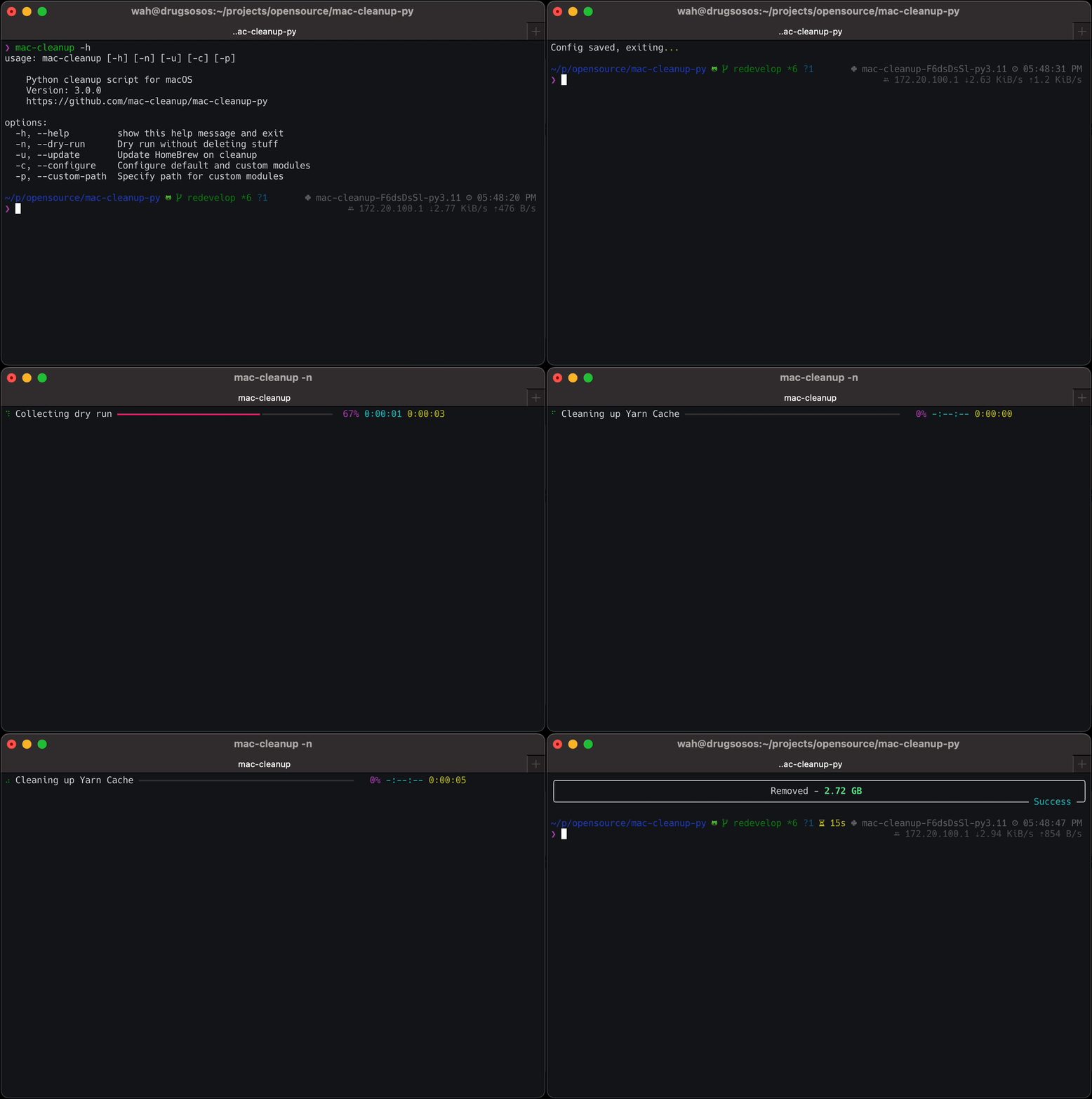
Help menu:
$ mac-cleanup -h
usage: mac-cleanup [-h] [-n] [-u] [-c] [-p] [-f]

    Python cleanup script for macOS
    Version: 3.4.0
    https://github.com/mac-cleanup/mac-cleanup-py

options:
  -h, --help         show this help message and exit
  -n, --dry-run      Run without deleting stuff
  -u, --update       Update Homebrew on cleanup
  -c, --configure    Open module configuration screen
  -p, --custom-path  Specify path for custom modules
  -f, --force        Accept all warnings
  -v, --verbose      Print folders to be deleted
🌟 Contributing
Contributions are always welcome!
If you have any ideas, suggestions, or bug reports, feel free to submit an issue or open a pull request.
📝 License
This project is licensed under the Apache-2.0 License.
👏 Acknowledgements
This project is developed using tools provided by the JetBrains OSS Development Program.
Find out more about their program and how they support open source here.

1 maintainer

Metadata
1 maintainer
Release files for mac_cleanup 3.4.0
For a detailed explanation of source distributions (sdists) and built distributions (wheels), please see the package formats documentation.
Source distribution (sdist)
| File | Size | Uploaded | Provenance | Actions |
|---|---|---|---|---|
| mac_cleanup-3.4.0.tar.gz | 23.0 kB | Without provenance | Details for mac_cleanup-3.4.0.tar.gz |
Built distribution (wheel)
| File | Interpreter | ABI | Platform | Actions Reset |
|---|---|---|---|---|
| mac_cleanup-3.4.0-py3-none-any.whl | Python 3 | none | any | Details for mac_cleanup-3.4.0-py3-none-any.whl |
Total release size: 48.1 kB
Release files / mac_cleanup-3.4.0.tar.gz
| Download URL | mac_cleanup-3.4.0.tar.gz |
|---|---|
| Size | 23.0 kB |
| Tags | Source |
|
SHA-256 checksum How to use checksums |
47718062d255f83eb47e108401e99ceb87e9d6a4d9423008739d74dc1b3aafa2
|
|
BLAKE2b-256 checksum How to use checksums |
b562dcc23b0a85ddf7810261edd6f92d1727a00cfab83064b2bf591866cdc846
|
| Upload date | |
|
Uploaded using Trusted Publishing? What is trusted publishing? |
No |
| Uploaded via |
poetry/2.5.1 CPython/3.15.1 Darwin/27.0.0
|
Release files / mac_cleanup-3.4.0-py3-none-any.whl
| Download URL | mac_cleanup-3.4.0-py3-none-any.whl |
|---|---|
| Size | 25.1 kB |
| Tags | Python 3 |
|
SHA-256 checksum How to use checksums |
178218190cb438f9964103a170e885d67723204f2cdae1b3125b330a3087b182
|
|
BLAKE2b-256 checksum How to use checksums |
a3e794f28c3c90efa91d4e78066f1c698320f171687ad356852e168be6aa6123
|
| Upload date | |
|
Uploaded using Trusted Publishing? What is trusted publishing? |
No |
| Uploaded via |
poetry/2.5.1 CPython/3.15.1 Darwin/27.0.0
|
Security for mac_cleanup 3.4.0
Provenance
Provenance describes where a file came from. On PyPI, provenance is shared via attestations, which provide a verifiable record of the build or publishing details. View details, limitations and caveats.
No provenance found
None of the files in this release were uploaded with provenance metadata.
A note on package security
PyPI is a repository for distributing packages, not a service for auditing them. While third-party security researchers and our staff do their best to detect and remove malicious packages, PyPI cannot guarantee the quality, security or suitability of any given package.
To learn more about protecting yourself from malicious actors, visit our package security documentation.














