
Learning environments for Multi-Agent Connected Autonomous Driving (MACAD) with OpenAI Gym compatible interfaces

Project description
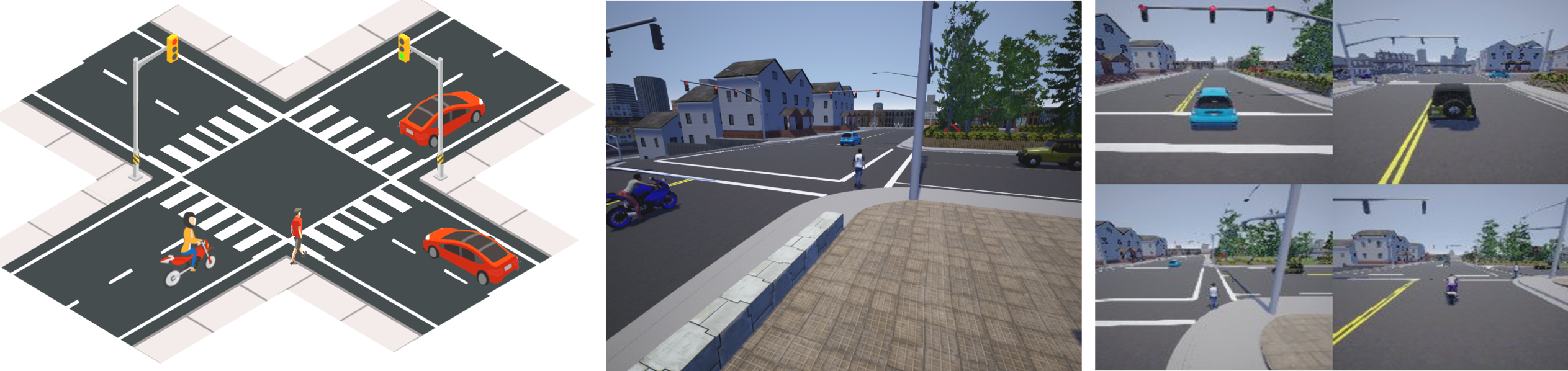
MACAD-Gym provides OpenAI Gym-compatible learning environments for various driving scenarios for training Deep RL algorithms in homogeneous/heterogenous, communicating/non-communicating and other multi-agent settings. New environments and scenarios can be easily added using a simple, JSON-like configuration.
Quick Start
Install MACAD-Gym using pip install macad-gym.
If you have CARLA installed, you can get going using the following 3 lines of code. If not, follow the
Getting started steps.
import gym
import macad_gym
env = gym.make("HomoNcomIndePOIntrxMASS3CTWN3-v0")

# Your agent code here
Any RL library that supports the OpenAI-Gym API can be used to train agents in MACAD-Gym. The MACAD-Agents repository provides sample agents as a starter.
Usage guide
Getting Started
Assumes an Ubuntu (16.04/18.04 or later) system.
-
Install the system requirements:
- Miniconda/Anaconda 3.x
wget -P ~ https://repo.anaconda.com/miniconda/Miniconda3-latest-Linux-x86_64.sh; bash ~/Miniconda3-latest-Linux-x86_64.sh
- cmake (
sudo apt install cmake) - zlib (
sudo apt install zlib1g-dev) - [optional] ffmpeg (
sudo apt install ffmpeg)
- Miniconda/Anaconda 3.x
-
Setup CARLA (0.9.x)
3.1
mkdir ~/software && cd ~/software3.2 Example: Download the 0.9.4 release version from: Here Extract it into
~/software/CARLA_0.9.43.3
echo "export CARLA_SERVER=${HOME}/software/CARLA_0.9.4/CarlaUE4.sh" >> ~/.bashrc -
Install MACAD-Gym:
- Option1 for users :
pip install macad-gym - Option2 for developers:
- Fork/Clone the repository to your workspace:
git clone https://github.com/praveen-palanisamy/macad-gym.git && cd macad-gym - Create a new conda env named "macad-gym" and install the required packages:
conda env create -f conda_env.yaml - Activate the
macad-gymconda python env:source activate carla-gym - Install the
macad-gympackage:pip install -e . - Install CARLA PythonAPI:
pip install carla==0.9.4
NOTE: Change the carla client PyPI package version number to match with your CARLA server version
- Fork/Clone the repository to your workspace:
- Option1 for users :
Learning Platform and Agent Interface
The MACAD-Gym platform provides learning environments for training agents in both,
single-agent and multi-agent settings for various autonomous driving tasks and
scenarios that enables training agents in homogeneous/heterogeneous
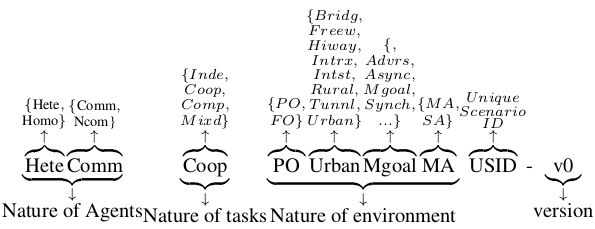
The learning environments follows naming convention for the ID to be consistent
and to support versioned benchmarking of agent algorithms.
The naming convention is illustrated below with HeteCommCoopPOUrbanMgoalMAUSID
as an example:
The number of training environments in MACAD-Gym is expected to grow over time (PRs are very welcome!).
Environments
The environment interface is simple and follows the widely adopted OpenAI-Gym interface. You can create an instance of a learning environment using the following 3 lines of code:
import gym
import macad_gym
env = gym.make("HomoNcomIndePOIntrxMASS3CTWN3-v0")
Like any OpenAI Gym environment, you can obtain the observation space and action spaces as shown below:
>>> print(env.observation_space)
Dict(car1:Box(168, 168, 3), car2:Box(168, 168, 3), car3:Box(168, 168, 3))
>>> print(env.action_space)
Dict(car1:Discrete(9), car2:Discrete(9), car3:Discrete(9))
To get a list of available environments, you can use
the list_available_envs() function as shown in the code snippet below:
import gym
import macad_gym
macad_gym.list_available_envs()
This will print the available environments. Sample output is provided below for reference:
Environment-ID: Short description
{'HeteNcomIndePOIntrxMATLS1B2C1PTWN3-v0': 'Heterogeneous, Non-communicating, '
                                          'Independent,Partially-Observable '
                                          'Intersection Multi-Agent scenario '
                                          'with Traffic-Light Signal, 1-Bike, '
                                          '2-Car,1-Pedestrian in Town3, '
                                          'version 0',
 'HomoNcomIndePOIntrxMASS3CTWN3-v0': 'Homogenous, Non-communicating, '
                                     'Independed, Partially-Observable '
                                     'Intersection Multi-Agent scenario with '
                                     'Stop-Sign, 3 Cars in Town3, version 0'}
Agent interface
The Agent-Environment interface is compatible with the OpenAI-Gym interface thus, allowing for easy experimentation with existing RL agent algorithm implementations and libraries. You can use any existing Deep RL library that supports the Open AI Gym API to train your agents.
The basic agent-environment interaction loop is as follows:
import gym
import macad_gym


env = gym.make("HomoNComIndePOIntrxMASS3CTWN3-v0")
configs = env.configs()
env_config = configs["env"]
actor_configs = configs["actors"]


class SimpleAgent(object):
    def __init__(self, actor_configs):
        """A simple, deterministic agent for an example
        Args:
            actor_configs: Actor config dict
        """
        self.actor_configs = actor_configs
        self.action_dict = {}


    def get_action(self, obs):
        """ Returns `action_dict` containing actions for each agent in the env
        """
        for actor_id in self.actor_configs.keys():
            # ... Process obs of each agent and generate action ...
            if env_config["discrete_actions"]:
                self.action_dict[actor_id] = 3  # Drive forward
            else:
                self.action_dict[actor_id] = [1, 0]  # Full-throttle
        return self.action_dict


agent = SimpleAgent(actor_configs)  # Plug-in your agent or use MACAD-Agents
for ep in range(2):
    obs = env.reset()
    done = {"__all__": False}
    step = 0
    while not done["__all__"]:
        obs, reward, done, info = env.step(agent.get_action(obs))
        print(f"Step#:{step}  Rew:{reward}  Done:{done}")
        step += 1
NOTEs:
MACAD-Gym is for CARLA 0.9.x . If you are looking for an OpenAI Gym-compatible agent learning environment for CARLA 0.8.x (stable release), use this carla_gym environment.


Download files
Download the file for your platform. If you're not sure which to choose, learn more about installing packages.
Source Distribution
Built Distribution
Filter files by name, interpreter, ABI, and platform.
If you're not sure about the file name format, learn more about wheel file names.
Copy a direct link to the current filters
File details
Details for the file macad-gym-0.1.1.tar.gz.
File metadata
- Download URL: macad-gym-0.1.1.tar.gz
- Upload date:
- Size: 91.9 kB
- Tags: Source
- Uploaded using Trusted Publishing? No
- Uploaded via: twine/2.0.0 pkginfo/1.5.0.1 requests/2.22.0 setuptools/41.4.0 requests-toolbelt/0.9.1 tqdm/4.26.0 CPython/3.6.7
File hashes
| Algorithm | Hash digest | |
|---|---|---|
| SHA256 |
f969f451513d18012c2a99262855a8ea1add9f1462884a09df03dcdddf484ba5
|
|
| MD5 |
e88b3ff5ce6323ea0b2dc7f1a0e260ae
|
|
| BLAKE2b-256 |
509c2cd891cd669f46854532518b00277126b67943dd89b41f7a00e7bd4d0ba1
|
File details
Details for the file macad_gym-0.1.1-py3-none-any.whl.
File metadata
- Download URL: macad_gym-0.1.1-py3-none-any.whl
- Upload date:
- Size: 109.8 kB
- Tags: Python 3
- Uploaded using Trusted Publishing? No
- Uploaded via: twine/2.0.0 pkginfo/1.5.0.1 requests/2.22.0 setuptools/41.4.0 requests-toolbelt/0.9.1 tqdm/4.26.0 CPython/3.6.7
File hashes
| Algorithm | Hash digest | |
|---|---|---|
| SHA256 |
4f7375457fea88bf509ec4269a7501299135adbf7943873ef7aee865f20a3e5b
|
|
| MD5 |
e1c3ad52c6fc191cf94d9d0ec27c83e0
|
|
| BLAKE2b-256 |
dc5fbd20bf794c12b280ebba4bea52e40c73b2a515f78a951c8524b45fe37835
|






