
Access Apple's on-device Foundation Models via CLI and OpenAI-compatible API

Reason this release was yanked:
Version not working
Project description
If you find this useful, please ⭐ the repo!
Latest app release --> https://github.com/scouzi1966/maclocal-api/releases/tag/v0.9.2
[!TIP]
What's new in v0.9.2 --> afm -w -g enables WebUI + API gateway mode. Auto-discovers and proxies to Ollama, LM Studio, Jan, and other local LLM backends. Reasoning model support (Qwen, DeepSeek, gpt-oss).
afm -w -g is all you need!
[!TIP]
TLDR Chose ONE of 2 methods to install
TLDR install with Homebrew
brew tap scouzi1966/afm
brew install afm

single command
brew install scouzi1966/afm/afm
OR NEW METHOD WITH PIP!
pip install macafmTo start a webchat:
afm -w
[!TIP]
TLDR install with pip
pip install macafm
MacLocalAPI is the repo for the afm command on macOS 26 Tahoe. The afm command (cli) allows one to access the on-device Apple LLM Foundation model from the command line in a single prompt or in API mode. It allows integration with other OS command line tools using standard Unix pipes.
Additionally, it contains a built-in server that serves the on-device Foundation Model with the OpenAI standard SDK through an API. You can use the model with another front end such as Open WebUI. By default, launching the simple 'afm' command starts a server on port 9999 immediately! Simple, fast.
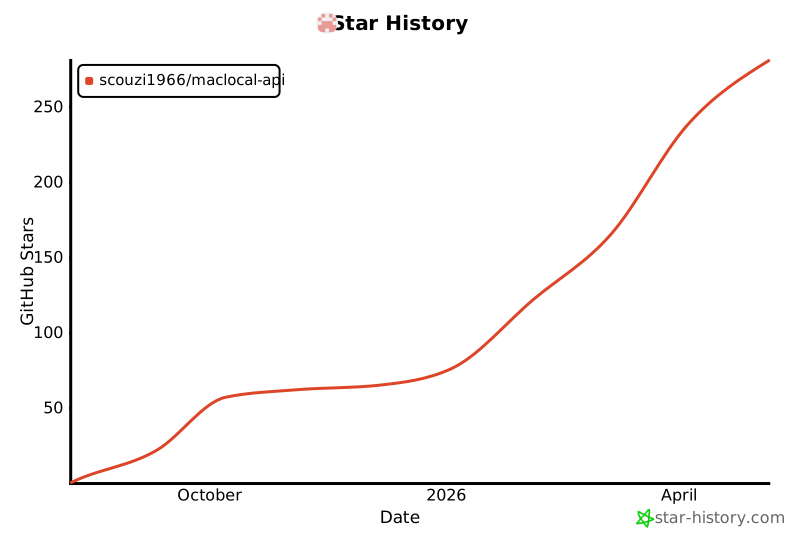
⭐ Star History
As easy to integrate with Open-webui as Ollama


Note: afm command supports trained adapters using Apple's Toolkit: https://developer.apple.com/apple-intelligence/foundation-models-adapter/
I have also created a wrapper tool to make the fine-tuning AFM easier on both Macs M series and Linux with CUDA using Apple's provided LoRA toolkit.
Get it here: https://github.com/scouzi1966/AFMTrainer
You can also explore a pure and private MacOS chat experience (non-cli) here: https://github.com/scouzi1966/vesta-mac-dist
The TLDR quick installation of the afm command on MacOS 26 Tahoe:
Chose ONE of 2 methods to install (Homebrew or pip):
Method 1: Homebrew
# Add the tap (first time only)
brew tap scouzi1966/afm

# Install or upgrade AFM
brew install afm
# OR upgrade existing:
brew upgrade afm

# Verify installation
afm --version  # Should show latest release

# Brew workaround If you are having issues upgrading, Try the following:
brew uninstall afm
brew untap scouzi1966/afm
# Then try again
Method 2: pip
pip install macafm

# Verify installation
afm --version
HOW TO USE afm:
# Start the API server only (Apple Foundation Model on port 9999)
afm

# Start the API server with WebUI chat interface
afm -w

# Start with WebUI and API gateway (auto-discovers Ollama, LM Studio, Jan, etc.)
afm -w -g

# Start on a custom port with a trained LoRA adapter
afm -a ./my_adapter.fmadapter -p 9998

# Use in single prompt mode
afm -i "you are a pirate, you only answer in pirate jargon" -s "Write a story about Einstein"

# Use in single prompt mode with adapter
afm -s "Write a story about Einstein" -a ./my_adapter.fmadapter

# Use in pipe mode
ls -ltr | afm -i "list the files only of ls output"
A very simple to use macOS server application that exposes Apple's Foundation Models through OpenAI-compatible API endpoints. Run Apple Intelligence locally with full OpenAI API compatibility. For use with Python, JS or even open-webui (https://github.com/open-webui/open-webui).
With the same command, it also supports single mode to interact the model without starting the server. In this mode, you can pipe with any other command line based utilities.
As a bonus, both modes allows the use of using a LoRA adapter, trained with Apple's toolkit. This allows to quickly test them without having to integrate them in your app or involve xCode.
The magic command is afm
🌟 Features
- 🔗 OpenAI API Compatible - Works with existing OpenAI client libraries and applications
- ⚡ LoRA adapter support - Supports fine-tuning with LoRA adapters using Apple's tuning Toolkit
- 📱 Apple Foundation Models - Uses Apple's on-device 3B parameter language model
- 🔒 Privacy-First - All processing happens locally on your device
- ⚡ Fast & Lightweight - No network calls, no API keys required
- 🛠️ Easy Integration - Drop-in replacement for OpenAI API endpoints
- 📊 Token Usage Tracking - Provides accurate token consumption metrics
📋 Requirements
- **macOS 26 (Tahoe) or later
- Apple Silicon Mac (M1/M2/M3/M4 series)
- Apple Intelligence enabled in System Settings
- **Xcode 26 (for building from source)
🚀 Quick Start
Installation
Option 1: Homebrew (Recommended)
# Add the tap
brew tap scouzi1966/afm

# Install AFM
brew install afm

# Verify installation
afm --version
Option 2: pip (PyPI)
# Install from PyPI
pip install macafm

# Verify installation
afm --version
Option 3: Build from Source
# Clone the repository (includes llama.cpp WebUI as a submodule)
git clone --recursive https://github.com/scouzi1966/maclocal-api.git
cd maclocal-api

# Build the WebUI (requires Node.js)
cd vendor/llama.cpp/tools/server/webui
npm install && npm run build
cd ../../../../..
mkdir -p Resources/webui
cp vendor/llama.cpp/tools/server/public/index.html.gz Resources/webui/

# Build the project
swift build -c release

# Run
./.build/release/afm --version
Running
# API server only (Apple Foundation Model on port 9999)
afm

# API server with WebUI chat interface
afm -w

# WebUI + API gateway (auto-discovers Ollama, LM Studio, Jan, etc.)
afm -w -g

# Custom port with verbose logging
afm -p 8080 -v

# Show help
afm -h
📡 API Endpoints
Chat Completions
POST /v1/chat/completions
Compatible with OpenAI's chat completions API.
curl -X POST http://localhost:9999/v1/chat/completions \
  -H "Content-Type: application/json" \
  -d '{
    "model": "foundation",
    "messages": [
      {"role": "user", "content": "Hello, how are you?"}
    ]
  }'
List Models
GET /v1/models
Returns available Foundation Models.
curl http://localhost:9999/v1/models
Health Check
GET /health
Server health status endpoint.
curl http://localhost:9999/health
💻 Usage Examples
Python with OpenAI Library
from openai import OpenAI

# Point to your local MacLocalAPI server
client = OpenAI(
    api_key="not-needed-for-local",
    base_url="http://localhost:9999/v1"
)

response = client.chat.completions.create(
    model="foundation",
    messages=[
        {"role": "user", "content": "Explain quantum computing in simple terms"}
    ]
)

print(response.choices[0].message.content)
JavaScript/Node.js
import OpenAI from 'openai';

const openai = new OpenAI({
  apiKey: 'not-needed-for-local',
  baseURL: 'http://localhost:9999/v1',
});

const completion = await openai.chat.completions.create({
  messages: [{ role: 'user', content: 'Write a haiku about programming' }],
  model: 'foundation',
});

console.log(completion.choices[0].message.content);
curl Examples
# Basic chat completion
curl -X POST http://localhost:9999/v1/chat/completions \
  -H "Content-Type: application/json" \
  -d '{
    "model": "foundation",
    "messages": [
      {"role": "system", "content": "You are a helpful assistant."},
      {"role": "user", "content": "What is the capital of France?"}
    ]
  }'

# With temperature control
curl -X POST http://localhost:9999/v1/chat/completions \
  -H "Content-Type: application/json" \
  -d '{
    "model": "foundation",
    "messages": [{"role": "user", "content": "Be creative!"}],
    "temperature": 0.8
  }'
Single Prompt & Pipe Examples
# Single prompt mode
afm -s "Explain quantum computing"

# Piped input from other commands
echo "What is the meaning of life?" | afm
cat file.txt | afm
git log --oneline | head -5 | afm

# Custom instructions with pipe
echo "Review this code" | afm -i "You are a senior software engineer"
🏗️ Architecture
MacLocalAPI/
├── Package.swift                    # Swift Package Manager config
├── Sources/MacLocalAPI/
│   ├── main.swift                   # CLI entry point & ArgumentParser
│   ├── Server.swift                 # Vapor web server configuration
│   ├── Controllers/
│   │   └── ChatCompletionsController.swift  # OpenAI API endpoints
│   └── Models/
│       ├── FoundationModelService.swift     # Apple Foundation Models wrapper
│       ├── OpenAIRequest.swift              # Request data models
│       └── OpenAIResponse.swift             # Response data models
└── README.md
🔧 Configuration
Command Line Options
OVERVIEW: macOS server that exposes Apple's Foundation Models through
OpenAI-compatible API

Use -w to enable the WebUI, -g to enable API gateway mode (auto-discovers and
proxies to Ollama, LM Studio, Jan, and other local LLM backends).

USAGE: afm <options>

OPTIONS:
  -s, --single-prompt <single-prompt>
                          Run a single prompt without starting the server
  -i, --instructions <instructions>
                          Custom instructions for the AI assistant (default:
                          You are a helpful assistant)
  -v, --verbose           Enable verbose logging
  --no-streaming          Disable streaming responses (streaming is enabled by
                          default)
  -a, --adapter <adapter> Path to a .fmadapter file for LoRA adapter fine-tuning
  -p, --port <port>       Port to run the server on (default: 9999)
  -H, --hostname <hostname>
                          Hostname to bind server to (default: 127.0.0.1)
  -t, --temperature <temperature>
                          Temperature for response generation (0.0-1.0)
  -r, --randomness <randomness>
                          Sampling mode: 'greedy', 'random',
                          'random:top-p=<0.0-1.0>', 'random:top-k=<int>', with
                          optional ':seed=<int>'
  -P, --permissive-guardrails
                          Permissive guardrails for unsafe or inappropriate
                          responses
  -w, --webui             Enable webui and open in default browser
  -g, --gateway           Enable API gateway mode: discover and proxy to local
                          LLM backends (Ollama, LM Studio, Jan, etc.)
  --prewarm <prewarm>     Pre-warm the model on server startup for faster first
                          response (y/n, default: y)
  --version               Show the version.
  -h, --help              Show help information.

Note: afm also accepts piped input from other commands, equivalent to using -s
with the piped content as the prompt.
Environment Variables
The server respects standard logging environment variables:
LOG_LEVEL- Set logging level (trace, debug, info, notice, warning, error, critical)
⚠️ Limitations & Notes
- Model Scope: Apple Foundation Model is a 3B parameter model (optimized for on-device performance)
- macOS 26+ Only: Requires the latest macOS with Foundation Models framework
- Apple Intelligence Required: Must be enabled in System Settings
- Token Estimation: Uses word-based approximation for token counting (Foundation model only; proxied backends report real counts)
🔍 Troubleshooting
"Foundation Models framework is not available"
- Ensure you're running **macOS 26 or later
- Enable Apple Intelligence in System Settings → Apple Intelligence & Siri
- Verify you're on an Apple Silicon Mac
- Restart the application after enabling Apple Intelligence
Server Won't Start
- Check if the port is already in use:
lsof -i :9999 - Try a different port:
afm -p 8080 - Enable verbose logging:
afm -v
Build Issues
- Ensure you have **Xcode 26 installed
- Update Swift toolchain:
xcode-select --install - Clean and rebuild:
swift package clean && swift build -c release
🤝 Contributing
Contributions are welcome! Please feel free to submit a Pull Request. For major changes, please open an issue first to discuss what you would like to change.
Development Setup
# Clone the repo with submodules
git clone --recursive https://github.com/scouzi1966/maclocal-api.git
cd maclocal-api

# Build WebUI (first time only, requires Node.js)
cd vendor/llama.cpp/tools/server/webui && npm install && npm run build && cd ../../../../..
mkdir -p Resources/webui && cp vendor/llama.cpp/tools/server/public/index.html.gz Resources/webui/

# Build for development
swift build

# Run with verbose logging
./.build/debug/afm -w -g -v
📄 License
This project is licensed under the MIT License - see the LICENSE file for details.
🙏 Acknowledgments
- Apple for the Foundation Models framework
- The Vapor Swift web framework team
- OpenAI for the API specification standard
- The Swift community for excellent tooling
📞 Support
If you encounter any issues or have questions:
- Check the Troubleshooting section
- Search existing GitHub Issues
- Create a new issue with detailed information about your problem
🗺️ Roadmap
- Streaming response support
- Function/tool calling implementation
- Multiple model support (API gateway mode)
- Performance optimizations
- Docker containerization (when supported)
- Web UI for testing (llama.cpp WebUI integration)
Made with ❤️ for the Apple Silicon community
Bringing the power of local AI to your fingertips.
Release history Release notifications | RSS feed


Download files
Download the file for your platform. If you're not sure which to choose, learn more about installing packages.
Source Distributions
Built Distribution
Filter files by name, interpreter, ABI, and platform.
If you're not sure about the file name format, learn more about wheel file names.
Copy a direct link to the current filters
File details
Details for the file macafm-0.9.2-py3-none-any.whl.
File metadata
- Download URL: macafm-0.9.2-py3-none-any.whl
- Upload date:
- Size: 10.8 MB
- Tags: Python 3
- Uploaded using Trusted Publishing? No
- Uploaded via: uv/0.9.27 {"installer":{"name":"uv","version":"0.9.27","subcommand":["publish"]},"python":null,"implementation":{"name":null,"version":null},"distro":{"name":"macOS","version":null,"id":null,"libc":null},"system":{"name":null,"release":null},"cpu":null,"openssl_version":null,"setuptools_version":null,"rustc_version":null,"ci":null}
File hashes
| Algorithm | Hash digest | |
|---|---|---|
| SHA256 |
af63d6803dd83c1bba86615d1afcfe6cd77e591c5483ae2e142cb19c4c3dad5e
|
|
| MD5 |
842b3dfd36ae6a1bff1ae2a6ce2bbddd
|
|
| BLAKE2b-256 |
5e356c4abac82e3903f99b7de9109be3cf3cb9a6124fd59fb09e12790c7f49ad
|






