

Real-robot learning on a MacBook.
Teleoperate, record, export to LeRobot and run ACT or π0.5 on the robot, all from a Mac on Apple silicon.





English · 中文
Why
Real-robot setups usually assume an Ubuntu workstation with an NVIDIA GPU next to the arm. We found a MacBook is enough for everything that happens at the robot: teleoperated data collection, data checks, export to LeRobot, and closed-loop policy inference, π0.5 included. Training still goes to a GPU machine. macbot is the toolkit we use for that, cleaned up so others can reuse it.
Measured on a MacBook Pro (M5 Pro, 48 GB), PyTorch MPS:
| Measurement | Result |
|---|---|
| π0.5 inference, 50-step action chunk, 10 denoising steps | ~280 ms (bf16 + torch.compile) |
| π0.5 with Real-Time Chunking guidance | ~350 ms |
| ACT inference, 100-step chunk | ~25 ms |
| Teleoperation loop / recording grid | 60 Hz / 30 fps |
| Camera frame age at sampling time, p95 | ≤ 40 ms (scene UVC + wrist Orbbec) |
What is inside
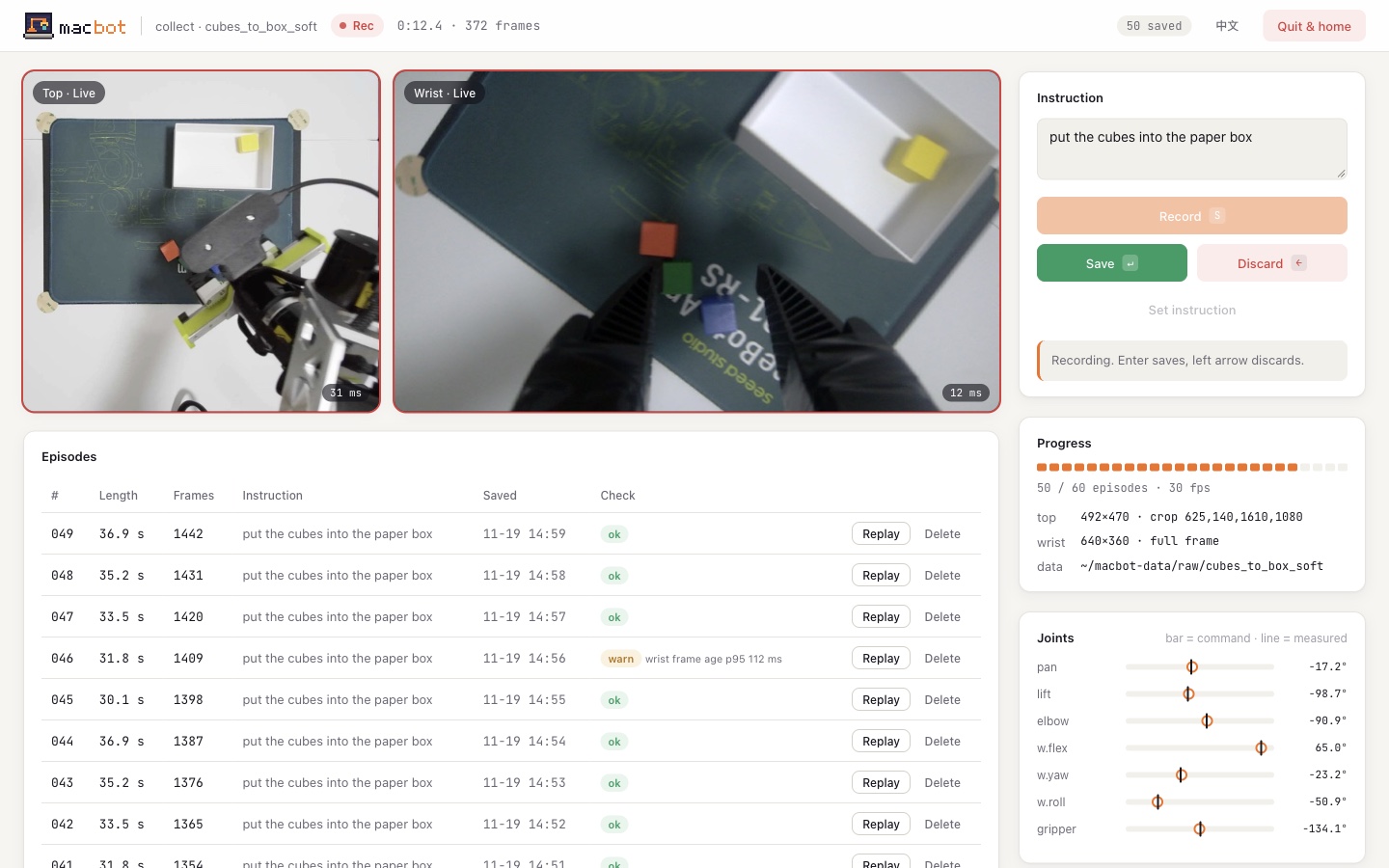
- Collection console in the browser: live cameras, one-key record / save / discard, per-episode language instruction, automatic quality checks (frame age, repeated frames, joint jumps, timing), instant replay of any episode with joint traces.
- Export to a LeRobot v3 dataset, optionally with a binary (open / closed) gripper action.
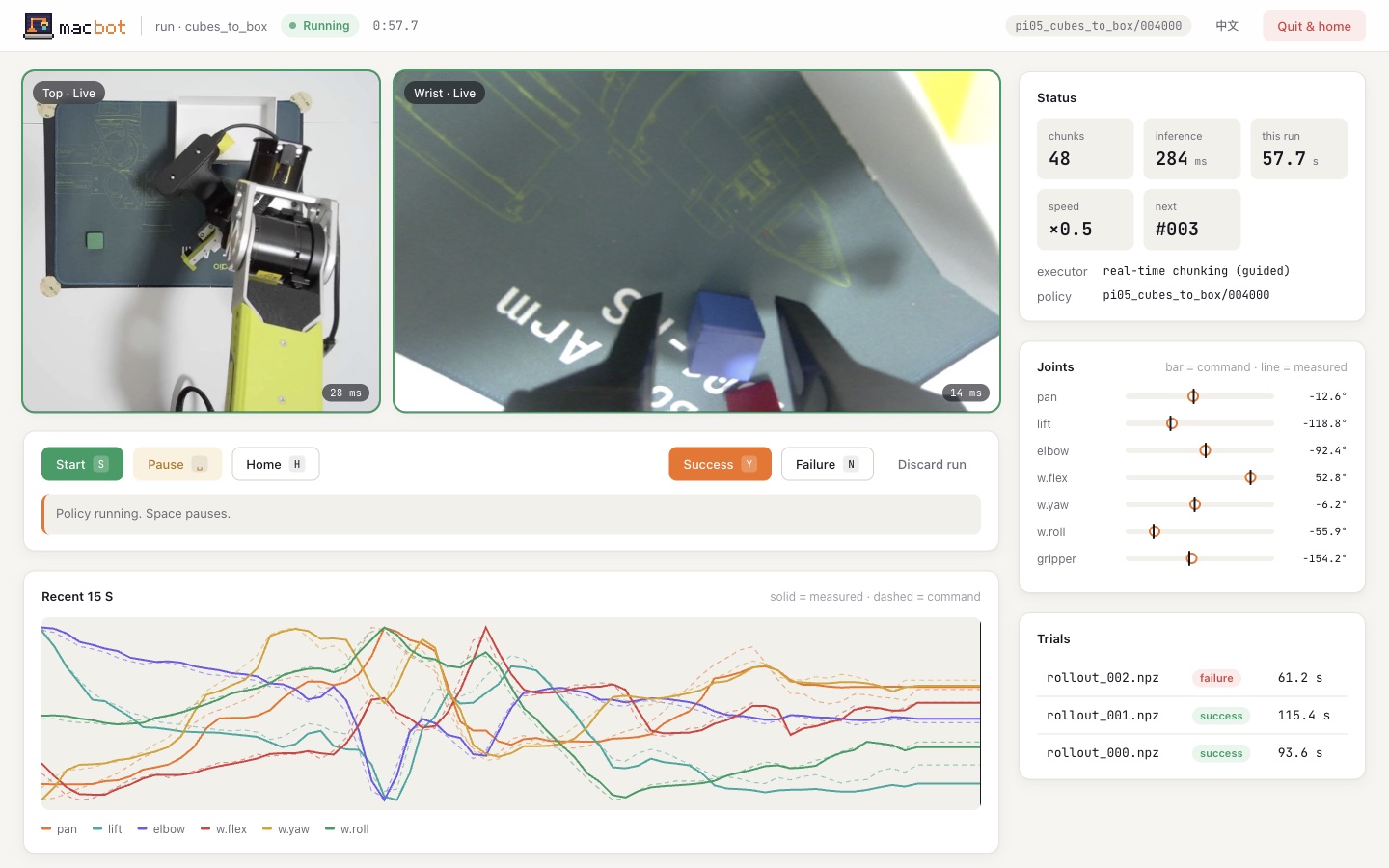
- Policy runner console for ACT and π0.5 with four execution schemes (synchronous chunks, temporal ensembling, asynchronous chunks, Real-Time Chunking), velocity and joint limits, pause / home / quit with a slow two-stage return to zero, and every trial saved with video and timing.
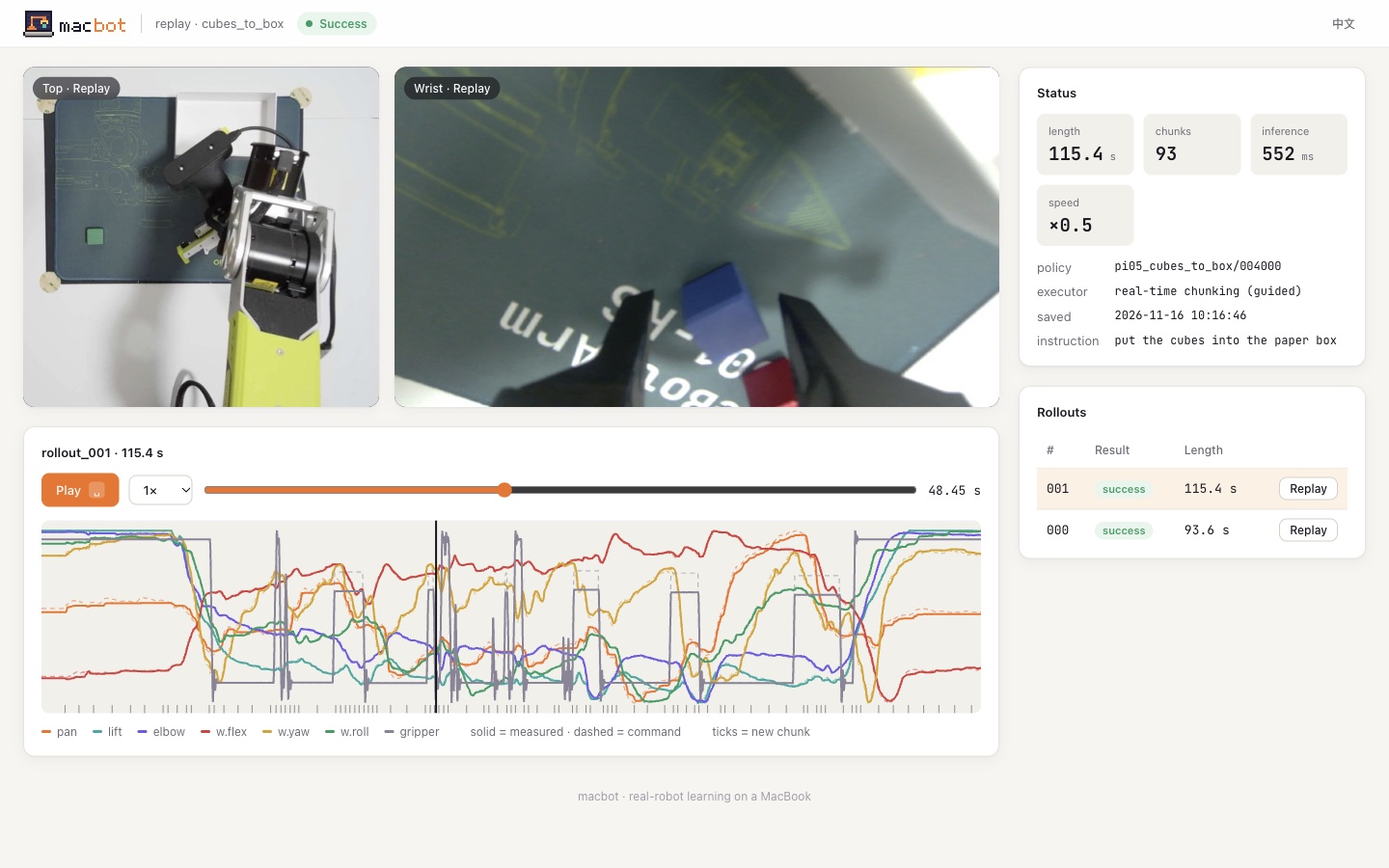
- Replay of saved trials (all cameras in sync, command vs. measured traces, chunk boundaries) and side-by-side MP4 export.
macbot doctorchecks packages, MPS and the configured robot and cameras before you start.--fakeoncollectandrunsubstitutes a fake arm and cameras;runstill runs the policy.- English and Chinese in every web page (toggle in the top bar), light and dark mode.
| Run a policy | Replay a trial |
|---|---|
 |
 |
Hardware
The reBot B601-RS is the reference arm tested on hardware. See robot support for the SO-100/101 and other compatible LeRobot arms, the local simulator, and what has been verified. The setup guide covers drivers and cameras. For π0.5, we recommend an Apple silicon Mac with at least 32 GB of memory.
Quick start
conda create -n macbot python=3.12 -y && conda activate macbot
pip install "macbot[orbbec,pi]"        # drop pi if you only use ACT
# or from source: git clone https://github.com/MuQY1818/macbot && pip install -e "./macbot[orbbec,pi]"

macbot doctor                          # what is ready, what is missing
macbot collect --fake                  # the collection console with a simulated arm and cameras
Open http://127.0.0.1:8766. Press S to record, Enter to save, ← to discard.
For MuJoCo, use pip install -e '.[sim]' in the source checkout, then
macbot --config configs/so101_sim.yaml collect. For hardware, follow setup.
Workflow
sudo -E $(which python) -m macbot.cli collect          # 1. teleoperate and record (sudo: Orbbec SDK)
macbot health                                          # 2. per-episode tracking and timing report
macbot export --gripper binary                         # 3. LeRobot dataset in ~/macbot-data/datasets/
DATASET=... ./train/train_pi05.sh my_run               # 4. train on a GPU machine (train_act.sh for ACT)
sudo -E $(which python) -m macbot.cli run --policy runs/my_run/checkpoints/last/pretrained_model
macbot replay                                          # 5. browse trials;  macbot video <rollout.npz> for an MP4
The full walkthrough, including the data format and the execution schemes, is in docs/guide.md.
Put your settings in a YAML file and pass macbot --config my.yaml <command>; anything you leave out falls
back to macbot/default.yaml. configs/example.yaml is a starting point.
What it took to run this on macOS
- CAN under sudo. The Orbbec SDK needs root, and dyld ignores
/usr/local/libfor root processes, solibPCBUSB.dylibis preloaded explicitly before the CAN backend looks for it. - The right camera. Opening a UVC camera by name or index can grab an iPhone through Continuity Camera. macbot opens cameras by AVFoundation uniqueID through a small Swift helper, and still finds the camera when it moves to another USB port.
- π0.5 on MPS. bf16 weights under autocast; the masked third camera slot is skipped (identical output,
~70 ms saved);
torch.compileon the denoising step and the language model cuts per-kernel dispatch overhead (~410 → ~280 ms); the random weight initialization that the checkpoint overwrites anyway is skipped, which saves about 80 s per load. - Files written as root are handed back to the user who ran
sudo.
Contributing
See CONTRIBUTING for development and hardware reports, architecture for the code layout, and the roadmap for planned work.
Safety
macbot moves a real arm. Every console starts paused or idle, limits joint speed and range, clamps the
gripper force, pauses when a camera stalls, and returns to zero slowly before disabling the motors. Keep the
workspace clear and a hand near the power switch, and start new policies at --speed 0.3.
Acknowledgements
Built on LeRobot. π0.5 and the augmentation recipe come from openpi; Real-Time Chunking from Black et al., 2025. The reBot arms are by Seeed Studio. JetBrains Mono is under the SIL Open Font License.
License
Apache-2.0. See LICENSE.
1 maintainer

Metadata
1 maintainer
Release files for macbot 0.2.0
For a detailed explanation of source distributions (sdists) and built distributions (wheels), please see the package formats documentation.
Source distribution (sdist)
| File | Size | Uploaded | Provenance | Actions |
|---|---|---|---|---|
| macbot-0.2.0.tar.gz | 181.3 kB | With provenance | Details for macbot-0.2.0.tar.gz |
Built distribution (wheel)
| File | Interpreter | ABI | Platform | Actions Reset |
|---|---|---|---|---|
| macbot-0.2.0-py3-none-any.whl | Python 3 | none | any | Details for macbot-0.2.0-py3-none-any.whl |
Total release size: 368.0 kB
Release files / macbot-0.2.0.tar.gz
| Download URL | macbot-0.2.0.tar.gz |
|---|---|
| Size | 181.3 kB |
| Tags | Source |
|
SHA-256 checksum How to use checksums |
bbd1c68d7bf29ce20a82e2142809e14e7763eee54b98ad143c3dd9942557a4ed
|
|
BLAKE2b-256 checksum How to use checksums |
1cbd1baba658a1766d3d6c8144d555bf71e2f64abb638ad81bbaf48972a44688
|
| Upload date | |
|
Uploaded using Trusted Publishing? What is trusted publishing? |
Yes |
| Uploaded via |
twine/7.0.0 CPython/3.13.16
|
Provenance
Provenance describes where a file came from. On PyPI, provenance is shared via attestations, which provide a verifiable record of the build or publishing details. View details, limitations and caveats.


PyPI Publish Attestation
PyPI verified that this artifact, at this checksum, originated from the publisher listed below.
Signed by GitHub Actions, verified by PyPI on Nov 20, 2026.
Transparency logRelease files / macbot-0.2.0-py3-none-any.whl
| Download URL | macbot-0.2.0-py3-none-any.whl |
|---|---|
| Size | 186.7 kB |
| Tags | Python 3 |
|
SHA-256 checksum How to use checksums |
c78581e246ed1757426a045e8f769b0a6ab65c1ea7223bed70bd6abb1317a54b
|
|
BLAKE2b-256 checksum How to use checksums |
e2d995589475f6e25e887e179727de3369726551ea2496e2cf4fbd3e7e1fcdbf
|
| Upload date | |
|
Uploaded using Trusted Publishing? What is trusted publishing? |
Yes |
| Uploaded via |
twine/7.0.0 CPython/3.13.16
|
Provenance
Provenance describes where a file came from. On PyPI, provenance is shared via attestations, which provide a verifiable record of the build or publishing details. View details, limitations and caveats.
PyPI Publish Attestation
PyPI verified that this artifact, at this checksum, originated from the publisher listed below.
Signed by GitHub Actions, verified by PyPI on Nov 20, 2026.
Transparency logSecurity for macbot 0.2.0
Provenance
Provenance describes where a file came from. On PyPI, provenance is shared via attestations, which provide a verifiable record of the build or publishing details. View details, limitations and caveats.
Full provenance
Both files in this release have been uploaded with provenance metadata.
Attestation for macbot-0.2.0.tar.gz
PyPI Publish Attestation
PyPI verified that this artifact, at this checksum, originated from the publisher listed below.
Signed by GitHub Actions, verified by PyPI on Nov 20, 2026.
Transparency logA note on package security
PyPI is a repository for distributing packages, not a service for auditing them. While third-party security researchers and our staff do their best to detect and remove malicious packages, PyPI cannot guarantee the quality, security or suitability of any given package.
To learn more about protecting yourself from malicious actors, visit our package security documentation.














