

Machine Internet
Turn any website into an MCP server. No API needed.
uvx machine-internet wrap https://www.ycombinator.com/companies
Machine Internet opens the site in a headless browser, watches the hidden API calls the page makes, and turns them into a small set of clean tools that Claude, Cursor or any MCP client can call directly.
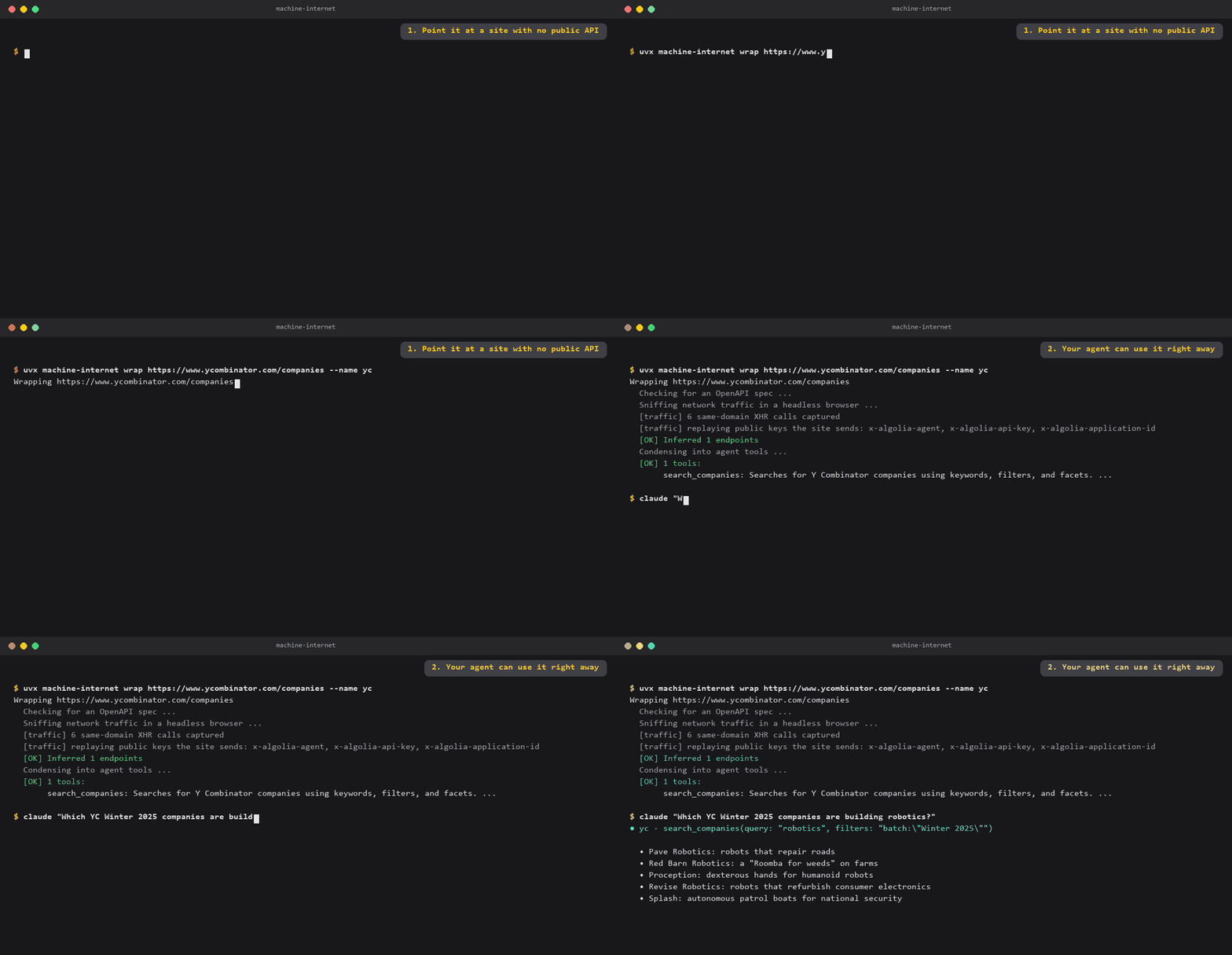
Try it in your browser, nothing to install: machine-internet.vercel.app runs every tool below against the real site.


Try it in 30 seconds (no API key)
Five sites come pre-wrapped. None has an official public API or MCP server for this data; the tools hit the same endpoints the site's own page uses. Add one to your Claude Desktop or Cursor config:
{
  "mcpServers": {
    "yc": {
      "command": "uvx",
      "args": ["machine-internet", "serve", "yc_companies"]
    }
  }
}
Restart your client and ask: "Which YC companies from the last two batches are building robotics, and what do they do?"
| Example | Site | Tools |
|---|---|---|
yc_companies |
YC company directory | search every YC company by keyword, batch, industry, status, team size |
spotify_podcasts |
Spotify Podcast Charts | top shows, top episodes and trending shows in any country |
substack |
Substack search | search posts and writers across every Substack |
vscode_marketplace |
VS Code Marketplace | search extensions with install counts and ratings |
bundlephobia |
bundlephobia.com | 6: package size, tree-shaking check, size history, similar packages, per-export sizes |
Each one was made with wrap, then tidied by hand: the VS Code request body, parameter defaults, and for Spotify and Substack merged or renamed tools, one broken tool removed and responses trimmed to the useful fields. The table under "What it works on" is honest about what wrap gets right on its own.
You need uv for uvx. Or install it once with pip install machine-internet (or straight from GitHub: pip install git+https://github.com/chetanty/machine_internet) and use machine-internet as the command.
Hosted, nothing to install: every example is also live at machine-internet.vercel.app as a remote MCP endpoint, e.g. https://machine-internet.vercel.app/mcp/yc_companies. Clients with remote MCP support take the URL directly; others can use npx mcp-remote <url>. Some sites rate-limit requests from cloud servers, so for heavy use run serve locally, which calls the site from your own connection.
Wrap your own site
What you need: uv and one LLM API key. That's it. The headless browser downloads itself on the first run.
The easiest key is Gemini's: get one free at aistudio.google.com/apikey (free tier, no credit card). Anthropic and OpenAI keys work too.
export GEMINI_API_KEY=your-key # Windows PowerShell: $env:GEMINI_API_KEY="your-key"
Then point it at a page that loads data as you use it:
uvx machine-internet wrap https://www.ycombinator.com/companies --name yc
Wrapping https://www.ycombinator.com/companies
  Checking for an OpenAPI spec ...
  Sniffing network traffic in a headless browser ...
  [traffic] 6 same-domain XHR calls captured
  [traffic] replaying public keys the site sends: x-algolia-agent, x-algolia-api-key, x-algolia-application-id
  [OK] Inferred 1 endpoints
  Condensing into agent tools ...
  [OK] 1 tools:
       search_companies: Searches for Y Combinator companies using keywords, filters, and facets. ...

Add this to your MCP client config (Claude Desktop, Cursor, ...):
{ "mcpServers": { "yc": { "command": "uvx", "args": ["machine-internet", "serve", "yc"] } } }
Then try it straight from the terminal:
uvx machine-internet call yc search_companies query=robotics 'filters=batch:"Winter 2025"'
The first run downloads headless Chromium automatically (one time, about 120 MB). Wrapping takes 1 to 3 minutes and costs a few cents of LLM usage, or nothing on Gemini's free tier. Serving afterwards needs no LLM at all.
Tips
- Pick a page that fetches data: a search results page or an item page works better than a static landing page.
- If the site publishes an OpenAPI spec, it is used automatically and nothing is sniffed. Point at one directly with
--spec <url>. - Large specs: keep only some areas with
--tags repos,issues.
How it works
- Spec check. Probes about 20 standard locations (
/openapi.json,/swagger.json, ...). If a real spec exists, it is parsed directly. - Traffic sniffing. Otherwise, launches headless Chromium, loads the page, scrolls and clicks through it, and records every same-site JSON request. Analytics and ad trackers are filtered out.
- Inference. An LLM reads the captured requests and responses and infers each endpoint's path, parameters and types.
- Condensation. An LLM collapses the endpoints into at most 15
verb_nountools, with descriptions written so an agent knows when to use each one. - Serving. The result is a small JSON file.
machine-internet serveexposes it as a standard MCP server (stdio by default, SSE with--sse) that makes real calls to the real site.
Commands
machine-internet wrap <url> [--name NAME] [--spec URL] [--tags a,b] [--sniff] [-o FILE]
machine-internet serve <name-or-file.json> [--sse --port 8000]
machine-internet list                  # bundled examples and servers you have wrapped
machine-internet tools <name>          # show a server's tools and parameters
machine-internet call <name> <tool> key=value ...   # call a tool from the terminal
machine-internet config <name>         # print the MCP client config block
Wrapped servers are saved to ~/.machine-internet/schemas/.
APIs that need auth: credentials are read from the environment when the server runs: MI_TOKEN (bearer), MI_API_KEY (plus MI_API_KEY_NAME, MI_API_KEY_IN=header|query), MI_USERNAME / MI_PASSWORD, or MI_TOKEN_URL / MI_CLIENT_ID / MI_CLIENT_SECRET for OAuth2 client credentials. Put them in the env block of your MCP client config.
What it works on
It works on sites whose pages load their data with API calls from the browser: most single-page apps, search pages, dashboards and developer tools. It does not work on sites that render pages on the server, or that block headless browsers.
Results from pointing wrap at 51 sites, with each generated tool then called for real:
| Result | Sites |
|---|---|
| Works | YC company directory, Spotify Podcast Charts, Substack search, Fontshare, OpenRouter rankings, Luma, crates.io, deps.dev, Hugging Face, archive.org, HN Search, OSS Insight, bundlephobia, npm trends, regex101 |
| Works after a hand fix | VS Code Marketplace (nested request body), caniuse (form-encoded body) |
| Wrong data found | IKEA (only the category tree; search runs on another domain), Raycast Store and Rotten Tomatoes (only session or layout calls), Nike, Target and Coursera (only privacy, store-picker or cart calls, mostly locked) |
| Search key locked to the site | Michelin Guide (its Algolia key only works from guide.michelin.com, so it is left alone) |
| Partly works | Open Library (1 of 2 tools), ESPN (side data only; the scores are server-rendered), Steam (search works but returns ready-made HTML) |
| No data API found (server-rendered) | Docker Hub, IMDb, Reddit, GitHub Trending, npmjs.com, Metacritic, Resident Advisor, HowLongToBeat, JSR, Figma Community |
| Data on another service | a16z portfolio (Google and LinkedIn embeds), Sequoia (served by Framer) |
| Blocked by bot protection | Devpost, LMArena, Printables, Product Hunt, lichess, packagephobia, Bandcamp, Kickstarter, Goodreads |
| Unusable internal format | Google Fonts (Google's batchexecute RPC), dev.to (only a session-token call), Chrome Web Store (same Google format) |
So about 1 in 3 arbitrary sites work fully. Developer tools, directories and search pages built as single-page apps do much better; big retail sites and Google products rarely work. When it fails, it says why: server-rendered, blocked, or data on another service.
Limitations
- Read-only by design.
wrapleaves out anything that would change data on the site (carts, logins, posting, tracking), even if the page made such a call while it was being sniffed. - Internal APIs change without notice. A wrapped site can break when it ships a new frontend. Re-run
wrapto refresh it. - It only sees what the page does while loading and being clicked. Actions behind logins, multi-step forms or heavy anti-bot protection usually are not captured.
- LLM output varies. If the tools look wrong, run
wrapagain or narrow the page you point it at.
Use responsibly
Undocumented APIs are still someone else's service. Check the site's terms before wrapping it, keep request volume reasonable, and do not use this to get around access controls or rate limits.
How it compares
| Machine Internet | OpenAPI-to-MCP converters | Browser agents | |
|---|---|---|---|
| Works without an API spec | Yes | No | Yes |
| Agent calls the API directly (fast, cheap per call) | Yes | Yes | No, drives a browser every time |
| One command from URL to MCP server | Yes | Needs a spec | No |
Related work worth knowing: Integuru generates integration code from captured traffic, and mitmproxy2swagger builds OpenAPI specs from recorded traffic. Machine Internet's focus is going straight from a URL to a running MCP server.
Development
git clone https://github.com/chetanty/machine_internet
cd machine_internet
pip install -e ".[dev]"
pytest
python evals/score.py      # condensation quality evals (needs an LLM key)
License
Apache 2.0
1 maintainer

Metadata
1 maintainer
Release files for machine-internet 0.1.3
For a detailed explanation of source distributions (sdists) and built distributions (wheels), please see the package formats documentation.
Source distribution (sdist)
| File | Size | Uploaded | Provenance | Actions |
|---|---|---|---|---|
| machine_internet-0.1.3.tar.gz | 43.6 kB | With provenance | Details for machine_internet-0.1.3.tar.gz |
Built distribution (wheel)
| File | Interpreter | ABI | Platform | Actions Reset |
|---|---|---|---|---|
| machine_internet-0.1.3-py3-none-any.whl | Python 3 | none | any | Details for machine_internet-0.1.3-py3-none-any.whl |
Total release size: 97.6 kB
Release files / machine_internet-0.1.3.tar.gz
| Download URL | machine_internet-0.1.3.tar.gz |
|---|---|
| Size | 43.6 kB |
| Tags | Source |
|
SHA-256 checksum How to use checksums |
f6a69649bbb15c72f3c9680ba121e6333dfba5fe3a73f7d6129af67d1d185454
|
|
BLAKE2b-256 checksum How to use checksums |
56b48d82db9df9a7250a4965aa7373e167c430bf397162fdecaaa26a021a9b91
|
| Upload date | |
|
Uploaded using Trusted Publishing? What is trusted publishing? |
Yes |
| Uploaded via |
twine/7.0.0 CPython/3.13.16
|
Provenance
Provenance describes where a file came from. On PyPI, provenance is shared via attestations, which provide a verifiable record of the build or publishing details. View details, limitations and caveats.


PyPI Publish Attestation
PyPI verified that this artifact, at this checksum, originated from the publisher listed below.
Signed by GitHub Actions, verified by PyPI on Nov 15, 2026.
Transparency logRelease files / machine_internet-0.1.3-py3-none-any.whl
| Download URL | machine_internet-0.1.3-py3-none-any.whl |
|---|---|
| Size | 54.0 kB |
| Tags | Python 3 |
|
SHA-256 checksum How to use checksums |
94a16f480bf286ac3bc536d3e04a57aa49cfad99273fd1f40c2dcf8f8c40709e
|
|
BLAKE2b-256 checksum How to use checksums |
0c4988e336c666cd092110304981ae47152554837ba1207d97ea5e19f5f8eefe
|
| Upload date | |
|
Uploaded using Trusted Publishing? What is trusted publishing? |
Yes |
| Uploaded via |
twine/7.0.0 CPython/3.13.16
|
Provenance
Provenance describes where a file came from. On PyPI, provenance is shared via attestations, which provide a verifiable record of the build or publishing details. View details, limitations and caveats.
PyPI Publish Attestation
PyPI verified that this artifact, at this checksum, originated from the publisher listed below.
Signed by GitHub Actions, verified by PyPI on Nov 15, 2026.
Transparency logSecurity for machine-internet 0.1.3
Provenance
Provenance describes where a file came from. On PyPI, provenance is shared via attestations, which provide a verifiable record of the build or publishing details. View details, limitations and caveats.
Full provenance
Both files in this release have been uploaded with provenance metadata.
Attestation for machine_internet-0.1.3.tar.gz
PyPI Publish Attestation
PyPI verified that this artifact, at this checksum, originated from the publisher listed below.
Signed by GitHub Actions, verified by PyPI on Nov 15, 2026.
Transparency logA note on package security
PyPI is a repository for distributing packages, not a service for auditing them. While third-party security researchers and our staff do their best to detect and remove malicious packages, PyPI cannot guarantee the quality, security or suitability of any given package.
To learn more about protecting yourself from malicious actors, visit our package security documentation.














