
macOS-Pkg-Builder
Python module for creating macOS packages more easily through native tooling (pkgbuild and productbuild). Primarily developed as an alternative to WhiteBox's Packages for easier CI/CD integration.
Usage
Installation:
# Requires Python 3.6+ and macOS host with pkgbuild and productbuild available
pip3 install macos-pkg-builder
Sample invocation:
from macos_pkg_builder import Packages

pkg_obj = Packages(
    pkg_output="Sample.pkg",
    pkg_bundle_id="com.myapp.installer",
    pkg_preinstall_script="Samples/MyApp/MyPreinstall.sh",
    pkg_postinstall_script="Samples/MyApp/MyPostinstall.sh",
    pkg_file_structure={
        "Samples/MyApp/MyApp.app": "/Applications/MyApp.app",
        "Samples/MyApp/MyLaunchDaemon.plist": "/Library/LaunchDaemons/com.myapp.plist",
    },
)

assert pkg_obj.build() is True
Supported classes:
Packages- For building single packages, either flat or distribution.- Recommended for most use cases. Internally uses
FlatPackageandDistributionPackageclasses.
- Recommended for most use cases. Internally uses
FlatPackage- For building flat packages.DistributionPackage- For building distribution packages.
Format of Packages constructor:
"""
    pkg_output:             Path to where the package will be saved.
                            Required.

    pkg_bundle_id:          Bundle ID of the package.
                            Required.

    pkg_version:            Version of the package.
                            Default: 1.0.0
                            Optional.

    pkg_install_location:   Location where the package will be installed.
                            Default: /
                            Optional.

    pkg_allow_relocation:   Allow the embedded application to be installed where the user has an existing copy (outside expected install location)
                            Requires a valid bundle to be provided in 'pkg_file_structure' (ex. app, plugin, etc.)
                            Default: True
                            Optional.

    pkg_file_structure:     File structure of the package.
                            Configured as a dictionary, where the key is the source file and the value is the destination.
                            Default: None
                            Optional if preinstall or postinstall scripts are provided.

    pkg_preinstall_script:  Path to the preinstall script.
                            Default: None
                            Optional.

    pkg_preflight_script:   Path to the preflight script.
                            Default: None
                            Optional.

    pkg_postinstall_script: Path to the postinstall script.
                            Default: None
                            Optional.

    pkg_postflight_script:  Path to the postflight script.
                            Default: None
                            Optional.

    pkg_script_resources:   List of additional scripts to be included in the package.
                            This is primarily for pre/postinstall scripts that need additional resources present next to them.
                            ex. Shipping 'desktoppr' with a wallpaper, and have the postinstall script set the wallpaper.
                            Default: None
                            Optional.

    pkg_signing_identity:   Signing identity to use when signing the package.
                            If missing, no signing will be performed.
                            Default: None
                            Optional.

    pkg_as_distribution:    Convert the package to a product archive.
                            Default: False
                            Optional.

    pkg_title:              Title of the distribution package.
                            Default: None
                            Optional. Requires 'pkg_as_distribution' to be True.

    pkg_welcome:            Content of the WELCOME file as markdown.
                            Default: None
                            Optional. Requires 'pkg_as_distribution' to be True.

    pkg_readme:             Content of the README file as markdown.
                            Default: None
                            Optional. Requires 'pkg_as_distribution' to be True.

    pkg_license:            Content of the LICENSE file as markdown.
                            Default: None
                            Optional. Requires 'pkg_as_distribution' to be True.

    pkg_background:         Path to the background image for the distribution package.
                            Default: None
                            Optional. Requires 'pkg_as_distribution' to be True.

    pkg_background_dark:    Path to the dark background image for the distribution package.
                            If not provided, the light background will be used.
                            Default: None
                            Optional. Requires 'pkg_as_distribution' to be True.

    File Structure:
        {
            # Source: Destination
            "~/Developer/MyApp.app": "/Applications/MyApp.app",
            "~/Developer/MyLaunchDaemon.plist": "/Library/LaunchDaemons/com.myapp.plist",
        }
"""
Additional Supported Use Cases
Building single-use packages that don't leave tooling behind
Useful for scenarios where you need to ship additional tools, but don't want to run any additional cleanup scripts to remove them.
Below is how to set a wallpaper using Scripting OS X's desktoppr:
Packages(
    pkg_output="Sample-Wallpaper.pkg",
    pkg_bundle_id="com.myapp.wallpaper",
    pkg_file_structure={
        "Samples/MyWallpaperConfigurator/Snow Leopard Server.jpg": "/Library/Desktop Pictures/Snow Leopard Server.jpg",
    },
    pkg_preinstall_script="Samples/MyWallpaperConfigurator/PrepareDirectory.sh",
    pkg_postinstall_script="Samples/MyWallpaperConfigurator/SetWallpaper.sh",
    pkg_script_resources=[
        "Samples/MyWallpaperConfigurator/desktoppr",
    ],
)
Building a simple uninstaller
Useful for when you have a single script you need to execute to remove your application:
Packages(
    pkg_output="Sample-Uninstall.pkg",
    pkg_bundle_id="com.myapp.uninstaller",
    pkg_preinstall_script="Samples/MyUninstaller/MyPreinstall.sh",
)
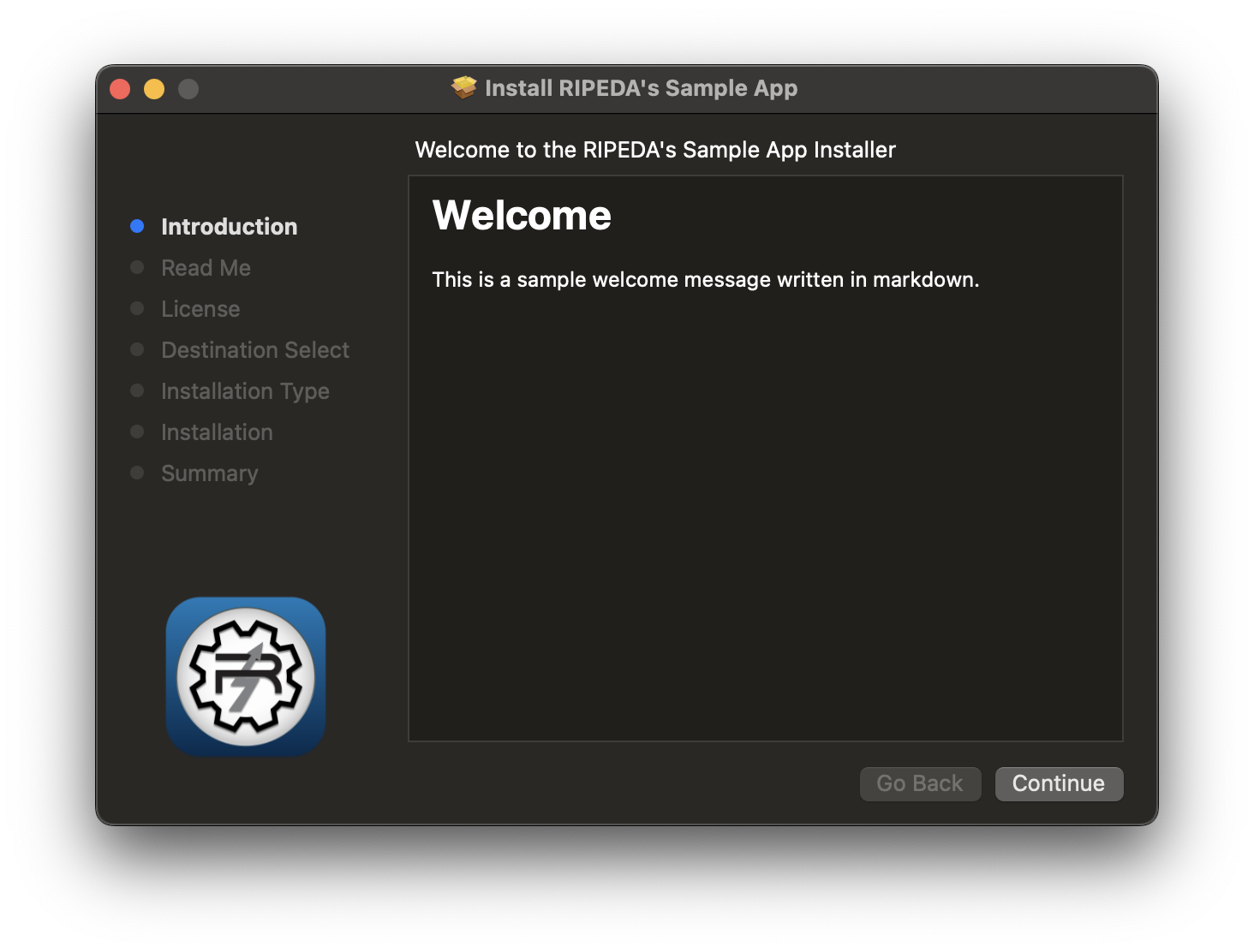
Building installers with welcome, readme, licensing and background image
Uses the markdown formatting to provide a more polished installer experience with little effort.
Notes:
- Requires package to be built as a distribution package.
- Optional
pkg_backgroundparameter to provide a background image for the distribution package.- Image recommended to be
- Optional
pkg_background_darkparameter to provide a dark mode background image.- If not provided,
pkg_backgroundwill be used for both light and dark mode.
- If not provided,
- Optional
pkg_titleparameter to provide a title for the distribution package.- Configures as follows in the distribution package:
- Header:
Install {title} - Welcome:
Welcome to the {title} Installer
- Header:
- Configures as follows in the distribution package:
- Optional
pkg_welcome,pkg_readmeandpkg_licenseparameters to provide markdown content for the respective pages in the distribution package.
Packages(
    pkg_output="Sample-Install.pkg",
    pkg_bundle_id="com.myapp.installer",
    pkg_file_structure={
        "Samples/MyApp/MyApp.app": "/Applications/MyApp.app",
    },
    pkg_as_distribution=True,
    pkg_welcome="# Welcome\n\nThis is a sample welcome message written in markdown.",
    pkg_readme="# Read Me\n\nThis is a sample README written in markdown.",
    pkg_license="# License\n\nThis is a sample license written in markdown.",
    pkg_title="RIPEDA's Sample App",
    pkg_background="Samples/MyApp/MyBackground.png",
),
1 maintainer

Metadata
1 maintainer
Release files for macos-pkg-builder 2.3.0
For a detailed explanation of source distributions (sdists) and built distributions (wheels), please see the package formats documentation.
Source distribution (sdist)
| File | Size | Uploaded | |
|---|---|---|---|
| macos_pkg_builder-2.3.0.tar.gz | 14.2 kB | Details |
Built distribution (wheel)
| File | Interpreter | ABI | Platform | Reset |
|---|---|---|---|---|
| macos_pkg_builder-2.3.0-py3-none-any.whl | Python 3 | none | any | Details |
Total release size: 29.9 kB
Release files / macos_pkg_builder-2.3.0.tar.gz
| Download URL | macos_pkg_builder-2.3.0.tar.gz |
|---|---|
| Size | 14.2 kB |
| Tags | Source |
|
SHA-256 checksum How to use checksums |
433d9ab4f1404a1a5fdde55603cf00cb64c6e8a182da38a1bd02915dceb669df
|
|
BLAKE2b-256 checksum How to use checksums |
2d8848ca540d0f02752ac785cc75121ca3121c5e8caad867265f15faa08eab5f
|
| Upload date | |
|
Uploaded using Trusted Publishing? What is trusted publishing? |
No |
| Uploaded via |
twine/5.1.1 CPython/3.9.13
|
Release files / macos_pkg_builder-2.3.0-py3-none-any.whl
| Download URL | macos_pkg_builder-2.3.0-py3-none-any.whl |
|---|---|
| Size | 15.7 kB |
| Tags | Python 3 |
|
SHA-256 checksum How to use checksums |
07b8ee08ad310ac5ff10a9cd334d87a7030c75499593d670526eb26d8ed70999
|
|
BLAKE2b-256 checksum How to use checksums |
1ea36785ada2d3eb0fbea44300a6057e5dc124aeebc0b8eef77b6b1234b3897a
|
| Upload date | |
|
Uploaded using Trusted Publishing? What is trusted publishing? |
No |
| Uploaded via |
twine/5.1.1 CPython/3.9.13
|














