
MAC Address Spoofer



A command-line tool to spoof your network interface's MAC address on Linux systems.
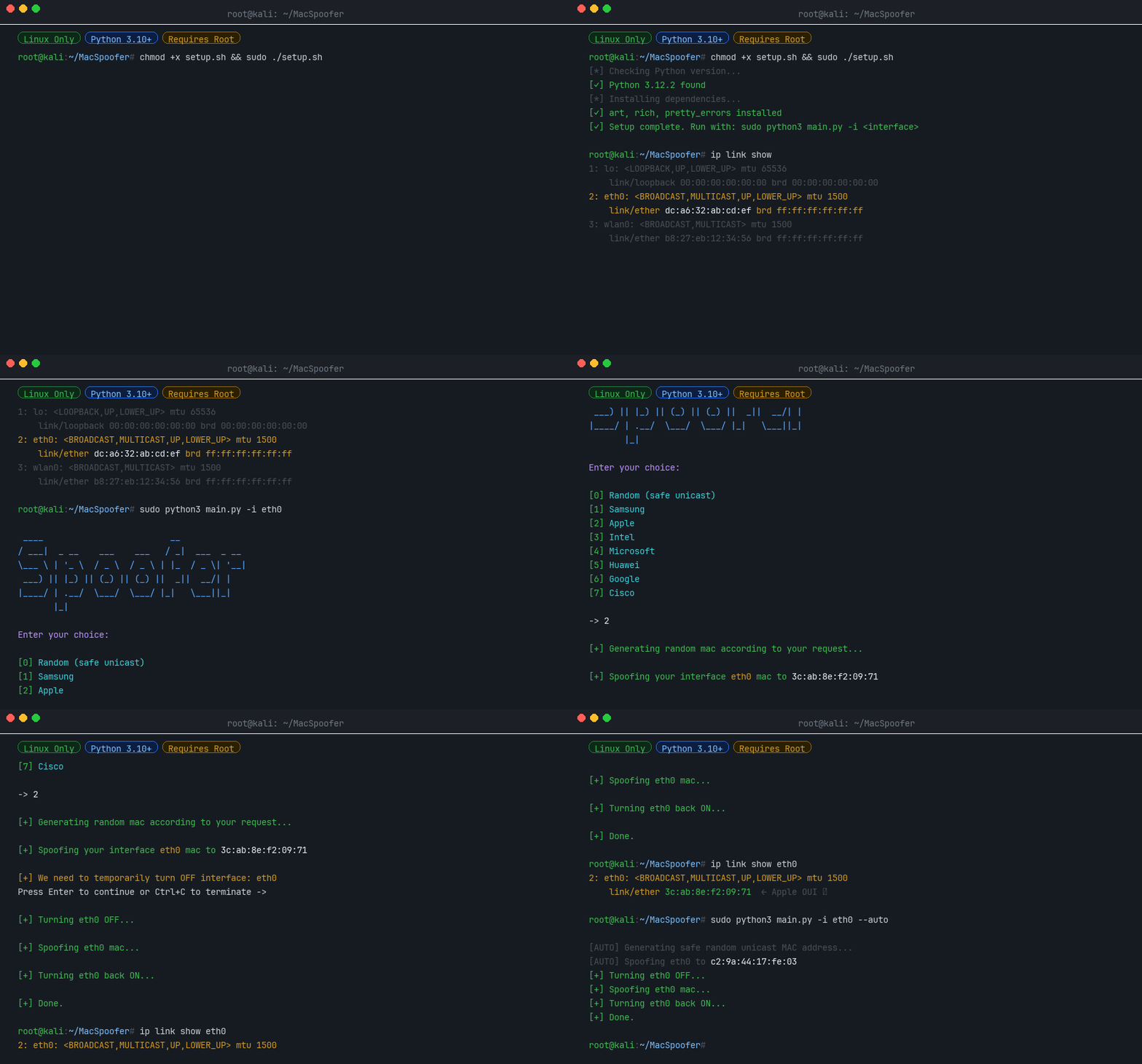
What is a MAC Address?
A Media Access Control (MAC) address is a unique identifier assigned to a network interface controller (NIC) for use as a network address in communications within a network segment. This identifier is used in most IEEE 802 networking technologies, including Ethernet, Wi-Fi, and Bluetooth.
Changing your MAC address can be useful for:
- Privacy - Prevent tracking across networks
- Testing - Simulate different network devices
- Bypassing restrictions - Some networks filter by MAC address
MAC Address Structure
A MAC address is a 12-digit hexadecimal number (6 bytes), typically represented in colon-hexadecimal notation (e.g., 00:1A:2B:3C:4D:5E).
| Bytes | Name | Description |
|---|---|---|
| First 3 bytes | OUI (Organizationally Unique Identifier) | Identifies the manufacturer |
| Last 3 bytes | NIC (Network Interface Controller) | Device-specific identifier |
Features
- 🎲 Random MAC generation - Generate safe, locally-administered unicast addresses
- 🏭 Vendor spoofing - Mimic devices from Samsung, Apple, Intel, Microsoft, Huawei, Google, or Cisco
- 🖥️ Interactive TUI - Easy to use text interface
- ⚡ Auto mode - Non-interactive operation for scripts
- 🔧 CI mode - Designed for automated testing pipelines
Installation
Via pip (recommended)
pip install macspoofer
From source
chmod +x setup.sh
sudo ./setup.sh
From a CI build artifact
Every run of the MacSpoofer CI workflow builds the package and uploads the resulting wheel as a GitHub Actions artifact named macspoofer-wheel. To install a pre-release build:
- Open the relevant workflow run on the Actions tab.
- Download the
macspoofer-wheelartifact and unzip it. - Install the wheel with
pip:
pip install ./macspoofer-*.whl
Usage
Find Your Interface Name
ifconfig -a
# or
ip link show
Interactive Mode (TUI)
sudo -E macspoofer -i <interface>
# or
sudo -E python3 main.py -i <interface>
Auto Mode (Non-Interactive)
sudo -E macspoofer -i <interface> --auto
# or
sudo -E python3 main.py -i <interface> --auto
Command Line Options
| Option | Description |
|---|---|
-i <interface> |
Network interface name (e.g., wlan0, eth0) [Required] |
--auto |
Non-interactive mode: generate and apply a random unicast MAC |
--ci |
CI mode: for automated testing |
--help |
Show help message and usage examples |
--version |
Show version information |
Programmatic Usage
You can also use macspoofer as a Python library:
Generate a Random MAC Address
from macspoofer.utils.random_utils import generate_safe_unicast_mac

mac = generate_safe_unicast_mac()
print(mac)  # e.g. "a6:3f:12:cb:90:01"
Search & Browse Vendors
from macspoofer.utils.vendors import VendorRegistry

# Total vendors in the database
print(VendorRegistry.vendor_count())

# Search by name (case-insensitive)
results = VendorRegistry.search("Raspberry")
print(results)

# Get OUI prefixes for a specific vendor
ouis = VendorRegistry.get_ouis_for_vendor("Apple")
print(ouis[:3])  # ['58:e6:ba', '8c:98:6b', ...]
Generate a Vendor-Specific MAC
from macspoofer.spoofer import generate_mac_for_vendor

mac = generate_mac_for_vendor("Samsung")
print(mac)  # e.g. "e4:7a:11:2f:c8:5d"
Spoof an Interface (requires root)
import asyncio
from macspoofer.modules.interface import NetworkInterface
from macspoofer.spoofer import spoof_mac_address
from macspoofer.utils.random_utils import generate_safe_unicast_mac


async def main():
    interface = NetworkInterface("wlan0")
    mac = generate_safe_unicast_mac()
    await spoof_mac_address(interface, mac, require_confirmation=False)


asyncio.run(main())
License
© 2022-2026 Daniel Kirshner. All rights reserved.
1 maintainer

Metadata
1 maintainer
Release files for macspoofer 1.0.10
For a detailed explanation of source distributions (sdists) and built distributions (wheels), please see the package formats documentation.
Source distribution (sdist)
| File | Size | Uploaded | |
|---|---|---|---|
| macspoofer-1.0.10.tar.gz | 1.6 MB | Details |
Built distribution (wheel)
| File | Interpreter | ABI | Platform | Reset |
|---|---|---|---|---|
| macspoofer-1.0.10-py3-none-any.whl | Python 3 | none | any | Details |
Total release size: 1.9 MB
Release files / macspoofer-1.0.10.tar.gz
| Download URL | macspoofer-1.0.10.tar.gz |
|---|---|
| Size | 1.6 MB |
| Tags | Source |
|
SHA-256 checksum How to use checksums |
ea38e55ce92f67efb11cd557c042f1fc06b85a32bb9b6b1e7f6d106411397c8a
|
|
BLAKE2b-256 checksum How to use checksums |
6e65294ab261aad781eb2b72c021c29f027e3ed0cb27ccf9a08617dbe1a8834c
|
| Upload date | |
|
Uploaded using Trusted Publishing? What is trusted publishing? |
Yes |
| Uploaded via |
twine/7.0.0 CPython/3.13.14
|
Provenance
Provenance describes where a file came from. On PyPI, provenance is shared via attestations, which provide a verifiable record of the build or publishing details. View details, limitations and caveats.


PyPI Publish Attestation
PyPI verified that this artifact, at this checksum, originated from the publisher listed below.
Signed by GitHub Actions, verified by PyPI on Aug 21, 2026.
Transparency logRelease files / macspoofer-1.0.10-py3-none-any.whl
| Download URL | macspoofer-1.0.10-py3-none-any.whl |
|---|---|
| Size | 357.5 kB |
| Tags | Python 3 |
|
SHA-256 checksum How to use checksums |
921120ec026cf42a8ea33ace2dd8afc9f1aea7f55f5616ddefca8d15f69134b7
|
|
BLAKE2b-256 checksum How to use checksums |
6c705aaa9dd02388498c2e9b5790050b120d250539e01a97c88b3eb0f36f93df
|
| Upload date | |
|
Uploaded using Trusted Publishing? What is trusted publishing? |
Yes |
| Uploaded via |
twine/7.0.0 CPython/3.13.14
|
Provenance
Provenance describes where a file came from. On PyPI, provenance is shared via attestations, which provide a verifiable record of the build or publishing details. View details, limitations and caveats.
PyPI Publish Attestation
PyPI verified that this artifact, at this checksum, originated from the publisher listed below.
Signed by GitHub Actions, verified by PyPI on Aug 21, 2026.
Transparency log













