
A command-line tool to spoof your network interface's MAC address on Linux systems.
Verified details
These details have been verified by PyPIProject links
GitHub Statistics
Maintainers

Project description
MAC Address Spoofer



A command-line tool to spoof your network interface's MAC address on Linux systems.
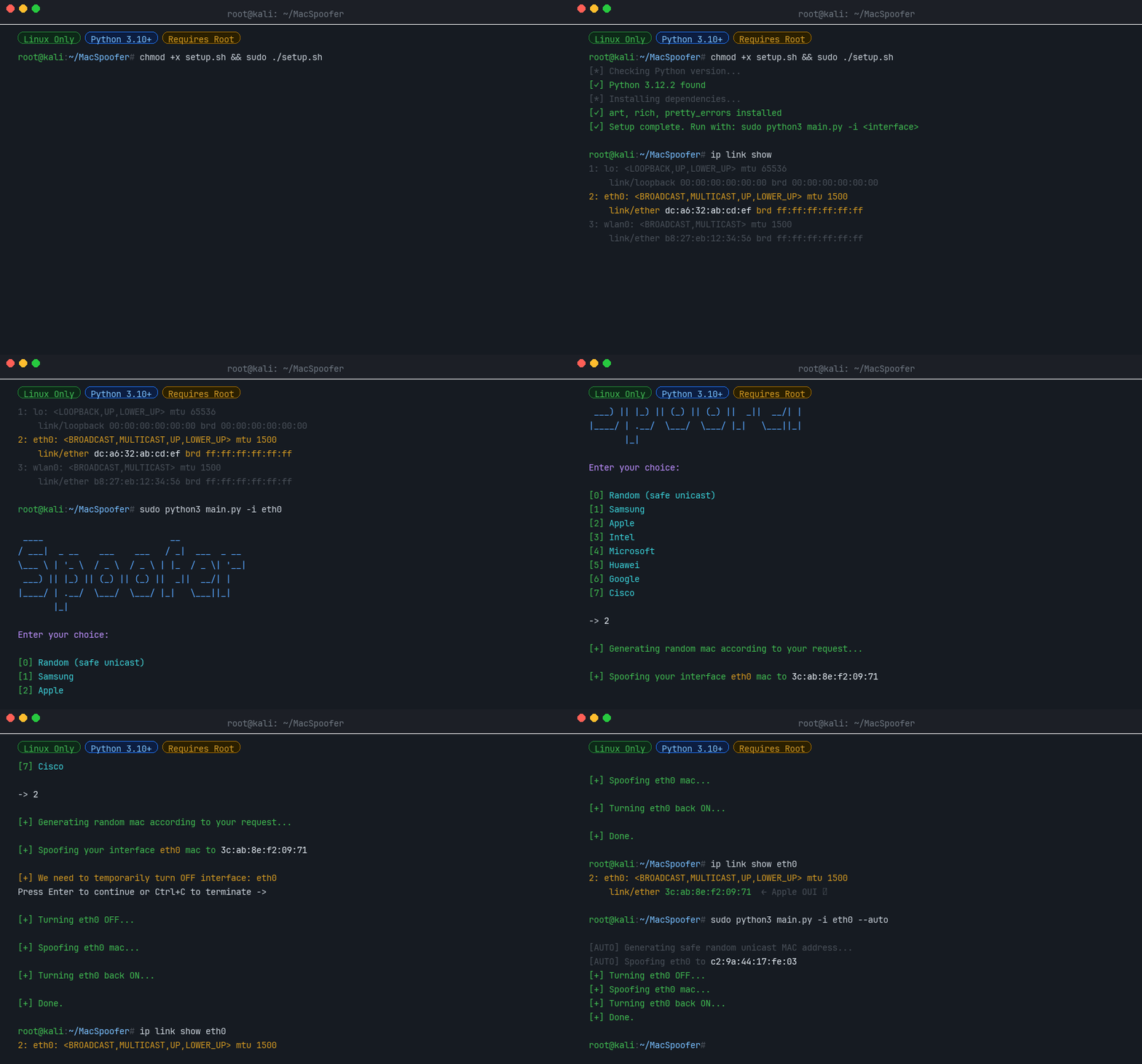
What is a MAC Address?
A Media Access Control (MAC) address is a unique identifier assigned to a network interface controller (NIC) for use as a network address in communications within a network segment. This identifier is used in most IEEE 802 networking technologies, including Ethernet, Wi-Fi, and Bluetooth.
Changing your MAC address can be useful for:
- Privacy - Prevent tracking across networks
- Testing - Simulate different network devices
- Bypassing restrictions - Some networks filter by MAC address
MAC Address Structure
A MAC address is a 12-digit hexadecimal number (6 bytes), typically represented in colon-hexadecimal notation (e.g., 00:1A:2B:3C:4D:5E).
| Bytes | Name | Description |
|---|---|---|
| First 3 bytes | OUI (Organizationally Unique Identifier) | Identifies the manufacturer |
| Last 3 bytes | NIC (Network Interface Controller) | Device-specific identifier |
Features
- 🎲 Random MAC generation - Generate safe, locally-administered unicast addresses
- 🏭 Vendor spoofing - Mimic devices from Samsung, Apple, Intel, Microsoft, Huawei, Google, or Cisco
- 🖥️ Interactive TUI - Easy to use text interface
- ⚡ Auto mode - Non-interactive operation for scripts
- 🔧 CI mode - Designed for automated testing pipelines
Installation
Via pip (recommended)
pip install macspoofer
From source
chmod +x setup.sh
sudo ./setup.sh
From a CI build artifact
Every run of the MacSpoofer CI workflow builds the package and uploads the resulting wheel as a GitHub Actions artifact named macspoofer-wheel. To install a pre-release build:
- Open the relevant workflow run on the Actions tab.
- Download the
macspoofer-wheelartifact and unzip it. - Install the wheel with
pip:
pip install ./macspoofer-*.whl
Usage
Find Your Interface Name
ifconfig -a
# or
ip link show
Interactive Mode (TUI)
sudo -E macspoofer -i <interface>
# or
sudo -E python3 main.py -i <interface>
Auto Mode (Non-Interactive)
sudo -E macspoofer -i <interface> --auto
# or
sudo -E python3 main.py -i <interface> --auto
Command Line Options
| Option | Description |
|---|---|
-i <interface> |
Network interface name (e.g., wlan0, eth0) [Required] |
--auto |
Non-interactive mode: generate and apply a random unicast MAC |
--ci |
CI mode: for automated testing |
--help |
Show help message and usage examples |
--version |
Show version information |
Programmatic Usage
You can also use macspoofer as a Python library:
Generate a Random MAC Address
from macspoofer.utils.random_utils import generate_safe_unicast_mac

mac = generate_safe_unicast_mac()
print(mac)  # e.g. "a6:3f:12:cb:90:01"
Search & Browse Vendors
from macspoofer.utils.vendors import VendorRegistry

# Total vendors in the database
print(VendorRegistry.vendor_count())

# Search by name (case-insensitive)
results = VendorRegistry.search("Raspberry")
print(results)

# Get OUI prefixes for a specific vendor
ouis = VendorRegistry.get_ouis_for_vendor("Apple")
print(ouis[:3])  # ['58:e6:ba', '8c:98:6b', ...]
Generate a Vendor-Specific MAC
from macspoofer.spoofer import generate_mac_for_vendor

mac = generate_mac_for_vendor("Samsung")
print(mac)  # e.g. "e4:7a:11:2f:c8:5d"
Spoof an Interface (requires root)
import asyncio
from macspoofer.modules.interface import NetworkInterface
from macspoofer.spoofer import spoof_mac_address
from macspoofer.utils.random_utils import generate_safe_unicast_mac

async def main():
    interface = NetworkInterface("wlan0")
    mac = generate_safe_unicast_mac()
    await spoof_mac_address(interface, mac, require_confirmation=False)

asyncio.run(main())
License
© 2022-2026 Daniel Kirshner. All rights reserved.
Project details
Verified details
These details have been verified by PyPIProject links
GitHub Statistics
Maintainers


Download files
Download the file for your platform. If you're not sure which to choose, learn more about installing packages.
Source Distribution
Built Distribution
Filter files by name, interpreter, ABI, and platform.
If you're not sure about the file name format, learn more about wheel file names.
Copy a direct link to the current filters
File details
Details for the file macspoofer-1.0.7.tar.gz.
File metadata
- Download URL: macspoofer-1.0.7.tar.gz
- Upload date:
- Size: 1.6 MB
- Tags: Source
- Uploaded using Trusted Publishing? Yes
- Uploaded via: twine/6.1.0 CPython/3.13.12
File hashes
| Algorithm | Hash digest | |
|---|---|---|
| SHA256 |
5cfe85f43141526f4cde9f6c90d4b780052003ef3d448a6518b98386498b0c5b
|
|
| MD5 |
30b45fb345d7eebaf0084f7790acdc44
|
|
| BLAKE2b-256 |
e8706da0ee550d3e1e769fd52f06810c03a6aa7be0e55a87c76b2dd0ba12dc65
|
Provenance
The following attestation bundles were made for macspoofer-1.0.7.tar.gz:
Publisher:
publish.yml on DanielKirshner/MacSpoofer
-
Statement:
-
Statement type:
https://in-toto.io/Statement/v1 -
Predicate type:
https://docs.pypi.org/attestations/publish/v1 -
Subject name:
macspoofer-1.0.7.tar.gz -
Subject digest:
5cfe85f43141526f4cde9f6c90d4b780052003ef3d448a6518b98386498b0c5b - Sigstore transparency entry: 1520660464
- Sigstore integration time:
-
Permalink:
DanielKirshner/MacSpoofer@0aec8119e0f1dbed79474e16c95f4dc7e539cfe6 -
Branch / Tag:
refs/tags/v1.0.7 - Owner: https://github.com/DanielKirshner
-
Access:
public
-
Token Issuer:
https://token.actions.githubusercontent.com -
Runner Environment:
github-hosted -
Publication workflow:
publish.yml@0aec8119e0f1dbed79474e16c95f4dc7e539cfe6 -
Trigger Event:
push
-
Statement type:
File details
Details for the file macspoofer-1.0.7-py3-none-any.whl.
File metadata
- Download URL: macspoofer-1.0.7-py3-none-any.whl
- Upload date:
- Size: 351.7 kB
- Tags: Python 3
- Uploaded using Trusted Publishing? Yes
- Uploaded via: twine/6.1.0 CPython/3.13.12
File hashes
| Algorithm | Hash digest | |
|---|---|---|
| SHA256 |
0bd25255b3b73e0c6f0f4593097d71e10048fe9660527d81fddb87da9c89ab76
|
|
| MD5 |
08afe6c25b676ad8fbfe3dc8efeebfa6
|
|
| BLAKE2b-256 |
d6caf3d5968ff84d566201aeb2c3e555e63d653af97e2084226f973a8b35d996
|
Provenance
The following attestation bundles were made for macspoofer-1.0.7-py3-none-any.whl:
Publisher:
publish.yml on DanielKirshner/MacSpoofer
-
Statement:
-
Statement type:
https://in-toto.io/Statement/v1 -
Predicate type:
https://docs.pypi.org/attestations/publish/v1 -
Subject name:
macspoofer-1.0.7-py3-none-any.whl -
Subject digest:
0bd25255b3b73e0c6f0f4593097d71e10048fe9660527d81fddb87da9c89ab76 - Sigstore transparency entry: 1520660520
- Sigstore integration time:
-
Permalink:
DanielKirshner/MacSpoofer@0aec8119e0f1dbed79474e16c95f4dc7e539cfe6 -
Branch / Tag:
refs/tags/v1.0.7 - Owner: https://github.com/DanielKirshner
-
Access:
public
-
Token Issuer:
https://token.actions.githubusercontent.com -
Runner Environment:
github-hosted -
Publication workflow:
publish.yml@0aec8119e0f1dbed79474e16c95f4dc7e539cfe6 -
Trigger Event:
push
-
Statement type:






