
macverdict
Stop watching graphs. macverdict tells you why your Mac was slow this week, and what to do about it.
Formerly called macpulse. If you installed it under that name, run macverdict setup once: it brings your history across and removes the old parts.
Activity Monitor, Stats and iStat Menus show you numbers right now, and leave the diagnosis to you. macverdict quietly samples your Mac in the background (about one second every 15 minutes) and turns weeks of history into four plain answers:
- What's slowing me down? It blames the app that was actually the biggest memory or CPU user each time your Mac struggled, grouping helper processes so Chrome's 60 processes count as Chrome.
- Do I need more RAM? A verdict from weeks of memory pressure and swap, not the misleading "memory used" figure, including what to buy next time.
- How long will my battery last? Your real wear rate vs. Apple's rating, and roughly when you'll hit 80% capacity.
- Is my Air overheating? How often the fanless MacBook Air slowed itself down to cool off, and which apps were running when it did.
$ macverdict insights          # illustration: three weeks on an 8 GB MacBook Air
macverdict insights · MacBook Air · 8.0 GB RAM · last 30 days

● What's slowing you down
  Google Chrome was the biggest memory user in 85% of your 794 slowdown moments.
    · Google Chrome: the biggest memory user in 85% of slowdowns, typically 5.0 GB.
    · Final Cut Pro: the biggest CPU user in 15% of slowdowns.
    · Biggest win: quit or trim Google Chrome when your Mac feels slow.

● Do you need more RAM?
  8 GB isn't enough for how you work. Your next Mac should have 16 GB.
    · Memory pressure was elevated in 33% of samples.
    · Swap: typically under 9.0 GB, peak 13.5 GB.

● How long will your battery last?
  At your pace, it reaches 80% capacity around May 2027.
    · It's wearing faster than Apple's rating: 3.8% of capacity per 100 cycles, vs 2% expected.

● Is your Air overheating?
  Your Mac slowed itself down to cool off in 6% of samples.
    · Busiest apps when it ran hot: Final Cut Pro.
See it on a real Mac
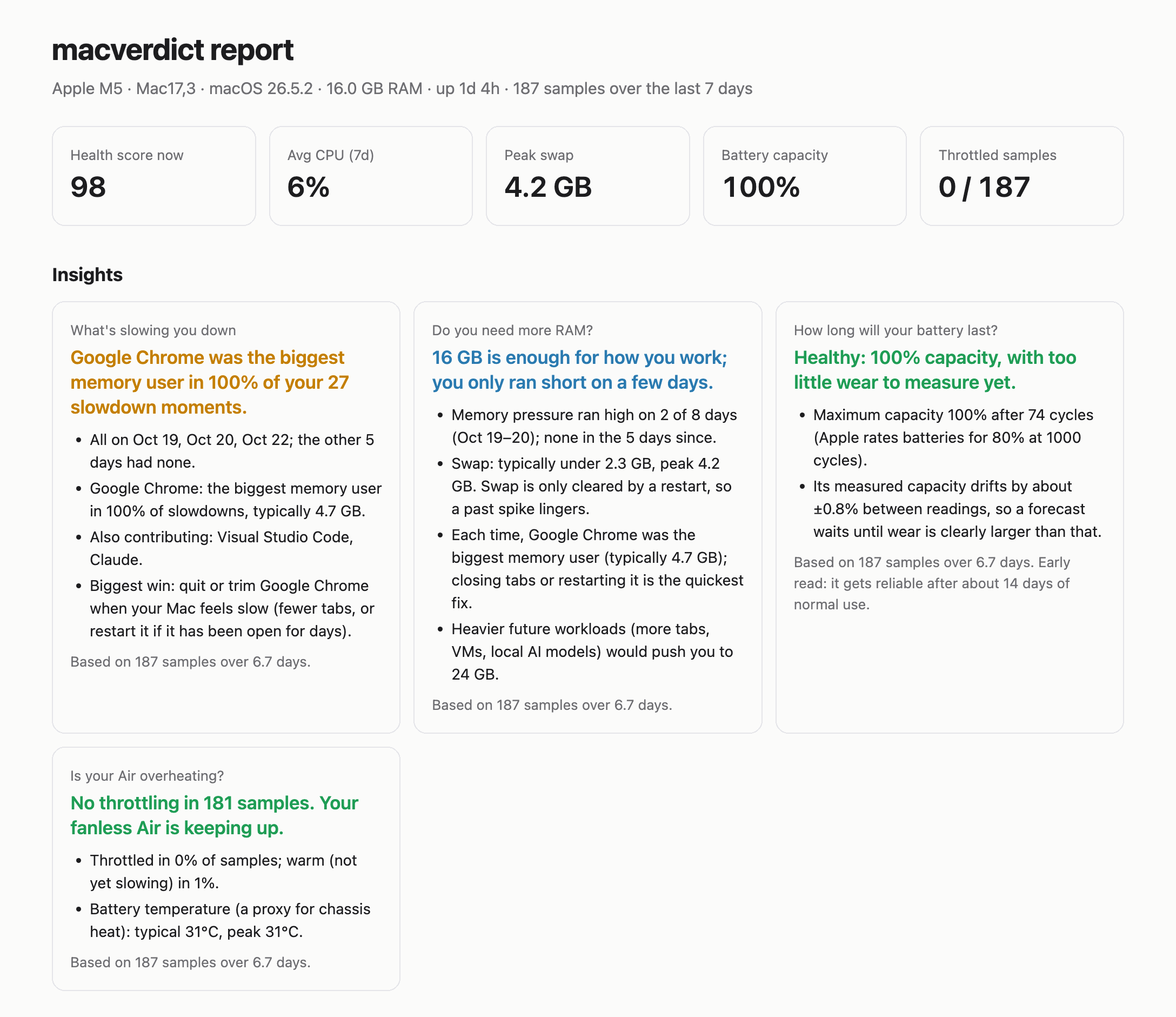
A real week on a MacBook Air (Apple M5, 16 GB). macverdict report turns the history into a page
like this. Open the full sample report.
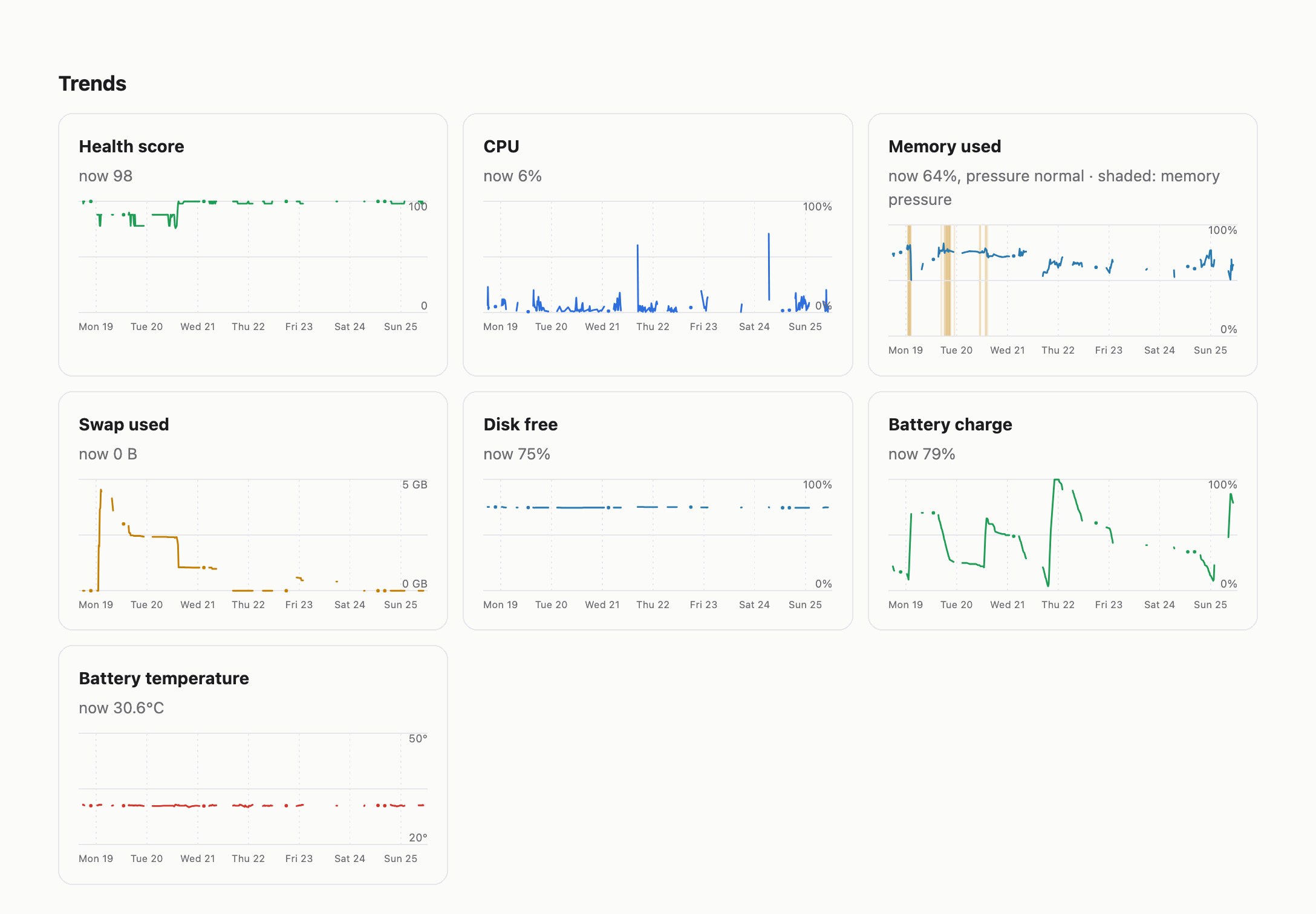
The trends make the story visible: memory pressure (shaded) on Mon 19 and Tue 20, matching the swap spike, then a quiet rest of the week.
Free and open source, one dependency (psutil), no sudo, no cloud: nothing leaves your Mac.
Built for Apple-silicon MacBooks, works on any Mac running macOS 12+.
How it compares
| Live stats | Keeps history | Tells you why & what to do | Price | |
|---|---|---|---|---|
| Activity Monitor (built in) | ✅ | ❌ | ❌ | Free |
| Stats | ✅ menu bar | ❌ | ❌ | Free |
| iStat Menus | ✅ very detailed | Some | Rule-based alerts | Paid |
| macmon / mactop | ✅ power & GPU | ❌ | ❌ | Free |
| Glances | ✅ any OS | Short buffer / export | ❌ | Free |
Mole mo status |
✅ | ❌ | Live health score | Free |
| coconutBattery | Battery only | ✅ battery | ❌ | Free / paid |
| macverdict | Snapshot (macverdict) |
✅ everything | ✅ blame, RAM verdict, battery forecast, throttling | Free |
Use macverdict alongside a live monitor, not instead of one. If you want to watch GPU power or fan speed in real time, Stats and macmon are excellent. macverdict answers the questions those tools can't: what happened over the last few weeks, and what you should change.
Everyday health check
$ macverdict
macverdict · Apple M5 · macOS 26.5.2 · 16.0 GB RAM · up 1d 17h

Health score: 100 / 100

  OK       cpu      CPU 6%, load 1.9 on 10 cores.
  OK       memory   Memory pressure normal, 66% used, swap 0 B.
  OK       disk     698.7 GB free (75%).
  OK       battery  52% charged, capacity 100%, 71 cycles, 30.6°C.
  OK       thermal  No thermal throttling.
What it checks
| Area | Signals | Why it matters |
|---|---|---|
| CPU | usage, 5-min load vs. core count, runaway processes | sustained load means work is queuing |
| Memory | macOS memory pressure (the real signal, not "% used"), swap, biggest apps | the #1 cause of slowdowns on 8–16 GB Macs |
| Disk | free space on the Data volume | macOS needs room for swap and updates |
| Battery | maximum capacity, cycle count, temperature | <80% capacity = service territory; heat = throttling |
| Thermal | macOS's own thermal state, plus CPU speed limit | fanless Airs slow themselves down when hot |
| Uptime | days since restart | long uptimes accumulate swap and leaks |
Each finding comes with plain-English advice, and everything rolls up into a 0–100 health score.
Install
brew install anirudhjayaraman/tap/macverdict
macverdict setup
That's it. macverdict setup starts background recording, builds the small alert app and sends a
test alert (click Allow if macOS asks). Then run macverdict any time.
To remove it: macverdict uninstall, then brew uninstall macverdict.
Not using Homebrew?
Install with uv or pipx instead, then run macverdict setup:
uv tool install git+https://github.com/anirudhjayaraman/macverdict
Needs macOS 12 or later. Clickable alerts need Apple's Command Line Tools (xcode-select --install);
without them, everything else still works.
Use
macverdict                      # diagnose right now
macverdict insights             # blame, RAM verdict, battery forecast, throttling
macverdict report               # HTML report with insights and trends, opens in your browser
macverdict history --days 30    # min/avg/max summary in the terminal
macverdict export history.csv   # take your data to a spreadsheet or notebook
macverdict check --json         # machine-readable snapshot
macverdict setup --every 5      # record every 5 minutes instead of 15
macverdict notify-test          # check that alerts reach you
macverdict uninstall            # stop background recording and remove the alert app
The background agent shows up as macverdict in System Settings → General → Login Items &
Extensions (or as python3 if the alert app couldn't be built).
macOS labels it "unidentified developer" because it's signed on your own Mac rather than with a
paid Apple Developer ID, which is normal for open-source command-line tools. Switching it off
there stops recording.
The background agent runs at low priority, survives reboots, and shows a macOS notification only when something is critical (e.g. memory pressure critical, battery overheating, disk nearly full).
Notifications
The background agent only alerts you when something is critical, and clicking an alert opens your
macverdict report. macverdict setup builds the small alert app that makes this work.
It's built from source on your machine (src/macverdict/notifier/MacverdictNotifier.swift, about
100 lines) and signed locally, so there's no downloaded binary and no Apple account involved.
It has no Dock icon and only runs for a few seconds when posting an alert or handling a click.
Without it, macverdict falls back to macOS's built-in osascript. Those alerts show as coming
from Script Editor, and clicking one opens Script Editor. If no banner appears at all, check
System Settings → Notifications (macverdict or Script Editor) and that no Focus mode is on.
Use it from Python
from macverdict import collect, evaluate, health_score, insights, storage

snap = collect()
findings = evaluate(snap)
print(health_score(findings), [f.message for f in findings if f.level != "ok"])

rows = storage.load(storage.connect(), days=30, full=True)
for i in insights.build(rows, snap["system"]["memory_total"], insights.hardware_model()):
    print(i.title, "→", i.headline)
Where data lives
~/Library/Application Support/macverdict/ holds history.db (SQLite), report.html and the agent
logs. Samples older than 90 days are pruned automatically. Set MACVERDICT_HOME to use another folder.
How it works
psutilfor CPU, memory, swap, disk, network and processessysctl kern.memorystatus_vm_pressure_levelfor macOS memory pressureioreg -rn AppleSmartBatteryfor battery capacity, cycles and temperatureNSProcessInfo.thermalState(read via ctypes, no PyObjC) andpmset -g thermfor throttling- a per-user
launchdagent for scheduling - a tiny Swift app (built locally) for clickable notifications, with
osascriptas a fallback
Development
uv venv && uv pip install -e ".[dev]"
.venv/bin/pytest
License
MIT
1 maintainer

Metadata
1 maintainer
Release files for macverdict 0.2.0
For a detailed explanation of source distributions (sdists) and built distributions (wheels), please see the package formats documentation.
Source distribution (sdist)
| File | Size | Uploaded | Provenance | |
|---|---|---|---|---|
| macverdict-0.2.0.tar.gz | 38.7 kB | Without provenance | Details |
Built distribution (wheel)
| File | Interpreter | ABI | Platform | Reset |
|---|---|---|---|---|
| macverdict-0.2.0-py3-none-any.whl | Python 3 | none | any | Details |
Total release size: 77.4 kB
Release files / macverdict-0.2.0.tar.gz
| Download URL | macverdict-0.2.0.tar.gz |
|---|---|
| Size | 38.7 kB |
| Tags | Source |
|
SHA-256 checksum How to use checksums |
3a9999fd62974ba603537cac270f47a87e0f39ba8cf3a39db9336ddc14f65a3e
|
|
BLAKE2b-256 checksum How to use checksums |
cbded58d1b6fe471656919b40a12fd047bf4215821789a4c6c8bb92b24ee7cdd
|
| Upload date | |
|
Uploaded using Trusted Publishing? What is trusted publishing? |
No |
| Uploaded via |
twine/7.0.0 CPython/3.12.13
|
Release files / macverdict-0.2.0-py3-none-any.whl
| Download URL | macverdict-0.2.0-py3-none-any.whl |
|---|---|
| Size | 38.7 kB |
| Tags | Python 3 |
|
SHA-256 checksum How to use checksums |
9e5888cb986bcc1466bb5f9653fb16739036a4d8b0ccdbada588780d4f50446c
|
|
BLAKE2b-256 checksum How to use checksums |
844a64b03666695802498d7cca1657ab7fbe8e7bf5e53f497c9478607c775fb7
|
| Upload date | |
|
Uploaded using Trusted Publishing? What is trusted publishing? |
No |
| Uploaded via |
twine/7.0.0 CPython/3.12.13
|
Security for macverdict 0.2.0
Provenance
Provenance describes where a file came from. On PyPI, provenance is shared via attestations, which provide a verifiable record of the build or publishing details. View details, limitations and caveats.
No provenance found
None of the files in this release were uploaded with provenance metadata.
A note on package security
PyPI is a repository for distributing packages, not a service for auditing them. While third-party security researchers and our staff do their best to detect and remove malicious packages, PyPI cannot guarantee the quality, security or suitability of any given package.
To learn more about protecting yourself from malicious actors, visit our package security documentation.














