
pip install madaramaster
Windows: download MadaraMaster-<version>-windows-x64.exe from the latest release · Windows: descarga el .exe de la última versión
🇬🇧 English
🧹 MadaraMaster
Secure file deletion for Linux, Windows and macOS. MadaraMaster overwrites files with the pass patterns of NIST SP 800-88 Clear and DoD 5220.22-M, scrubs their metadata and then deletes them, so that ordinary undelete and file-carving tools cannot bring them back.
⚠️ Read Limitations before relying on it. Overwriting a file only destroys the copy the filesystem currently points to. SSDs, copy-on-write filesystems, snapshots, backups and cloud sync can keep other copies that no file-level tool can reach.
Features
- Storage detection — tells HDD, SSD and NVMe apart on Linux (sysfs), Windows (
IOCTL_STORAGE_QUERY_PROPERTY) and macOS (diskutil) and picks the number of passes accordingly. - Direct I/O —
O_DIRECT | O_SYNCon Linux andFILE_FLAG_NO_BUFFERING | FILE_FLAG_WRITE_THROUGHon Windows, with page-aligned buffers; falls back to buffered I/O plusfsyncwhen the filesystem does not support it. - Slack space — every pass covers the file rounded up to a whole cluster, so the tail of the last cluster is overwritten too.
- Alternate Data Streams (Windows) — every NTFS stream of the file is overwritten and removed.
- Metadata scrubbing — timestamps set to epoch 0 and 3–5 renames to random names of the same length before deletion.
- Verification —
--verifyre-reads the file and compares it with what the last pass wrote; on mismatch the file is not deleted.purgealways verifies. - Safety checks — symlinks and junctions are never followed, non-regular files are skipped, files with several hard links are refused, and protected targets (filesystem roots, your home directory and its parents, system directories, mount points) are refused unless explicitly allowed. Wiping a directory asks you to type its name.
- Audit log — one JSON line per file in a private per-user file.
- Free-space wipe —
wipe-free-spacefills the free space of a filesystem with zeros and removes the fill file, even if interrupted. - Interactive session — run
madarawithout arguments, drag files into the terminal, review the queue and confirm. - Bilingual — English and Spanish (
--lang esorMADARA_LANG=es).
Requirements
- Python 3.10 or newer
- Runtime dependencies (installed automatically):
typer,rich,aiofiles
Installation
From PyPI (published releases):
pip install madaramaster
Latest development version:
pip install git+https://github.com/jaimefgdev/MadaraMaster
or from a clone:
git clone https://github.com/jaimefgdev/MadaraMaster
cd MadaraMaster
pip install .
This installs the madara command. python -m madaramaster and python madara.py (from a clone) are equivalent.
Windows executable: download MadaraMaster-<version>-windows-x64.exe from the latest release (each release lists the SHA-256 of its files; older versions are on the Releases page), or build it yourself with .\build.ps1 (see Development). The executable runs with your own rights and never asks for elevation by itself.
Usage
madara                                   # interactive session
madara wipe secret.pdf                   # wipe one file (asks for confirmation)
madara wipe ./old-project                # wipe a directory tree (type its name to confirm)
madara wipe secret.pdf --dry-run         # list what would be wiped, touch nothing
madara wipe data.pdf -s purge            # 3 passes on HDD + verification
madara wipe data.pdf --no-log            # do not write an audit log
madara wipe-free-space /mnt/data         # overwrite the free space of a filesystem
madara --lang es wipe secret.pdf         # Spanish interface
madara version
madara install-right-click               # Windows: add "Wipe with MadaraMaster" to Explorer
madara wipe TARGET
| Option | Alias | Description |
|---|---|---|
--confirm |
-y |
Skip the confirmation prompt |
--dry-run |
-n |
List the targets and exit |
--standard |
-s |
clear (default), purge or dod |
--verify |
Re-read and compare after wiping; keep the file on mismatch | |
--log-path |
-l |
Custom audit-log path |
--no-log |
Do not write an audit log | |
--hash |
Record each file's pre-wipe SHA-256 in the audit log | |
--trim |
After the batch, send one TRIM per filesystem (SSD/NVMe, Linux only) | |
--allow-hardlinks |
Also wipe files with several hard links (destroys the data of every name) | |
--allow-dangerous-target |
Allow protected targets (roots, home, system directories, mount points) |
The exit code is 0 when every file was wiped and 1 otherwise.
madara wipe-free-space [DIR]
| Option | Alias | Description |
|---|---|---|
--confirm |
-y |
Skip the confirmation prompt |
--dry-run |
-n |
Show what would be done and exit |
--no-trim |
Do not send TRIM afterwards |
The filesystem is full for a moment while this runs; existing files are not modified.
Global options
| Option | Description |
|---|---|
--lang en|es |
Interface language (also the MADARA_LANG environment variable) |
Standards
| Standard | HDD passes | SSD/NVMe passes | Verification |
|---|---|---|---|
clear |
1 (zeros) | 1 (random) | only with --verify |
purge |
3 (zeros, ones, random) | 1 (random) | always |
dod |
3 (zeros, ones, random) | 1 (random) | only with --verify |
On flash storage one random pass is used whatever the standard: wear-leveling means extra passes do not reach more cells. Using purge or dod on SSD/NVMe prints a warning, because overwriting files on flash does not meet NIST SP 800-88 Purge.
Audit log
Each wiped file adds one JSON line with the UTC timestamp, path, size, standard, passes, verification result, user, hostname and outcome. By default the log lives in a private per-user location:
| OS | Default path |
|---|---|
| Linux | $XDG_STATE_HOME/madaramaster/audit.jsonl (default ~/.local/state/…) |
| macOS | ~/Library/Logs/MadaraMaster/audit.jsonl |
| Windows | %LOCALAPPDATA%\MadaraMaster\audit.jsonl |
The pre-wipe SHA-256 is only recorded with --hash, because it lets anyone holding the log confirm what a file contained. --no-log disables the log.
Limitations
Before wiping, MadaraMaster warns you when it detects one of these cases: SSD/NVMe drives, copy-on-write filesystems, network locations, cloud-synced folders and ext3/ext4 mounted with data=journal. The absence of a warning is not a guarantee.
MadaraMaster works at file level. It cannot guarantee that no copy of the data survives when:
- The file is on an SSD, NVMe drive, USB stick or SD card. The controller remaps writes (wear-leveling, over-provisioning), so the old blocks can stay on the chips. Use full-disk encryption from day one, or the drive's own sanitize command (ATA Secure Erase, NVMe Format / Sanitize), to purge flash.
- The filesystem is copy-on-write or log-structured — btrfs, ZFS, APFS, ReFS, F2FS: new data goes to new blocks and the old ones are left behind.
- Snapshots or backups exist — Volume Shadow Copies, Time Machine, btrfs/ZFS snapshots, backup software.
- The file is synced or cached elsewhere — OneDrive, Dropbox, iCloud, Google Drive, network shares.
- The filesystem journals data — e.g. ext4 with
data=journal; NTFS and ext4 journal metadata such as names. - Other copies exist — editor backups and autosaves, temporary files, the swap file or hibernation file, thumbnails, recently-used lists.
For strong guarantees, combine full-disk encryption with destroying the key, or sanitize the whole device.
Development
pip install -e ".[dev]"
python -m pytest          # test suite
ruff check .              # lint
The tests never wipe anything real: an autouse fixture mocks TRIM and storage detection, blocks every device path and ioctl, and refuses any write, rename or delete outside pytest's temporary directory. CI runs on Linux, Windows and macOS and also builds the Windows executable.
To build MadaraMaster.exe on Windows: .\build.ps1, or pip install ".[build]" and pyinstaller MadaraMaster.spec --clean --noconfirm.
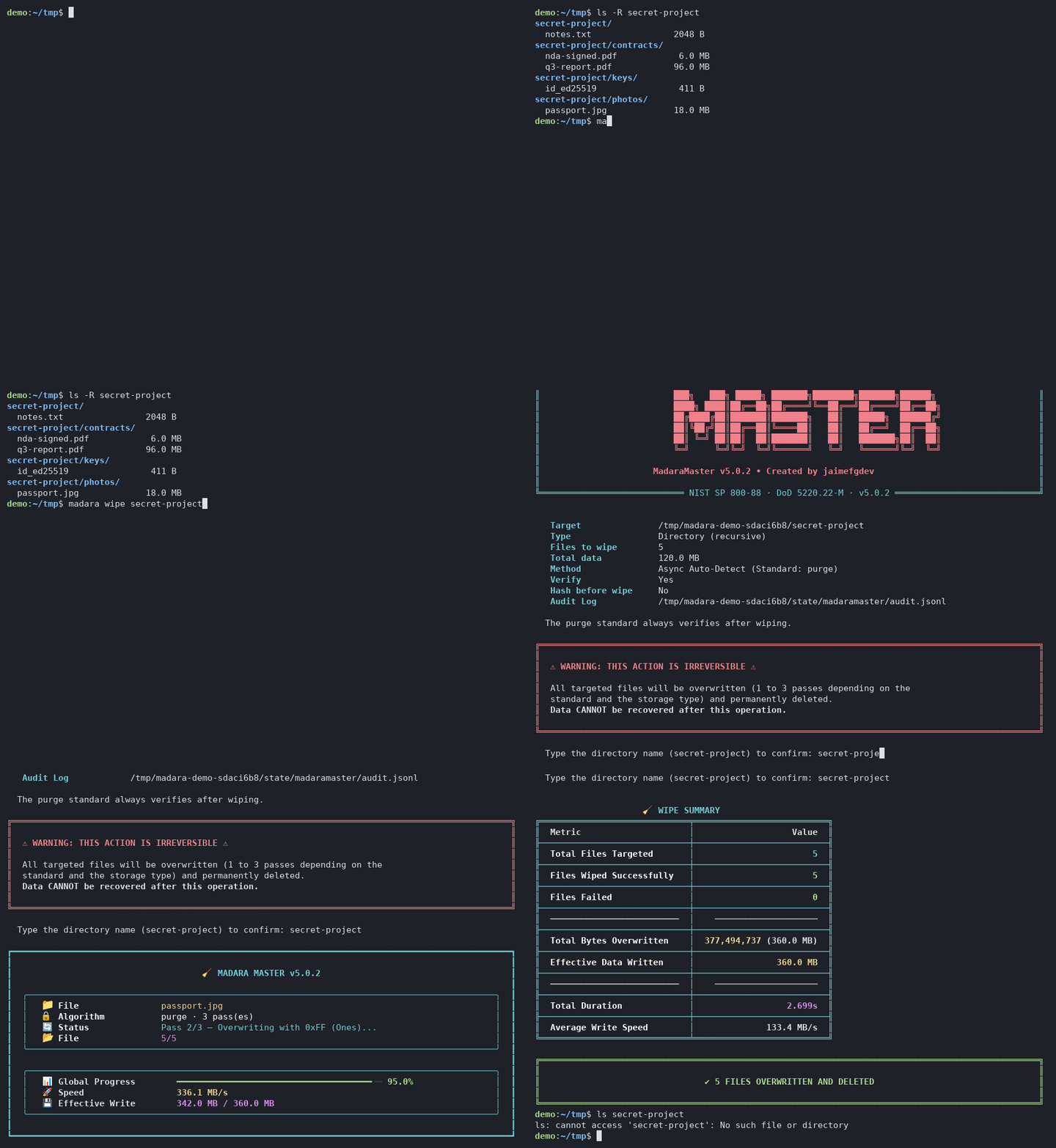
The demo GIF at the top is generated, not hand-made: scripts/demo/make_demo.sh (Linux or macOS) records madara wipe on throwaway files inside a fresh temporary directory into docs/demo.cast, checks every screen of the recording for repaint leftovers (scripts/demo/check_cast.py) and renders docs/demo.gif, with agg if it is installed or otherwise with scripts/demo/render_gif.py (pip install ".[demo]"). Nothing outside that temporary directory is touched, and it is removed afterwards.
Releases are automated: pushing a tag vX.Y.Z that matches __version__ builds the .exe, the wheel and the sdist, creates a GitHub Release and publishes to PyPI. See RELEASING.md.
Project structure
MadaraMaster/
├── madaramaster/
│   ├── cli.py         # entry point (madara) and stable import surface
│   ├── commands.py    # Typer app: wipe, wipe-free-space, version, install-right-click
│   ├── interactive.py # interactive drag-and-drop session
│   ├── runner.py      # shared wipe flow: target expansion, batch with dashboard, cleanup
│   ├── ui.py          # console output: banner, prompts, summary, dashboard, warnings
│   ├── i18n.py        # EN/ES strings and the active language
│   ├── free_space.py  # free-space fill engine
│   ├── engine.py      # async wipe engine (Direct I/O, ADS, slack space, verification)
│   ├── residue.py     # detection of setups where copies may survive
│   ├── safety.py      # link-safe target collection and protected-target checks
│   ├── storage.py     # storage-type detection (sysfs / IOCTL / diskutil)
│   ├── trim.py        # TRIM on Linux (FITRIM)
│   ├── audit.py       # JSON Lines audit log
│   ├── models.py      # result and telemetry data classes
│   └── utils.py       # formatting helpers
├── tests/             # pytest suite with the safety net (tests/conftest.py)
├── madara.py          # compatibility entry point
├── MadaraMaster.spec  # PyInstaller build
├── madara.manifest    # Windows manifest (asInvoker)
├── build.ps1          # Windows release script
├── scripts/           # release-notes generator used by the release workflow
│   └── demo/          # reproducible README demo (record, check, render)
├── docs/              # demo.cast and demo.gif shown at the top of this README
├── RELEASING.md       # release process and PyPI Trusted Publishing setup
└── pyproject.toml
License
MIT. See the LICENSE file.
This software is provided for authorized data sanitization only. The author takes no responsibility for misuse or for data lost through incorrect use.
🇪🇸 Español
🧹 MadaraMaster
Borrado seguro de archivos para Linux, Windows y macOS. MadaraMaster sobrescribe los archivos con los patrones de pases de NIST SP 800-88 Clear y DoD 5220.22-M, limpia sus metadatos y después los elimina, de modo que las herramientas habituales de recuperación y carving no puedan devolverlos.
⚠️ Lee las Limitaciones antes de confiar en ella. Sobrescribir un archivo solo destruye la copia a la que apunta ahora el sistema de archivos. Los SSD, los sistemas de archivos copy-on-write, las instantáneas, las copias de seguridad y la sincronización en la nube pueden conservar otras copias que ninguna herramienta a nivel de archivo alcanza.
Características
- Detección de almacenamiento — distingue HDD, SSD y NVMe en Linux (sysfs), Windows (
IOCTL_STORAGE_QUERY_PROPERTY) y macOS (diskutil) y elige el número de pases en consecuencia. - Direct I/O —
O_DIRECT | O_SYNCen Linux yFILE_FLAG_NO_BUFFERING | FILE_FLAG_WRITE_THROUGHen Windows, con buffers alineados a página; si el sistema de archivos no lo admite, usa I/O con buffer másfsync. - Slack space — cada pase cubre el archivo redondeado a un clúster completo, así que también se sobrescribe la cola del último clúster.
- Alternate Data Streams (Windows) — se sobrescriben y eliminan todos los flujos NTFS del archivo.
- Limpieza de metadatos — timestamps a epoch 0 y de 3 a 5 renombrados con nombres aleatorios de la misma longitud antes de borrar.
- Verificación —
--verifyrelee el archivo y lo compara con lo escrito en el último pase; si no coincide, el archivo no se elimina.purgesiempre verifica. - Salvaguardas — los enlaces simbólicos y junctions nunca se siguen, los archivos no regulares se omiten, los archivos con varios enlaces duros se rechazan y los objetivos protegidos (raíces de sistemas de archivos, tu HOME y sus directorios padre, directorios del sistema, puntos de montaje) se rechazan salvo que se permita explícitamente. Para borrar un directorio hay que escribir su nombre.
- Log de auditoría — una línea JSON por archivo en un fichero privado del usuario.
- Borrado del espacio libre —
wipe-free-spacellena de ceros el espacio libre de un sistema de archivos y elimina el archivo de relleno, incluso si se interrumpe. - Sesión interactiva — ejecuta
madarasin argumentos, arrastra archivos a la terminal, revisa la cola y confirma. - Bilingüe — inglés y español (
--lang esoMADARA_LANG=es).
Requisitos
- Python 3.10 o superior
- Dependencias (se instalan automáticamente):
typer,rich,aiofiles
Instalación
Desde PyPI (versiones publicadas):
pip install madaramaster
Última versión de desarrollo:
pip install git+https://github.com/jaimefgdev/MadaraMaster
o desde un clon:
git clone https://github.com/jaimefgdev/MadaraMaster
cd MadaraMaster
pip install .
Esto instala el comando madara. python -m madaramaster y python madara.py (desde un clon) son equivalentes.
Ejecutable para Windows: descarga MadaraMaster-<versión>-windows-x64.exe de la última versión (cada versión lista el SHA-256 de sus ficheros; las anteriores están en la página de Releases), o genéralo tú con .\build.ps1 (ver Desarrollo). El ejecutable funciona con tus propios permisos y nunca pide elevación por su cuenta.
Uso
madara                                   # sesión interactiva
madara wipe secreto.pdf                  # borrar un archivo (pide confirmación)
madara wipe ./proyecto-viejo             # borrar un árbol de directorios (escribe su nombre para confirmar)
madara wipe secreto.pdf --dry-run        # listar lo que se borraría sin tocar nada
madara wipe datos.pdf -s purge           # 3 pases en HDD + verificación
madara wipe datos.pdf --no-log           # sin log de auditoría
madara wipe-free-space /mnt/datos        # sobrescribir el espacio libre de un sistema de archivos
madara --lang es wipe secreto.pdf        # interfaz en español
madara version
madara install-right-click               # Windows: añade "Wipe with MadaraMaster" al Explorador
madara wipe OBJETIVO
| Opción | Alias | Descripción |
|---|---|---|
--confirm |
-y |
Saltar la confirmación |
--dry-run |
-n |
Listar los objetivos y salir |
--standard |
-s |
clear (por defecto), purge o dod |
--verify |
Releer y comparar tras el borrado; conserva el archivo si no coincide | |
--log-path |
-l |
Ruta del log de auditoría |
--no-log |
No escribir log de auditoría | |
--hash |
Guardar en el log el SHA-256 previo de cada archivo | |
--trim |
Al terminar, enviar un TRIM por sistema de archivos (SSD/NVMe, solo Linux) | |
--allow-hardlinks |
Borrar también archivos con varios enlaces duros (destruye los datos de todos sus nombres) | |
--allow-dangerous-target |
Permitir objetivos protegidos (raíces, HOME, directorios del sistema, puntos de montaje) |
El código de salida es 0 si se borraron todos los archivos y 1 en caso contrario.
madara wipe-free-space [DIR]
| Opción | Alias | Descripción |
|---|---|---|
--confirm |
-y |
Saltar la confirmación |
--dry-run |
-n |
Mostrar lo que se haría y salir |
--no-trim |
No enviar TRIM al terminar |
Mientras se ejecuta, el sistema de archivos queda lleno durante un momento; los archivos existentes no se modifican.
Opciones globales
| Opción | Descripción |
|---|---|
--lang en|es |
Idioma de la interfaz (también la variable de entorno MADARA_LANG) |
Estándares
| Estándar | Pases en HDD | Pases en SSD/NVMe | Verificación |
|---|---|---|---|
clear |
1 (ceros) | 1 (aleatorio) | solo con --verify |
purge |
3 (ceros, unos, aleatorio) | 1 (aleatorio) | siempre |
dod |
3 (ceros, unos, aleatorio) | 1 (aleatorio) | solo con --verify |
En almacenamiento flash se usa un pase aleatorio sea cual sea el estándar: por el wear-leveling, más pases no alcanzan más celdas. Al usar purge o dod en SSD/NVMe se muestra un aviso, porque sobrescribir archivos en flash no cumple Purge de NIST SP 800-88.
Log de auditoría
Cada archivo borrado añade una línea JSON con el timestamp UTC, la ruta, el tamaño, el estándar, los pases, el resultado de la verificación, el usuario, el hostname y el resultado. Por defecto el log está en una ubicación privada del usuario:
| SO | Ruta por defecto |
|---|---|
| Linux | $XDG_STATE_HOME/madaramaster/audit.jsonl (por defecto ~/.local/state/…) |
| macOS | ~/Library/Logs/MadaraMaster/audit.jsonl |
| Windows | %LOCALAPPDATA%\MadaraMaster\audit.jsonl |
El SHA-256 previo solo se guarda con --hash, porque permite a quien tenga el log confirmar qué contenía un archivo. --no-log desactiva el log.
Limitaciones
Antes de borrar, MadaraMaster avisa cuando detecta alguno de estos casos: SSD/NVMe, sistemas de archivos copy-on-write, ubicaciones de red, carpetas sincronizadas con la nube y ext3/ext4 montado con data=journal. Que no aparezca un aviso no es una garantía.
MadaraMaster trabaja a nivel de archivo. No puede garantizar que no sobreviva ninguna copia de los datos cuando:
- El archivo está en un SSD, NVMe, pendrive o tarjeta SD. El controlador reubica las escrituras (wear-leveling, sobreaprovisionamiento), así que los bloques antiguos pueden seguir en los chips. Para purgar flash, usa cifrado de disco completo desde el principio o el comando de borrado de la propia unidad (ATA Secure Erase, NVMe Format / Sanitize).
- El sistema de archivos es copy-on-write o log-structured — btrfs, ZFS, APFS, ReFS, F2FS: los datos nuevos van a bloques nuevos y los antiguos se quedan atrás.
- Hay instantáneas o copias de seguridad — Volume Shadow Copies, Time Machine, instantáneas de btrfs/ZFS, software de backup.
- El archivo está sincronizado o en caché en otro sitio — OneDrive, Dropbox, iCloud, Google Drive, carpetas de red.
- El sistema de archivos registra datos en el journal — p. ej. ext4 con
data=journal; NTFS y ext4 registran metadatos como los nombres. - Existen otras copias — copias de seguridad y autoguardados de editores, archivos temporales, el archivo de intercambio o de hibernación, miniaturas, listas de recientes.
Para garantías fuertes, combina cifrado de disco completo con la destrucción de la clave, o borra el dispositivo entero.
Desarrollo
pip install -e ".[dev]"
python -m pytest          # tests
ruff check .              # lint
Los tests nunca borran nada real: un fixture autouse sustituye TRIM y la detección de almacenamiento por mocks, bloquea toda ruta de dispositivo y todo ioctl, y rechaza cualquier escritura, renombrado o borrado fuera del directorio temporal de pytest. El CI se ejecuta en Linux, Windows y macOS y además construye el ejecutable de Windows.
Para construir MadaraMaster.exe en Windows: .\build.ps1, o pip install ".[build]" y pyinstaller MadaraMaster.spec --clean --noconfirm.
El GIF de demostración del principio se genera, no se hace a mano: scripts/demo/make_demo.sh (Linux o macOS) graba madara wipe sobre ficheros desechables dentro de un directorio temporal nuevo en docs/demo.cast, comprueba que ninguna pantalla de la grabación tenga restos de repintado (scripts/demo/check_cast.py) y genera docs/demo.gif, con agg si está instalado o, si no, con scripts/demo/render_gif.py (pip install ".[demo]"). No se toca nada fuera de ese directorio temporal, que se borra al terminar.
Las versiones se publican automáticamente: al subir un tag vX.Y.Z que coincida con __version__ se construyen el .exe, el wheel y el sdist, se crea una GitHub Release y se publica en PyPI. Consulta RELEASING.md.
Estructura del proyecto
MadaraMaster/
├── madaramaster/
│   ├── cli.py         # punto de entrada (madara) e interfaz de importación estable
│   ├── commands.py    # app Typer: wipe, wipe-free-space, version, install-right-click
│   ├── interactive.py # sesión interactiva de arrastrar y soltar
│   ├── runner.py      # flujo común: expansión de objetivos, lote con dashboard, limpieza
│   ├── ui.py          # salida por consola: banner, preguntas, resumen, dashboard, avisos
│   ├── i18n.py        # textos EN/ES e idioma activo
│   ├── free_space.py  # motor de relleno del espacio libre
│   ├── engine.py      # motor asíncrono (Direct I/O, ADS, slack space, verificación)
│   ├── residue.py     # detección de configuraciones donde pueden quedar copias
│   ├── safety.py      # recogida de objetivos sin seguir enlaces y objetivos protegidos
│   ├── storage.py     # detección del tipo de almacenamiento (sysfs / IOCTL / diskutil)
│   ├── trim.py        # TRIM en Linux (FITRIM)
│   ├── audit.py       # log de auditoría JSON Lines
│   ├── models.py      # clases de datos de resultados y telemetría
│   └── utils.py       # utilidades de formato
├── tests/             # tests con la red de seguridad (tests/conftest.py)
├── madara.py          # punto de entrada de compatibilidad
├── MadaraMaster.spec  # build de PyInstaller
├── madara.manifest    # manifiesto de Windows (asInvoker)
├── build.ps1          # script de release para Windows
├── scripts/           # generador de notas usado por el workflow de release
│   └── demo/          # demo reproducible del README (grabar, comprobar, generar)
├── docs/              # demo.cast y demo.gif que se muestran al principio de este README
├── RELEASING.md       # proceso de release y configuración de Trusted Publishing
└── pyproject.toml
Licencia
MIT. Consulta el archivo LICENSE.
El software se proporciona solo para uso autorizado de borrado seguro de datos. El autor no se hace responsable del mal uso ni de la pérdida de datos por uso incorrecto.
1 maintainer

Release files for madaramaster 5.0.2
For a detailed explanation of source distributions (sdists) and built distributions (wheels), please see the package formats documentation.
Source distribution (sdist)
| File | Size | Uploaded | |
|---|---|---|---|
| madaramaster-5.0.2.tar.gz | 744.3 kB | Details |
Built distribution (wheel)
| File | Interpreter | ABI | Platform | Reset |
|---|---|---|---|---|
| madaramaster-5.0.2-py3-none-any.whl | Python 3 | none | any | Details |
Total release size: 807.2 kB
Release files / madaramaster-5.0.2.tar.gz
| Download URL | madaramaster-5.0.2.tar.gz |
|---|---|
| Size | 744.3 kB |
| Tags | Source |
|
SHA-256 checksum How to use checksums |
884e806cd75cc04c2949bdbfaddce36f1adecec544edfed74d8e36be4d449075
|
|
BLAKE2b-256 checksum How to use checksums |
3d17abffec2667a2124829f9c78581fd8ad783f6e36c044b9e8c5d4bc7b995d9
|
| Upload date | |
|
Uploaded using Trusted Publishing? What is trusted publishing? |
Yes |
| Uploaded via |
twine/7.0.0 CPython/3.13.14
|
Provenance
Provenance describes where a file came from. On PyPI, provenance is shared via attestations, which provide a verifiable record of the build or publishing details. View details, limitations and caveats.


PyPI Publish Attestation
PyPI verified that this artifact, at this checksum, originated from the publisher listed below.
Signed by GitHub Actions, verified by PyPI on Sep 30, 2026.
Transparency logRelease files / madaramaster-5.0.2-py3-none-any.whl
| Download URL | madaramaster-5.0.2-py3-none-any.whl |
|---|---|
| Size | 62.9 kB |
| Tags | Python 3 |
|
SHA-256 checksum How to use checksums |
758aae6a39c7b536905c77e07e6167424aea5bf3990ad8b9772629d98cfc5147
|
|
BLAKE2b-256 checksum How to use checksums |
ef4edcaf67463f5530404f8223151faa0108524415445be95984feeeb55007f5
|
| Upload date | |
|
Uploaded using Trusted Publishing? What is trusted publishing? |
Yes |
| Uploaded via |
twine/7.0.0 CPython/3.13.14
|
Provenance
Provenance describes where a file came from. On PyPI, provenance is shared via attestations, which provide a verifiable record of the build or publishing details. View details, limitations and caveats.
PyPI Publish Attestation
PyPI verified that this artifact, at this checksum, originated from the publisher listed below.
Signed by GitHub Actions, verified by PyPI on Sep 30, 2026.
Transparency log













