
madcatter🎩





Rich-based Markdown console renderer (mdcat) and helpers.
Quick Start
# Mac:
#   # Required for quick install.
#   brew install uv

# Ubuntu/Debian:
#   # Required for quick install.
#   sudo apt-get install -y curl
#   curl -LsSf https://astral.sh/uv/install.sh | sh

uv tool install madcatter

mdcat README.md

# As a library dependency: uv add madcatter
# Alternatively: python -m pip install madcatter
Example
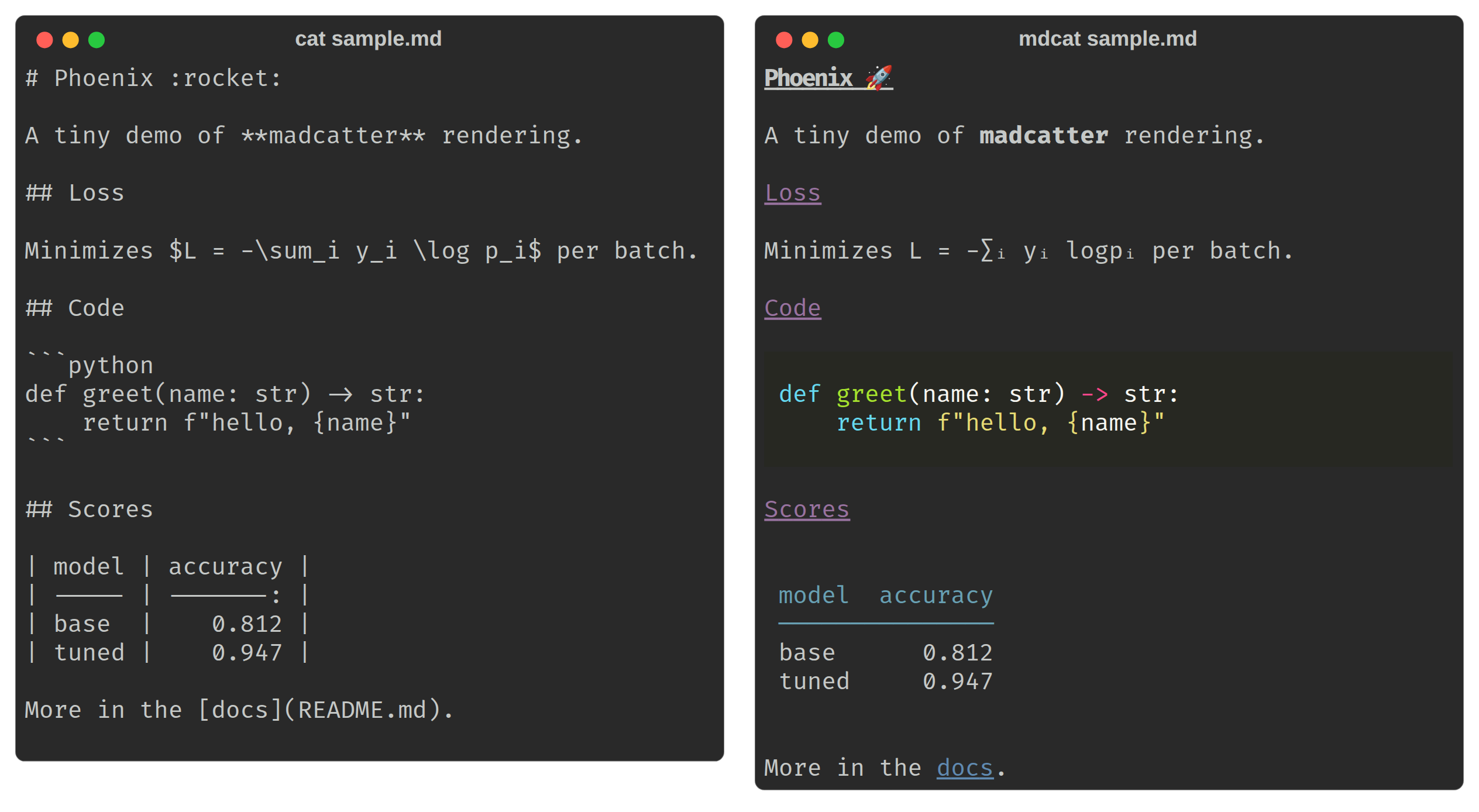
If you like reading Markdown in the terminal and want it actually rendered — emoji, math, tables, syntax highlighting — instead of dumped raw.
mdcat README.md                  # render a file
mdcat -                          # render stdin
echo '# hi :wave:' | mdcat -     # emoji shortcodes are expanded
echo '$e^{i\pi}+1=0$' | mdcat    # best effort LaTeX: eⁱ⁽π⁾+1=0
mdcat --toc README.md            # render just the table of contents
mdcat -c foo.md | less -R        # ANSI colored pipes.
Description
madcatter is a Rich-based Markdown renderer for the
terminal. It exists because cat-ing a Markdown file dumps raw #/**/``` noise, and most
"pretty cat" tools stop at syntax highlighting: madcatter also expands :shortcode: emoji,
converts LaTeX math to Unicode, extracts a table of contents or a single section, validates links,
diffs two documents, and can tail a growing file the way tail -F tails a log. The package is
called madcatter; it installs a CLI called mdcat.
The same file (docs/assets/sample.md), dumped raw with cat (left)
and rendered by mdcat (right): an emoji shortcode, $...$ math, a highlighted code block, and
a table.
Features
- Left-justified headings (Rich's default
Markdowncenters them;madcatterdoesn't). :shortcode:emoji expansion, skipped inside fenced/indented code.- LaTeX-to-Unicode math for
$...$and$$...$$, also skipped inside code. - Syntax-highlighted fenced code blocks via Pygments themes, plus a code-only extraction mode.
- Table-of-contents rendering and single-section extraction by heading name.
- Link extraction and live link validation (HTTP HEAD checks).
- Unified diff rendering between two Markdown files.
--watch(re-render on change) and--follow/-f/-F(tail -Fsemantics: emit only new lines, survive atomic rewrites).- ASCII-only, HTML, and ANSI export.
- YAML frontmatter stripping.
Usage cookbook
All examples below use real mdcat flags; run mdcat --help for the complete list.
Basic render
mdcat README.md              # render a file
mdcat -                      # render stdin
mdcat a.md b.md --separator  # render several files, with a rule between them
Style profiles (--style, one of dark, light, dracula, solarized)
mdcat --style dracula doc.md
Table of contents
mdcat --toc README.md
Single section by heading name
mdcat --section Install README.md
Links: list or validate
mdcat --links README.md         # list every URL found in the document
mdcat --check-links README.md   # also issue a live HTTP HEAD request to each http(s) link
Code blocks only, optionally filtered by language (--code-lang implies --code-only)
mdcat --code-only README.md
mdcat --code-lang python README.md
Diff two Markdown files
mdcat old.md --diff new.md
Watch vs. follow — both require a single real file path (stdin - is rejected), and the two
are mutually exclusive with each other:
mdcat --watch notes.md   # re-render the whole file whenever its mtime changes
mdcat -f log.md          # tail -F semantics: emit only new lines, re-anchor across rewrites
mdcat -n 20 -f log.md    # on first attach/reopen, show only the last 20 lines
Export
mdcat --export-html out.html README.md
mdcat --export-ansi out.ansi README.md
ASCII-only output (no ANSI codes, no Unicode — box-drawing, bullets, arrows, etc. are transliterated)
mdcat --ascii README.md
Strip YAML frontmatter before rendering — useful for notes that start with a --- metadata
block
mdcat --no-frontmatter note-with-frontmatter.md
Library
The preprocessing helpers are importable directly:
from madcatter.markdown import process_math_blocks, strip_frontmatter
from madcatter.latex import latex2unicode
from madcatter.emoji import resolve

process_math_blocks(
    "area is $\\pi r^2$"
)  # -> unicode-rendered math, code blocks left intact
strip_frontmatter(["---", "title: x", "---", "body"])  # -> ["body"]
latex2unicode("x^2 + y_i")  # -> "x² + yᵢ"
resolve("wave")  # -> "👋" (or None if unknown)
Development
Requires Python 3.12 and uv.
uv sync --all-groups
uv run pytest
Tests are organized into tiers via pytest markers (see pyproject.toml). The default run
(uv run pytest) excludes the slower/networked tiers — ci_smoke, cuda, integration,
performance, cluster, and slow — so opt in explicitly when needed, e.g.:
uv run pytest -m ci_smoke        # package/CLI smoke tests
uv run pytest -m integration     # tests needing networking or external CLIs
Before opening a pull request, run the same checks CI runs in package-validation.yml:
uv run ruff check --no-fix --no-cache .
uv run ruff format --check --no-cache .
uv run codespell .
uv run ty check
uv run basedpyright madcatter
uv run pytest
uv build
See also
Sibling projects in the rekursiv-ai family:
- sagent — The self-mutating multi-provider coding-agent CLI and typed Python library.
- trackinizer — Centralized agent database for tracking inquiries, work, and the evidence behind conclusions.
- wesearch — Web search, resilient page fetch, and scholarly-paper lookup without a browser stack.
- priml — Composable PyTorch building blocks: models, optimizers, losses, and a step-based training loop.
- configgle — Hierarchical experiment configuration in typed pure-Python dataclasses instead of YAML.
- copybarista — Bidirectional source sync for publishing OSS-ready trees from a monorepo.
Citing
If you find our work useful, please consider citing:
@misc{rekursivai2026madcatter,
      title={Madcatter - Rich-based Markdown console renderer (mdcat) and helpers.},
      author={Joshua V. Dillon},
      year={2026},
      howpublished={Github},
      url={https://github.com/rekursiv-ai/madcatter},
}
2 maintainers


Metadata
2 maintainers
Release files for madcatter 0.1.6
For a detailed explanation of source distributions (sdists) and built distributions (wheels), please see the package formats documentation.
Source distribution (sdist)
| File | Size | Uploaded | Provenance | |
|---|---|---|---|---|
| madcatter-0.1.6.tar.gz | 352.9 kB | With provenance | Details |
Built distribution (wheel)
| File | Interpreter | ABI | Platform | Reset |
|---|---|---|---|---|
| madcatter-0.1.6-py3-none-any.whl | Python 3 | none | any | Details |
Total release size: 431.9 kB
Release files / madcatter-0.1.6.tar.gz
| Download URL | madcatter-0.1.6.tar.gz |
|---|---|
| Size | 352.9 kB |
| Tags | Source |
|
SHA-256 checksum How to use checksums |
6b1a5f4b3b2fc5a45d012bf09e21f3310c587c3621542a737357c226cb74386f
|
|
BLAKE2b-256 checksum How to use checksums |
8bbc686995b65afc723aa684f9c5bb8327e2d6ffb1e4b091df794a864b59d47c
|
| Upload date | |
|
Uploaded using Trusted Publishing? What is trusted publishing? |
Yes |
| Uploaded via |
twine/7.0.0 CPython/3.13.14
|
Provenance
Provenance describes where a file came from. On PyPI, provenance is shared via attestations, which provide a verifiable record of the build or publishing details. View details, limitations and caveats.


PyPI Publish Attestation
PyPI verified that this artifact, at this checksum, originated from the publisher listed below.
Signed by GitHub Actions, verified by PyPI on Oct 21, 2026.
Transparency logRelease files / madcatter-0.1.6-py3-none-any.whl
| Download URL | madcatter-0.1.6-py3-none-any.whl |
|---|---|
| Size | 79.0 kB |
| Tags | Python 3 |
|
SHA-256 checksum How to use checksums |
56bba80764e81ded795ec69e62f8598ff4ccb5988d0cf88fb34764ad04ec119c
|
|
BLAKE2b-256 checksum How to use checksums |
e1a7857fc8c611d047167dca328f6ac2176c84304e97e7b6cdef2cc8199a1abe
|
| Upload date | |
|
Uploaded using Trusted Publishing? What is trusted publishing? |
Yes |
| Uploaded via |
twine/7.0.0 CPython/3.13.14
|
Provenance
Provenance describes where a file came from. On PyPI, provenance is shared via attestations, which provide a verifiable record of the build or publishing details. View details, limitations and caveats.
PyPI Publish Attestation
PyPI verified that this artifact, at this checksum, originated from the publisher listed below.
Signed by GitHub Actions, verified by PyPI on Oct 21, 2026.
Transparency logSecurity for madcatter 0.1.6
Provenance
Provenance describes where a file came from. On PyPI, provenance is shared via attestations, which provide a verifiable record of the build or publishing details. View details, limitations and caveats.
Full provenance
All 2 files in this release have been uploaded with provenance metadata.
Attestation for madcatter-0.1.6.tar.gz
PyPI Publish Attestation
PyPI verified that this artifact, at this checksum, originated from the publisher listed below.
Signed by GitHub Actions, verified by PyPI on Oct 21, 2026.
Transparency logA note on package security
PyPI is a repository for distributing packages, not a service for auditing them. While third-party security researchers and our staff do their best to detect and remove malicious packages, PyPI cannot guarantee the quality, security or suitability of any given package.














