
Customized tool to run Maestro tests, parse Maestro report file, and push reports to Lark.

Project description
py-maestro-reporter



Customized tool to run Maestro tests, parse Maestro report file and send the parsed report to Lark respective group. This tool allows you to run Maestro tests seamlessly by providing built-in methods to run the tests and also CLI arguments to directly run the without having to write any code
Prerequisites
- Python 3.10 or above
- Maestro framework installed on your system (version 2.0.0 or above)
- Device/emulator with the app under test installed
- Lark webhook URL
Installation
For the installation, you can either install the package from PyPI or from source. If you'd like to install from PyPI, you can install it with:
pip install maestro-reporter
Or, using uv:
uv pip install maestro-reporter
Or, if you'd prefer to install from source, you'll need to clone this repository and install it in editable mode:
pip install -e .
Usage
Using as a CLI argument
As you can see, this package also provides a CLI tool to run Maestro tests and parse the report immediately. To do this, all you need to do is, ensure you have Maestro installed on your device, example flows which is going to be tested, physical device or emulator and Webhook URL from Lark. Once you have all of these, you can run with CLI arguments such as:
python -m reporter -c "maestro test examples/facebook-sign-up-flow.yaml --format junit --output tests/report.xml" -r "tests/report.xml" -w "https://webhook.url.com"
Or, if you only want to run and parse the report without testing, you can use --no-run flag
python -m reporter --no-run -r "tests/report.xml" -w "https://webhook.url.com"
You can also overrides the Webhook URL by setting the
LARK_URLenvironment variable in your.envfile
Using the reporter package
Otherwise, if you'd like to run the tests without using the CLI arguments and you need to run the tests with the reporter package, you can follow the example below (this will test the Facebook sign up flow):
import os
from dotenv import load_dotenv
from reporter import parse_xml_report, send_report_to_lark, run_maestro_command


load_dotenv()


command = "maestro test examples/facebook-sign-up-flow.yaml --format junit --output tests/report.xml"
run_maestro_command(command=command, cwd="tests")
parsed_result = parse_xml_report(file_path="report.xml")
report = send_report_to_lark(
    summary=parsed_result,
    title="Maestro Reporter Test",
    color_template="Green",
    webhook_url=os.getenv("LARK_URL"),
)
The parameters of color_template and title are mandatory, if you don't provide them, the default values will be used
All successful tests (from execute the Maestro command -> parse the report -> send the report to Lark) will be displayed in the log stream handler, for example:
27-11-2025 : 10:51:46 : main : [WARNING] : No color template provided, using default color template or you can set it with `--color` flag
27-11-2025 : 10:51:46 : main : [WARNING] : No title provided, using default title or you can set it with `--title` flag
27-11-2025 : 10:51:46 : main : [INFO] : --no-run flag is set, skipping Maestro tests
27-11-2025 : 10:51:46 : main : [INFO] : Parsing Maestro report file: tests/report.xml
27-11-2025 : 10:51:46 : main : [INFO] : Sending Maestro report to Lark...
27-11-2025 : 10:51:46 : reporter.sender : [INFO] : Lark message sent successfully
27-11-2025 : 10:51:46 : main : [INFO] : Maestro report sent successfully
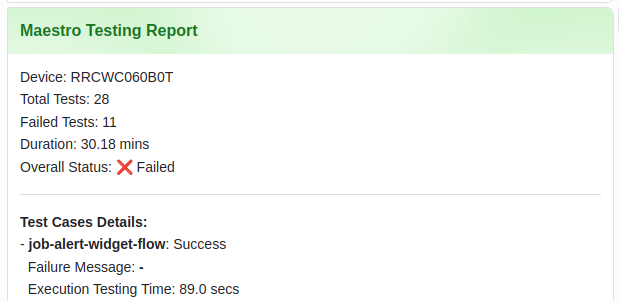
Once the report is sent successfully, you should be able to see the interactive card message in your Lark group like the following image
CLI arguments
List of available CLI arguments that you can use with this package:
| arguments | description |
|---|---|
-h / --help |
show this help message and exit |
-c / --command |
Maestro command to run |
-r / --report |
Path to Maestro report, by default it's report.xml but you can configure it by yourself |
-w / --webhook |
Specify a webhook URL to send the report to Lark |
-n / --no-run |
No need to run Maestro tests, just parse the report and send the result to Lark |
-t / --title |
Set a custom title for the interactive card Lark message |
-ct / --color |
Set a custom color template for the interactive card Lark message |
Notes
- At the moment, this package only supports the parsing of the
junitformat as follows for the Maestro report - In addition, the webhook integration currently only supports for Lark. At the meantime, we're working on adding more integrations with other platforms
- The interactive card message is built using the
msg_actioncardmessage type, which is currently only supported by Lark. Any customizable message types will be added in the future release
Further references


Download files
Download the file for your platform. If you're not sure which to choose, learn more about installing packages.
Source Distribution
Built Distribution
Filter files by name, interpreter, ABI, and platform.
If you're not sure about the file name format, learn more about wheel file names.
Copy a direct link to the current filters
File details
Details for the file maestro_reporter-0.3.0.tar.gz.
File metadata
- Download URL: maestro_reporter-0.3.0.tar.gz
- Upload date:
- Size: 9.9 kB
- Tags: Source
- Uploaded using Trusted Publishing? No
- Uploaded via: twine/6.2.0 CPython/3.10.12
File hashes
| Algorithm | Hash digest | |
|---|---|---|
| SHA256 |
0595d3d99186a0aac37d99ed4714c424951ab031276998dadb6003a7fd3e6a85
|
|
| MD5 |
41b5290048a915e075524b25c1124fd3
|
|
| BLAKE2b-256 |
8f857369c6bbdf5228e0724907149644f814cc192423b7a0caeec23d5efc8269
|
File details
Details for the file maestro_reporter-0.3.0-py3-none-any.whl.
File metadata
- Download URL: maestro_reporter-0.3.0-py3-none-any.whl
- Upload date:
- Size: 12.8 kB
- Tags: Python 3
- Uploaded using Trusted Publishing? No
- Uploaded via: twine/6.2.0 CPython/3.10.12
File hashes
| Algorithm | Hash digest | |
|---|---|---|
| SHA256 |
db9b961c522507510dc45bed72bcbb0e96862f04278589c269aeb485d1fadf1c
|
|
| MD5 |
b40f7a4712b2ab44b1257067b58373b0
|
|
| BLAKE2b-256 |
6a3a3c87420463b292947b8791096e90d92f4ed1d082949f914ab7a3e72717f5
|






