


You type. It already knows.
MAFDET reads your message while you type it, and starts thinking about it before you send it.
Hit Enter, and most of the work is already done.



Why
Chat interfaces make the model wait for you to press Enter before it does anything. While you type, the GPU sits idle. When you send, the model first has to read your whole message (prefill). Then a reasoning model, like Qwen3 in thinking mode, thinks for hundreds of tokens before the first word of its answer. On a mid-range GPU that thinking is the longest wait of all: ten seconds and more on a word problem, minutes on a model larger than the VRAM.
MAFDET uses the time you spend typing for both. It reads your message as you write it, so the prefill is done before Enter. And it thinks ahead: the model starts reasoning about your message while you are still typing it, and keeps that reasoning when you change the text. On Qwen3-4B, with 24 word problems typed in real time, the mean wait after Enter goes from 12.2 s to 3.2 s, with the same 24/24 correct answers; on Qwen3-14B, from 108 s to 47 s. On a MacBook Pro M2 Pro, from 18.1 s to 5.6 s (4B, 24/24 both ways) and from 32.7 s to 12.1 s (14B).
MAFDET is built for the hardware most people actually own. The reference machine is an RTX 2060 with 6 GB of VRAM; it also runs on Apple Silicon Macs (Metal, measured on an M2 Pro with 16 GB), and everything also runs on CPU only. AMD Radeon cards run through Vulkan, not measured yet: help wanted.
Named after Mafdet, the ancient Egyptian feline goddess known as "the runner", who struck snakes and scorpions before they could attack.
How it works
Reading ahead
An LLM processes text in two phases:
| Phase | What happens | Speed |
|---|---|---|
| Prefill | reads the prompt; all tokens are processed in parallel | fast |
| Decode | generates the answer, one token at a time | slow |
While reading, the model stores intermediate results for every token in the KV cache. Those results never change for a given prefix, so they can be computed ahead of time.
MAFDET keeps the KV cache in sync with the text while you type:
- On every pause, it tokenizes the current text.
- It holds back the last few tokens, because a word you are still typing can still change how the text is split into tokens.
- It finds the longest common prefix between the new tokens and the ones already in cache, trims the cache there, and prefills only what is new.
- When you hit enter, only a handful of tokens are left to process.
Correctness does not depend on how you type. Backspaces, edits in the middle of the text, pasted blocks, missing punctuation or spaces: the common-prefix check always brings the cache back to exactly what a from-scratch computation would produce. Heuristics such as hold-back and debounce only affect how much work is wasted, never the result.
Thinking ahead
Reading ahead takes the prefill out of the wait; the reasoning is still there. So the model also reasons while you type: in short chunks, on the message as it is at that moment. When you change the text, the reasoning is not thrown away. It stays in the prompt as notes after the new version of the message, which costs only a prefill, and the model goes on from there. On Enter it finishes reasoning from where it got to and answers. On Qwen3-4B about two thirds of the reasoning is done before Enter. How the notes are framed, and what that changed, is in Thinking ahead, in detail below.
Reading ahead is exact. Thinking ahead is not, because the model reasons on versions of the message that are not final yet; that is why it was measured on answers that can be checked.
Quick start
On Windows, with a double-click. Download MAFDET (on GitHub, Code → Download ZIP, and unzip it; or git clone https://github.com/TheLastOxygen/mafdet.git) and double-click start_mafdet.bat. The first time it creates a Python environment in .venv and installs MAFDET in it, which takes about a minute and needs Python 3.10 or later. After that, a double-click opens MAFDET in under a second, and after an update it installs the new libraries by itself. The terminal shows what is being downloaded as it goes: each library, and later llama.cpp and the models you pick in the app, with size, a progress bar, speed and time left.
On macOS, with a double-click. The same, with start_mafdet.command (Python 3.10 or later: from python.org, or brew install python@3.12). If the Finder says it cannot verify the file, right-click it, Open, then Open again; this is needed only the first time.
From a terminal:
git clone https://github.com/TheLastOxygen/mafdet.git
cd mafdet
python -m venv .venv          # Windows: py -3.12 -m venv .venv
source .venv/bin/activate     # Windows: .venv\Scripts\Activate.ps1
pip install -e .
mafdet
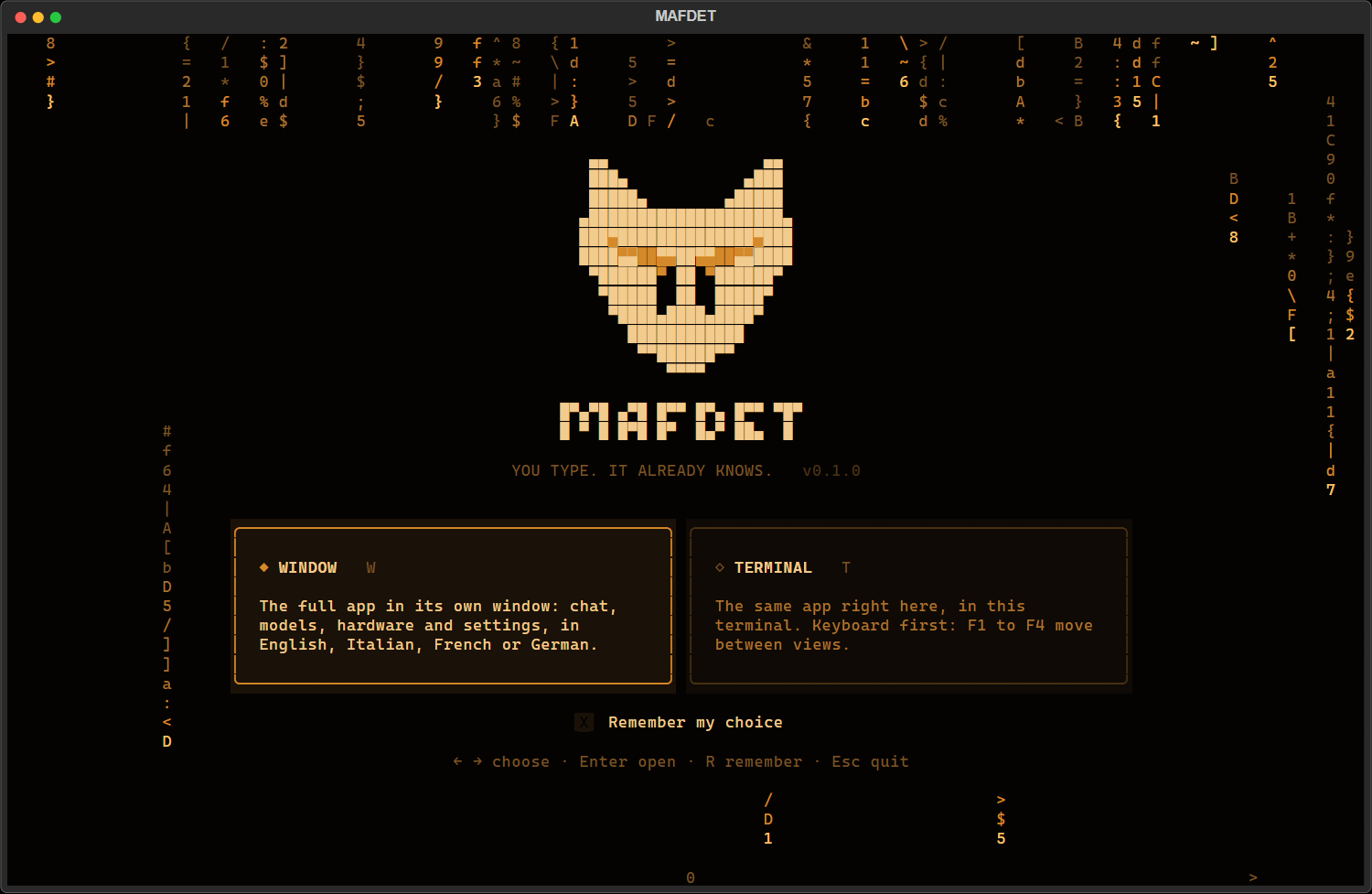
Either way, no PyTorch and no manual downloads: MAFDET asks whether to open the window or the terminal app, and the first start guides you through the rest. It looks at your machine, installs the right build of llama.cpp by itself (CUDA for an NVIDIA card, Vulkan for an AMD Radeon, Metal on an Apple Silicon Mac, CPU otherwise) and downloads the model that runs best on your hardware.
The app
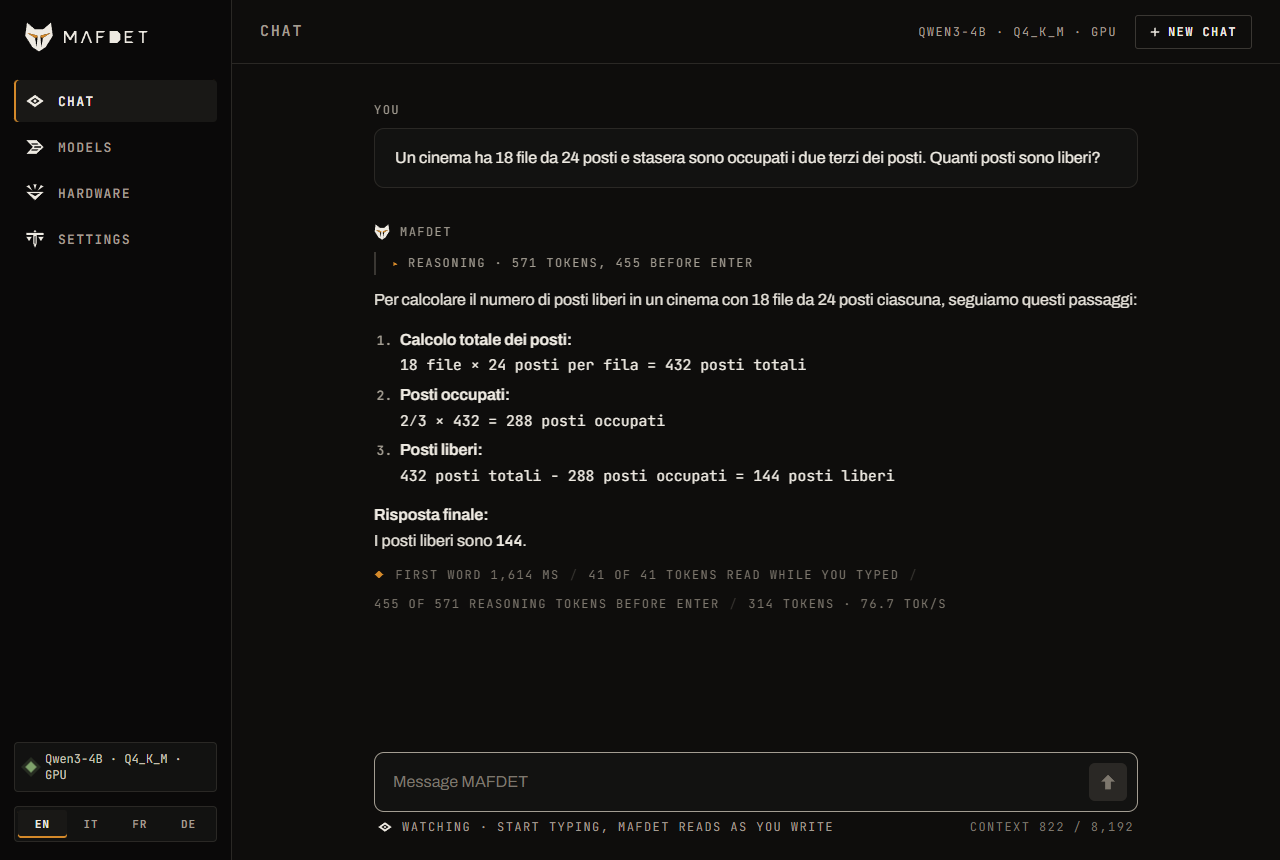
The same app comes in two forms, on the same engine:
| Command | What it is | |
|---|---|---|
 |
mafdet gui |
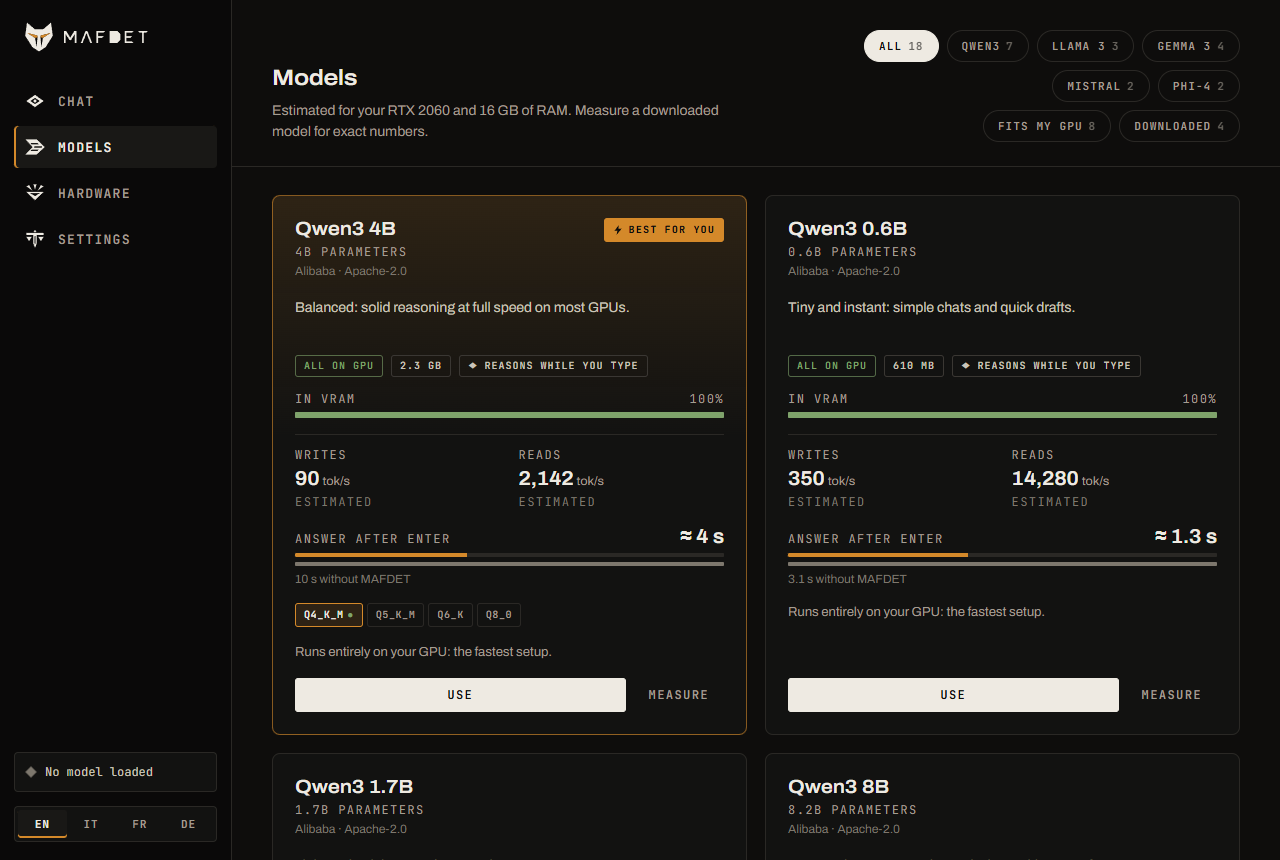
The window: chat, models, hardware and settings, in English, Italian, French or German |
 |
mafdet tui |
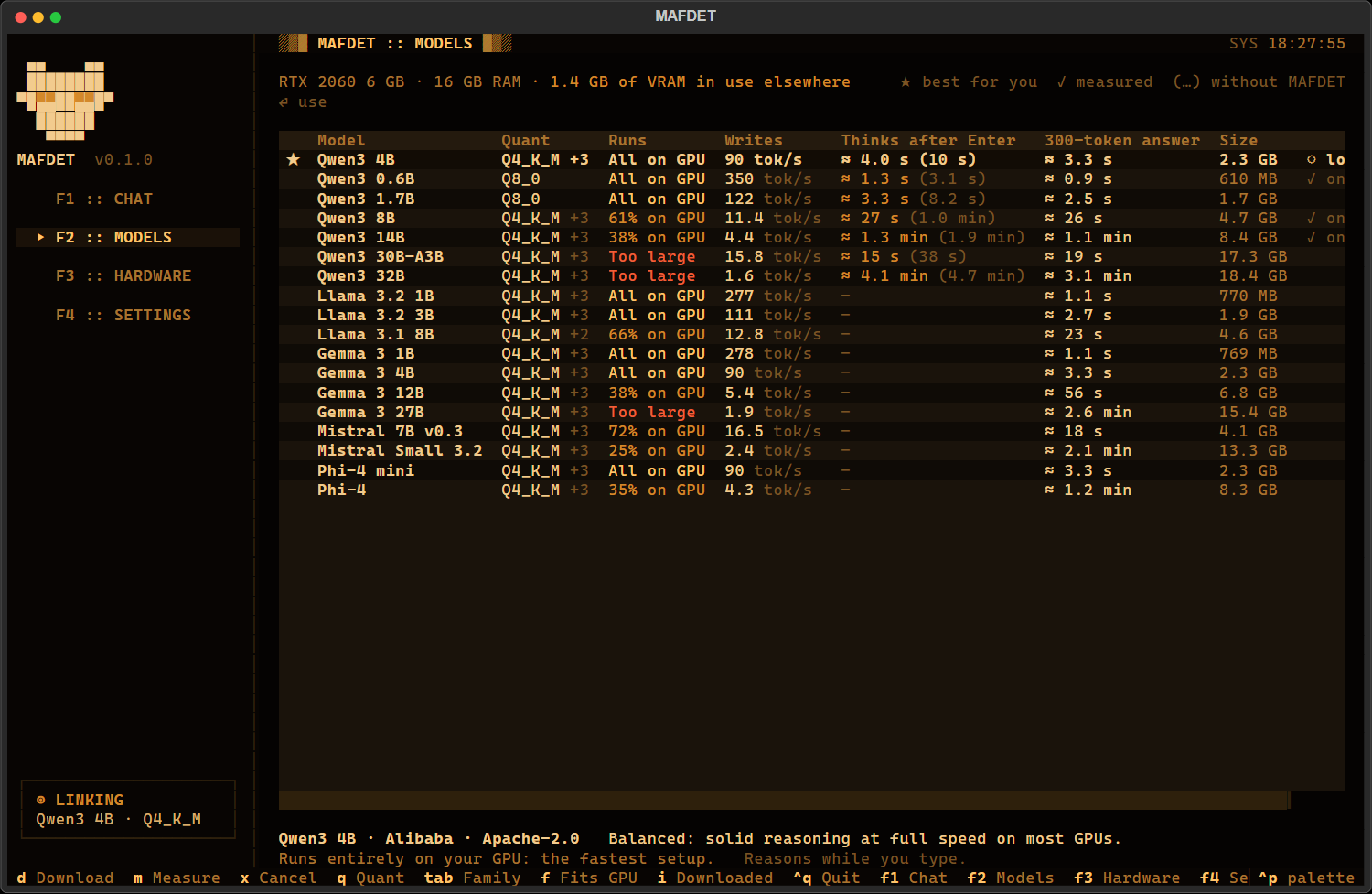
The terminal app: the same views in the terminal, keyboard first (F1 to F4), on an amber phosphor screen with a boot sequence (Settings, Cinematic effects, turns the animations off) |
 |
mafdet models |
the model catalog for this machine (--family, --download) |
 |
mafdet doctor |
checks the GPU, memory, llama.cpp and the models; --install installs llama.cpp (--build 12, 13, vulkan or cpu to pick the build) |
mafdet alone opens the launcher, which can remember your choice (mafdet --ask shows it again).
Chat. While you type, a status line under the message shows what the model is doing with it: how much it has read, and how many reasoning tokens it has written ahead (the field glows amber while it thinks). On Enter only the tail is left to compute. The reasoning is shown folded above the answer, and every answer ends with its numbers: first word after Enter, tokens read while you typed, reasoning done before Enter, speed.
Models. Five families: Qwen3, Llama 3, Gemma 3, Mistral and Phi-4, from 0.6B to 32B parameters, each in several quantizations. With every model, MAFDET reads your message while you type and, at a pause, writes the answer ahead; Qwen3 also reasons ahead, the one family whose reasoning frame was measured. Every model of the catalog comes with what it does on your machine, before you download it: whether it fits in VRAM or runs partly on the CPU, how fast it writes and reads, and for Qwen3 how long the answer takes after Enter with and without MAFDET (for the other families, how long a typical answer takes to write). The estimate comes from your hardware (GPU and RAM bandwidth, VRAM, llama.cpp's split of layers between GPU and CPU) and is within 12% of the measured speeds on the reference PC (Qwen3-4B 89.6 estimated / 87.1 measured tok/s, 8B 16.2 / 16.2, 14B 5.1 / 4.9) and on an M2 Pro (Qwen3-4B 53 / 57 tok/s). Once a model is downloaded, Measure benchmarks it in half a minute and the real numbers replace the estimate. The model that runs best here is marked Best for you, and each family has its own best pick. To add a model, add a line to tools/build_catalog.py: it reads the file sizes and the shape of the model from Hugging Face.
Hardware and settings. The Hardware view shows the GPU, CPU, memory and the llama.cpp runtime, with a button to install or reinstall it. Settings keep the chat options from one start to the next (in ~/.mafdet, or $MAFDET_HOME).
Requirements
- Windows, with an NVIDIA GPU and up-to-date drivers (tested target: RTX 2060, 6 GB), an AMD Radeon through Vulkan (in place, not measured yet: help wanted), or just a CPU. Linux has its llama.cpp builds and code paths in place, but has not been tested yet
- macOS on Apple Silicon (M1 or later): the models run on the GPU through Metal, in the unified memory (tested: M2 Pro, 16 GB, macOS 26.2; Qwen3-4B reads 593 tokens/s and writes 57). Intel Macs run on the CPU
- Python 3.10 or later (tested with 3.12)
- Disk space: about 0.7 GB for llama.cpp with CUDA (100 MB with Vulkan, 60 MB for the CPU), plus the models, from 0.6 GB (Qwen3-0.6B) to 2.3 GB for the 4B recommended on 6-8 GB cards
- 16 GB of RAM recommended for CPU-only runs and for models larger than the VRAM
The app needs no PyTorch: llama.cpp runs the models, and transformers only provides the tokenizers. PyTorch is needed only for the measurements on the PyTorch backend (below): install it first from the CUDA index, then pip install -e ".[research]".
Thinking ahead, in detail
In the app this is on by default for Qwen3 (Settings, Reason while I type); from the command line it is mafdet strike, with the options below. The model starts thinking about your message while you are still typing it. It runs Qwen3 in thinking mode, so before answering the model reasons in a hidden block (shown folded above the answer). That reasoning is usually the longest wait, and strike moves as much of it as possible to before Enter:
- While you type, the model reasons in short chunks of 32 tokens, on the message as it is at that moment, on whole words (after a space or punctuation, or at a pause).
- When the text changes, the reasoning is not thrown away. It stays in the prompt as notes, after the new version of the message. Moving it there only costs a prefill: the fast, parallel phase, about 60 times faster than writing the same tokens again for the 14B on the RTX 2060. A new line of the notes names the words just typed, so the model goes on gathering material on them instead of starting over.
- On Enter, a last sentence tells the model that the message is now complete. It finishes reasoning from where it got to and answers. Rarely (Qwen3-4B: once in the 24 problems on the Mac, once before on the RTX 2060) the model writes its answer among its thoughts and ends its turn without leaving the reasoning: the app then closes the reasoning as Qwen3's template does, and the model writes the answer, a few seconds later instead of an empty one.
The notes are a list of material for the answer, started by a frame: "The user is still typing. I will not wonder what they will ask, nor remark that the text is unfinished. While I wait, I collect material for the answer: for each key term, name or number already written, one line with what it is and the facts I know about it, or a partial result." followed by one example line from a different message. Each time you type more, a new line names the new words: - New words "finestra di contesto": . So from "Quando finisce la finestra di contesto degli LLM?" the notes already hold what a context window is and what LLM stands for, and from a word problem the partial results (3 × 12 = 36) before the question has been typed.
The frame matters. Without one, the model spent its notes remarking that the message was unfinished, and after every edit it copied its last paragraph again. On six messages typed in real time, the share of sentences in the notes about the user or the message itself (instead of its content) went from 86% with a generic frame ("work out what you can") to 41-54% with this list, and to 17-26% with the example line and a logit bias that, while reasoning ahead and only then, makes words such as user, incomplete, typing less likely (their token ids come from the tokenizer of the model loaded, so it works with any model). Thinking mode also uses the presence penalty suggested by Qwen3's authors, which keeps the 4B out of loops that repeat a sentence until the token limit.
If you pause and send the message unchanged, strike goes further and also writes the answer itself. That part is exact: the answer only holds for the exact text it was written for, and any change drops it. With --no-think (no reasoning) this is all strike does, and with greedy decoding the answer is identical token by token to the one started after Enter (checked).
Reasoning ahead is not exact: the model reasons on intermediate versions of the message, so the answer can differ from the one it would give starting from scratch. That is why it was measured on answers that can be checked (below).
| Option | What it does |
|---|---|
--no-think |
no reasoning: answer right away, and write ahead only the exact answer |
--think-ahead N |
longest reasoning kept across edits (default 1024 tokens) |
--ahead N |
answer tokens written ahead when the text does not change (default 512) |
--branches N |
experimental: the model also guesses how you will finish the message and, on a slot of its own, reasons on the guess; if it guessed the exact message, that reasoning (and the answer, if it got that far) is ready on Enter. 1 is the measured setting, see below |
--recycle |
reuse the answers written for earlier versions of the message as n-gram drafts for speculative decoding (+4% decode speed measured with natural typing, +20% on code) |
--draft repo:file |
a small model of the same family drafts tokens for speculative decoding (no gain measured on the RTX 2060, see below) |
mafdet watch and mafdet strike open the window with the model and options given on the command line (--gguf repo:file), instead of the app's settings. demo_live.py (start_demo.bat) is the step-by-step view for debugging: tokens, cache, hold-back and timings, live in the terminal (--auto types an example by itself).
Measure and verify
| Command | What it does | ||
|---|---|---|---|
 |
mafdet hunt |
the hunt | simulates people typing and measures the wait after sending |
|
mafdet race |
the race | benchmarks prefill and decode on your machine |
 |
mafdet judge |
the judgement | checks results against a from-scratch computation: must end with 0 errors |
|
mafdet awaken |
the awakening | checks PyTorch and the GPU, for the PyTorch backend |
They run on llama.cpp with --backend llama (no PyTorch needed), or on PyTorch/transformers with the default --backend hf (pip install -e ".[research]" after installing PyTorch from the CUDA index: from PyPI, on Windows, pip would get the CPU-only build). mafdet --help is the full guide, mafdet <command> --help the options of one. Add --device cpu to any command to measure the no-GPU case. Results are saved as CSV files in results/ (change it with --out).
Typing scenarios
mafdet hunt replays three scenarios (pick them with --scenario):
- clean: a message typed from start to finish
- messy: typos fixed with backspace, a word deleted and retyped, an insertion in the middle, little punctuation
- paste: a long document pasted in, followed by a typed question. This is where the gain is largest.
The typing is not replayed in real time. Each prefill really runs on the model, and its measured duration is placed on the typing timeline. If the model falls behind the typist, the delay piles up and is added to the final wait, just as in a real system.
Results
On an RTX 2060 (6 GB) unless stated (the Mac has its own table), llama.cpp, Q4_K_M models, real-time typing (5 to 8 characters per second, a few natural pauses, Enter right after the last character, no rereading).
Reasoning ahead, Qwen3-4B (fits in VRAM, 83 tok/s): 24 word problems with a known numeric answer, typed in Italian (script and data: research/thinking_ahead.py).
| Without reasoning ahead | mafdet strike |
|
|---|---|---|
| Correct answers | 24/24 | 24/24 |
| Median wait for the first word of the answer | 10.7 s | 2.9 s |
| Mean wait | 12.2 s | 3.2 s |
| Faster | in 24 of 24 problems | |
| Reasoning in total | 944 tokens | 662 tokens |
| Reasoning left after Enter | 944 tokens | 244 tokens |
Same accuracy, less reasoning in total (the material gathered while typing saves the model from starting over), and almost two thirds of it done before Enter. The two earlier frames, measured the same way: a generic frame gave 22/24 and a median of 4.4 s; no frame gave 22/24, 6.9 s and 70% more reasoning.
Exact answer ahead, Qwen3-4B, no reasoning (pause before Enter, text unchanged):
| Answer | Written before Enter | Full answer on screen after Enter, strike | Without strike |
|---|---|---|---|
| 300 tokens | 200 | 1.2 s | 3.5 s |
| 168 tokens | 168 (all of it) | instant | 1.9 s |
Larger models. What the model can do before Enter is bounded by typing time × its writing speed:
| Model | Fits in 6 GB? | Writes | Reasoning written while typing a 30 s message |
|---|---|---|---|
| Qwen3-4B | yes | 83 tok/s | most of it |
| Qwen3-8B | no, partly on the CPU | 13 to 16 tok/s | 130 to 280 tokens |
| Qwen3-14B | no, partly on the CPU | 5 tok/s | about 160 tokens |
Even so, on the 14B (6 word problems typed in real time, 6/6 correct both ways) reasoning ahead halves the mean wait after Enter: 108 s → 47 s, with 164 reasoning tokens written before Enter on average. Single runs vary a lot (the same problem took 106 s once and 154 s another time), so 6 problems give the order of magnitude, not a precise figure. Reading ahead gains more the larger the model: the 14B reads a 3,000-token pasted document in about 10 s, all of it hidden while you type.
On a Mac
MacBook Pro M2 Pro, 16 GB, macOS 26.2, llama.cpp with Metal: the same scripts and problems as above.
| M2 Pro | Without reasoning ahead | mafdet strike |
|---|---|---|
| Qwen3-4B, 24 problems: correct answers | 24/24 | 24/24 |
| Median wait for the first word of the answer | 16.7 s | 4.1 s |
| Mean wait | 18.1 s | 5.6 s |
| Faster | in 24 of 24 problems | |
| Reasoning in total / left after Enter | 966 / 966 tokens | 773 / 248 tokens |
| Qwen3-14B, 6 problems: correct answers | 6/6 | 6/6 |
| Median wait | 26.5 s | 11.7 s |
| Mean wait | 32.7 s | 12.1 s |
The 4B writes at 54 tok/s on the M2 Pro (83-87 on the RTX 2060), so both waits are longer than on the PC, and reasoning ahead takes about the same share of them away. The 14B is where the Mac differs: Metal may use 12 GB of the 16 GB of unified memory, so the whole model is on the GPU and writes at 18 tok/s (4.5-5 on the RTX 2060, with 62% of it on the CPU). The wait after Enter is 12 s instead of 47 s. The column without reasoning ahead comes from an earlier run of the same day; in that run one answer came out empty (the model ended its turn inside its reasoning, see Thinking ahead, in detail), which the app now handles, and the column with reasoning ahead is the run after the fix. During the runs the Mac reached thermal pressure Heavy for a few minutes (54 → 51 tok/s). Data: research/data/thinking_ahead_4b_m2pro.json, thinking_ahead_4b_m2pro_fixed.json, thinking_ahead_14b_m2pro.json.
A small model gathering for a large one (--gatherer, experimental). For models larger than the VRAM we tried having a small, fast model (Qwen3-0.6B, also fine-tuned for it with training/) write material while you type, for the 14B to read on Enter. On the RTX 2060 it does not beat the 14B reasoning ahead by itself:
| 14B, mean wait after Enter | |
|---|---|
| No reasoning ahead | 108 s |
| Reasoning ahead by itself | 47 s |
| Gatherer, untrained Qwen3-0.6B | 60 s |
| Gatherer, fine-tuned Qwen3-0.6B | 79-86 s |
| Ideal material, written by hand (every partial result right), presented as "from a fast assistant" | 62 s |
| The same ideal material, presented as the model's own reasoning | 49 s |
Even perfect material only matches reasoning ahead: the 14B reads it, then redoes and double-checks the calculations, except on the easiest problems (17-24 s instead of 37-63 s). How the material is presented matters more than its quality (62 s → 49 s). Open questions for anyone who wants to take this further: combining both (the large model reasons ahead and reads the material as its own), teaching the large model to trust partial results, or a gatherer where the large model cannot reason ahead at all (CPU only).
Guessing the ending (--branches, experimental). The reasoning left after Enter is mostly about the end of the message, which arrives last: in a word problem, the question. Qwen3-4B often guesses it before you type it: in one run, with the text at "…e una penna da 2", one of its guesses was already the exact rest of the message, "euro. Quanti euro gli restano?". So with --branches 1 the model also guesses how you will finish the message (only when few words are left, and only when two guesses in a row agree), and on a llama-server slot of its own reasons on the guessed message as if you had sent it, while its main reasoning waits. If you then send exactly that message, its reasoning and answer were written for that very prompt and are taken as they are. Same 24 problems, two runs each (48 messages; script and data in research/):
| Reasoning ahead | --branches 1 |
|
|---|---|---|
| Correct answers | 48/48 | 48/48 |
| Mean wait for the first word of the answer | 4.17 s | 3.51 s |
| Median wait | 2.98 s | 2.85 s |
| Slowest tenth | 7.9 s | 5.3 s |
| Messages guessed exactly | 14 of 48 |
The reasoning-ahead column was measured again for this comparison, the same day and on the same code: 4.17 s against the 3.2 s of the table above, two runs of the same 24 problems differ that much. A modest gain, mostly on the slowest answers, and on 24 problems not yet a significant one (faster on 16 of 24, sign test p = 0.15). What did not work: adopting a guess that was only close ("ha rimasto" for "gli restano"), with a line asking the model to check its reasoning against the real message, gave 2 wrong answers out of 4: the guess had another number (32 for 41), or a word that changed the problem ("current age"). Two branches at once are slower than none (median 4.50 s against 2.94 s on half the problems): on the RTX 2060 two sequences write 1.7 times as many tokens as one, four 2.2 times, so each branch slows the others down.
Larger than the VRAM. On Qwen3-14B (partly on the CPU, 4.5 tok/s through llama-server) a second sequence is not free either: two run at 77% of the speed of one each, three at 55%. And each guess takes seconds: 1 or 2 per message instead of 10 to 20 on the 4B, so on 4 problems no branch ever started reasoning before Enter (mean wait 44.7 s with the option, 43.9 s without: noise, single problems vary from 24 s to 73 s). The arithmetic does not leave much room anyway: between the moment the question can be guessed and Enter there are a few seconds, about 20 tokens of the 14B, against about 200 left after Enter. So in the app Guess the ending gives a branch only to models that fit in VRAM, and none to the others.
Tried, and why they are not on by default:
--recycle(answers to earlier versions of the message as n-gram drafts): +4% decode speed with natural typing, +20% on code, slightly later first token.--draft(Qwen3-0.6B drafting for the 14B): on the GPU it takes VRAM from the 14B, which then runs more of its layers on the CPU (4.8 → 3.5 tok/s); on the CPU it gains 8% with 4-token drafts and halves the reading speed.- The reasoning ahead as the draft for speculative decoding after Enter (
--spec-type ngram-simple: the notes are in the prompt, and after Enter the model works the same steps out again). Replayed offline, prompt lookup would write 1.5 to 1.7 tokens per decoding step on Qwen3-4B, against 1.3 to 1.5 without notes. For real it is no faster on the 4B (73 tok/s either way) and slower on the 14B (5.0 → 3.1 tok/s): checking a 9-token draft costs the 14B 2.4 decoding steps, because its layers on the CPU compute every token of the draft, and only 11% of the drafted tokens were right. Script and data:research/notes_as_draft.py.
Help wanted: benchmarks on an AMD Radeon
MAFDET runs on AMD Radeon cards through llama.cpp's Vulkan build, but nobody has measured it on one yet: the machines here are an RTX 2060 and an M2 Pro. The Vulkan path itself is checked, on the RTX 2060 (Qwen3-4B reads 2,103 tokens/s and writes 83, about as with CUDA; 3/3 word problems correct, reasoning ahead working). What is missing is a Radeon. If you have one (a dedicated card, RX 5000 or later; 8 GB or more is ideal), about half an hour of it would fill this page:
- Install MAFDET (Quick start) and open it once: it should find your card, install llama.cpp Windows · Vulkan (or Linux · Vulkan) and download Qwen3-4B.
mafdet doctorshows what it found. - In the app, Models, Measure Qwen3-4B.
- From the MAFDET folder, with its environment active:
python research/thinking_ahead.py radeon_4b.json. It types 24 word problems in real time, with and without reasoning ahead, and takes about 20 minutes; leave the machine otherwise idle. - Open an issue with the output of
mafdet doctor, the numbers of Measure andradeon_4b.json.
If something does not work (the card not found, llama.cpp not starting, the model running on the CPU), an issue with the output of mafdet doctor and the server*.log files next to llama-server (in ~/.mafdet/llama.cpp) is just as useful. Integrated Radeons (Ryzen APUs) are not used yet: they keep the CPU build. Any card with a Vulkan driver can try it with mafdet doctor --install --build vulkan.
Roadmap
- Incremental prefill engine with common-prefix sync and token hold-back
- Benchmarks, typing simulation and correctness checks
- Unified
mafdetCLI -
mafdet watch: the chat window - llama.cpp backend with quantized (GGUF) models
-
mafdet strike: reasoning ahead while you type, kept across edits; the exact answer ahead at a pause - The app: window and terminal, model catalog with estimates for your hardware, automatic llama.cpp setup, guided first start, four languages
- Five model families: Qwen3, Llama 3, Gemma 3, Mistral, Phi-4
- A small model gathers while you type, a large one answers: tried and measured (no gain on the RTX 2060, see Results)
- Reasoning ahead for models larger than the VRAM that beats the large model thinking by itself
- Reasoning ahead beyond Qwen3, including the thinking models with their own formats (DeepSeek-R1, gpt-oss): each needs its frame measured
- macOS on Apple Silicon (Metal)
- AMD Radeon through Vulkan (in place; measured on a Radeon: help wanted, above)
- Linux tested
Related research
- LiveMind: Low-latency Large Language Models with Simultaneous Inference
- StreamingThinker: Large Language Models Can Think While Reading
- SHANKS: Simultaneous Hearing and Thinking for Spoken Language Models
- Asynchronous Reasoning: Training-Free Interactive Thinking LLMs
License
1 maintainer

Metadata
1 maintainer
Release files for mafdet 0.3.0
For a detailed explanation of source distributions (sdists) and built distributions (wheels), please see the package formats documentation.
Source distribution (sdist)
| File | Size | Uploaded | Provenance | |
|---|---|---|---|---|
| mafdet-0.3.0.tar.gz | 328.9 kB | With provenance | Details |
Built distribution (wheel)
| File | Interpreter | ABI | Platform | Reset |
|---|---|---|---|---|
| mafdet-0.3.0-py3-none-any.whl | Python 3 | none | any | Details |
Total release size: 655.3 kB
Release files / mafdet-0.3.0.tar.gz
| Download URL | mafdet-0.3.0.tar.gz |
|---|---|
| Size | 328.9 kB |
| Tags | Source |
|
SHA-256 checksum How to use checksums |
09b41694f3033320c9d96d8d80beb1d070f5d9df45374aadf2533552beb39400
|
|
BLAKE2b-256 checksum How to use checksums |
8c2b4c0aea9757923e5c1bd75974c28be1fee7a43834afb785a33a5033a44764
|
| Upload date | |
|
Uploaded using Trusted Publishing? What is trusted publishing? |
Yes |
| Uploaded via |
twine/7.0.0 CPython/3.13.16
|
Provenance
Provenance describes where a file came from. On PyPI, provenance is shared via attestations, which provide a verifiable record of the build or publishing details. View details, limitations and caveats.


PyPI Publish Attestation
PyPI verified that this artifact, at this checksum, originated from the publisher listed below.
Signed by GitHub Actions, verified by PyPI on Oct 26, 2026.
Transparency logRelease files / mafdet-0.3.0-py3-none-any.whl
| Download URL | mafdet-0.3.0-py3-none-any.whl |
|---|---|
| Size | 326.4 kB |
| Tags | Python 3 |
|
SHA-256 checksum How to use checksums |
7437f0ab5c49d5e00646638503eb87bd12559cbdf2daa46028537f4bf91d1007
|
|
BLAKE2b-256 checksum How to use checksums |
3bb9645f32fcbd0297737d5a4ed5b233842978d1baae6d064477a8d878e1492e
|
| Upload date | |
|
Uploaded using Trusted Publishing? What is trusted publishing? |
Yes |
| Uploaded via |
twine/7.0.0 CPython/3.13.16
|
Provenance
Provenance describes where a file came from. On PyPI, provenance is shared via attestations, which provide a verifiable record of the build or publishing details. View details, limitations and caveats.
PyPI Publish Attestation
PyPI verified that this artifact, at this checksum, originated from the publisher listed below.
Signed by GitHub Actions, verified by PyPI on Oct 26, 2026.
Transparency logSecurity for mafdet 0.3.0
Provenance
Provenance describes where a file came from. On PyPI, provenance is shared via attestations, which provide a verifiable record of the build or publishing details. View details, limitations and caveats.
Full provenance
All 2 files in this release have been uploaded with provenance metadata.
Attestation for mafdet-0.3.0.tar.gz
PyPI Publish Attestation
PyPI verified that this artifact, at this checksum, originated from the publisher listed below.
Signed by GitHub Actions, verified by PyPI on Oct 26, 2026.
Transparency logA note on package security
PyPI is a repository for distributing packages, not a service for auditing them. While third-party security researchers and our staff do their best to detect and remove malicious packages, PyPI cannot guarantee the quality, security or suitability of any given package.
To learn more about protecting yourself from malicious actors, visit our package security documentation.













