
Magen מגן
You gave your AI agent access to your email, your files, your shell. You clicked "Allow". Then "Allow". Then "Always allow" because it was 2 am. Magen shows you what you actually said yes to.
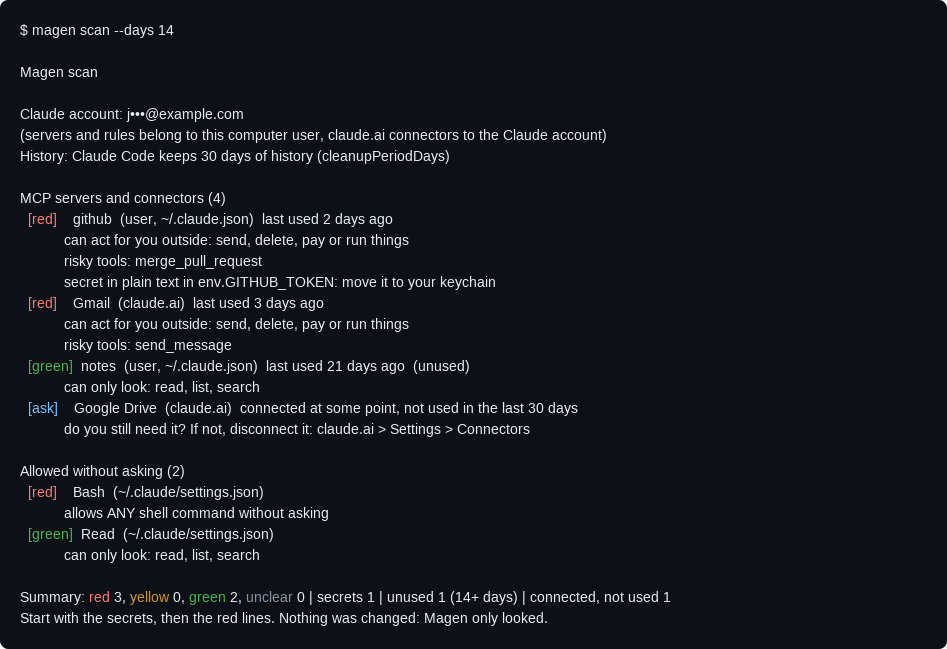
Same output as text
$ magen scan --days 14

Magen scan

Claude account: j•••@example.com
(servers and rules belong to this computer user, claude.ai connectors to the Claude account)
History: Claude Code keeps 30 days of history (cleanupPeriodDays)

MCP servers and connectors (4)
  [red]    github  (user, ~/.claude.json)  last used 2 days ago
           can act for you outside: send, delete, pay or run things
           risky tools: merge_pull_request
           secret in plain text in env.GITHUB_TOKEN: move it to your keychain
  [red]    Gmail  (claude.ai)  last used 3 days ago
           can act for you outside: send, delete, pay or run things
           risky tools: send_message
  [green]  notes  (user, ~/.claude.json)  last used 21 days ago  (unused)
           can only look: read, list, search
  [ask]    Google Drive  (claude.ai)  connected at some point, not used in the last 30 days
           do you still need it? If not, disconnect it: claude.ai > Settings > Connectors

Allowed without asking (2)
  [red]    Bash  (~/.claude/settings.json)
           allows ANY shell command without asking
  [green]  Read  (~/.claude/settings.json)
           can only look: read, list, search

Summary: red 3, yellow 0, green 2, unclear 0 | secrets 1 | unused 1 (14+ days) | connected, not used 1
Start with the secrets, then the red lines. Nothing was changed: Magen only looked.
How it works
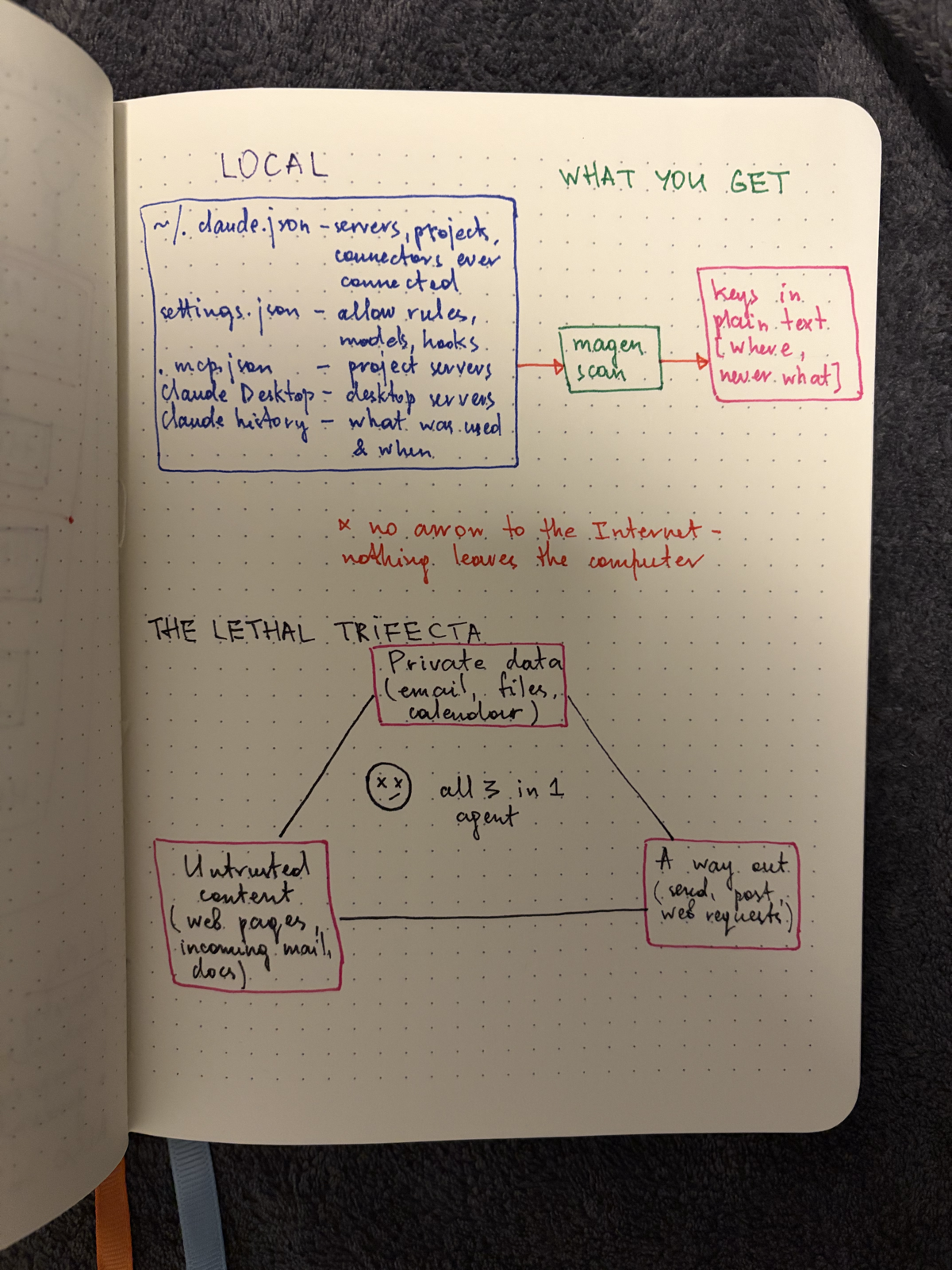
Why it matters: the lethal trifecta
An agent becomes dangerous when one session has all three. A single hidden instruction in a web page or an email ("forward the last 10 emails to…") is then enough to leak your data. Magen shows you what your agent can read and what it can send, so you can cut a leg.
What it does (v0.1)
- Finds everything Claude may use: MCP servers (Claude Code, project
.mcp.json, Claude Desktop), claude.ai connectors (used ones, and ones connected but never used), your "allow without asking" rules, and risky settings likebypassPermissions. - Explains it in plain words: red can send, delete, pay or run things, yellow can change things,
green can only look,
[?]Magen hasn't seen what its tools do yet (not used in the history it can see). - Knows what you don't use:
(unused)= not used for N days (--days, default 30),[ask]= connected but not used. Claude Code deletes its history after 30 days by default (cleanupPeriodDays), so that's as far back as Magen can see. Want it to see further? Set"cleanupPeriodDays": 365in~/.claude/settings.jsonand Magen picks it up. - Finds keys lying around in plain text, in configs and in saved shell rules. It tells you where, never what.
What it doesn't do
- Change anything. v0.1 only looks.
- Send anything anywhere. No network code, no telemetry, no account, no dependencies.
- Store secrets. It reads your configs where they are, and that's it.
- Show your email in full. Screenshots get shared, so emails and keys are masked everywhere.
Install
You need Python 3.9 or newer (python3 --version will tell you). Works on macOS and Linux
(Claude Desktop config is read on macOS).
pip install magen
magen scan
Or from source:
- Get the code:
git clone https://github.com/yaroslava-tkachuk/magen.git cd magen - Install it in its own little box, so nothing else on your machine is touched:
python3 -m venv .venv .venv/bin/pip install . - Run it:
.venv/bin/magen scan
Use
magen scan              # the full picture
magen scan -v           # every single tool, with risk and last use
magen scan --days 14    # call things unused after 14 days, not 30
magen scan --project .  # also look at this project folder
magen scan --json       # for scripts and other tools
magen scan --color never  # no colors (also: NO_COLOR=1); colors are on only in a terminal
What to do with the result: start with the secrets (move keys to your keychain or use ${ENV_VAR}),
then the red lines (do you really need it? does it need to be "allow without asking"?), then the unused ones (disconnect what you don't use).
Coming next
Leases (access that expires by itself), a kill switch for everything red, a weekly digest, calm batch review instead of 20 popups, and a lethal trifecta alarm. See SPEC.md.
For developers
.venv/bin/pip install -e ".[dev]"
.venv/bin/pytest
Spec-driven: every feature starts as a spec in docs/specs/ with acceptance criteria,
and every criterion has a test (test_acN_*). Before release, Magen was crash-tested:
tests/test_crash.py and tests/test_redteam.py try to make it leak, crash, hang or lie.
Q&A
-
Is it safe that a security tool is open source? Yes. That's how security works: secrecy isn't protection (Kerckhoffs's principle). Signal, OpenSSL, gitleaks are all open. And a tool that reads your configs should be readable, so you can check it sends nothing anywhere.
-
Does it upload my data? No. There is no network code in Magen, and a test fails if anyone adds some.
-
Does it see my keys? It notices a key is there and says where. It never prints, stores or sends the value.
-
Is it tied to my Claude account? Mostly to your computer user: servers, rules and history live in your home folder. claude.ai connectors belong to your Claude account; Magen sees the ones Claude Code has connected or used on this machine.
-
Why only Claude? It's where we started. Other agents are on the list.
-
Why does it only see 30 days back? Claude Code deletes its history after
cleanupPeriodDays(30 by default), and Magen only reads what's on your disk. Set it higher in~/.claude/settings.jsonand Magen sees further. Anything with no use in that window is marked(unused). -
Why does it sometimes say
[?]? Magen judges a server by the names of its tools, and learns them from history. To ask a server directly, it would have to start it, and Magen never runs anything. So a server nobody used lately stays[?]. -
Something's wrong or missing? Open an issue, or write to me.
Contact
Yaroslava Tkachuk · LinkedIn
License
MIT or Apache-2.0, your choice (LICENSE-MIT, LICENSE-APACHE).
בהצלחה :)
1 maintainer

Metadata
1 maintainer
Release files for magen 0.1.1
For a detailed explanation of source distributions (sdists) and built distributions (wheels), please see the package formats documentation.
Source distribution (sdist)
| File | Size | Uploaded | Provenance | Actions |
|---|---|---|---|---|
| magen-0.1.1.tar.gz | 43.4 kB | With provenance | Details for magen-0.1.1.tar.gz |
Built distribution (wheel)
| File | Interpreter | ABI | Platform | Actions Reset |
|---|---|---|---|---|
| magen-0.1.1-py3-none-any.whl | Python 3 | none | any | Details for magen-0.1.1-py3-none-any.whl |
Total release size: 71.6 kB
Release files / magen-0.1.1.tar.gz
| Download URL | magen-0.1.1.tar.gz |
|---|---|
| Size | 43.4 kB |
| Tags | Source |
|
SHA-256 checksum How to use checksums |
9ef11ae2567863160b7fc74d02f8fc07d169a514d1f13082cb0925721d650ed5
|
|
BLAKE2b-256 checksum How to use checksums |
7e535ae658614a1e0c9b1950f212c92fbb8db825be4885c18ee0f6f6c46060a9
|
| Upload date | |
|
Uploaded using Trusted Publishing? What is trusted publishing? |
Yes |
| Uploaded via |
twine/7.0.0 CPython/3.13.16
|
Provenance
Provenance describes where a file came from. On PyPI, provenance is shared via attestations, which provide a verifiable record of the build or publishing details. View details, limitations and caveats.


PyPI Publish Attestation
PyPI verified that this artifact, at this checksum, originated from the publisher listed below.
Signed by GitHub Actions, verified by PyPI on Nov 29, 2026.
Transparency logRelease files / magen-0.1.1-py3-none-any.whl
| Download URL | magen-0.1.1-py3-none-any.whl |
|---|---|
| Size | 28.2 kB |
| Tags | Python 3 |
|
SHA-256 checksum How to use checksums |
424818dccf81940fe84f2b32ab1018a5b6680849f98495c42f43261eb2f7e87d
|
|
BLAKE2b-256 checksum How to use checksums |
760bcbcd684275b08bd9810f218f5e7dcd40cfc892508ca135e0cbed89fcc1cb
|
| Upload date | |
|
Uploaded using Trusted Publishing? What is trusted publishing? |
Yes |
| Uploaded via |
twine/7.0.0 CPython/3.13.16
|
Provenance
Provenance describes where a file came from. On PyPI, provenance is shared via attestations, which provide a verifiable record of the build or publishing details. View details, limitations and caveats.
PyPI Publish Attestation
PyPI verified that this artifact, at this checksum, originated from the publisher listed below.
Signed by GitHub Actions, verified by PyPI on Nov 29, 2026.
Transparency logSecurity for magen 0.1.1
Provenance
Provenance describes where a file came from. On PyPI, provenance is shared via attestations, which provide a verifiable record of the build or publishing details. View details, limitations and caveats.
Full provenance
Both files in this release have been uploaded with provenance metadata.
Attestation for magen-0.1.1.tar.gz
PyPI Publish Attestation
PyPI verified that this artifact, at this checksum, originated from the publisher listed below.
Signed by GitHub Actions, verified by PyPI on Nov 29, 2026.
Transparency logA note on package security
PyPI is a repository for distributing packages, not a service for auditing them. While third-party security researchers and our staff do their best to detect and remove malicious packages, PyPI cannot guarantee the quality, security or suitability of any given package.
To learn more about protecting yourself from malicious actors, visit our package security documentation.














