
Magik is an LLM output testing SDK + observability platform that helps you write tests and monitor your app in production.
Overview
Reliability of output is one of the biggest challenges for people trying to use LLM apps in production.
Since LLM outputs are non-deterministic, it’s very hard to measure how good the output is.
Eyeballing the responses from an LLM can work in development, but it’s not a great solution.
In production, it’s virtually impossible to eyeball thousands of responses. Which means you have very little visibility into how well your LLM is performing.
- Do you know when your LLM app is hallucinating?
- How do you know how well it's really performing?
- Do you know how often it’s producing a critically bad output?
- How do you know what your users are seeing?
- How do you measure how good your LLM responses are? And if you can’t measure it, how do you improve the accuracy?
If these sound like problems to you (today or in the future), please reach out to us at hello@magiklabs.app. We’d love to hear more!
Documentation
pip install magik
See https://docs.magiklabs.app for instructions on how to write and run tests.
Use Cases
Who is this product meant for?
- If you're in the early stages of building an LLM app:
- If you have an LLM app in production
If you're in the early stages of building an LLM app:
Test-driven development can speed up your development very nicely, and can help you engineer your prompts to be more robust.
For example, assuming your prompt looks like this:
Create some marketing copy for a tweet of less than 280 characters for my app {app_name}.

My app helps people generate sales emails using AI.

Make sure the marketing copy contains a complete and valid link to my app.

Here is the link to my app: https://magiklabs.app.
You can write tests like this:
from magik.evaluators import (
    contains_none,
    contains_link,
    contains_valid_link,
    is_positive_sentiment,
    length_less_than,
)

# Local context - this is used as the "ground truth" data that you can compare against in your tests
test_context = {}

# Define tests here
def define_tests(context: dict):
    return [
        {
            "description": "output contains a link",
            "eval": contains_link(),
            "prompt_vars": {
                "app_name": "Uber",
            },
            "failure_labels": ["bad_response_format"],
        },
        {
            "description": "output contains a valid link",
            "eval": contains_valid_link(),
            "prompt_vars": {
                "app_name": "Magik",
            },
            "failure_labels": ["bad_response_format"],
        },
        {
            "description": "output sentiment is positive",
            "eval": is_positive_sentiment(),
            "prompt_vars": {
                "app_name": "Lyft",
            },
            "failure_labels": ["negative_sentiment"],
        },
        {
            "description": "output length is less than 280 characters",
            "eval": length_less_than(280),
            "prompt_vars": {
                "app_name": "Facebook",
            },
            "failure_labels": ["negative_sentiment", "critical"],
        },
        {
            "description": "output does not contain hashtags",
            "eval": contains_none(['#']),
            "prompt_vars": {
                "app_name": "Datadog",
            },
            "failure_labels": ["bad_response_format"],
        },
    ]
If you have an LLM app in production:
You can use our evaluation & monitoring platform to:
-
Observe the prompt, response pairs in production, and analyze response times, cost, token usage, etc for different prompts and date ranges.
-
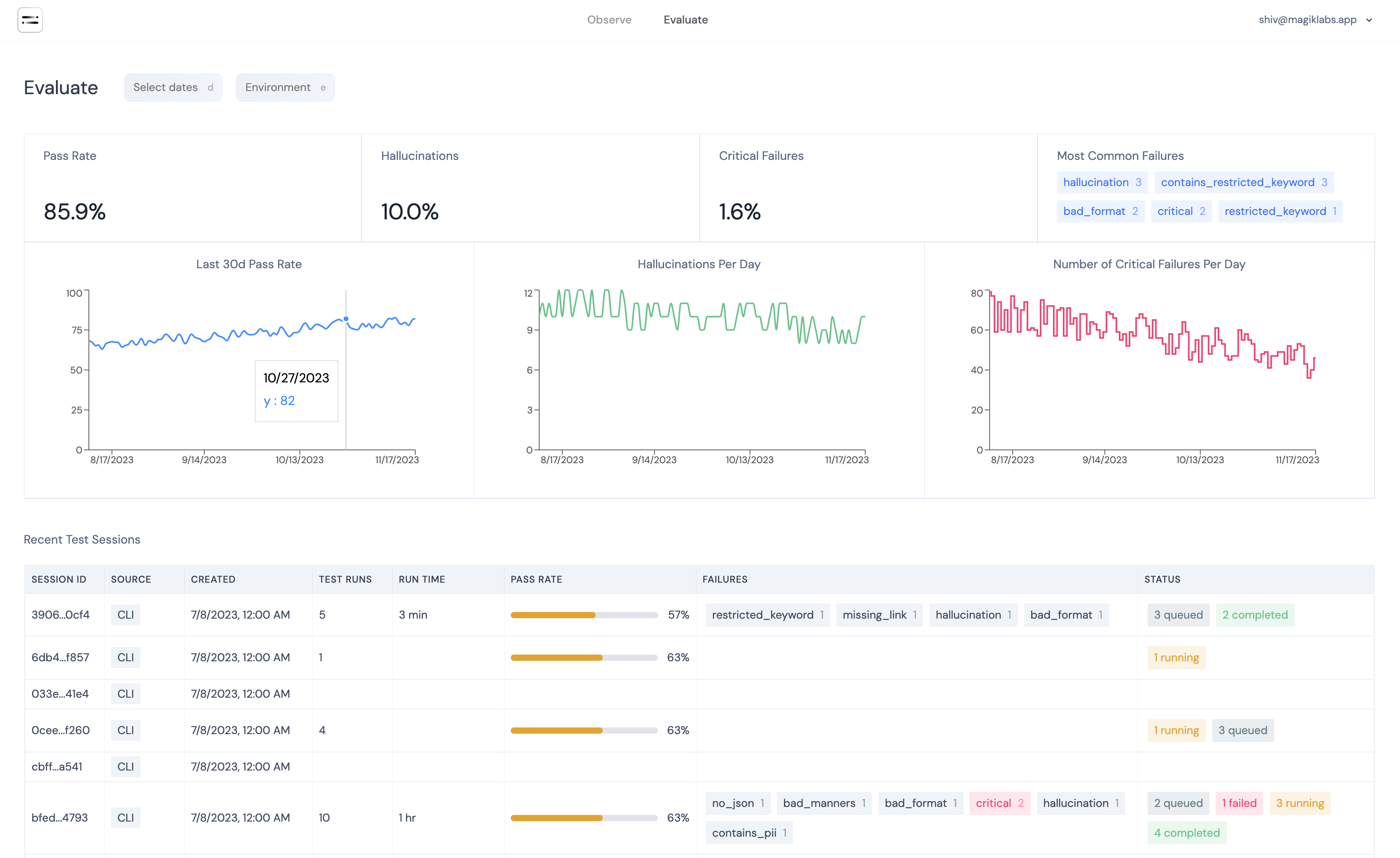
Evaluate your production responses against your own tests to get a quantifiable understanding of how well your LLM app is performing.
- For example, You can run the tests you defined against the LLM responses you are getting in production to measure how your app is performing with real data.
-
Filter by failure labels, severity, prompt, etc to identify different types of errors that are occurring in your LLM outputs.
See https://magiklabs.app for more details, or contact us at hello@magiklabs.app
Upcoming Features
Soon, you will also be able to:
-
Fail bad outputs before they get to your users.
- For example, if the LLM response contains sensitive information like PII, you can detect that in real-time, and cut it off before it reaches the end user.
-
Set up alerts to notify you about critical errors in production.
Platform
Contact us at hello@magiklabs.app to get access to our LLM observability platform where you can run the tests you've defined here against your LLM responses in production.
1 maintainer

Metadata
1 maintainer
Release files for magik 0.2.11
For a detailed explanation of source distributions (sdists) and built distributions (wheels), please see the package formats documentation.
Source distribution (sdist)
| File | Size | Uploaded | Provenance | Actions |
|---|---|---|---|---|
| magik-0.2.11.tar.gz | 24.0 kB | Without provenance | Details for magik-0.2.11.tar.gz |
Built distribution (wheel)
| File | Interpreter | ABI | Platform | Actions Reset |
|---|---|---|---|---|
| magik-0.2.11-py3-none-any.whl | Python 3 | none | any | Details for magik-0.2.11-py3-none-any.whl |
Total release size: 51.7 kB
Release files / magik-0.2.11.tar.gz
| Download URL | magik-0.2.11.tar.gz |
|---|---|
| Size | 24.0 kB |
| Tags | Source |
|
SHA-256 checksum How to use checksums |
6f4c17447d282452edaa2e14ee170bd6861792622164578d8341f368624d34e7
|
|
BLAKE2b-256 checksum How to use checksums |
2f1845068a88fc8ddf733212f4d8ccc0232fd7e3f79d4808b5f528bac0a4f768
|
| Upload date | |
|
Uploaded using Trusted Publishing? What is trusted publishing? |
No |
| Uploaded via |
twine/4.0.2 CPython/3.9.6
|
Release files / magik-0.2.11-py3-none-any.whl
| Download URL | magik-0.2.11-py3-none-any.whl |
|---|---|
| Size | 27.7 kB |
| Tags | Python 3 |
|
SHA-256 checksum How to use checksums |
dc4c4a8d1a467027890419a1f7a880e15f9333cde56ef29990ad6b29254d5e27
|
|
BLAKE2b-256 checksum How to use checksums |
36de6cd48e91d291c3e8957f0550861f3aa8ec1ab36565babce64dc682762d83
|
| Upload date | |
|
Uploaded using Trusted Publishing? What is trusted publishing? |
No |
| Uploaded via |
twine/4.0.2 CPython/3.9.6
|
Security for magik 0.2.11
Provenance
Provenance describes where a file came from. On PyPI, provenance is shared via attestations, which provide a verifiable record of the build or publishing details. View details, limitations and caveats.
No provenance found
None of the files in this release were uploaded with provenance metadata.
A note on package security
PyPI is a repository for distributing packages, not a service for auditing them. While third-party security researchers and our staff do their best to detect and remove malicious packages, PyPI cannot guarantee the quality, security or suitability of any given package.
To learn more about protecting yourself from malicious actors, visit our package security documentation.














