
A flexible framework for creating multi-agent systems that can each interact with humans while sharing relevant context internally.

Project description
Mahilo: Multi-Agent with Human-in-the-Loop System Framework



🎉 OpenAI Realtime API available with mahilo!
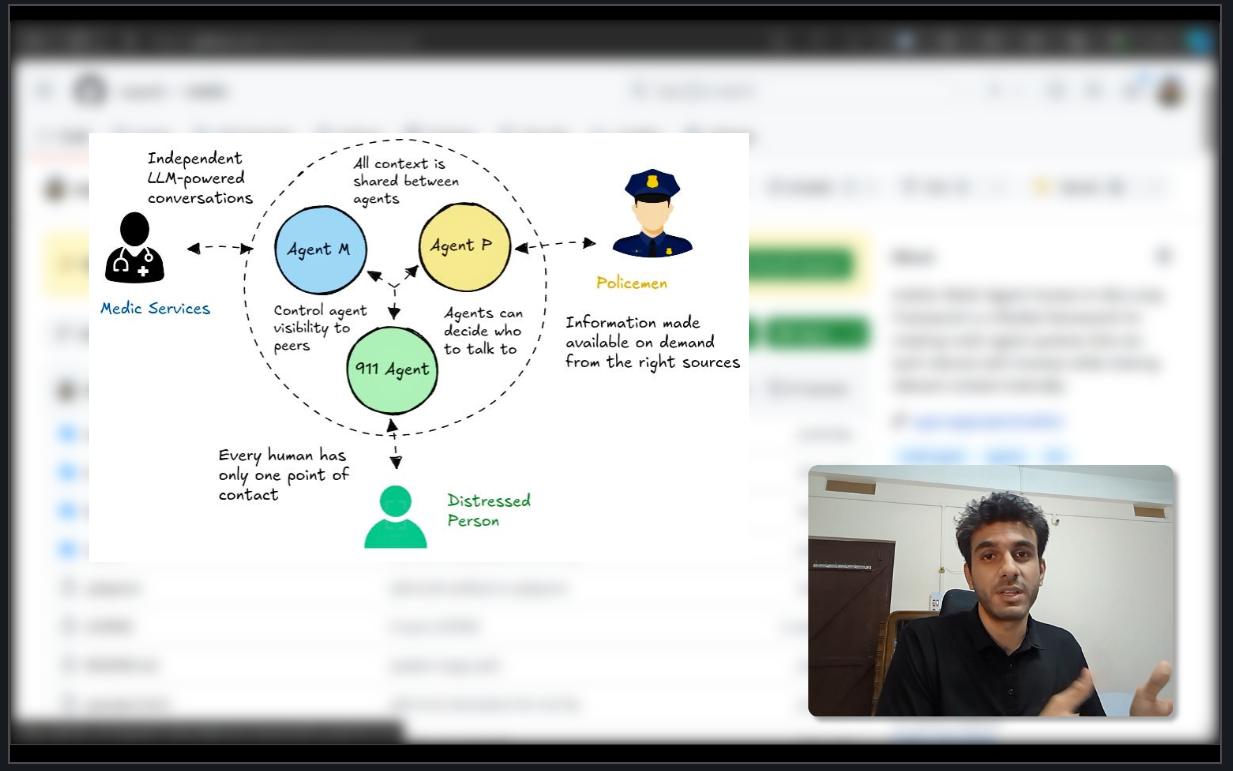
You can now use voice to interact with your mahilo agents, powered by the OpenAI Realtime API! Here's a blog on how I built this feature, with technical details: Building a voice-enabled Python FastAPI app using OpenAI's Realtime API
Check out the video below to see the new Realtime API feature in action with mahilo!
Install
pip install mahilo
Note that if you want to use the voice feature, you need to have pyaudio installed. Learn how to do it for your OS, here.
Usage
from mahilo.agent import BaseAgent
from mahilo.agent_manager import AgentManager
from mahilo.server import ServerManager


# initialize the agent manager
manager = AgentManager()

# create the agents
emergency_dispatcher = Agent(
    type='emergency_dispatcher',
    description=EMERGENCY_DISPATCHER_PROMPT,
    short_description=EMERGENCY_DISPATCHER_SHORT_DESCRIPTION,
)
police_proxy = Agent(
    type='police_proxy',
    description=POLICE_PROXY_PROMPT,
    short_description=POLICE_PROXY_SHORT_DESCRIPTION,
)
medical_proxy = Agent(
    type='medical_proxy',
    description=MEDICAL_PROXY_PROMPT,
    short_description=MEDICAL_PROXY_SHORT_DESCRIPTION,
)

# register the agents to the manager
manager.register_agent(emergency_dispatcher)
manager.register_agent(police_proxy)
manager.register_agent(medical_proxy)

# activate the emergency dispatcher as the starting point of the conversation
emergency_dispatcher.activate()

# initialize the server manager
server = ServerManager(manager)

# run the server
def main():
    server.run()

if __name__ == "__main__":
    main()
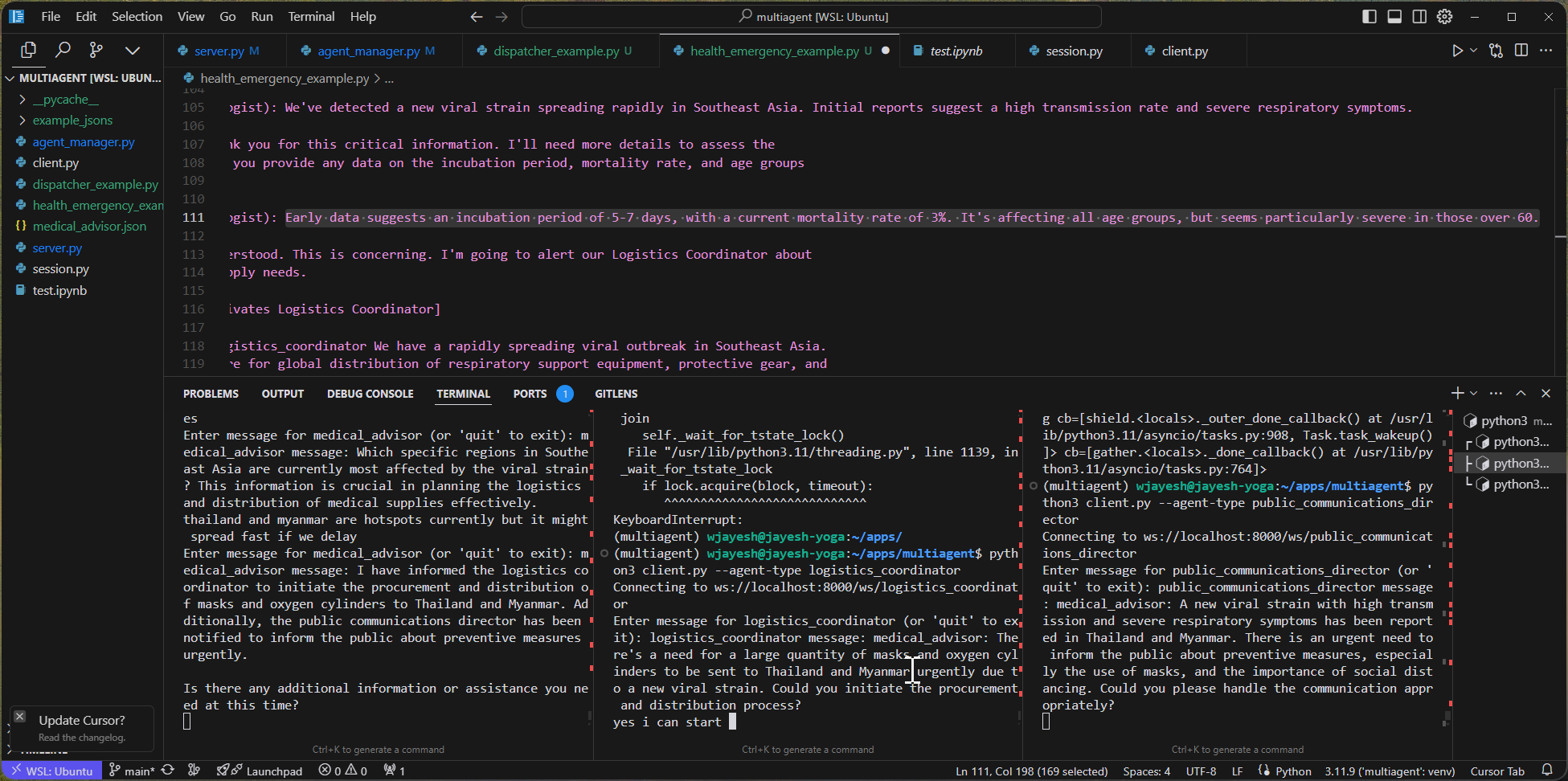
When the code above is run, it starts a websocket server on localhost (unless some other host is specified)that clients can connect to. In this case, clients can connect to three websocket endpoints corresponding to the three agents. For example, to do that for one agent, you can run the following command in a separate terminal (from the root of this repo):
python mahilo/client.py --url http://localhost:8000 --agent-name emergency_dispatcher
This would then allow you to talk to the emergency dispatcher agent. If you pass the --voice flag, you would be able to talk to the agent using voice.
Ideally, you would spin up more terminals for the other agents and can then observe how the conversation would unfold across the agents.
How does the transfer of context work?
Every BaseAgent comes with a function called chat_with_an_agent that takes in a question or a message and the agent it is being sent to. This function is used by the agents whenever they feel that they want info from the other agents.
The AgentManager class manages the context and makes the last N conversations available across agents, for added visibility. More on this is in the Detailed Features section below.
For a demo of agents sharing context with each other, check out the video below, in addition to the Realtime API video above:
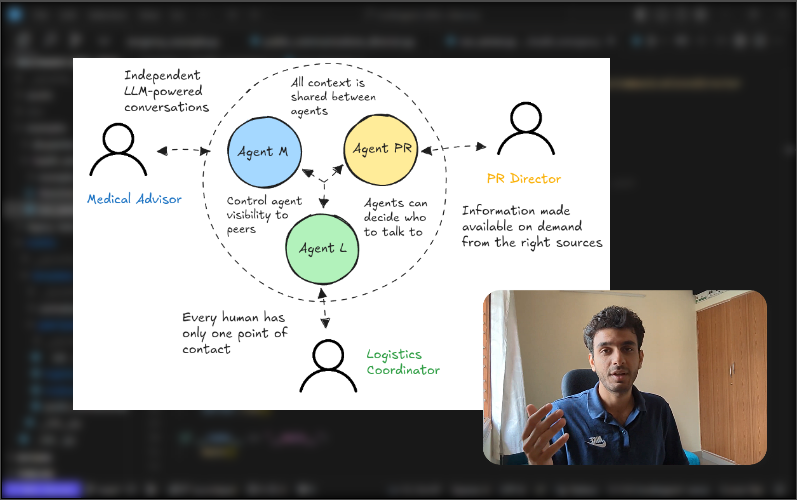
Table of Contents
Overview
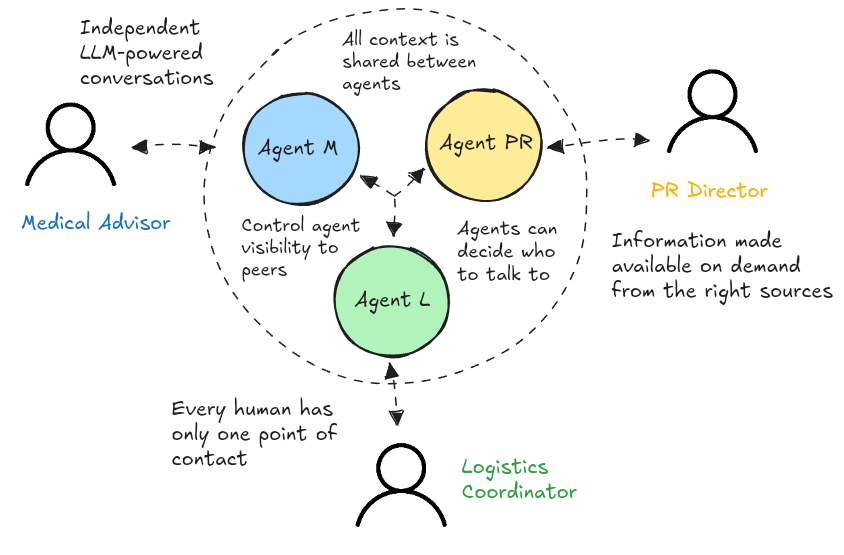
This project provides a flexible framework for defining and creating multi-agent systems that can each interact with humans while sharing relevant context internally. It allows developers to easily set up complex agent networks for various applications, from customer service to emergency response simulations.
Agents are aware of other agents in the system and can decide to talk to one or more agents based on the current conversation context, simultaneously. The system is designed to make humans more efficient by giving them an assitant that can handle context from multiple agents and help the human stay focused on their specific problem, while surfacing all relevant information on demand.
Features
TL;DR:
- Realtime API support for talking to your agents via voice!
- Easy-to-extend BaseAgent class to create your own agents
- WebSocket-based real-time communication with multiple users simultaneously
- Flexible communication patterns: peer-to-peer and hierarchical (or centralized)
- Control hierarchy in communication via
can_contactlists: limit what agents can talk to what other agents. - Session management for persistent conversations
- CLI client for easy testing and interaction
- Multiple users can connect to the same agent. In emergency situation scenarios, this means multiple police officers can connect to the same dispatcher and receive updates from the dispatcher.
- Agents are only activated when they are needed.
More information on the features can be found in the Detailed Features section below.
Getting Started
🤘 Quickstart
-
Install the package:
pip install mahiloNote that if you want to use the voice feature, you need to have
pyaudioinstalled. Learn how to do it for your OS, here. -
Export your OpenAI API key:
export OPENAI_API_KEY=<your_api_key> -
Go to one of the example directories and run the server:
cd examples/your_example  # one of dispatcher or health_emergency
python run_server.py
This starts the agent server locally at
http://localhost:8000. -
Connect to the server using the CLI client: For each of the agents in the system, you can spin up a client to connect to the server.
cd mahilo
python client.py --url http://localhost:8000 --agent-name your_agent_name
Run this command in separate terminals for each of the agents and you can then start talking with them.
If you want to use the voice feature, you can run the same command with the
--voiceflag:cd mahilo python client.py --url http://localhost:8000 --agent-name your_agent_name --voice
[!TIP] You dont have to specify the URL if you want to connect to the default server.
🧑🍳 Building your own agents
-
Define your agents looking at examples in the
templatesdirectory. -
Create a run script for your specific use case. See the examples in the
examplesdirectory. -
Run your server:
python examples/your_example/run_server.py -
Connect to your server using the CLI client:
python mahilo/client.py --url http://localhost:8000 --agent-name your_agent_nameYou can connect to the same server using multiple clients to test the system with multiple users. This is useful for testing the system in a real-world scenario where multiple agents need to coordinate their actions.
If you want to use the voice feature, you can run the same command with the
--voiceflag:cd mahilo python client.py --url http://localhost:8000 --agent-name your_agent_name --voice
[!TIP] You dont have to specify the URL if you want to connect to the default server.
Project Structure
agent_manager.py: Defines theAgentManagerandBaseAgentclassesserver.py: Implements theServerManagerfor handling WebSocket connectionssession.py: Manages conversation sessions for each agentclient.py: Provides a CLI client for interacting with the agentstemplates/: Contains agent templates for different use casesexamples/: Includes example implementations of multi-agent systems
Detailed Features
Index
- Human-in-the-Loop
- Easy-to-use agent definition system
- WebSocket-based real-time communication
- Flexible communication patterns: peer-to-peer and hierarchical (or centralized)
- Flexible agent manager for handling multiple agent types
- Session management for persistent conversations
Human-in-the-Loop
- The human-in-the-loop is implemented by having the human client connect to each agent in the system.
- The system is designed to make humans more efficient by giving an assitant that can handle context from multiple agents and help the human stay focused on the conversation.
- The agents are aware of what's going on in all the conversations and can help the human get information on demand.
- The human can override the agent's decision to choose an agent for any situation.
Easy-to-use agent definition system
The BaseAgent class is designed to be subclassed for defining new agents. It comes with:
- tools that allow it to talk to other agents.
- a message queue that stores the history of messages that the agent has received.
- a prompt that tells the agent about the system
- a method to process a message which takes care of the context and the conversation history.
- a session object that stores the conversation history in a file for persistence.
WebSocket-based real-time communication
- The server uses FastAPI's WebSocket support to handle real-time communication between the agents and the client. This allows for natural, two-way conversations that can be used for a variety of applications, from customer service to emergency response simulations.
- The server keeps track of all connected agents and the messages they receive from other agents and coordinates the conversation between them.
Flexible communication patterns: peer-to-peer and hierarchical (or centralized)
- In a peer-to-peer communication pattern, agents are connected directly to each other and can call each other directly.
- This is useful when a complex problem needs to be tackled by a combination of one or more agents. The example directory contains a health emergency scenario where a medical advisor, a logistics coordinator and a public communication director each independently decide on a course of action.
- In a hierarchical (or centralized) communication pattern, agents are connected to a single dispatcher agent. This is useful for a group of agents who need to coordinate their actions with a single leader. The example directory contains a dispatch scenario where the dispatcher coordinates the actions of a plumber and mold removal specialist agent.
Flexible agent manager for handling multiple agent types
- The
AgentManagerclass is designed to manage multiple agent types, allowing for easy addition and removal of agents. - Agent manager makes sure that an agent can only talk to agents that are on its
can_contactlist.
Session management for persistent conversations
- The
Sessionclass is designed to manage conversation sessions for each agent. It stores the conversation history in a file for persistence. - The messages from the queue or the shared context are not stored to avoid duplication and redundancy.
Contributing
Contributions are welcome! Please feel free to submit a Pull Request.
Release history Release notifications | RSS feed


Download files
Download the file for your platform. If you're not sure which to choose, learn more about installing packages.
Source Distribution
Built Distribution
Filter files by name, interpreter, ABI, and platform.
If you're not sure about the file name format, learn more about wheel file names.
Copy a direct link to the current filters
File details
Details for the file mahilo-0.4.1.tar.gz.
File metadata
- Download URL: mahilo-0.4.1.tar.gz
- Upload date:
- Size: 33.0 kB
- Tags: Source
- Uploaded using Trusted Publishing? No
- Uploaded via: twine/5.1.1 CPython/3.11.10
File hashes
| Algorithm | Hash digest | |
|---|---|---|
| SHA256 |
bc0afe12f39d5084e3e42989d727bd137a2a5e99dcf4be66c5b405a326ad1b42
|
|
| MD5 |
81350ee835ff9191879927c95ceafaf6
|
|
| BLAKE2b-256 |
a234589195d6b19723b35d7936d3ef9cb78f69c249bd7c6fad6e792307fc1aea
|
File details
Details for the file mahilo-0.4.1-py3-none-any.whl.
File metadata
- Download URL: mahilo-0.4.1-py3-none-any.whl
- Upload date:
- Size: 36.6 kB
- Tags: Python 3
- Uploaded using Trusted Publishing? No
- Uploaded via: twine/5.1.1 CPython/3.11.10
File hashes
| Algorithm | Hash digest | |
|---|---|---|
| SHA256 |
1df223a6058fa45670c4b9da3d635d20bbec9eda46aaf521368359ce94f9a1e3
|
|
| MD5 |
29606d5ce2ae79cfbc46be69985ca83e
|
|
| BLAKE2b-256 |
5d32b7bceaa7d512dfc711bb4dc9a2684330d07e0f0d5621b63c0e91677360d0
|






