
Don't let broken agent changes merge.

Project description
Maida
Don't let broken agent changes merge.


Maida is a local-first, CI-first behavioral regression gate for AI agents. It captures structured traces, turns known-good runs into checked-in baselines, and fails changes when structural behavior regresses: more steps, unexpected tool calls, loops, latency spikes, or cost blowups.
Add @trace, capture a baseline, then gate future runs (commands default to the latest run):
python my_agent.py
maida baseline --out baselines/my_agent.json
# ...after your next change:
python my_agent.py
maida assert --baseline baselines/my_agent.json --policy .maida/policy.yaml --format markdown
For local inspection, use:
maida view
The viewer shows the execution timeline behind a pass/fail decision, but the core workflow is baseline, policy, and CI gate.
No cloud. No accounts. No telemetry. Everything stays on your machine.
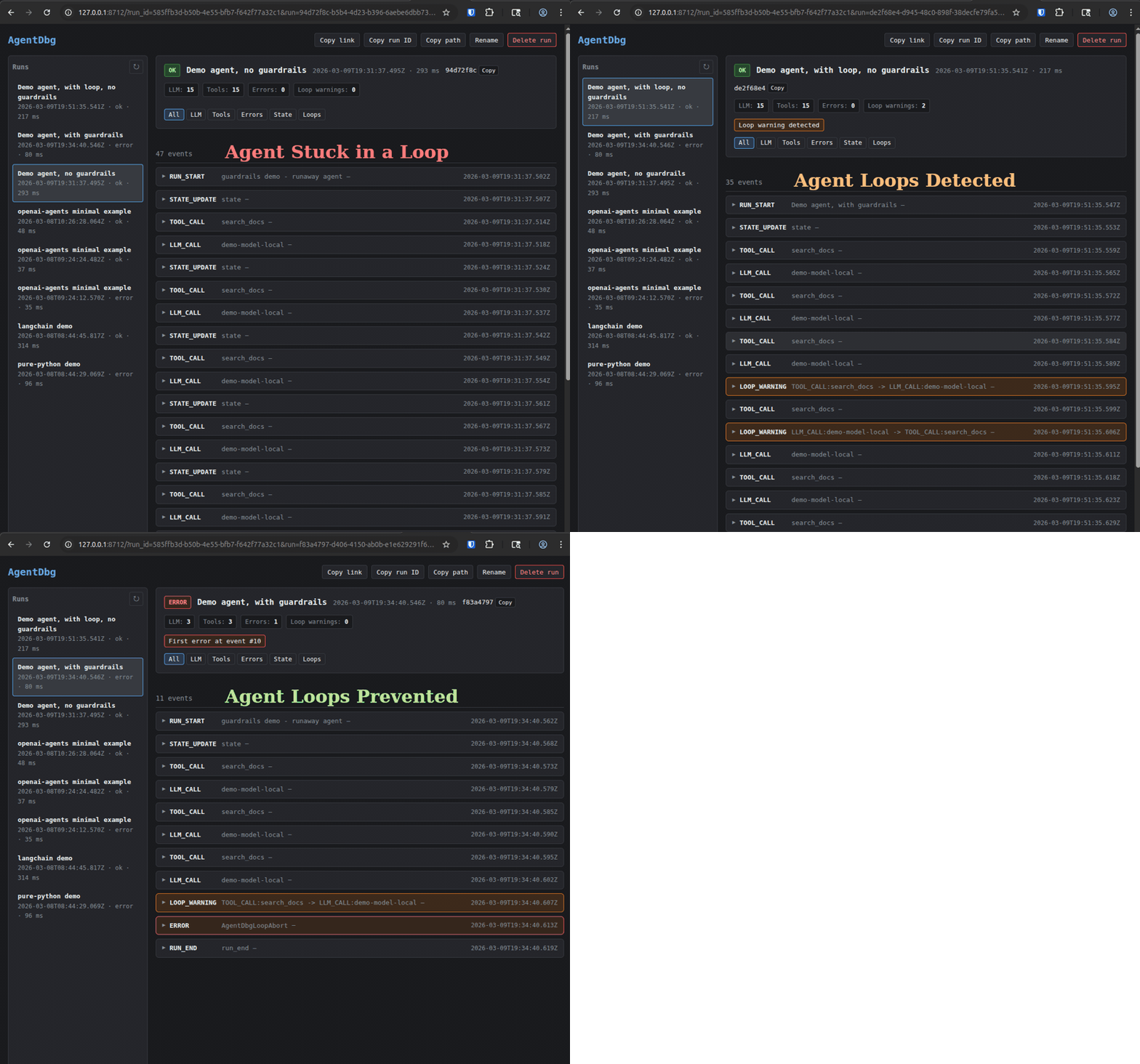
Built-in run guardrails: stop runaway agent runs when a prompt, model, or tool change starts looping or exceeds your limits for LLM calls, tool calls, total events, or duration.
Try it in 60 seconds
Three commands. No repo clone, no config files, no API keys, no sign-up:
pip install maida-ai
maida demo
maida view
maida demo runs a bundled simulated customer-support agent (tool calls, LLM calls, state updates, automatic secret redaction — all canned data, nothing leaves your machine). maida view opens the timeline at http://127.0.0.1:8712 — every event with inputs, outputs, and timing. The viewer stays running: run more agents and their timelines appear automatically.
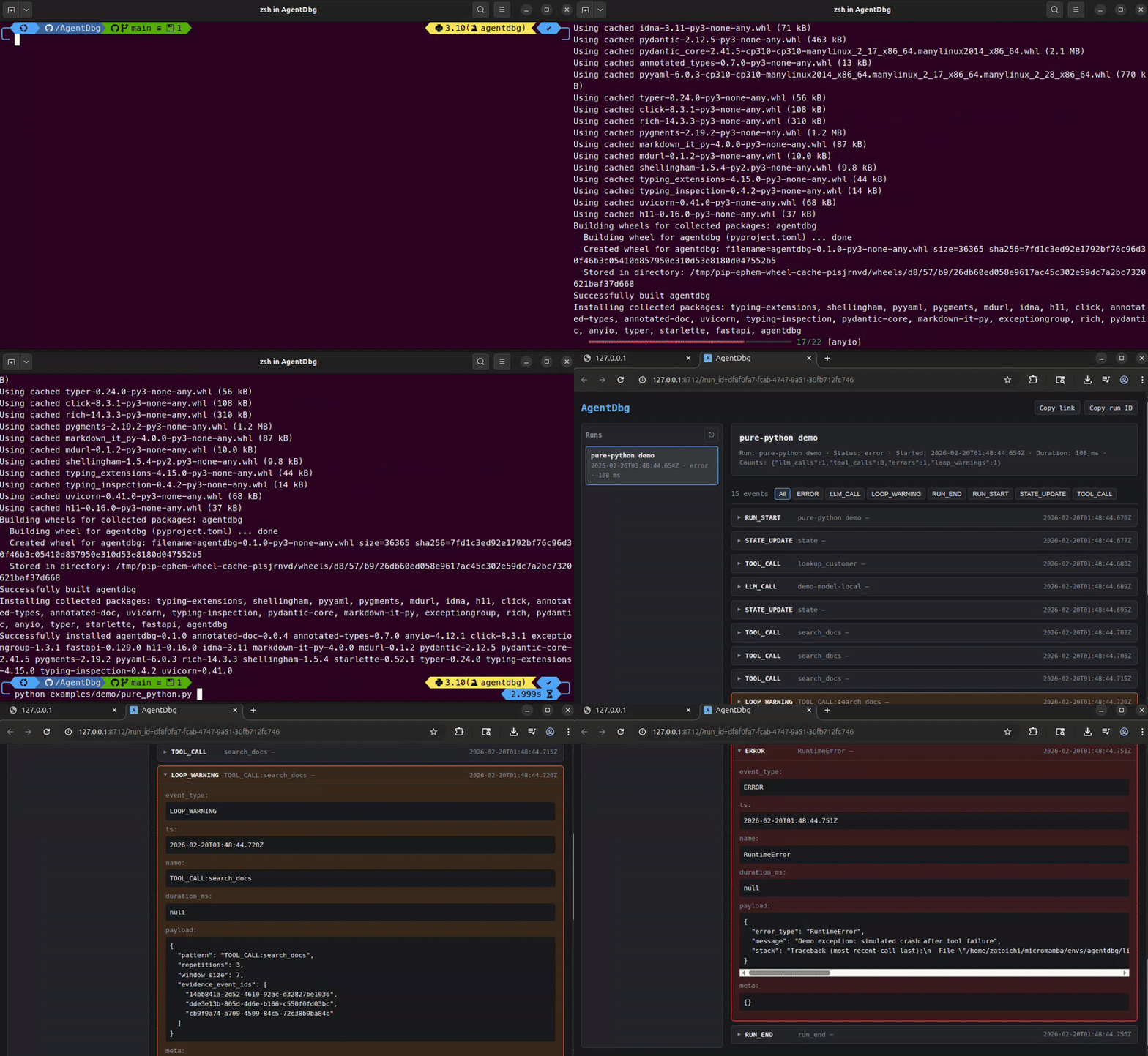
That trace is the evidence source for baselines, diffs, and CI assertions.
Watch Maida catch a regression
maida demo --regression
One command tells the whole story: Maida baselines a known-good run of the demo agent, then runs a "refactored" version that swaps in a cheaper model, loops on a tool, calls a tool the baseline has never seen, and burns 5x the tokens — while still exiting with status ok. The gate fails, the terminal shows exactly what changed, and you get a preview of the PR comment your team would see in CI.
Set up your own project
maida init            # writes a starter .maida/policy.yaml
maida init --github   # also writes .github/workflows/maida.yml
Instrument your own agent
Add three lines to any Python agent:
from maida import trace, record_llm_call, record_tool_call

@trace
def run_agent():
    # ... your existing agent code ...

    record_tool_call(
        name="search_db",
        args={"query": "active users"},
        result={"count": 42},
    )

    record_llm_call(
        model="gpt-4",
        prompt="Summarize the search results.",
        response="There are 42 active users.",
        usage={"prompt_tokens": 12, "completion_tokens": 8, "total_tokens": 20},
    )

run_agent()
Then use maida baseline, maida assert, or maida view depending on whether you want to gate, compare, or inspect the run.
What gets captured
| Event | Recorded by | What you see |
|---|---|---|
| Run start/end | @trace (automatic) |
Duration, status, error if any |
| LLM calls | record_llm_call() |
Model, prompt, response, token usage |
| Tool calls | record_tool_call() |
Tool name, args, result, status |
| State updates | record_state() |
Arbitrary state snapshots |
| Errors | @trace (automatic) |
Exception type, message, stack trace |
| Loop warnings | Automatic detection | Repetitive pattern + evidence |
Stop runaway runs with guardrails
Guardrails are opt-in and meant for development-time safety rails: they let you stop an agent when it starts looping or using more budget than intended, while still writing a normal trace you can inspect afterward.
from maida import (
    GuardrailExceeded,
    LoopAbort,
    record_llm_call,
    record_tool_call,
    trace,
)


@trace(
    stop_on_loop=True,
    max_llm_calls=10,
    max_tool_calls=20,
    max_events=80,
    max_duration_s=30,
)
def run_agent():
    ...


try:
    run_agent()
except LoopAbort:
    print("Maida stopped a repeated loop.")
except GuardrailExceeded as exc:
    print(exc.guardrail, exc.threshold, exc.actual)
When a guardrail fires, Maida uses the existing lifecycle:
- it records the event that triggered the issue
- it records
ERROR - it records
RUN_END(status=error) - it re-raises a dedicated exception so your code knows the run was intentionally aborted
Available guardrails:
stop_on_loopstop_on_loop_min_repetitionsmax_llm_callsmax_tool_callsmax_eventsmax_duration_s
You can set them in @trace(...), traced_run(...), .maida/config.yaml, ~/.maida/config.yaml, or env vars like MAIDA_MAX_LLM_CALLS=50.
See docs/guardrails.md for full examples, precedence, and trace behavior.
What you see
In the UI, you see:
- Run summary panel: status (ok / error / running), duration, LLM call count, tool call count, error count, loop warnings, jump-to-first-error, jump-to-first-loop-warning
- Chronological timeline of events
- Expandable events: LLM calls (prompt, response, usage), tool calls (args, results, error status), loop warnings with evidence
- Live-refresh: leave
maida viewrunning — new runs appear in the sidebar, events stream in real-time for running agents - Filter chips: All, LLM, Tools, Errors, State, Loops
Each run produces meta.json (metadata, status, counts) and spans.jsonl (OpenTelemetry span records) under ~/.maida/. Nothing leaves your machine.
What Maida is
- A behavioral regression gate: compare agent runs against checked-in baselines and policy.
- CI-first:
maida assertreturns stable exit codes and markdown/JSON output for pull request checks. - Local-first: traces are JSONL on disk. No cloud, no accounts, no telemetry by default.
- Framework-agnostic: works with any Python code and optional framework adapters.
- Redacted by default: secrets are scrubbed before writing to disk.
- Inspection-friendly: the local timeline helps explain why a gate passed or failed.
What Maida is NOT
- Not a hosted service or cloud platform
- Not a production telemetry or alerting platform
- Not a generic output eval or scoring framework
- Not tied to a single framework
CLI reference
Commands that take a run ID (assert, baseline, export, diff) default to the latest run when the ID is omitted; a short prefix also works.
Run the bundled demo
maida demo               # trace a simulated agent (no network, no API keys)
maida demo --regression  # baseline a good run, then watch the gate catch a bad refactor
Scaffold a project
maida init           # starter .maida/policy.yaml
maida init --github  # + .github/workflows/maida.yml (maida-assert action)
List recent runs
maida list              # last 20 runs
maida list --limit 50   # more runs
maida list --json       # machine-readable output
View a run timeline
maida view              # opens latest run, stays running
maida view <TRACE_ID>   # specific run
maida view --no-browser # just print the URL
Export a run
maida export --out run-export.json             # latest run
maida export <TRACE_ID> --out run-export.json  # specific run
Capture a baseline
maida baseline                                      # latest run -> .maida/baselines/<run_name>.json
maida baseline <TRACE_ID> --out baselines/v1.json   # specific run, custom path
Assert against a baseline
maida assert --baseline .maida/baselines/my_agent.json    # latest run
maida assert <TRACE_ID> --max-steps 80 --no-loops          # standalone thresholds
maida assert --baseline baseline.json --format markdown    # for CI summaries / PR comments
Exit code 0 = pass, 1 = fail. With a baseline, the markdown report includes a "What changed vs baseline" section (new tools, metric deltas, model changes) so a failing check explains itself. See docs/regression-testing.md for the full workflow and docs/reference/policy.md for policy YAML configuration.
Diff two runs
maida diff <RUN_A> <RUN_B>
maida diff --baseline .maida/baselines/my_agent.json  # latest run vs baseline
Regression testing
Baselines, assertions, and diffs let you catch agent regressions locally or in CI. The workflow:
- Baseline a known-good run (
maida baseline) - Assert future runs against it (
maida assert --baseline ...) - Diff failures to see what changed (
maida diff)
Control assertion thresholds via a committed .maida/policy.yaml file or CLI flags. Supports text, JSON, and markdown output formats.
See docs/regression-testing.md for the end-to-end guide and docs/reference/policy.md for the policy file reference.
Redaction & privacy
Redaction is ON by default. Maida scrubs values for keys matching sensitive patterns (case-insensitive) before writing to disk. Large fields are truncated (marked with __TRUNCATED__ marker).
Default redacted keys: api_key, token, authorization, cookie, secret, password.
# Override defaults via environment variables
export MAIDA_REDACT=1                    # on by default
export MAIDA_REDACT_KEYS="api_key,token,authorization,cookie,secret,password"
export MAIDA_MAX_FIELD_BYTES=20000       # truncation limit
You can also configure redaction in .maida/config.yaml (project root) or ~/.maida/config.yaml.
Guardrails
Guardrails are separate from redaction and are disabled by default. They are useful when you want Maida to actively stop a run instead of only recording what happened.
export MAIDA_STOP_ON_LOOP=1
export MAIDA_STOP_ON_LOOP_MIN_REPETITIONS=3
export MAIDA_MAX_LLM_CALLS=50
export MAIDA_MAX_TOOL_CALLS=50
export MAIDA_MAX_EVENTS=200
export MAIDA_MAX_DURATION_S=60
YAML example:
guardrails:
  stop_on_loop: true
  stop_on_loop_min_repetitions: 3
  max_llm_calls: 50
  max_tool_calls: 50
  max_events: 200
  max_duration_s: 60
Precedence:
- Function arguments passed to
@trace(...)ortraced_run(...) - Environment variables
- Project YAML:
.maida/config.yaml - User YAML:
~/.maida/config.yaml - Defaults
See docs/guardrails.md and docs/reference/config.md.
Storage
All data is local. Plain files, easy to inspect or delete.
~/.maida/
└── runs/
    └── <trace_id>/
        ├── meta.json       # run metadata (status, counts, timing)
        └── spans.jsonl     # append-only OpenTelemetry span records
Override the location:
export MAIDA_DATA_DIR=/path/to/traces
Integrations
Maida is framework-agnostic at its core. The SDK works with any Python code.
LangChain / LangGraph
Optional callback handler that auto-records LLM and tool events. Requires langchain-core:
pip install maida-ai[langchain]
from maida import trace
from maida.integrations import LangChainCallbackHandler

@trace
def run_agent():
    handler = LangChainCallbackHandler()
    # pass to your chain: config={"callbacks": [handler]}
    ...
See examples/langchain/minimal.py for a runnable example.
OpenAI Agents SDK
Optional tracing adapter that auto-records generation, function, and handoff spans. Requires openai-agents:
pip install maida-ai[openai]
from maida import trace
from maida.integrations import openai_agents  # registers hooks


@trace
def run_agent():
    # ... your OpenAI Agents SDK code ...
    ...
See examples/openai_agents/minimal.py for a runnable fake-data example with no API key and no networked model calls.
CrewAI
Optional execution-hook adapter that auto-records LLM and tool events from CrewAI crews and flows. Requires crewai[tools]:
pip install maida-ai[crewai]
import maida
from maida.integrations import crewai as mai_crewai  # registers hooks

@maida.trace
def run_crew():
    # ... your crew.kickoff() or flow.kickoff() ...
    ...
More framework adapters coming soon (Agno, and others).
Tutorials
Step-by-step Jupyter notebooks live in a separate repository: maida-ai/maida-tutorials. Covers LangChain, OpenAI Agents SDK, and guardrails - all runnable without API keys.
Development
git clone https://github.com/maida-ai/maida.git
cd maida
uv venv && uv sync && uv pip install -e .
No uv? Use pip instead.
python -m venv .venv && source .venv/bin/activate
pip install -e .
For LangChain support: pip install -e ".[langchain]". For OpenAI Agents support: pip install -e ".[openai]". Run tests: uv run pytest (or pytest).
License
Licensed under the Apache License, Version 2.0. See LICENSE.
Release history Release notifications | RSS feed


Download files
Download the file for your platform. If you're not sure which to choose, learn more about installing packages.
Source Distribution
Built Distribution
Filter files by name, interpreter, ABI, and platform.
If you're not sure about the file name format, learn more about wheel file names.
Copy a direct link to the current filters
File details
Details for the file maida_ai-0.4.0.tar.gz.
File metadata
- Download URL: maida_ai-0.4.0.tar.gz
- Upload date:
- Size: 8.9 MB
- Tags: Source
- Uploaded using Trusted Publishing? No
- Uploaded via: twine/6.2.0 CPython/3.14.3
File hashes
| Algorithm | Hash digest | |
|---|---|---|
| SHA256 |
1ea358f2a65a3e25de736297f80ae89abaa0ac9ef12d650e74958fcc79bc60cf
|
|
| MD5 |
b92328060bf9022023fc0d75b3cfbd34
|
|
| BLAKE2b-256 |
d842d40da9afd34a1eac99ddc0cd54181291279b009af2fa4832c87a7cdad433
|
File details
Details for the file maida_ai-0.4.0-py3-none-any.whl.
File metadata
- Download URL: maida_ai-0.4.0-py3-none-any.whl
- Upload date:
- Size: 87.9 kB
- Tags: Python 3
- Uploaded using Trusted Publishing? No
- Uploaded via: twine/6.2.0 CPython/3.14.3
File hashes
| Algorithm | Hash digest | |
|---|---|---|
| SHA256 |
4d1f83271c32ccd69d34b6a2a51929308df05bfbe2b56d6e28499fa174a0d865
|
|
| MD5 |
9bbb0828a932f05f4fc82dcafe7dca3b
|
|
| BLAKE2b-256 |
5fc963cea2a69a1a933b6028cabea6c972227c45a308440a139f7a0c6614d2ef
|






