
Let's connect







mailaccess.pro · Docs · PyPI · Changelog
Open-source email OSINT and email scraper. One email in, every account behind it: 82 modules check 5,300+ platforms, and every finding says how it was found and how sure we are. One domain in, every public email at the company. Run it on your own machine, or use it hosted at mailaccess.pro.







Built for security researchers, OSINT analysts and penetration testers working under authorization. Read DISCLAIMER.md before use.
See it run
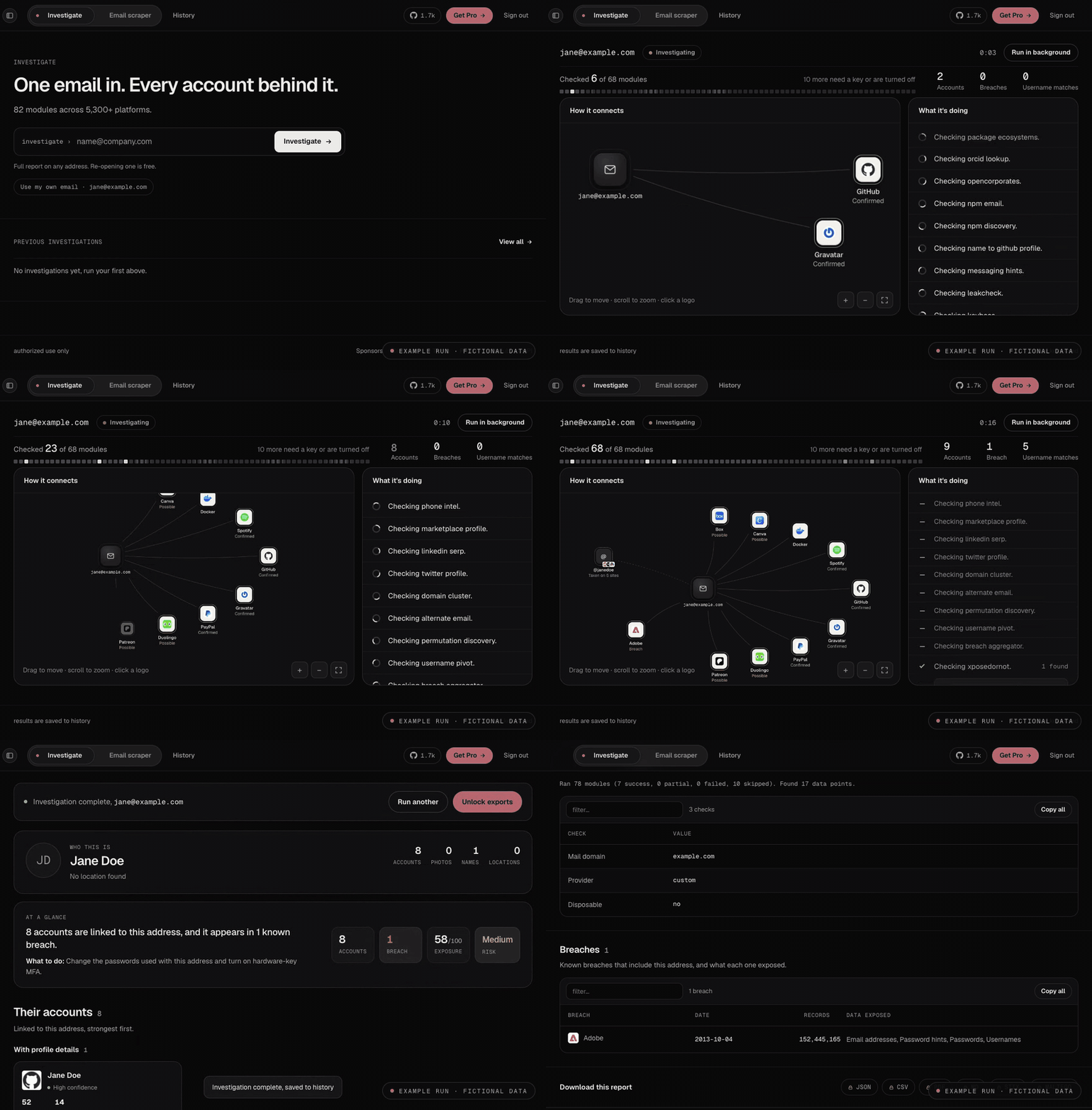
Example run with fictional data (jane@example.com). The live view, then the report it opens into.
Install
pip install mailaccess
mailaccess investigate jane@example.com
Python 3.10+. The CLI starts and stops its backend for each run. Use mailaccess serve for a persistent server, mailaccess[ml] for spaCy name classification, and mailaccess[browser] (then playwright install chromium) for the optional headless-browser checks. Docker and self-hosting: docs/self-hosting.md.
Quick start
mailaccess investigate jane@example.com                  # every account behind an email
mailaccess investigate jane@example.com -o report.html   # save the report (also .pdf, .md, .json)
mailaccess harvest-emails --domain example.com           # every public email at a domain
mailaccess find-email --name "Jane Doe" --domain example.com
mailaccess login                                         # sign in for your free key
mailaccess doctor                                        # check your setup
mailaccess keys set HIBP_API_KEY your-key                # optional providers
mailaccess upgrade
Pipelines, stdin, JSONL and CI: docs/integrations.md.
What it does
- Accounts behind an email. About 340 sign-up and login checks on public, logged-out pages, plus a username sweep over the 746 strongest of 5,300+ platforms. Full list and methods.
- Every finding shows its work. The check that ran, what the site said back, why it counts, and a grade: Confirmed, Likely, Possible or Username match.
- Who is behind it. A name consensus across independent sources. With an operator credential, the Google profile name and photo; with an Oxylabs key, Instagram, Facebook and LinkedIn profiles that match the address.
- What it means. A Defender's Brief with the next action, an exposure score, a credential risk score and public breach records.
- Email scraper.
harvest-emailsfinds the public addresses at a domain from Common Crawl, GitHub, certificate logs, keyservers, team pages and patterns, then grades each one. - Company patterns.
find-emailturns a name and an employer domain into one graded likely address, offline, from a bundled 384K-domain pattern index. - Exports. JSON, CSV, HTML, PDF, Markdown, STIX 2.1 and Maltego XML.
Email scraper
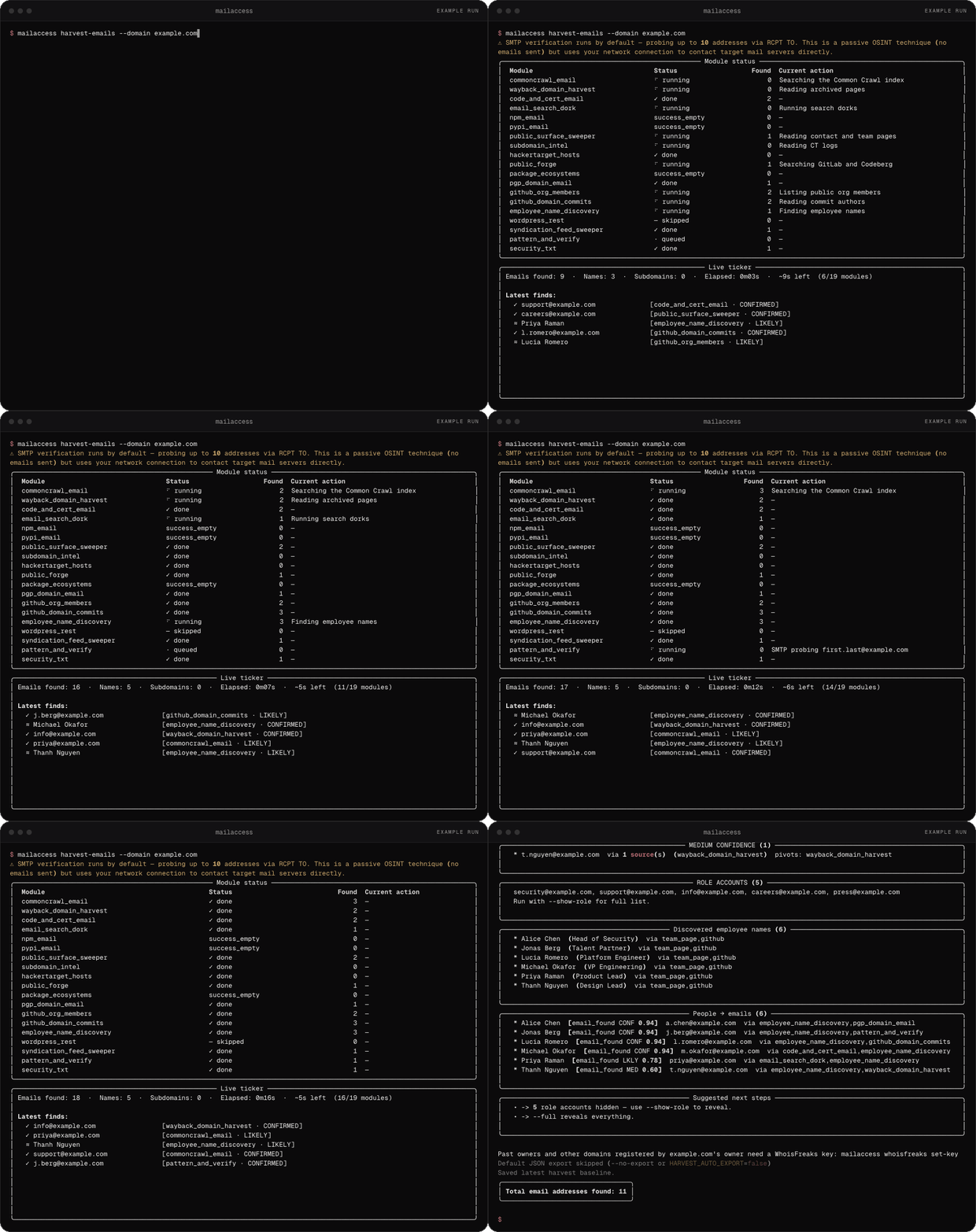
Example run with fictional data (example.com).
MailAccess Pro
Your free harvest finds the addresses that are public. Pro adds the people who make the decisions: business contacts with name, role, company, email and LinkedIn, from public and third-party commercial sources.
$ mailaccess harvest-emails --domain example.com
  11 found · 194 available with Pro
  ──────────────────────────────────────────────────────────────────
  Dana Reed    VP Security           Example   dana.reed@example.com   in/danareed
  Sam Okoye    Head of Procurement   Example   s.okoye@example.com     in/samokoye
  Priya Nair   Director, Platform    Example   p.nair@example.com      in/priyanair
  … 180 more business contacts (name, role, company, email, LinkedIn)
- See the gap first. Every free harvest prints how many contacts Pro would add for that domain.
- Company names work too.
--company "Example Corp"resolves the domain for you. - $5 a month, locked for life, for the first 100 subscribers. Then $9. Run
mailaccess profor seats left.
Pro contacts stay in their own view. They never enter your exports, local database or history. Without a key, nothing changes.
Modules and API keys
82 modules, and 71 of them need no API key. Investigations probe a bounded, evidence-first set of the highest-signal platforms rather than the whole corpus. Optional keys (HIBP, Netlas, ipgeolocation.io, WhoisFreaks, Oxylabs and others) add coverage: set them with mailaccess keys set.
Module reference · API keys · Export formats · Self-hosting
Staying up to date
MailAccess checks PyPI for a newer release (cached, never blocking) and prints a hint when you're behind. Update with mailaccess upgrade. Silence it with MAILACCESS_NO_UPDATE_CHECK=1, or get release notes by email.
To stop the calls MailAccess makes on its own (the coverage teaser, the sponsor feed, the founder-seat counter and this update check), run mailaccess --local-only <command>, or turn it on for good with mailaccess local-only enable. OSINT checks still run. With a Pro key set, Pro enrichment still runs, and the CLI tells you before it sends anything.
Sponsors
MailAccess is free and MIT licensed. Sponsors keep the corpus and the infrastructure running. Sponsor this project.
Links
| Self-hosting guide | Docker Compose, .env reference, PostgreSQL, proxy and Tor, Maltego setup |
| Module reference | Every module, the findings schema, adding a module |
| False-positive controls | Common names, disposable domains, clustering, platform health, scoring |
| API reference | REST endpoints, live run events, authentication |
| Export formats | Formats, MIME types, file names |
| Integrations | Maltego, Slack, Discord, webhooks |
| Brand assets | Logo, palette, type, downloadable SVGs |
| Contributing | Adding modules and exporters, code style, PR checklist |
License
MIT. By default MailAccess reads public, logged-out sources; optional providers you configure, and Pro, bring their own data. See DISCLAIMER.md for authorized use and legal responsibility.
If MailAccess saved you time, a ⭐ helps other researchers find it.
1 maintainer

Metadata
1 maintainer
Release files for mailaccess 0.19.1
For a detailed explanation of source distributions (sdists) and built distributions (wheels), please see the package formats documentation.
Source distribution (sdist)
| File | Size | Uploaded | Provenance | |
|---|---|---|---|---|
| mailaccess-0.19.1.tar.gz | 17.9 MB | Without provenance | Details |
Built distribution (wheel)
| File | Interpreter | ABI | Platform | Reset |
|---|---|---|---|---|
| mailaccess-0.19.1-py3-none-any.whl | Python 3 | none | any | Details |
Total release size: 23.6 MB
Release files / mailaccess-0.19.1.tar.gz
| Download URL | mailaccess-0.19.1.tar.gz |
|---|---|
| Size | 17.9 MB |
| Tags | Source |
|
SHA-256 checksum How to use checksums |
614b33c40aa643e3d3634286efab0c9e64decf1f0ce3e49c13d7e653d1a2b879
|
|
BLAKE2b-256 checksum How to use checksums |
6e371f60f4ff67655976145fd352cd0d77930d2587b05fa6909ff69f06309adb
|
| Upload date | |
|
Uploaded using Trusted Publishing? What is trusted publishing? |
No |
| Uploaded via |
uv/0.12.13 {"installer":{"name":"uv","version":"0.12.13","subcommand":["publish"]},"python":null,"implementation":{"name":null,"version":null},"distro":{"name":"macOS","version":null,"id":null,"libc":null},"system":{"name":null,"release":null},"cpu":null,"openssl_version":null,"setuptools_version":null,"rustc_version":null,"ci":null}
|
Release files / mailaccess-0.19.1-py3-none-any.whl
| Download URL | mailaccess-0.19.1-py3-none-any.whl |
|---|---|
| Size | 5.7 MB |
| Tags | Python 3 |
|
SHA-256 checksum How to use checksums |
c67647b1b6a9c64cd9ee0830aa887ce50c233c578dcebeaab80f5d06d5afbcd0
|
|
BLAKE2b-256 checksum How to use checksums |
e17b41a426455a5989bb94ba2f8043ef955ffb02e87351e1a5a9e82cbd911071
|
| Upload date | |
|
Uploaded using Trusted Publishing? What is trusted publishing? |
No |
| Uploaded via |
uv/0.12.13 {"installer":{"name":"uv","version":"0.12.13","subcommand":["publish"]},"python":null,"implementation":{"name":null,"version":null},"distro":{"name":"macOS","version":null,"id":null,"libc":null},"system":{"name":null,"release":null},"cpu":null,"openssl_version":null,"setuptools_version":null,"rustc_version":null,"ci":null}
|
Security for mailaccess 0.19.1
Provenance
Provenance describes where a file came from. On PyPI, provenance is shared via attestations, which provide a verifiable record of the build or publishing details. View details, limitations and caveats.
No provenance found
None of the files in this release were uploaded with provenance metadata.
A note on package security
PyPI is a repository for distributing packages, not a service for auditing them. While third-party security researchers and our staff do their best to detect and remove malicious packages, PyPI cannot guarantee the quality, security or suitability of any given package.
To learn more about protecting yourself from malicious actors, visit our package security documentation.














