
 MailVigil
English · Português (Brasil)


MailVigil is an offline, zero-dependency DMARC report analyzer: a command-line tool that reads
the aggregate reports (RUA) your mail providers send you and tells you, in plain language, who is
sending mail as your domain and whether it is safe to move your policy to p=reject.
Everyone who deploys DMARC receives a daily XML file (usually inside a .zip or .gz) from each
provider, and nobody reads them. The result is people who stay on p=none forever, afraid of
blocking legitimate mail. MailVigil reads them for you, groups the traffic by sender, and gives a
verdict with an explicit, documented criterion instead of a wall of numbers.
It is built for site owners, developers, agencies and infrastructure freelancers who are rolling out DMARC, and it runs entirely on your machine: your reports are never sent to anyone.
Status: stable, from
1.0.0. The commands, the exit codes, the--jsondocuments and the configuration file are a contract that changes only in a major version; what is public and what is not is in docs/stability.md.
Install: pipx install mailvigil or uv tool install mailvigil (Python 3.12 or newer, nothing
else). Then mailvigil verdict --config mailvigil.toml reports/.
Two real runs on invented reports (example.com, documentation addresses): the first period is
NOT READY and the command exits with 4; after the sender fixes its DKIM key, a month of newer
reports gives READY and 0. The commands are typed for the recording and the wait between the
two runs is cut. The recording is docs/demo/verdict.cast, made by
docs/demo/build_demo.py; play it with asciinema play.
What it does
MailVigil is built milestone by milestone, each one designed as a spec first, under
specs/. The milestones are the history of the build, not published versions: 1.0.0 is
the first release and contains v0.1 to v0.9.
| Milestone | Focus | Status |
|---|---|---|
v0.1 |
Read a folder or files (.zip, .gz, .xml), filter by domain; hostile input: cap the decompressed size (zip bombs) and refuse XML with DOCTYPE or ENTITY (entity expansion) |
shipped |
v0.2 |
Configuration: a TOML file with your domain and a map from DKIM selector to service name; a signature only counts under your own domain | shipped |
v0.3 |
mailvigil summary: per sender and per situation (ok, fragile, failing), failures highlighted |
shipped |
v0.4 |
mailvigil verdict: "Ready for reject?" with a declared criterion: 28 days covered, reports on 80% of the days, 100 messages, no failure from a recognized sender, at most 0.5% of the messages failing from unrecognized sources |
shipped |
v0.5 |
--json and stable exit codes for scripts and CI; the text in English or Brazilian Portuguese (--lang pt-BR) |
shipped |
v0.6 |
Mail messages as input: .eml and .mbox, the report attachment taken out in memory |
shipped |
v0.7 |
mailvigil verdict --html: one static page with the verdict, each rule against its limit and the messages day by day; no script, no network, opened from disk |
shipped |
v0.8 |
mailvigil fetch: download the report messages from a mailbox over IMAP into a folder, opt-in, read-only, always over verified TLS |
shipped |
v0.9 |
Hardening before the release: bounds on a report's count and period, a day counts as covered by time, notes for old data and for a reporter that went quiet, and distinct exit codes for a bug, Ctrl+C and a closed pipe | shipped |
Not planned, on purpose: indexing in Elasticsearch, a web dashboard served by the tool and sending e-mail, each with its reason in Permanent non-goals.
Configuration
MailVigil names a sender from the DKIM selector in its reports, using a map you write. The file is TOML, and the names below are invented:
domain = "example.com"

[senders]
newsletter = "Example Mailer (newsletters)"
mailbox = "Example Mail (staff mailboxes)"
"k1.v2" = "Example Campaigns"
- Start with an empty
[senders]and fill it from what the first summary shows as unknown. - A selector must identify one service. Names such as
defaultare shared by unrelated services, so MailVigil ships no built-in table and shows an unlisted sender as unknown. - A selector with a dot is written in quotes (
"k1.v2"). Without them TOML readsk1.v2as a nested table and MailVigil refuses the file. - A selector alone is not trusted. It names a service only on a passing DKIM signature under your domain or one of its subdomains; the same selector under another domain is reported as a foreign domain.
- The file is strict. An unknown key (
domian), a duplicate selector or a control character in a name is an error with a reason, never a silent guess, because a typo would change the answer.
mailvigil summary --config FILE reads it. Without --config the command reads mailvigil.toml
in the current folder, if there is one; with neither a file nor --domain it asks for one.
MailVigil vs. other tools
| MailVigil | parsedmarc | Hosted services (dmarcian, EasyDMARC, Postmark) | |
|---|---|---|---|
| Shape | One small CLI, standard library only | Parser and pipeline for Elasticsearch, Splunk and Kibana | Web dashboards |
| Where your reports go | Nowhere: offline | Your own stack | To a third party |
| Answer | A verdict on p=reject with a stated criterion |
Parsed data (JSON, CSV, dashboards) | Dashboards and recommendations |
| Best for | Deciding if you can enforce DMARC, from the terminal | Continuous monitoring at scale | Teams that want a managed product |
MailVigil is not a replacement for a monitoring pipeline: if you already run parsedmarc, keep it. It answers one question, and answers it without a stack to install.
Scope and limitations
MailVigil is deliberately small. For each limit below, what to reach for instead.
- It reads only the reports you give it. Mail that no receiver reports on, and senders that were quiet in the period, are not covered, and the verdict says so under every answer. Instead: collect a full cycle first; the verdict asks for 28 days.
fetchhas no OAuth. It logs in with a name and a password, so Microsoft 365 and Google accounts without an app password are not supported (see Fetch). Instead: save the report messages from your mail client into a folder as.emlfiles and pointsummaryat it. The same goes for a provider with no IMAP.- It is not a monitoring pipeline. There are no dashboards, no history and no alerts, and a web dashboard is not planned (see Permanent non-goals). Instead: parsedmarc with Elasticsearch or Kibana.
Quick start
Install it as a command, with pipx or uv. It needs Python 3.12 or newer and nothing else.
# Install the command (one of the two)
pipx install mailvigil
uv tool install mailvigil

# Check that the command runs
mailvigil --version

# Sum up a folder of reports (or name the files); mailvigil.toml is read if it is here
mailvigil summary reports/
mailvigil summary --config mailvigil.toml reports/
mailvigil summary --domain example.com report.xml.gz

# Ask if the domain is ready for p=reject (same arguments as summary)
mailvigil verdict --config mailvigil.toml reports/

# The same answers as one JSON document, for a script or a CI job
mailvigil verdict --config mailvigil.toml reports/ --json

# The text in Brazilian Portuguese (English is the default)
mailvigil verdict --config mailvigil.toml reports/ --lang pt-BR

# One HTML page to open in a browser (redirect it to a file)
mailvigil verdict --config mailvigil.toml reports/ --html > report.html

# Bring the report messages home from a mailbox (asks for the password), then read them
mailvigil fetch --host imap.example.com --user me@example.com --to reports/
summary and verdict print their text and nothing else; they only read your files and touch no
network. Only fetch connects to a server (see Fetch).
A folder is searched, one level deep, only for the names providers use for their attachments
(provider!domain!begin!end.zip, also .gz and .xml) and for .eml and .mbox files, whose
report attachments are taken out of the messages in memory. A file named on the command line is
read whatever its name.
What summary prints (invented data)
MailVigil summary for example.com
  config    mailvigil.toml (3 selectors)
  period    2026-10-20 to 2026-10-20 (1 of 1 day has a report)
  reports   1 from 1 reporter
  policy    p=none, sp=none, pct=100
  messages  7335 (7250 from recognized senders, 98.8%)

Situations
  ok       6300  85.9%
  fragile   975  13.3%
  failing    60   0.8%

Senders
  sender                               ok  fragile  failing  total
  Example Mailer (newsletters)       6300        0        0   6300
  Example Mail (staff mailboxes)        0      950        0    950
! 203.0.113.5 (unrecognized)            0        0       40     40
  198.51.100.99 (failing signature)     0       25        0     25
! 203.0.113.9 (unrecognized)            0        0       12     12
! 2001:db8::7 (unrecognized)            0        0        8      8

! FAILING: 60 messages in 3 sources
  Unrecognized sources that fail
  ! 203.0.113.5
      40 messages  dkim: fail, spf: fail
  ! 203.0.113.9
      12 messages  dkim: none, spf: fail
  ! 2001:db8::7
      8 messages  dkim: none, spf: none

Left out of these numbers
  skipped files  0
  duplicates     0
  other domains  0
A ! marks a sender with failing messages. Files that were refused, duplicates and reports of
another domain are counted at the bottom, so a number never silently drops out.
The verdict
mailvigil verdict answers one of three things, each with the rule that decided it. This is a
NOT READY (invented data):
MailVigil verdict for example.com: NOT READY for p=reject

Why: failures from unrecognized sources are 0.8% of the messages (56 of 7056);
     the limit is 0.5%.
  203.0.113.5  unrecognized: 56 failing messages

Rules
  rule                      measured         needed   result
  1  period covered         29 days          >= 28    pass
  2  days with a report     29 of 29 (100%)  >= 80%   pass
  3  messages seen          7056             >= 100   pass
  4  recognized failures    0                <= 0     pass
  5  unrecognized failures  56 (0.8%)        <= 0.5%  FAIL

Next: look at the sources above and add the selectors of the ones that are yours
      to [senders] in the configuration.

This reads only the reports you gave it: mail that no receiver reports on, and
senders that were quiet in this period, are not covered.
READY means every rule passes. TOO EARLY means the data rules (1 to 3) fail and nothing is
failing yet: wait for more reports. NOT READY means a source fails (rules 4 and 5), and the
command names it.
When files were refused, duplicated or from another domain, the verdict adds one line saying so;
mailvigil summary shows why. They never change the answer.
HTML report
mailvigil verdict --html prints one self-contained HTML page instead of the text, for reading the
answer on a screen or sending it to someone who will not open a terminal. The page opens with the
answer, then shows each of the five rules as a meter against its limit, the split of the messages
in four situations, one column per day of the period, the senders and the failing sources. It
follows --lang, switches to dark with the system, and prints on paper.
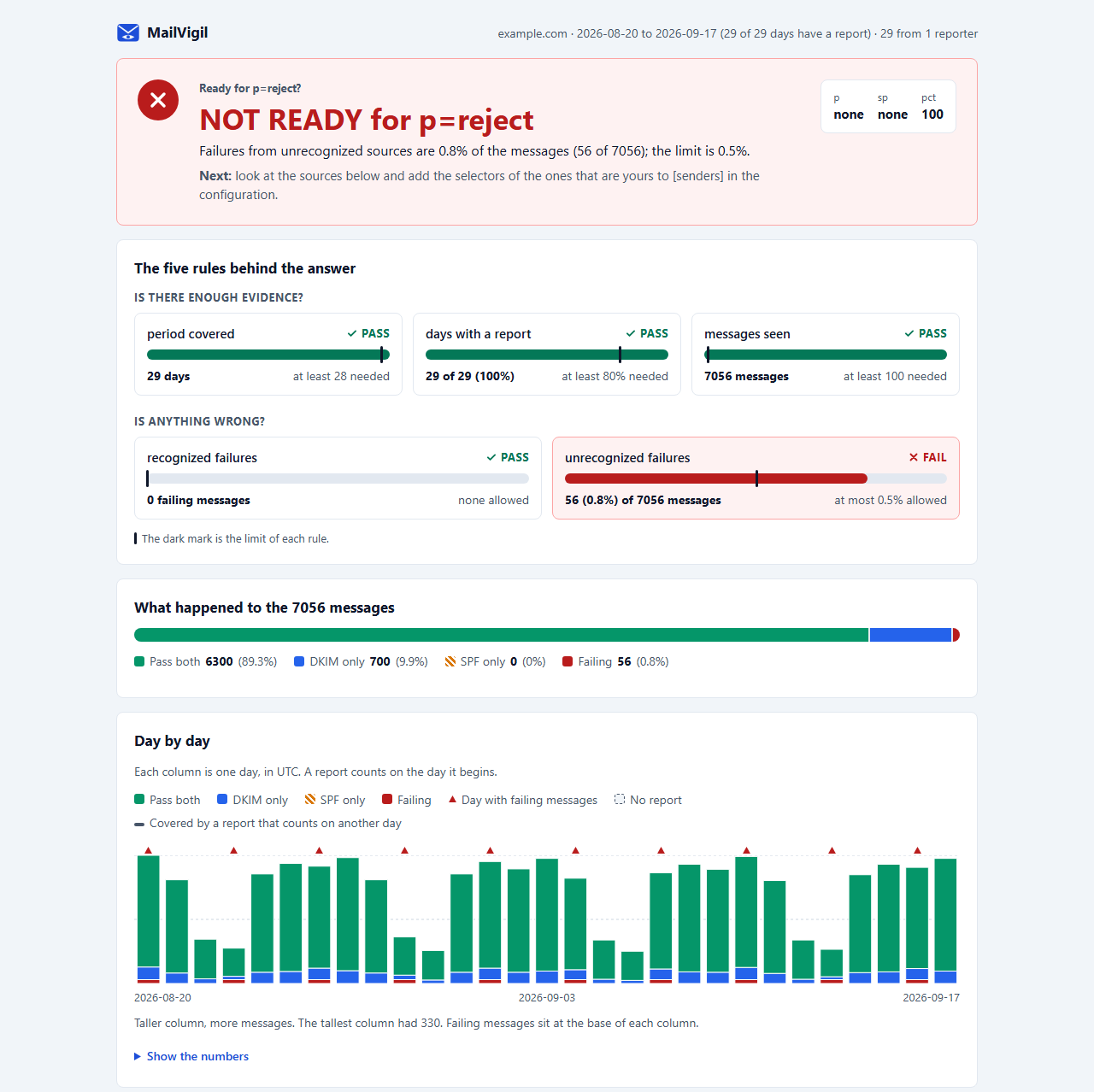
The page for an invented domain (example.com, documentation addresses), in the light and the dark palette: unrecognized sources fail 0.8% of the messages (56 of 7056), above the 0.5% limit, so the answer is NOT READY.
mailvigil verdict --config mailvigil.toml reports/ --html > report.html
- It is a file, not a server. The page has no script, loads nothing from the network and declares a content security policy that forbids both; the text from your reports is escaped before it reaches the markup. Open it from disk.
- It carries no path and no file name, only what the reports say, so it can be shared as it is once you are happy to show the domain and the sending addresses in it.
- The exit code is the same as without
--html(0,3,4), and--htmlcannot be combined with--json.summaryhas no--html. --output FILEwrites the page itself, as ASCII bytes, so no shell sits in between:mailvigil verdict --config mailvigil.toml reports/ --html --output report.html. It replaces a file already there, never creates the folder, prints nothing when it works and needs--html. Use it in Windows PowerShell 5.1, whose>writes UTF-16, which browsers do not read as the page intends. The page is ASCII, so any other shell's>is fine too.
Fetch
mailvigil fetch saves the DMARC report messages of a mailbox, untouched, as .eml files in a
folder; summary and verdict read that folder afterwards. It is the one command that opens a
network connection, and summary and verdict never load its code.
# Ask for the password on the terminal
mailvigil fetch --host imap.example.com --user me@example.com --to reports/

# Only recent mail, at most 200 messages, the password read from a file (for cron)
mailvigil fetch --host imap.example.com --user me@example.com --to reports/ \
  --since 2026-10-01 --limit 200 --password-file ~/.mailvigil-password
What it does:
- Looks in
INBOX(or--folder) for the messages whose subject hasReport Domain:, the subject providers use for their reports, and saves each one as<tag>-<validity>-<uid>.eml. - Is incremental: run it again and only the new messages are saved, so it can run from
cron.--limit(default 500, at most 10000) caps one run and takes the newest first. - Prints six numbers (matched, saved, already saved, too large, skipped, left for the next run) and the folder, never a subject, sender or address.
What it does not do:
- It never changes the mailbox: no delete, move, flag, and the messages are not marked as read.
- It never connects without TLS, and the certificate is always checked. There is no option to turn
that off, no plain IMAP and no STARTTLS (
--portdefaults to 993). - The password is asked for on the terminal, or read from the first line of
--password-file. It is never an argument or an environment variable, and nothing stores it. - It does not parse the reports: it saves bytes, and the ingestion reads them.
No IMAP at your provider? fetch needs one, and many free mail plans do not offer it. Then
download the report messages by hand (save each as .eml, or save the attachments) into a folder
and point summary or verdict at it: everything but the download works the same. When a login is
refused or the server cannot be reached, the message says so.
Provider limits: it logs in with a name and a password (LOGIN), with no OAuth. Gmail works with
an app password (two-step verification on).
Microsoft 365 and Google accounts without an app password are not supported in this version. A
name or password with a character outside ASCII is sent with AUTHENTICATE PLAIN in UTF-8, and
only if the server offers it; otherwise the run is refused.
Exit codes: 0 when the run finished, even with nothing new; 1 when it was refused (the one-line
reason is printed); 2 for a usage error; 70 for a bug (see below).
Exit codes
The exit code is a contract: a script can tell "yes", "wait" and "no" from "I could not run"
without reading the text. --json does not change it.
| Code | Meaning | Commands |
|---|---|---|
0 |
An answer was printed; for verdict, the answer is ready; for fetch, the run finished |
all |
1 |
The run was refused: invalid configuration or domain, no report kept, or (for fetch) the connection, login or folder failed |
all |
2 |
Usage error (an unknown option, a missing argument) | all |
3 |
verdict printed too early: wait for more reports |
verdict |
4 |
verdict printed not ready: a source fails |
verdict |
70 |
Internal error, a bug: one line on standard error says where; please report it | all |
130 |
Interrupted with Ctrl+C | all |
141 |
The output pipe was closed (mailvigil verdict ... | head) |
all |
Note that 1 is a refusal and 4 is "not ready"; a script that treats every non-zero code alike
mixes them up:
mailvigil verdict reports/ --domain example.com --json > verdict.json
case $? in
  0) echo "ready for p=reject" ;;
  3) echo "too early: keep collecting reports" ;;
  4) echo "not ready: see verdict.json" ;;
  *) echo "mailvigil could not run" >&2 ;;
esac
A change to this table is a breaking change. docs/stability.md lists what else is public and what is not.
JSON
--json on summary or verdict prints one JSON document and a newline on standard output,
and nothing on standard error. The document is data, not text: integers, booleans, identifiers and
the report values, with no sentence and no rounded percentage. It carries every sender and every
failing source, without the limits the text keeps, and a value that may not exist (no period yet,
no sp) is null. A refused run prints no document: the one line goes to standard error, as
without --json, and the exit code is 1. docs/json-schema.md lists every field and the
compatibility promise.
Language
The text of both commands and the one-line refusals are in English by default. --lang pt-BR
(pt-br works too) prints them in Brazilian Portuguese; --lang en is the default spelled out, and
any other code is a usage error (exit 2). The Portuguese is plain ASCII (nao, not não), so no
console encoding can break the layout.
The same invented NOT READY as above, in Portuguese
Veredito do MailVigil para example.com: NAO PRONTO para p=reject

Motivo: as falhas de origens nao reconhecidas sao 0.8% das mensagens (56 de
        7056); o limite e 0.5%.
  203.0.113.5  nao reconhecido: 56 mensagens com falha

Regras
  regra                       medido           necessario  resultado
  1  periodo coberto          29 dias          >= 28       passa
  2  dias com relatorio       29 de 29 (100%)  >= 80%      passa
  3  mensagens vistas         7056             >= 100      passa
  4  falhas reconhecidas      0                <= 0        passa
  5  falhas nao reconhecidas  56 (0.8%)        <= 0.5%     FALHA

Proximo: olhe as origens acima e acrescente os seletores das que forem suas a
         [senders] na configuracao.

Isto le apenas os relatorios que voce deu: email que nenhum receptor reporta, e
remetentes que ficaram quietos neste periodo, nao sao cobertos.
Numbers keep the decimal point in both languages, --json has no language (its identifiers do not
change), --help stays in English, and neither the language nor --json changes an exit code.
Development
Python 3.12 is the floor (CI tests 3.12 to 3.15, on Linux and on Windows). The quality gate runs before every commit through a versioned hook:
# Activate the pre-commit hook once per clone
git config core.hooksPath .githooks

# Lint (the hook and the CI run the same four steps, in this order)
uv run ruff check .

# Check the formatting
uv run black --check .

# Check the types (strict)
uv run mypy

# Run the tests with coverage
uv run pytest --cov
Each technology of the stack, and why it was chosen, is explained in docs/stack.md. Features are specified under specs/ before they are built.
Contributions are welcome: see CONTRIBUTING.md. To report a vulnerability in MailVigil itself, use the private channel described in SECURITY.md, never a public issue.
License
1 maintainer

Metadata
1 maintainer
Release files for mailvigil 1.1.1
For a detailed explanation of source distributions (sdists) and built distributions (wheels), please see the package formats documentation.
Source distribution (sdist)
| File | Size | Uploaded | Provenance | Actions |
|---|---|---|---|---|
| mailvigil-1.1.1.tar.gz | 122.1 kB | With provenance | Details for mailvigil-1.1.1.tar.gz |
Built distribution (wheel)
| File | Interpreter | ABI | Platform | Actions Reset |
|---|---|---|---|---|
| mailvigil-1.1.1-py3-none-any.whl | Python 3 | none | any | Details for mailvigil-1.1.1-py3-none-any.whl |
Total release size: 264.5 kB
Release files / mailvigil-1.1.1.tar.gz
| Download URL | mailvigil-1.1.1.tar.gz |
|---|---|
| Size | 122.1 kB |
| Tags | Source |
|
SHA-256 checksum How to use checksums |
bd7e4cfa8395ae13f40d892373a2c793e99229167b0db3f5ae2a8f273c4fd8ec
|
|
BLAKE2b-256 checksum How to use checksums |
ac0c9805cba6a511191d4369c0a6f18bc3764b1e896842cb0480fc782ece9f18
|
| Upload date | |
|
Uploaded using Trusted Publishing? What is trusted publishing? |
Yes |
| Uploaded via |
twine/7.0.0 CPython/3.13.16
|
Provenance
Provenance describes where a file came from. On PyPI, provenance is shared via attestations, which provide a verifiable record of the build or publishing details. View details, limitations and caveats.


PyPI Publish Attestation
PyPI verified that this artifact, at this checksum, originated from the publisher listed below.
Signed by GitHub Actions, verified by PyPI on Oct 30, 2026.
Transparency logRelease files / mailvigil-1.1.1-py3-none-any.whl
| Download URL | mailvigil-1.1.1-py3-none-any.whl |
|---|---|
| Size | 142.5 kB |
| Tags | Python 3 |
|
SHA-256 checksum How to use checksums |
ab48c547ab14dbd016706b2769f25c06140233c75a386b351621dbd1cd78cf6a
|
|
BLAKE2b-256 checksum How to use checksums |
f77ef6fa1c3dd96da01c2e82dad5456470eb0c6f2d1bf4828ba78677438c96c3
|
| Upload date | |
|
Uploaded using Trusted Publishing? What is trusted publishing? |
Yes |
| Uploaded via |
twine/7.0.0 CPython/3.13.16
|
Provenance
Provenance describes where a file came from. On PyPI, provenance is shared via attestations, which provide a verifiable record of the build or publishing details. View details, limitations and caveats.
PyPI Publish Attestation
PyPI verified that this artifact, at this checksum, originated from the publisher listed below.
Signed by GitHub Actions, verified by PyPI on Oct 30, 2026.
Transparency logSecurity for mailvigil 1.1.1
Provenance
Provenance describes where a file came from. On PyPI, provenance is shared via attestations, which provide a verifiable record of the build or publishing details. View details, limitations and caveats.
Full provenance
Both files in this release have been uploaded with provenance metadata.
Attestation for mailvigil-1.1.1.tar.gz
PyPI Publish Attestation
PyPI verified that this artifact, at this checksum, originated from the publisher listed below.
Signed by GitHub Actions, verified by PyPI on Oct 30, 2026.
Transparency logA note on package security
PyPI is a repository for distributing packages, not a service for auditing them. While third-party security researchers and our staff do their best to detect and remove malicious packages, PyPI cannot guarantee the quality, security or suitability of any given package.
To learn more about protecting yourself from malicious actors, visit our package security documentation.














