
maix_lvgl
中文文档 | English
LVGL bindings for MaixPy on MaixCAM/MaixCAM2 and desktop Linux / Windows
(x86_64, SDL)
with the MicroPython-style API. The MaixPy build is a standard MaixCDK
project: the LVGL library is downloaded and built by MaixCDK, the binding is
generated from that source, and setup.py packages the result the same way
MaixPy does.
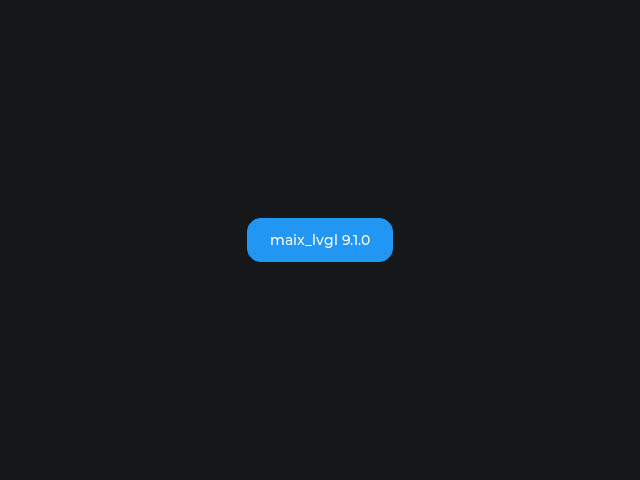
Rendered by MaixCAM2 through maix.display.Display (640×480, BGRA8888).
The binding is generated with the generator from
PyDevices/omnipython-lvgl
(MIT), vendored under tools/omnipython_lvgl/.
Prebuilt wheel: Releases.
Install
PyPI (recommended)
python3 -m pip install maix-lvgl
pip selects the wheel that matches the platform (MaixCAM2: aarch64 / Python
3.13, MaixCAM: RISC-V 64 / Python 3.11, desktop Linux / Windows: x86_64 / Python 3.13).
The import name is maix_lvgl:
import maix_lvgl as lv
GitHub Release
Install the prebuilt wheel directly from the GitHub Release on the device.
MaixCAM2 (aarch64, Python 3.13) — tested
python3 -m pip install --force-reinstall --no-deps \
  https://github.com/Taoxuan-168/Maix_LVGL/releases/download/v0.1.0/maix_lvgl-0.1.0-cp313-cp313-manylinux2014_aarch64.whl
MaixCAM (RISC-V 64, Python 3.11) — untested
python3 -m pip install --force-reinstall --no-deps \
  https://github.com/Taoxuan-168/Maix_LVGL/releases/download/v0.1.0/maix_lvgl-0.1.0-cp311-cp311-musllinux_1_2_riscv64.whl
Verify the installation:
import maix_lvgl as lv
print(lv.__version__)
Release page: https://github.com/Taoxuan-168/Maix_LVGL/releases/tag/v0.1.0
The MaixCAM wheel is built but not tested on MaixCAM hardware; only the MaixCAM2 wheel has been verified. If pip reports "not a supported wheel", check the device platform and Python version (MaixCAM2: aarch64 / 3.13, MaixCAM: RISC-V 64 / 3.11).
Quick start
import time
from maix import app, display, touchscreen
import maix_lvgl as lv

disp = display.Display()
ts = touchscreen.TouchScreen()

try:
    lv.init(disp, ts)               # pass MaixPy display + touchscreen

    scr = lv.screen_active()
    btn = lv.button(scr)            # same style as MicroPython's lvgl
    btn.set_size(240, 120)
    btn.center()
    label = lv.label(btn)
    label.set_text("Hello MaixCAM2")

    btn.add_event_cb(lambda e: print("clicked"), lv.EVENT.CLICKED, None)

    while not app.need_exit():
        lv.timer_handler()          # maix_lvgl version: advances the LVGL tick
        time.sleep(0.005)
finally:
    lv.deinit()
    ts.close()
    disp.close()
Desktop Linux / Windows (x86_64)
On a normal x86_64 Linux desktop the same package uses LVGL's SDL window driver instead of MaixPy's display:
import time
import maix_lvgl as lv

lv.init(800, 600)              # SDL window size
scr = lv.screen_active()
label = lv.label(scr)
label.set_text("Hello from Linux")
label.center()

try:
    while True:
        lv.timer_handler()
        time.sleep(0.01)
except KeyboardInterrupt:
    pass
finally:
    lv.deinit()
maix_lvgl detects whether maix is importable. On MaixCAM it keeps using
display.Display + touchscreen.TouchScreen; elsewhere it creates an SDL
window with mouse and keyboard input.
- The PyPI
manylinuxwheel bundles SDL2 and needs glibc 2.28+ (Ubuntu 20.04+ / Debian 10+). - The
linux_x86_64wheel on GitHub Releases uses the systemlibSDL2-2.0.so.0(sudo apt install libsdl2-2.0-0).
Build the desktop wheel:
tools/build_linux.sh

# portable manylinux build (Docker)
docker run --rm -v "$PWD/..:/src" -w /src/maix_lvgl \
  quay.io/pypa/manylinux_2_28_x86_64 bash tools/build_linux_manylinux.sh
Windows
The win_amd64 wheel is cross-compiled with mingw-w64 and bundles
SDL2.dll; it targets 64-bit Python 3.13. The same SDL example above
applies:
lv.init(800, 600)
python -m pip install maix-lvgl
The current Windows wheel has been cross-compiled on Linux and checked with PE dependency/export inspection, but has not been run on Windows hardware yet.
Build it on Linux:
WIN_PY_DIR=/path/to/windows-python/tools \
WIN_SDL_DIR=/path/to/SDL2/x86_64-w64-mingw32 \
tools/build_windows.sh
The UI examples (demo.py, showcase.py, tile_dashboard.py,
neon_dashboard.py, music_player.py, watchface.py, drawing_board.py) run
on desktop Linux as well:
cd examples
python demo.py
The camera examples (threshold_editor.py, multi_color_threshold.py) require
the MaixPy camera and print a hint on desktop Linux.
Feature showcase
examples/showcase.py is a four-page interactive demo:
| page | contents |
|---|---|
| Controls | buttons, switch, checkbox, slider, bar, arc, dropdown, roller, spinbox, LED |
| Data | live sin/cos chart, table, calendar |
| Input | textarea + on-screen keyboard, list, message box |
| Canvas | direct canvas pixel drawing, property animation, spinner |
Run it on the device, then use the on-screen Exit button (top-right):
python showcase.py
Screenshots: examples/screenshots/{controls,data,input,canvas}.png.
With MAIXPY_DEBUG_IMAGES=1 the demo auto-advances the pages, exits after
12 seconds and writes showcase_<tab>.png into the skill run artifacts.
UI style examples
Four self-contained examples reproduce the visual styles collected for this
project. Each has an on-screen Exit button; --debug-images captures a
screenshot and exits after 12 seconds.
HomeTiles — tile dashboard
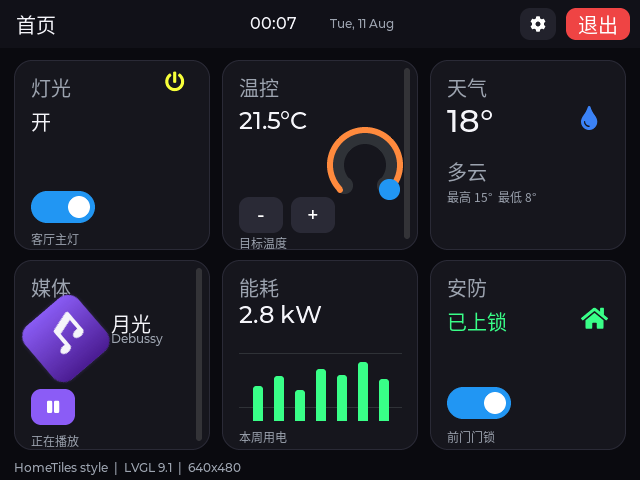
Tile dashboard with light, climate, weather, media, energy and security cards, popups, a chart and a rotating cover.
Project Aura — neon instrument panel
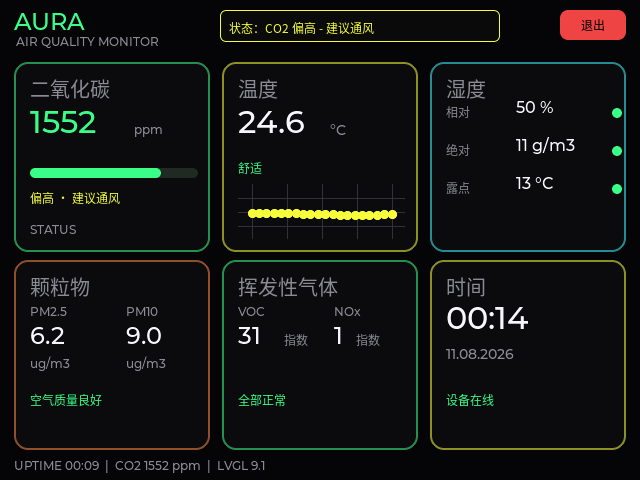
Black background with neon outlines: CO2, temperature, humidity, particle, VOC/NOx and time cards, live trend and breathing borders.
LVGL Music — player
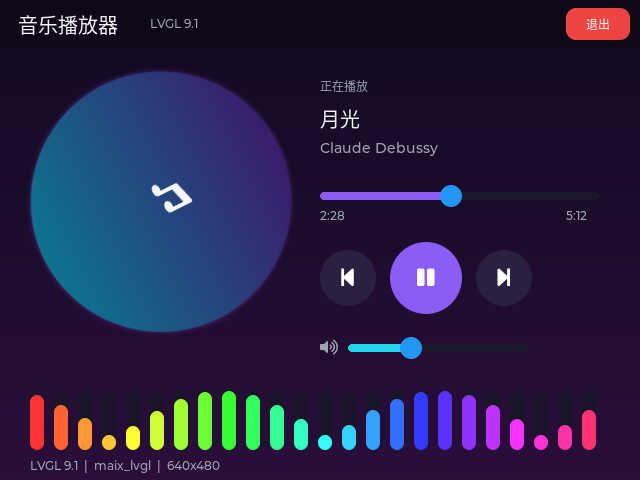
Rotating cover, progress/volume sliders, previous/play/next controls and a 24-bar spectrum analyzer.
ZSWatch — watchface
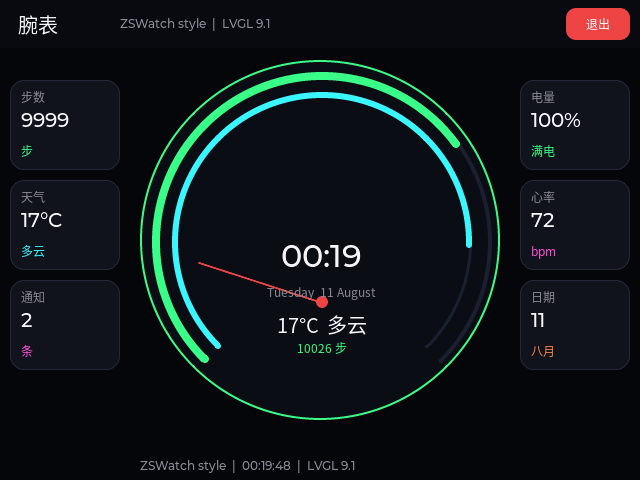
Round dial with neon step/battery arcs, a seconds hand and tappable theme switching.
Run one directly on the device:
python examples/tile_dashboard.py
Camera threshold editors
Two utilities for tuning color thresholds against the live camera. Both run on the device and use only MaixPy image APIs.
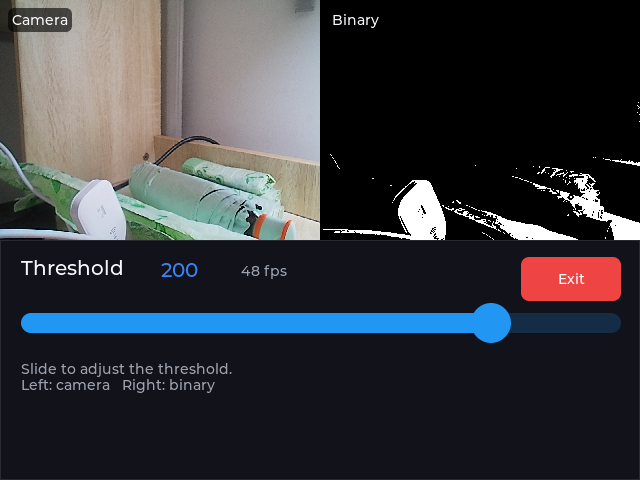
Binary threshold editor
A single gray threshold (0–255) with a live camera / binary split view and a slider that applies immediately.
Multi-color LAB threshold editor
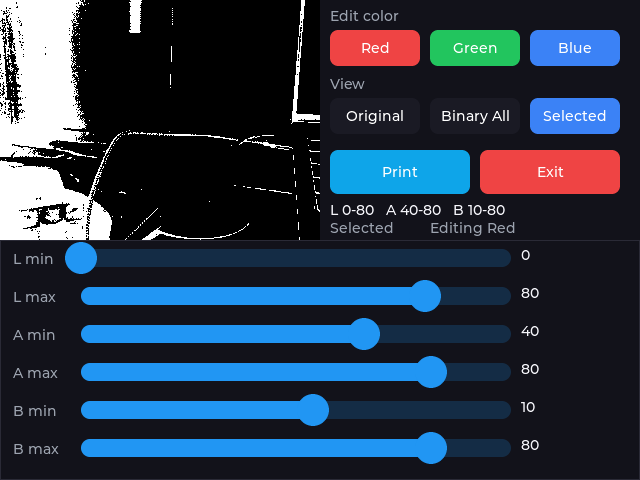
examples/multi_color_threshold.py
Inspired by MaixCDK's app_find_blobs: three color entries (red / green /
blue), six LAB sliders for the selected color, and three view modes:
Original— camera imageBinary All— all three color thresholds combinedSelected— only the currently selected color
Print dumps the threshold table to stdout. Sliders are independent and
apply immediately; a reversed min/max range simply matches no pixels.
Run either one on the device:
python examples/threshold_editor.py
python examples/multi_color_threshold.py
Drawing board
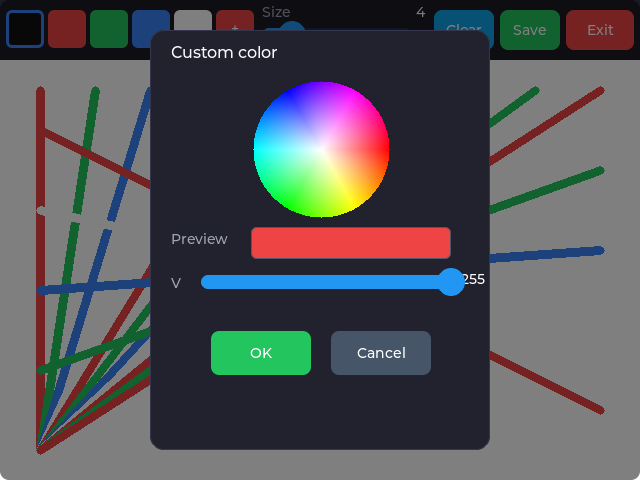
A touch drawing board with five preset colors, a custom HSV color wheel
(open with the + button), brush size, clear, PNG export and exit. The
canvas is 640×420 and drawing writes pixels into an LVGL canvas from the
pointer input device.
Run on the device:
python examples/drawing_board.py
Saved images are written to /root/drawing.png.
Chinese text with FreeType
LVGL's built-in Montserrat fonts only cover Latin. The build enables
LV_USE_FREETYPE (see tools/patch_maixcdk.py) and links MaixCDK's
freetype component, so device fonts can be loaded at runtime.
Complete example (run on the device):
import time

from maix import app, display, touchscreen

import maix_lvgl as lv

FONT = "/maixapp/share/font/SourceHanSansCN-Regular.otf"


def main():
    disp = display.Display()
    ts = touchscreen.TouchScreen()
    running = [True]
    font = None
    try:
        lv.init(disp, ts)
        scr = lv.screen_active()
        scr.set_style_bg_color(lv.color_hex(0x101018), 0)
        scr.set_style_bg_opa(lv.OPA.COVER, 0)

        # lv_init() already initializes FreeType, and lv_deinit() cleans it
        # up.  Do not call lv.freetype_init()/lv.freetype_uninit() manually.
        font = lv.freetype_font_create(
            FONT,
            0,      # LV_FREETYPE_FONT_RENDER_MODE_BITMAP
            24,     # pixel size
            0,      # LV_FREETYPE_FONT_STYLE_NORMAL
        )
        if font is None:
            raise RuntimeError("cannot load " + FONT)

        title = lv.label(scr)
        title.set_text("你好,MaixCAM2!")
        title.set_style_text_font(font, 0)
        title.set_style_text_color(lv.color_hex(0xFFFFFF), 0)
        title.set_pos(20, 20)

        body = lv.label(scr)
        body.set_text(
            "这是 LVGL FreeType 渲染的中文。\n"
            "汉字:你好世界\n"
            "标点:,。!?:;()\n"
            "混合:LVGL 9.1 中文 123"
        )
        body.set_style_text_font(font, 0)
        body.set_style_text_color(lv.color_hex(0x9CA3AF), 0)
        body.set_pos(20, 70)

        def on_exit(event):
            running[0] = False

        button = lv.button(scr)
        button.set_pos(20, 230)
        button.set_size(120, 44)
        button.add_event_cb(on_exit, lv.EVENT.CLICKED, None)
        button_label = lv.label(button)
        button_label.set_text("退出")
        button_label.set_style_text_font(font, 0)
        button_label.center()

        while not app.need_exit() and running[0]:
            lv.timer_handler()
            time.sleep(0.005)

        # Delete widgets that use the font first, then the font itself.
        button.delete()
        body.delete()
        title.delete()
        font.freetype_font_delete()
        font = None
    finally:
        if font is not None:
            font.freetype_font_delete()
        lv.deinit()
        ts.close()
        disp.close()


if __name__ == "__main__":
    main()
Notes:
lv_init()initializes FreeType andlv_deinit()cleans it up. Callinglv.freetype_init()/lv.freetype_uninit()manually and thenlv.deinit()makes cleanup run twice and can hang.- Delete widgets that use the font before
font.freetype_font_delete(). - The Source Han font is ~8.3 MB; create it on demand. The glyph cache is
LV_FREETYPE_CACHE_SIZE(768 KB by default). - Screenshot:
examples/screenshots/cjk_font.png.
Debugging with AI (screen capture loop)
maix_lvgl renders into a Python bytearray (driver._buffer, BGRA8888)
and pushes the same bytes to maix.display.Display. A script can therefore
turn the exact frame the user sees into a PNG and hand it back to an assistant
or a CI job:
img = image.from_bytes(
    driver.width, driver.height,
    image.Format.FMT_BGRA8888,
    bytes(driver._buffer), True,
)
img.save("/tmp/maixpy_skill/<run>/artifacts/frame.png")
examples/showcase.py implements this behind MAIXPY_DEBUG_IMAGES=1 (the
skill CLI sets it with --debug-images): it captures every 2 s, cycles
through the four pages, and exits after 12 s. Normal user runs never capture.
Run loop
python3 <skill>/scripts/maixpy_skill/cli.py run examples/showcase.py --debug-images
The CLI enters development mode, stops the launcher, runs the script on the
device, then pulls the run directory back to .maixpy/runs/<run_id>/:
| artifact | use |
|---|---|
stdout.log / stderr.log |
prints, tracebacks, crash output |
summary.json |
exit_code (139 SIGSEGV, 135 SIGBUS, 124 timeout) |
device-last-run.log |
full device log |
artifacts/*.png |
exact LVGL frames, readable as images |
Pixel checks without a screenshot
Tests can assert on the raw frame buffer:
idx = (h // 2) * w * 4 + (w // 2) * 4
b, g, r, a = driver._buffer[idx: idx + 4]
assert (r, g, b) == (255, 0, 0)
Notes
- Capture code lives only in
examples/andtests/; the wheel contains no debug switches, debug symbols, or capture paths. - Real touch input still needs a person (or
send_eventfor synthetic events). - Keep
--debug-imagesout of final user-facing runs.
Standard MaixCDK project layout
maix_lvgl/
├── CMakeLists.txt           # MaixCDK project entry
├── project.py               # MaixCDK build driver
├── Kconfig                  # project config
├── main/                    # entry component (depends on lvgl_binding)
├── components/lvgl_binding/ # LVGL CPython extension component
│   ├── CMakeLists.txt       # links MaixCDK's lvgl + python3, generates binding
│   ├── component.py         # add_requirements: lvgl, python3
│   └── Kconfig
├── binding/                 # generated C binding + pyi + lv_conf.h
├── runtime/                 # CPython runtime glue (lvpy_runtime.c/h)
├── maix_lvgl/               # Python backend + built extension (in the wheel)
│   └── linux_driver.py      # SDL window backend for desktop Linux
├── linux/                   # desktop Linux lv_conf.h + generated binding
├── windows/                 # Windows lv_conf.h + generated binding
├── tools/
│   ├── maixcdk_lvgl.py      # locate MaixCDK / its LVGL source
│   ├── regenerate_binding.py# regenerate binding from MaixCDK's LVGL (stamped)
│   ├── regenerate_linux_binding.py
│   ├── build_linux.sh       # native x86_64 SDL wheel
│   ├── build_linux_manylinux.sh
│   ├── regenerate_windows_binding.py
│   ├── build_windows.sh
│   ├── build_windows_wheel.py
│   └── omnipython_lvgl/     # vendored generator (MIT)
├── configs/config_platform_maixcam2.mk
├── setup.py                 # project.py build + wheel packaging (like MaixPy)
├── setup_linux.py           # desktop Linux wheel packaging
└── dist/
components/lvgl_binding declares ADD_REQUIREMENTS lvgl python3, so
MaixCDK downloads its pinned LVGL (9.1.0 today, from
components/3rd_party/lvgl/Kconfig), compiles it together with the rest of
the stack, and the binding links against that exact library.
Building
export MAIXCDK_PATH=/path/to/MaixCDK

# MaixCAM2 (aarch64, Python 3.13) — tested on hardware
python3 setup.py bdist_wheel --board maixcam2

# MaixCAM (RISC-V, Python 3.11) — NOT tested on hardware
python3.11 setup.py bdist_wheel --board maixcam
--board also accepts -b maixcam, --board=maixcam, a positional
maixcam/maixcam2, or the MAIX_BOARD environment variable. The default
is maixcam2.
Desktop Linux (x86_64, SDL):
# native build (needs libsdl2-dev and Python headers)
tools/build_linux.sh

# manylinux_2_28 container build (PyPI-compatible tag)
docker run --rm -v "$PWD/..:/src" -w /src/maix_lvgl \
  quay.io/pypa/manylinux_2_28_x86_64 bash tools/build_linux_manylinux.sh
MaixCAM build is untested. The
maixcamwheel targetscp311-musllinux_1_2_riscv64and is provided for completeness; only the MaixCAM2 build has been verified on hardware.
What happens:
setup.pyrunspython project.py build -p <board> --release(same pattern as MaixPy'ssetup.py).- MaixCDK downloads its LVGL source and dependencies (first build), then the
lvgl_bindingcomponent's custom target regeneratesbinding/lvgl_python.cfrom that source when it changed. - The component compiles and links against MaixCDK's
lvglandpython3components with MaixCDK's cross toolchain. - The wheel is packaged with the target tag:
- MaixCAM2:
cp313-manylinux2014_aarch64,lvgl.cpython-313-aarch64-linux-gnu.so - MaixCAM:
cp311-musllinux_1_2_riscv64,lvgl.soBoth containmaix_lvgl/(__init__.py,driver.py, the extension) anddl_lib/libdatachannel.so.
- MaixCAM2:
The build also generates MaixPy-style API documentation from
binding/lvgl.pyi into docs/api/ (api.json, config.json, README.md,
README2.md, sidebar.yaml and maix_lvgl/{lvgl,maix_lvgl}.md), the same
build-time flow as MaixPy's components/maix/gen_api.py -> docs/api/maix.
The generated docs are a build artifact and are not tracked in git; run
python3 tools/gen_api_docs.py to regenerate them alone.
Fresh clone / clean build
Only tracked sources are required. binding/lvgl_python.c, binding/lvgl.pyi,
binding/lv_conf.h, build/, dist/ and docs/api/ are generated:
git clone https://github.com/Taoxuan-168/Maix_LVGL.git
cd Maix_LVGL
export MAIXCDK_PATH=/path/to/MaixCDK

# MaixCAM2 (host Python 3.13)
python3 -m pip install 'pycparser>=3.0'
python3 setup.py bdist_wheel --board maixcam2

# MaixCAM (host Python 3.11; untested)
python3.11 -m pip install --user 'pycparser>=3.0'
python3.11 setup.py bdist_wheel --board maixcam
The build automatically:
- downloads LVGL/freetype into MaixCDK on first use,
- applies
tools/patch_maixcdk.py(enablesLV_USE_FREETYPE, links the freetype component and adds CMake 4 compatibility), - applies
tools/patch_lvgl.py(LVGL 9.1.0 observer/canvas fixes), - regenerates
binding/lvgl_python.candbinding/lvgl.pyi, - builds and packages
dist/maix_lvgl-*.whl.
Build requirements: MaixCDK with the target toolchain/Python headers under
dl/extracted, host Python 3.13 for MaixCAM2 and host Python 3.11 for
MaixCAM, cmake 3.x or 4.x (tools/patch_maixcdk.py passes
-DCMAKE_POLICY_VERSION_MINIMUM=3.5 to freetype for CMake 4), pycparser
(pip install 'pycparser>=3.0'), host gcc, and network access for the
first dependency download.
For the MaixCAM build, python3-config must also resolve to Python 3.11.
If your system default is another version, prepend a 3.11 bin directory or a
small wrapper:
mkdir -p /tmp/py311-bin
printf '#!/bin/sh\nexec /usr/bin/python3.11-config "$@"\n' > /tmp/py311-bin/python3-config
chmod +x /tmp/py311-bin/python3-config
PATH=/tmp/py311-bin:$PATH python3.11 setup.py bdist_wheel --board maixcam
Binding regeneration is cached in binding/.binding_stamp.json and runs
automatically during project.py build. Force it with:
python3 tools/regenerate_binding.py --force
# or
./scripts/regenerate_binding.sh
--skip-build reuses the existing MaixCDK build when re-packaging. The
build directory is tracked per board; switching boards without
--skip-build triggers a clean rebuild:
python3 setup.py bdist_wheel --board maixcam2 --skip-build
Configuration notes
The binding uses MaixCDK's LVGL lv_conf.h as-is (so struct layouts match the
library MaixCDK compiles): LV_USE_OS=LV_OS_PTHREAD, LV_USE_RLOTTIE=1,
LV_COLOR_DEPTH=32. Two build-system-only bits are removed
(global_config.h include and the lv_ui_mutex_* declarations), and the
generated C has Python access stripped from fields whose types are
pthread_mutex_t (lv_thread_sync_t, lv_draw_global_info_t.circle_cache_mutex,
lv_cache_t.lock), which have no Python representation.
MaixCAM2's display only accepts BGRA8888, which is byte-identical to LVGL's
little-endian ARGB8888 output; FMT_RGB565 is rejected by the display driver.
Tick and main loop
lv_tick_set_cb() cannot be used from the generated CPython binding: that API
takes no user_data, so the Python callback is not kept alive and the tick
stays at 0 (no LVGL timer, including the indev read timer, ever fires).
maix_lvgl.timer_handler() advances lv_tick_inc() on the main thread before
calling LVGL's timer handler; the re-exported lv.timer_handler already
points to it.
Do not call the raw lvgl.timer_handler() unless you advance lv_tick_inc()
yourself.
Verified
- Wheel built through MaixCDK's
project.py, installed on MaixCAM2 (MaixPy 4.12.5) from insidemaix_lvgl/; 640×480 BGRA8888 rendering confirmed by screenshot. - Touch indev: 25 read callbacks in 50 timer-handler passes; manual
indev.read()also wired correctly. - Earlier builds of the same backend: 74 consecutive
lv.EVENT.CLICKEDhits, cleanlv.deinit(). - Desktop Linux: built in
manylinux_2_28(glibc 2.28), installed in WSL with Python 3.13;lv.init(800, 600)created an 800×600 SDL window and ran about 290 frames in 3 s. - Windows:
lvgl.cp313-win_amd64.pydcross-compiled with mingw-w64, linkspython313.dllandSDL2.dll, exportsPyInit_lvgl; not run on Windows hardware yet.
Known limitations
- JPEG images: upstream jpegio depends on LVGL 9.5 image-cache internals that do not exist in 9.1.0, so it is not compiled.
- Chinese text: only Montserrat fonts are enabled (MaixCDK's LVGL config).
- Touch targets: touch is verified; widgets must cover the actual touched area.
- Display ownership: only one
maix.display.Displayuser at a time; stop the launcher/other apps beforelv.init(). - Desktop Linux: x86_64 only; the manylinux wheel needs glibc 2.28+.
The bare
linux_x86_64wheel is only on GitHub Releases (PyPI rejects that tag) and requires the system SDL2 runtime. - Windows: x64 / Python 3.13 only; the wheel is cross-compiled on Linux and has not been verified on Windows hardware yet.
Binding fixes (2026-11)
The binding generator and runtime were fixed after an API sweep on MaixCAM2:
menu_page.set_page_title()/set_page_title_static()(previously bound tomenuand freed a bogus pointer).image_decoder_t.delete(),scale_section_t.set_range(),image_src_get_type(),image_decoder_create(),image_cache_resize(),image_header_cache_resize(),image_cache_drop()andcanvas_buf_size()are now module-level functions where the C API is not a receiver method.lv.ANIM_ENABLE,lv.SCREEN_LOAD_ANIMandlv.SYMBOLare exported.anim_set_exec_cb(anim, cb)is provided at themaix_lvglmodule level (LVGL'slv_anim_set_exec_cbhas no user_data slot, so the raw binding is private). The callback is called ascb(anim, value); useanim.set_custom_exec_cb()for the same behaviour directly.grid_dsc_arrayaccepts lists as well asarray.array.remove_event_cb()/remove_event_cb_with_user_data()now match the trampoline used byadd_event_cb.observer.remove()no longer leaves a danglingLV_EVENT_DELETEhook (LVGL 9.1.0 upstream fix, applied bytools/patch_lvgl.py).canvas.copy_buf()no longer hangs on same-format copies (same upstream fix).obj.set_user_data()/timer.set_user_data()/anim.set_var()/subject.init_pointer()accept widget objects; plain Python ints remain unsupported because LVGL stores avoid *.font.set_kerning()is not exposed: built-in Montserrat fonts are const data and writing them crashes.
1 maintainer

Metadata
1 maintainer
Release files for maix-lvgl 0.1.1
For a detailed explanation of source distributions (sdists) and built distributions (wheels), please see the package formats documentation.
Built distributions (wheels)
| File | Actions Reset | |||
|---|---|---|---|---|
| maix_lvgl-0.1.1-cp313-cp313-win_amd64.whl | CPython 3.13 | CPython 3.13 | Windows x86-64 | Details for maix_lvgl-0.1.1-cp313-cp313-win_amd64.whl |
| maix_lvgl-0.1.1-cp313-cp313-manylinux_2_27_x86_64.manylinux_2_28_x86_64.whl | CPython 3.13 | CPython 3.13 | Linux glibc 2.28+ x86-64, Linux glibc 2.27+ x86-64 | Details for maix_lvgl-0.1.1-cp313-cp313-manylinux_2_27_x86_64.manylinux_2_28_x86_64.whl |
| maix_lvgl-0.1.1-cp313-cp313-manylinux2014_aarch64.whl | CPython 3.13 | CPython 3.13 | Linux glibc 2.17+ ARM64 | Details for maix_lvgl-0.1.1-cp313-cp313-manylinux2014_aarch64.whl |
| maix_lvgl-0.1.1-cp311-cp311-musllinux_1_2_riscv64.whl | CPython 3.11 | CPython 3.11 | Linux musl 1.2+ RISC-V 64 | Details for maix_lvgl-0.1.1-cp311-cp311-musllinux_1_2_riscv64.whl |
Total release size: 6.6 MB
Release files / maix_lvgl-0.1.1-cp313-cp313-win_amd64.whl
| Download URL | maix_lvgl-0.1.1-cp313-cp313-win_amd64.whl |
|---|---|
| Size | 1.5 MB |
| Tags | CPython 3.13 Windows x86-64 |
|
SHA-256 checksum How to use checksums |
c6b5c62d86aa84c94b6662d3e3e0fb80978c044cd7c9fad9f3b7c4d71f4f869e
|
|
BLAKE2b-256 checksum How to use checksums |
60c8de4de8d54bca4ecff9afeaf117ed13c2133aca31eb0432e2c220f784a3bc
|
| Upload date | |
|
Uploaded using Trusted Publishing? What is trusted publishing? |
No |
| Uploaded via |
twine/7.0.0 CPython/3.13.12
|
Release files / maix_lvgl-0.1.1-cp313-cp313-manylinux_2_27_x86_64.manylinux_2_28_x86_64.whl
| Download URL | maix_lvgl-0.1.1-cp313-cp313-manylinux_2_27_x86_64.manylinux_2_28_x86_64.whl |
|---|---|
| Size | 1.4 MB |
| Tags | CPython 3.13 Linux glibc 2.27+ x86-64 Linux glibc 2.28+ x86-64 |
|
SHA-256 checksum How to use checksums |
67abe36e213304e4395a55262196f9446d155ada469f42102b4a5e5507d78bbe
|
|
BLAKE2b-256 checksum How to use checksums |
3a70812db657d9652a1fa5f0834844d7722f757fc6b31f9e4c2a01e7735d2194
|
| Upload date | |
|
Uploaded using Trusted Publishing? What is trusted publishing? |
No |
| Uploaded via |
twine/7.0.0 CPython/3.13.12
|
Release files / maix_lvgl-0.1.1-cp313-cp313-manylinux2014_aarch64.whl
| Download URL | maix_lvgl-0.1.1-cp313-cp313-manylinux2014_aarch64.whl |
|---|---|
| Size | 1.9 MB |
| Tags | CPython 3.13 Linux glibc 2.17+ ARM64 |
|
SHA-256 checksum How to use checksums |
2c45fc6e0aac0d46f58589080df6b76e6805de2c85dce5c6f72a3eb11d0db3a0
|
|
BLAKE2b-256 checksum How to use checksums |
2662949a4ebb2bd83aaad47c834da46f222734b554e0457de0525345b4f95a13
|
| Upload date | |
|
Uploaded using Trusted Publishing? What is trusted publishing? |
No |
| Uploaded via |
twine/7.0.0 CPython/3.13.12
|
Release files / maix_lvgl-0.1.1-cp311-cp311-musllinux_1_2_riscv64.whl
| Download URL | maix_lvgl-0.1.1-cp311-cp311-musllinux_1_2_riscv64.whl |
|---|---|
| Size | 1.8 MB |
| Tags | CPython 3.11 Linux musl 1.2+ RISC-V 64 |
|
SHA-256 checksum How to use checksums |
c3607844e596db02799a41e0d817b8d8e959eb1e16b2538ae7483dbd45855bbc
|
|
BLAKE2b-256 checksum How to use checksums |
d9f0e4073204fbf6b2f4f7d6d7d95e0ee8796eb1ea72aaf8fc7c38e8e9c2091f
|
| Upload date | |
|
Uploaded using Trusted Publishing? What is trusted publishing? |
No |
| Uploaded via |
twine/7.0.0 CPython/3.13.12
|
Security for maix-lvgl 0.1.1
Provenance
Provenance describes where a file came from. On PyPI, provenance is shared via attestations, which provide a verifiable record of the build or publishing details. View details, limitations and caveats.
No provenance found
None of the files in this release were uploaded with provenance metadata.
A note on package security
PyPI is a repository for distributing packages, not a service for auditing them. While third-party security researchers and our staff do their best to detect and remove malicious packages, PyPI cannot guarantee the quality, security or suitability of any given package.
To learn more about protecting yourself from malicious actors, visit our package security documentation.














