
Create complex project structures effortlessly.

Project description

Maketree CLI






Create project structures effortlessly with a single command.
📜 Table of Contents
- Overview
- Why Maketree?
- Features
- Installation
- Quickstart
- Usage
- Compatibility
- FAQ
- Contributing
📖 Overview
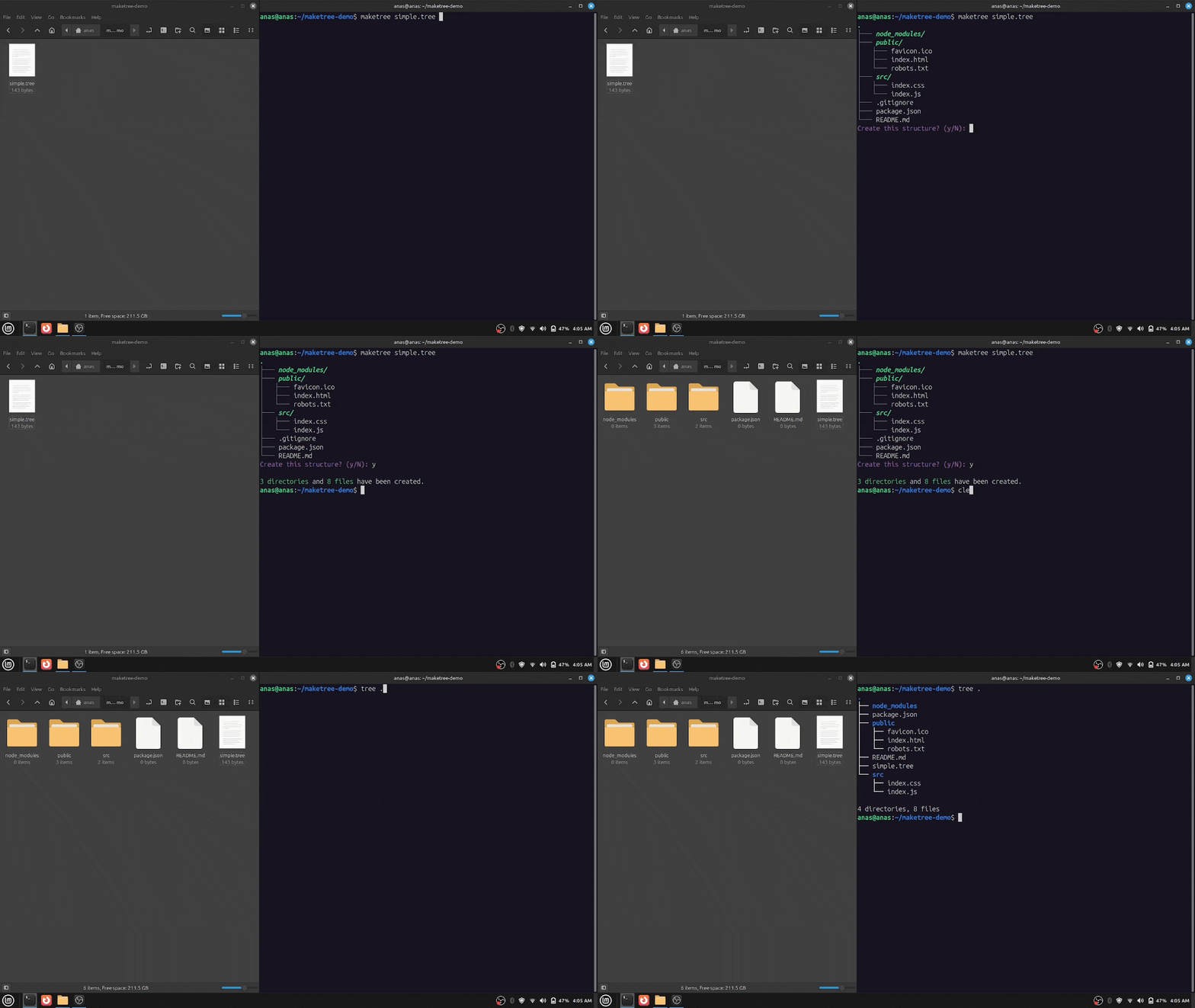
Maketree is a powerful CLI tool that generates directories and files based on a predefined structure. Instead of manually creating folders and files, just define your structure and let Maketree handle the rest.
🤔 Why Maketree?
- Saves Time: No more manually creating directories and files.
- Consistency: Maintain a standard project structure across all your projects.
- Easy to Use: Define a structure in plain text and generate it instantly.
🚀 Features:
- Supports nested directory structures
- Automatically creates missing parent directories
- Flexible file handling with warning, skip, and overwrite options
- Preview the directory tree before creation
- Color support
- Simple and easy to write structure syntax
- Lightweight, fast, and has zero dependencies
- Simple and user-friendly CLI
📦 Installation:
Install via **pip**:
Maketree is available on PyPI. (Recommended if you're a python developer and have python already installed on your system)
You can install it using:
pip install maketree
python>=3.8 must be installed on your system.
Install from **Source**:
If you are installing from source, you will need python>=3.8.
git clone https://github.com/Anas-Shakeel/maketree-cli.git
cd maketree-cli
pip install .
Download **Binaries**: _(No Python Required)_
Maketree provides standalone binaries for Linux, macOS, and Windows. (Recommended if you don't want to install Python.)
-
Download the latest release from the Releases page.
-
(Optional) Move the executable to a directory in your system's
PATH(e.g.,/usr/local/binon Linux/macOS ORC:\maketreeon Windows). -
Run
maketreefrom the terminal.maketree -h
⚡ Quickstart:
Define your project structure in a .tree file:
structure.tree
my_project/
    src/
        main.py
        utils.py
    tests/
        test_main.py
    README.md
    .gitignore
Then, run:
maketree structure.tree
This will instantly generate the entire structure in your current directory.
⚙️ Usage
You can maketree from any location in your terminal. (If installed via pip or if moved the executable to a directory recognized by system's PATH)
Display Help
maketree -h
This will show the available commands and options:
usage: maketree [OPTIONS]

Create complex project structures effortlessly.

positional arguments:
  src                   source file (with .tree extension)
  dst                   where to create the tree structure (default: .)

options:
  -h, --help            show this help message and exit
  -cd, --create-dst     create destination folder if it doesn't exist.
  -et, --extract-tree   write directory tree into a .tree file. (takes a PATH)
  -g, --graphical       show source file as graphical tree and exit
  -o, --overwrite       overwrite existing files
  -s, --skip            skip existing files
  -nc, --no-color       don't use colors in output
  -nC, --no-confirm     don't ask for confirmation
  -v, --verbose         enable verbose mode

Maketree 1.2.0
Creating a Directory Structure
Maketree reads .tree file that defines the folder and file structure and then creates the corresponding structure on your filesystem.
Define the Structure
Create a file named myapp.tree:
src/
    style.css
    app.js
    index.html
This will create a src folder with three files: index.html, style.css, and app.js.
Generate the Structure
To generate the structure, Run:
maketree myapp.tree
It will ask for confirmation with a graphical representation of the structure.
.
└─── src/
│   ├─── app.js
│   ├─── index.html
│   └─── style.css
Create this structure? (y/N):
Output:
1 directory and 3 files have been created.
By default, maketree creates the structure in the current directory.
Syntax for Writing a `.tree` File
To ensure correctness, follow these simple points:
- Directories must end with
/ - Indentation must be exactly 4 spaces (other indentations may cause unexpected results)
- File and directory names must be valid according to your OS
- Comments start with
//(inline comments are not supported)
Example:
myapp.tree
// This is a comment, and is ignored by maketree.
node_modules/
public/
    favicon.ico
    index.html
    robots.txt
src/
    index.css
    index.js
.gitignore
package.json
README.md
Now, run:
maketree myapp.tree
Output: (After confirming)
3 directories and 8 files have been created.
Specifying a Destination Folder
You can specify a destination folder instead of creating the structure in the current directory.
maketree myapp.tree myapp/
It will throw an error if myapp/ does not exist.
Error: destination path 'myapp' does not exist.
Use --create-dst or -cd flag, maketree then creates the destination directory if it doesn't exists.
maketree myapp.tree myapp/ --create-dst
Output:
3 directories and 8 files have been created.
Handling Existing Files
If you run maketree again in the same directory without deleting files, you’ll see an error:
maketree myapp.tree myapp
Output:
Error: Found 8 existing files, cannot proceed. (try --skip or --overwrite)
By default, maketree does not overwrite or skip existing files.
Overwrite Existing Files
Use the --overwrite or -o flag to overwrite existing files:
maketree myapp.tree myapp --overwrite
Output:
0 directories and 8 files have been created.
Skip Existing Files
Use the --skip or -s flag to keep existing files but create missing ones:
maketree myapp.tree myapp --skip
Output: (After deleting 3 files)
0 directories and 3 files have been created.
Extracting the Structure
You can also extract an already created project structure using -et or --extract-tree flag following the directory path of structure:
maketree --extract-tree myapp/
Output:
Tree has been extracted into 'myapp_1.tree'
Notice it created myapp_1.tree, because there was a myapp.tree already in the current directory.
Contents of myapp_1.tree file:
myapp/
    .gitignore
    package.json
    README.md
    node_modules/
    public/
        favicon.ico
        index.html
        robots.txt
    src/
        index.css
        index.js
Now this .tree file can be used whenever you want to create a similar project structure.
Preview the Structure
Use --graphical or -g to visualize the myapp.tree file:
maketree myapp.tree -g
Output:
.
├─── node_modules/
├─── public/
│   ├─── favicon.ico
│   ├─── index.html
│   └─── robots.txt
├─── src/
│   ├─── index.css
│   └─── index.js
├─── .gitignore
├─── package.json
└─── README.md
It is also shown before you create a structure for confirmation.
Avoid Confirming:
By default, maketree confirms before creating the structure. But this can sometimes be anoyying. Use --no-confirm or -nC flag to create the structure without confirming. (Notice the C is capital in -nC)
maketree myapp.tree myapp --no-confirm
Avoid Color Output:
By default, maketree uses ANSI escape codes to color the output.
maketree myapp.tree myapp/
If you're seeing something like this:
←[1m←[3m←[92msrc/←[0m
←[90m├───←[0m ←[1m←[3m←[92mnode_modules/←[0m
←[90m├───←[0m ←[1m←[3m←[92mpublic/←[0m
←[90m│   ←[0m←[90m├───←[0m favicon.ico
←[90m│   ←[0m←[90m├───←[0m index.html
←[90m│   ←[0m←[90m└───←[0m robots.txt
←[90m├───←[0m ←[1m←[3m←[92msrc/←[0m
←[90m│   ←[0m←[90m├───←[0m index.css
←[90m│   ←[0m←[90m└───←[0m index.js
←[90m├───←[0m .gitignore
←[90m├───←[0m package.json
←[90m└───←[0m README.md
←[95mCreate this structure? (y/N): ←[0m
Then your terminal doesn't support ANSI escape codes by default. (there are workarounds but they require extra python dependencies).
You will have to disable colors using --no-color or -nc flag.
maketree myapp.tree myapp/ --no-color
This will disable colors and you'll see normal text again.
Summary
| Feature | Command Example |
|---|---|
| Create structure | maketree myapp.tree |
| Set destination | maketree myapp.tree myapp -cd |
| Overwrite files | maketree myapp.tree myapp -o |
| Skip existing | maketree myapp.tree myapp -s |
| Extract structure | maketree -et myapp/ |
| Graphical preview | maketree myapp.tree -g |
| Avoid Confirm | maketree myapp.tree myapp -nC |
| Avoid Colors | maketree myapp.tree myapp -nc |
🖥️ Compatibility
OS Support
Maketree is compatible with the following operating systems:
| OS | Compatibility |
|---|---|
| Linux | ✅ Supported |
| macOS | ✅ Supported |
| Windows | ✅ Supported |
Python Version Support
Maketree works with Python 3.8 and later, ensuring compatibility with the latest Python releases.
| Python Version | Compatibility |
|---|---|
| 3.8 | ✅ Supported |
| 3.9 | ✅ Supported |
| 3.10 | ✅ Supported |
| 3.11 | ✅ Supported |
| 3.12 | ✅ Supported |
| 3.13 | ✅ Supported (Latest) |
❓ FAQ
What is Maketree?
Maketree is a command-line tool that helps developers quickly generate a predefined folder and file structures for your projects. It eliminates the need to manually create directories and files, allowing developers to start coding right away with a well-organized project structure.
Do I have to be a Software Developer to use Maketree?
No, you can be anyone. You can be a lawyer, student, or heck even Yavascript programmer.
Why should I use Maketree?
If you frequently create CLI applications, Maketree saves you time by setting up a standardized project structure instantly. It follows best practices and helps you maintain consistency across different projects.
How do I install Maketree?
You can install Maketree via pip. (for python developers)
pip install maketree
Or download the executable for your OS from Releases page.
How do I use Maketree to generate a project structure?
Simply create a file like anything.tree and define your project structure in it:
anything.tree
src/
    app.js
    index.html
    style.css
then run the following command:
maketree anything.tree
This will create the files and folders you specified in anything.tree file.
What should I do if I find a bug?
If you encounter a bug, please open an issue on GitHub with details about the problem. Be sure to include:
- A description of the issue
- Steps to reproduce
- Expected vs. actual behavior
- Any error messages you received
How do I uninstall Maketree?
To uninstall Maketree (installed via pip), Run:
pip uninstall maketree
🤝 Contributing
Contributions to Maketree are welcome and highly appreciated. However, before you jump right into it, i would like you to review Contribution Guidelines to make sure you have a smooth experience contributing to Maketree.


Download files
Download the file for your platform. If you're not sure which to choose, learn more about installing packages.
Source Distribution
Built Distribution
Filter files by name, interpreter, ABI, and platform.
If you're not sure about the file name format, learn more about wheel file names.
Copy a direct link to the current filters
File details
Details for the file maketree-1.2.0.tar.gz.
File metadata
- Download URL: maketree-1.2.0.tar.gz
- Upload date:
- Size: 29.1 kB
- Tags: Source
- Uploaded using Trusted Publishing? No
- Uploaded via: twine/6.1.0 CPython/3.13.1
File hashes
| Algorithm | Hash digest | |
|---|---|---|
| SHA256 |
91425ba710e796c35862cb1c20f81719a638e5ce23507f8e14be6c2277609444
|
|
| MD5 |
92516d2f411c9c6eeccf519c972e0074
|
|
| BLAKE2b-256 |
283d4c44f600e9df0981b46541f9e805b116d4c8f3e76d1a1663b50280e4d503
|
File details
Details for the file maketree-1.2.0-py3-none-any.whl.
File metadata
- Download URL: maketree-1.2.0-py3-none-any.whl
- Upload date:
- Size: 29.0 kB
- Tags: Python 3
- Uploaded using Trusted Publishing? No
- Uploaded via: twine/6.1.0 CPython/3.13.1
File hashes
| Algorithm | Hash digest | |
|---|---|---|
| SHA256 |
6e56e65f4cb64f37a1a5c48a79d36a344d907609e92cfb37c00cf843edd37f92
|
|
| MD5 |
da907840e5d34c942a50d5da07ee8755
|
|
| BLAKE2b-256 |
abd24e02d318d6ebe1df517106d84f3cc1181f9621548a5f88bdb37ce87cf063
|






