
MAMBO V3 deployment
Identify moths and butterflies from images, with species, genus and family predictions. V3 adds a standalone ONNX option alongside PyTorch: no training package or GPU is needed for ONNX/CPU. Both backends use the same API, regional lists and output format. The comparisons below show quality and speed against V2, including CPU, laptop GPU and server GPU measurements.
Weights: CC BY-NC-SA 4.0 (non-commercial, share-alike). Adapter code: MIT. Model notices explain attribution and scope.
Model files download automatically from public ERDA storage on first use and are verified and cached. Reuse one predictor across calls.
Package · Model card and weights · Try one image · Citation
Quick start
Create an environment, or use your application's existing environment. Python 3.12+ is required. Install ONNX/CPU to start without a CUDA setup:
uv venv --python 3.13 .venv
source .venv/bin/activate  # Windows PowerShell: .venv\Scripts\Activate.ps1
uv pip install 'mambo-v3[onnx]==0.3.0'
Python — supply images directly:
from mambo_deploy import Predictor

predictor = Predictor()  # Global species list, ONNX, CPU
result = predictor.predict(["moth.jpg", "butterfly.jpg"])
print(result[0].label)       # (species_id, genus_id, family_id)
print(result[0].confidence)  # confidence for each of those ranks
records = result.to_dict()   # list of JSON-serializable records for your application
CLI — the same defaults, for files or a directory:
mambo_predict -i ./images -o ./output --name predictions
This creates output/predictions/predictions.json and mini_metric.csv;
--embeddings also writes embeddings.npy. Choose a new output name for each run.
For a one-off command without installing into your application environment, replace
mambo_predict with
uvx --from 'mambo-v3[onnx]==0.3.0' mambo_predict.
| Interface | Inputs | Outputs |
|---|---|---|
Python predict(images) |
A path, PIL image, CHW array/tensor, or collection of these; BCHW batches also work. Original pixels: uint8 or floats in [0,1]. | One result per image, in input order. label, confidence, index have species/genus/family order; labels are GBIF taxon IDs as strings. to_dict() produces ordinary Python records; save(path) writes JSON. |
Python predict_with_embeddings(images) |
Same inputs. | (result, vectors); vectors are a float32 NumPy array [N,1280] with unit-length rows. |
CLI -i |
One or more image files or directories, searched recursively. | JSON contains results, metadata and config; each result has label, confidence, index. CSV has one row per image/rank for evaluation. |
For an RGB HWC NumPy image, pass image.transpose(2, 0, 1); convert OpenCV BGR to
RGB first. Do not resize or normalize images yourself. Alpha is discarded and EXIF
orientation is not applied. topk cannot exceed the smallest retained rank; narrow custom lists may require topk=1.
Predictions at each rank are independent, so the three
IDs need not form one ancestral path. CSV truth labels are inferred from parent
folder names; arbitrary image folders do not supply evaluation ground truth.
Choose the configuration that matters
Start with the defaults; select a regional preset when your location is known. ONNX/CPU is the simplest dependency footprint and a useful starting point for CPU-only and edge applications. For NVIDIA GPU throughput, use PyTorch if it fits your environment, or ONNX/CUDA to keep the training package out of your application. Runtime installation and offline use covers these alternatives. Changing runtime does not change the input/output contract.
Enable tta=True / --tta for monitoring images when the quality gain below is
worth roughly 3× lower throughput. Keep the default recipe. Its benefit is
image-domain dependent; the general-photograph comparison below provides context.
Keep precision="auto". Increase batch_size only when processing enough images
to benefit; reduce it if memory is tight. Adjust CPU workers only if needed to meet
your application's throughput or CPU budget. Request embeddings or extra candidates
only when your workflow uses them. No server, dataset metadata or training setup is
required.
Pass API settings to Predictor(...), except the prediction methods shown below.
CLI flags apply to mambo_predict.
| Python API | CLI | Default | Role / main trade-off |
|---|---|---|---|
model=, class_list= |
--model, --class-list |
full / no override |
Eligible species; affects predictions and confidence. |
backend=, device= |
--backend, --device |
onnx, cpu |
Runtime and hardware: onnx or torch; cpu or cuda:0. |
tta=True |
--tta |
Off | Quality versus throughput; enabling uses the recommended three-view recipe. |
batch_size= |
--batch-size |
8 |
Images per model call: throughput versus memory. |
threads= |
--threads |
2 |
ONNX CPU threads and default image-preparation workers; does not set PyTorch's model threads. |
preprocess_workers= |
--preprocess-workers |
Follows threads |
Image-preparation CPU allocation. |
precision= |
--precision |
auto |
Runtime-selected compute precision; normally leave unchanged. |
predict_with_embeddings(images) |
--embeddings |
Off | Vectors for similarity/search or downstream features. |
predict(images, topk=k) |
--topk k |
1 |
Candidates per rank; Python returns a list of candidates per image when k > 1. |
| CLI only | --threshold |
0 |
Acceptance flag in the evaluation CSV; JSON predictions stay unfiltered. |
Geographic scope
Use predictor.available_presets() to list choices, or read the
preset catalogue for their exact scope and construction.
Presets include species that can occur in a region, including introduced
species; they are neither native-distribution maps nor exhaustive checklists.
Use model="full" if a regional restriction is inappropriate.
europe and north_europe preserve the V2 lists. Updated _v3 lists are also
available; legacy north_europe performed better on Flemming and is recommended
for comparable northern-European use. A custom class_list=["GBIF_SPECIES_ID", ...]
or UTF-8 file with one ID per line overrides the preset (--class-list species.txt
in the CLI). Unknown IDs and empty lists fail; duplicates are removed.
Large image collections
Use streaming for a large collection of paths, consuming results as they arrive:
from contextlib import closing

with closing(predictor.predict_stream(image_paths)) as batches:
    for result in batches:
        records = result.to_dict()
        # Write records to your database, file or downstream service here.
Input order is preserved. Add embeddings=True to receive (result, vectors) pairs.
For in-memory inputs, split large collections into smaller predict() requests;
that method retains results for the whole request. The CLI writes results batch by
batch. batch_size limits model calls, not total request memory.
Streaming controls are available
if the defaults do not fit your workload.
Changes from MAMBO V2
- Installation: use
mambo-v3(Python importmambo_deploy). Its maintenance releases retain the V3 trained model; pin the package version for reproducible builds. Keep V2 or older deployment candidates in a separate environment. - Defaults: global (
full) scope and ONNX/CPU. Selecteuropeornorth_europeto retain the V2 lists. Native CLI workflows must specify--backend torch --device cuda:0; only the deployment package installsmambo_predict. - Existing Python callers:
mini_trainer.deploy.Predictorretains native/CUDA defaults, callable prediction,class_maskand native result containers. Install both release wheels. New integrations can usemambo_deployfor CPU results independent of backend; both entry points download model assets automatically. - Model and features: EfficientNetV2-S, ONNX, expanded presets, optional TTA and streaming. Supply original pixels and match classes by GBIF ID rather than numeric index. V2 and V3 share the ordered taxon vocabulary. Scores and embedding width change; thresholds and stored embeddings need migration.
Migration details cover compatibility boundaries; versioning explains how package, model and preset identities relate.
Beyond Python
The ONNX assets also provide a path to local browser inference with ONNX Runtime Web, where images can be processed on the user's device. Existing browser work is recorded in the release roadmap. This Python release does not ship a browser SDK: preprocessing, external weights and browser/runtime support still need integration. The same local API or CLI can be embedded in desktop applications, batch jobs and services without a hosted prediction service.
Release comparison
These results help choose TTA and runtime; they do not establish accuracy in every
region. All models use legacy northern Europe on the same 52,788 Flemming reporting
images, including out-of-vocabulary truth. mini_metrics selects calibrated
thresholds per pipeline/rank on 5,852 separate images. Recipe exploration used
Flemming too, so this is descriptive evidence, not independent validation.
The quality figure compares unthresholded and calibrated predictions, with
full-support and support >5 macro metrics alongside acceptance coverage. TTA uses
rotation30_pad25_3; its quality gain comes at the throughput cost shown below.
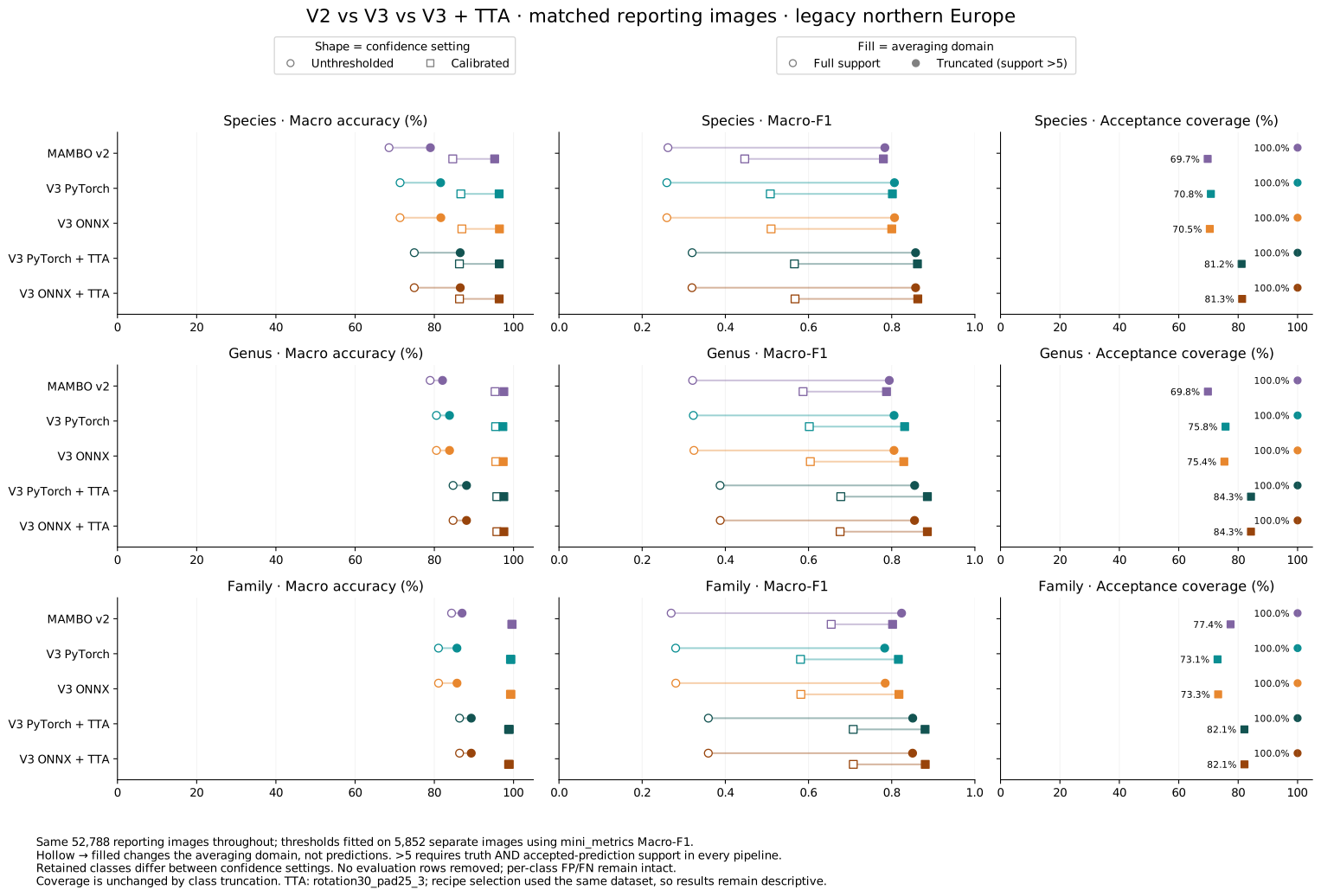
Support >5 requires more than five truth instances and accepted predictions in every compared pipeline. Truth classes outside that average account for 15.30% / 0.42% / 0.01% of images at species/genus/family without thresholds, and 18.95% / 11.21% / 0.03% after calibration. No evaluation rows are discarded; the averaging class sets differ between confidence settings. Full-support metrics retain rare and predicted-only classes, which can change model rankings.
Measured images/second, end to end, on an i7-12800H / RTX 3080 Ti Laptop with four preparation/runtime threads. V3 uses automatic precision; compare on your own hardware before choosing a batch size. These laptop measurements predate the latest pipeline improvements and remain a consumer-hardware baseline.
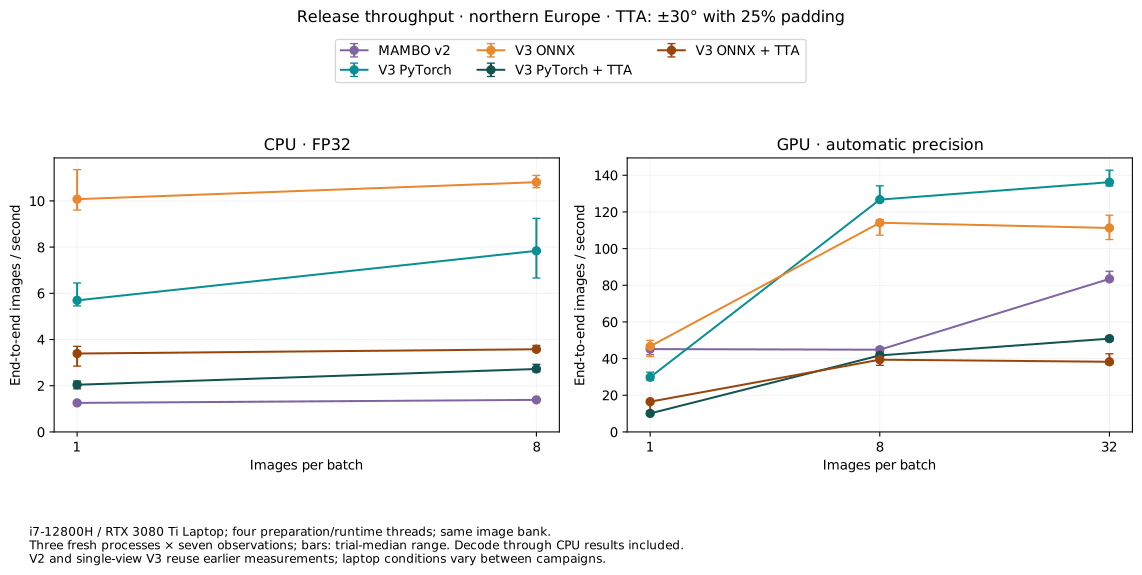
On this laptop, ONNX is faster on CPU; native PyTorch benefits more from larger GPU batches. TTA improves quality but reduces throughput, so enable it according to your accuracy and processing-budget requirements.
The complete evidence reference retains exact metric tables, calibrated thresholds, timing ranges and limitations.
Complementary in-domain and HPC results
The original global-lepi test split adds a comparison on general photographs using
the global vocabulary. It complements Flemming's deployment-relevant monitoring
crops; the image domains and class lists differ, so their absolute scores should
not be compared as a controlled domain-effect estimate. The same mini_metrics
calibration/support policy uses 568,939 reporting images and 63,974 separate
calibration images, with both confidence settings evaluated on the reporting split.
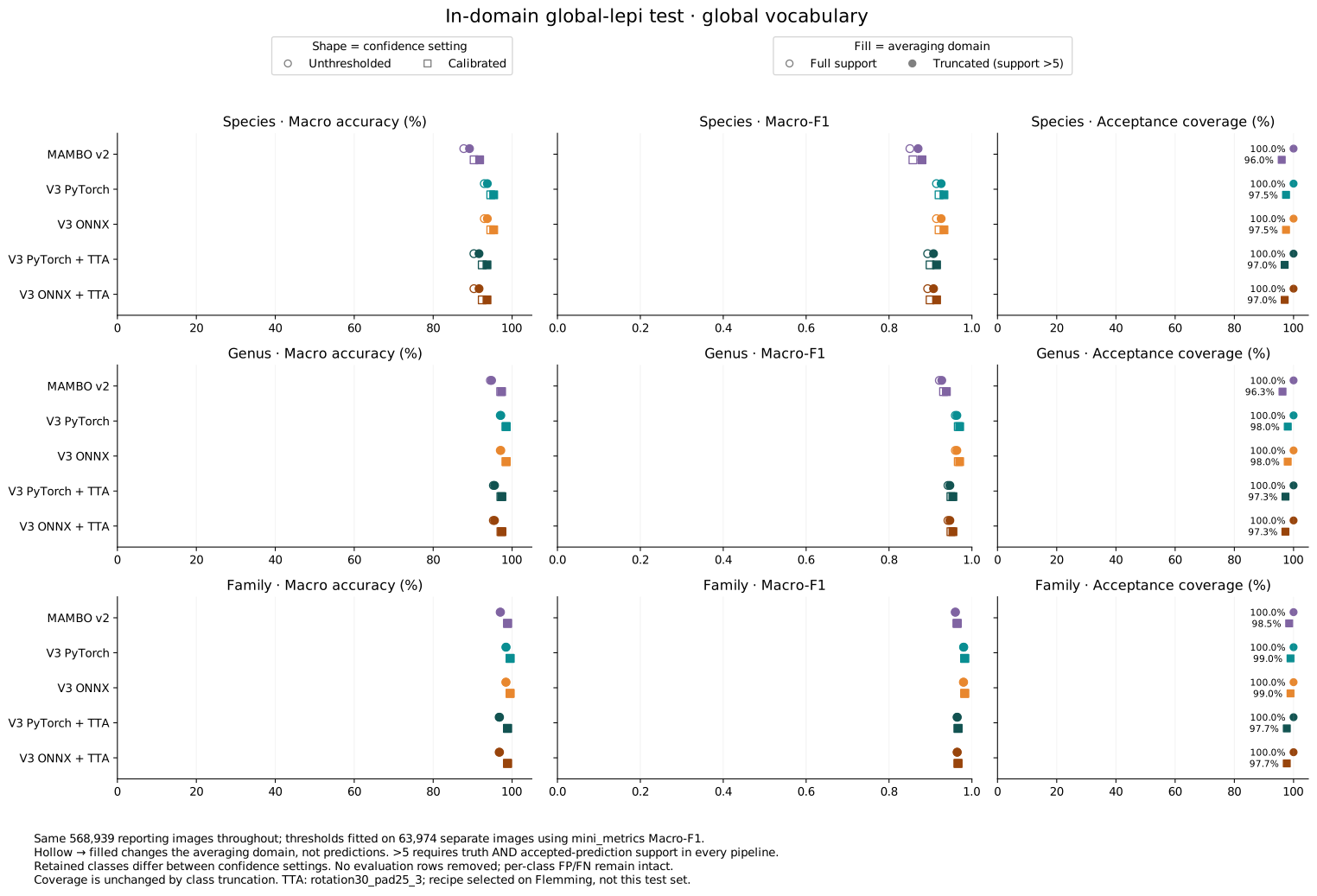
V3 improves in-domain performance over V2. The Flemming-selected TTA recipe reduces in-domain performance, illustrating that its benefit depends on the input domain; this does not override its benefit on the more deployment-relevant Flemming crops. Support >5 changes the class average, not the evaluation rows. Truth classes outside that average represent 1.70% / 0.34% / <0.01% of species/genus/family images without thresholds, and 1.88% / 0.38% / <0.01% after calibration. Thresholds and complete metrics are in the in-domain evidence.
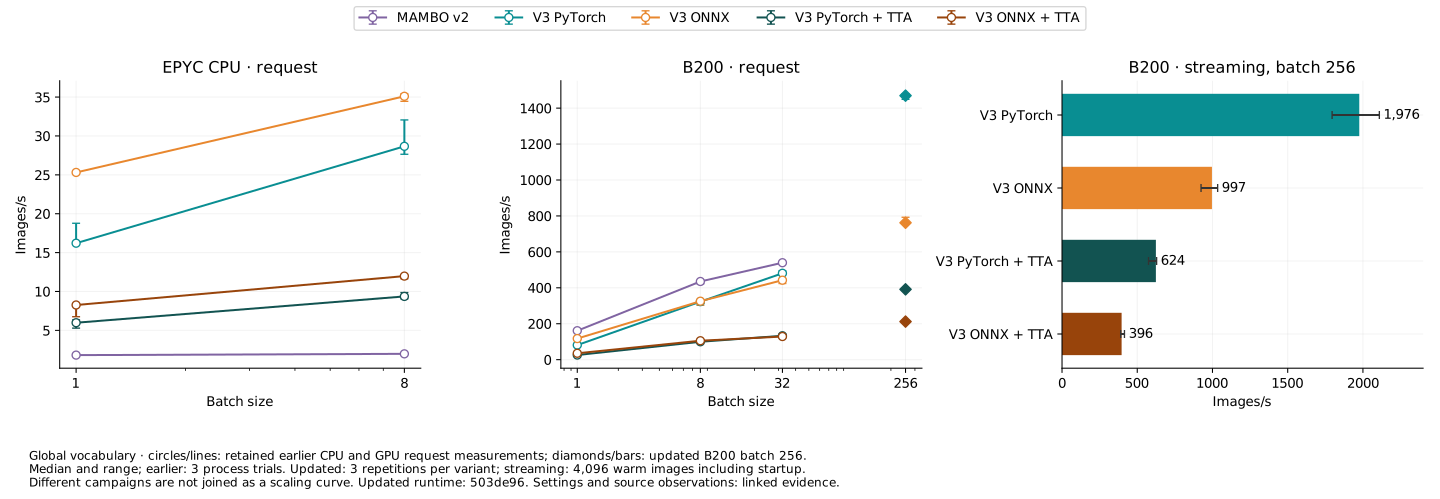
The server comparison retains CPU, GPU request and GPU streaming throughput in images/second. B200 batch-256 values are updated: PyTorch reaches 1,976 images/s and ONNX 997 images/s when streaming, or 624 and 396 with TTA. CPU, V2 and smaller-batch results retain their earlier measurements; new request points are shown separately rather than joined to older scaling curves. These are measured application rates, not a promise of GPU saturation.
Timing details and provenance record measurement settings, memory and repeat ranges. Keep the laptop comparison above when choosing for consumer devices. ONNX's CPU advantage and independence from the training package make it especially relevant when a GPU or the full PyTorch stack is not an option; PyTorch remains the faster GPU choice in these measurements.
1 maintainer

Release files for mambo-v3 0.3.0
For a detailed explanation of source distributions (sdists) and built distributions (wheels), please see the package formats documentation.
Source distribution (sdist)
| File | Size | Uploaded | |
|---|---|---|---|
| mambo_v3-0.3.0.tar.gz | 257.0 kB | Details |
Built distribution (wheel)
| File | Interpreter | ABI | Platform | Reset |
|---|---|---|---|---|
| mambo_v3-0.3.0-py3-none-any.whl | Python 3 | none | any | Details |
Total release size: 517.6 kB
Release files / mambo_v3-0.3.0.tar.gz
| Download URL | mambo_v3-0.3.0.tar.gz |
|---|---|
| Size | 257.0 kB |
| Tags | Source |
|
SHA-256 checksum How to use checksums |
1c2ea2e121e83cbf37f4b8cde6776d8b82d339f98af6fd9cb21715430fd5d46f
|
|
BLAKE2b-256 checksum How to use checksums |
2c29fa4d3b3452d126309b8092ba42972225234e3a53206940e9ca01b3cd57ab
|
| Upload date | |
|
Uploaded using Trusted Publishing? What is trusted publishing? |
Yes |
| Uploaded via |
uv/0.12.19 {"installer":{"name":"uv","version":"0.12.19","subcommand":["publish"]},"python":null,"implementation":{"name":null,"version":null},"distro":{"name":"Ubuntu","version":"24.04","id":"noble","libc":null},"system":{"name":null,"release":null},"cpu":null,"openssl_version":null,"setuptools_version":null,"rustc_version":null,"ci":true}
|
Release files / mambo_v3-0.3.0-py3-none-any.whl
| Download URL | mambo_v3-0.3.0-py3-none-any.whl |
|---|---|
| Size | 260.6 kB |
| Tags | Python 3 |
|
SHA-256 checksum How to use checksums |
c6281b7d9f2d4dbefea962563d48ebe5498790d44feb454e7c5c207130d2bc1d
|
|
BLAKE2b-256 checksum How to use checksums |
e3d62650f5cc35baa77365ec11c1c57822b539536b4c57a1a4f62af17e5c606a
|
| Upload date | |
|
Uploaded using Trusted Publishing? What is trusted publishing? |
Yes |
| Uploaded via |
uv/0.12.19 {"installer":{"name":"uv","version":"0.12.19","subcommand":["publish"]},"python":null,"implementation":{"name":null,"version":null},"distro":{"name":"Ubuntu","version":"24.04","id":"noble","libc":null},"system":{"name":null,"release":null},"cpu":null,"openssl_version":null,"setuptools_version":null,"rustc_version":null,"ci":true}
|













