
MaMiMo
This is a small library that helps you with your everyday Marketing Mix Modelling. It contains a few saturation functions, carryovers and some utilities for creating with time features. You can also read my article about it here: >>>Click<<<.
Give it a try via pip install mamimo!
Small Example
You can create a marketing mix model using different components from MaMiMo as well as scikit-learn. First, we can create a dataset via
from mamimo.datasets import load_fake_mmm

data = load_fake_mmm()

X = data.drop(columns=['Sales'])
y = data['Sales']
X contains media spends only now, but you can enrich it with more information.
Feature Engineering
MaMiMo lets you add time features, for example, via
from mamimo.time_utils import add_time_features, add_date_indicators


X = (X
     .pipe(add_time_features, month=True)
     .pipe(add_date_indicators, special_date=["2020-01-05"])
     .assign(trend=range(200))
)
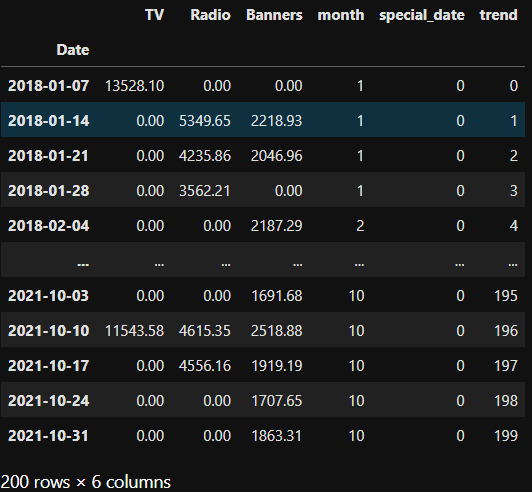
This adds
- a month column (integers between 1 and 12),
- a binary column named special_date that is 1 on the 5h of January 2020 and 0 everywhere else, and
- a (so far linear) trend which is only counting up from 0 to 199.
X looks like this now:
Building a Model
We can now build a final model like this:
from mamimo.time_utils import PowerTrend
from mamimo.carryover import ExponentialCarryover
from mamimo.saturation import ExponentialSaturation
from sklearn.linear_model import LinearRegression
from sklearn.preprocessing import OneHotEncoder
from sklearn.compose import ColumnTransformer
from sklearn.pipeline import Pipeline

cats =  [list(range(1, 13))] # different months, known beforehand

preprocess = ColumnTransformer(
    [
     ('tv_pipe', Pipeline([
            ('carryover', ExponentialCarryover()),
            ('saturation', ExponentialSaturation())
     ]), ['TV']),
     ('radio_pipe', Pipeline([
            ('carryover', ExponentialCarryover()),
            ('saturation', ExponentialSaturation())
     ]), ['Radio']),
     ('banners_pipe', Pipeline([
            ('carryover', ExponentialCarryover()),
            ('saturation', ExponentialSaturation())
     ]), ['Banners']),
    ('month', OneHotEncoder(sparse=False, categories=cats), ['month']),
    ('trend', PowerTrend(), ['trend']),
    ('special_date', ExponentialCarryover(), ['special_date'])
    ]
)

model = Pipeline([
    ('preprocess', preprocess),
    ('regression', LinearRegression(
        positive=True,
        fit_intercept=False # no intercept because of the months
        )
    )
])
This builds a model that does the following:
- the media channels are preprocessed using the adstock transformation, i.e. a carryover effect and a saturation is added
- the month is one-hot (dummy) encoded
- the trend is changed from linear to something like t^a, with some exponent a to be optimized
- the special_date 2020-01-05 gets a carryover effect as well, meaning that not only on this special week there was some special effect on the sales, but also the weeks after it
Training The Model
We can then hyperparameter tune the model via
from scipy.stats import randint, uniform
from sklearn.model_selection import RandomizedSearchCV, TimeSeriesSplit

tuned_model = RandomizedSearchCV(
    model,
    param_distributions={
        'preprocess__tv_pipe__carryover__window': randint(1, 10),
        'preprocess__tv_pipe__carryover__strength': uniform(0, 1),
        'preprocess__tv_pipe__saturation__exponent': uniform(0, 1),
        'preprocess__radio_pipe__carryover__window': randint(1, 10),
        'preprocess__radio_pipe__carryover__strength': uniform(0, 1),
        'preprocess__radio_pipe__saturation__exponent': uniform(0, 1),
        'preprocess__banners_pipe__carryover__window': randint(1, 10),
        'preprocess__banners_pipe__carryover__strength': uniform(0, 1),
        'preprocess__banners_pipe__saturation__exponent': uniform(0, 1),
        'preprocess__trend__power': uniform(0, 2),
        'preprocess__special_date__window': randint(1, 10),
        'preprocess__special_date__strength': uniform(0, 1),
    },
    cv=TimeSeriesSplit(),
    random_state=0,
    n_iter=1000, # can take some time, lower number for faster results
)

tuned_model.fit(X, y)
You can also use GridSearch, Optuna, or other hyperparameter tune methods and packages here, as long as it is compatible to scikit-learn.
Analyzing
With tuned_model.predict(X) and some plotting, we get
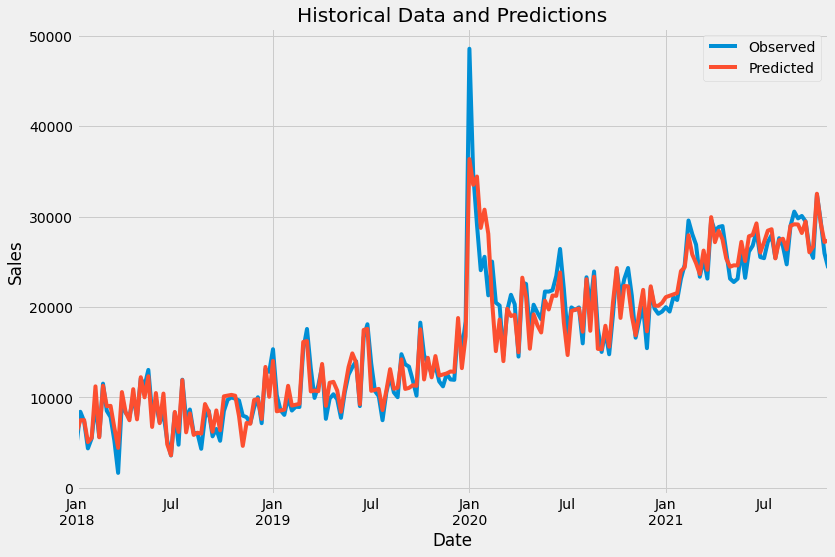
You can get the best found hyperparameters using print(tuned_model.best_params_).
Plotting
You can compute the channel contributions via
from mamimo.analysis import breakdown

contributions = breakdown(tuned_model.best_estimator_, X, y)
This returns a dataframe with the contributions of each channel fo each time step, summing to the historical values present in y. You can get a nice plot via
ax = contributions.plot.area(
    figsize=(16, 10),
    linewidth=1,
    title="Predicted Sales and Breakdown",
    ylabel="Sales",
    xlabel="Date",
)
handles, labels = ax.get_legend_handles_labels()
ax.legend(
    handles[::-1],
    labels[::-1],
    title="Channels",
    loc="center left",
    bbox_to_anchor=(1.01, 0.5),
)
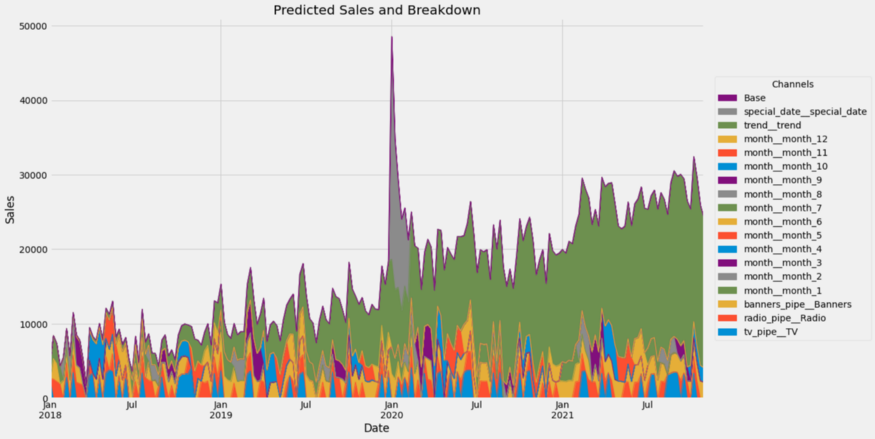
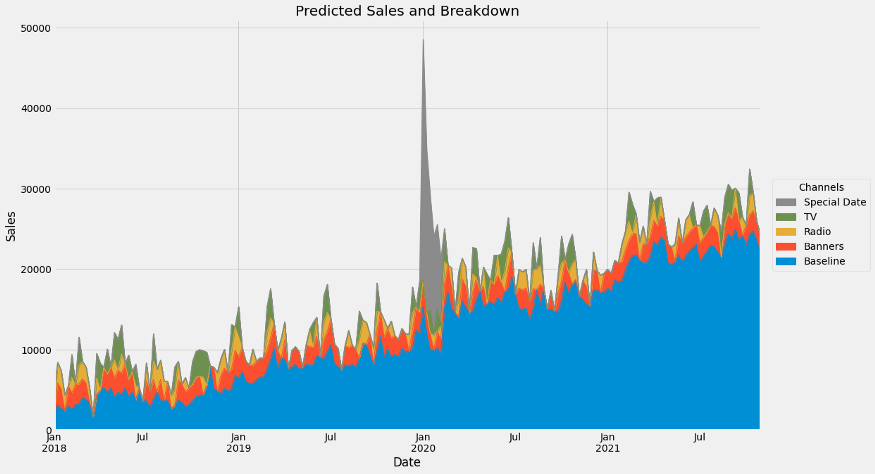
Wow, that's a lot of channels. Let us group some of them together.
group_channels = {'Baseline': [f'month__month_{i}' for i in range(1, 13)] + ['Base', 'trend__trend']}
# read: 'Baseline consists of the months, base and trend.'
# You can add more groups!

contributions = breakdown(
    tuned_model.best_estimator_,
    X,
    y,
    group_channels
)
If we plot again, we get
Yay!

1 maintainer

Metadata
1 maintainer
Release files for mamimo 0.4.3
For a detailed explanation of source distributions (sdists) and built distributions (wheels), please see the package formats documentation.
Source distribution (sdist)
| File | Size | Uploaded | Provenance | |
|---|---|---|---|---|
| mamimo-0.4.3.tar.gz | 14.6 kB | Without provenance | Details |
Built distribution (wheel)
| File | Interpreter | ABI | Platform | Reset |
|---|---|---|---|---|
| mamimo-0.4.3-py3-none-any.whl | Python 3 | none | any | Details |
Total release size: 30.8 kB
Release files / mamimo-0.4.3.tar.gz
| Download URL | mamimo-0.4.3.tar.gz |
|---|---|
| Size | 14.6 kB |
| Tags | Source |
|
SHA-256 checksum How to use checksums |
4c093f1dcda9bf532b9a0f9a7f41f1ea940261adf843f9cc7d5ce2be97811c3a
|
|
BLAKE2b-256 checksum How to use checksums |
1d7935f4c2c6063c133572ed2595709cc5a7e7ca396a1a12d18ac89a9a77bbae
|
| Upload date | |
|
Uploaded using Trusted Publishing? What is trusted publishing? |
No |
| Uploaded via |
poetry/1.1.12 CPython/3.9.9 Windows/10
|
Release files / mamimo-0.4.3-py3-none-any.whl
| Download URL | mamimo-0.4.3-py3-none-any.whl |
|---|---|
| Size | 16.3 kB |
| Tags | Python 3 |
|
SHA-256 checksum How to use checksums |
49ff375647fb416886e4f6c88e4216a074e89d1d957d792581997b27377cec47
|
|
BLAKE2b-256 checksum How to use checksums |
87762bf2f17c069da09780bed67b7dcfeb664abe8fab572426c0fef1731d4e0d
|
| Upload date | |
|
Uploaded using Trusted Publishing? What is trusted publishing? |
No |
| Uploaded via |
poetry/1.1.12 CPython/3.9.9 Windows/10
|
Security for mamimo 0.4.3
Provenance
Provenance describes where a file came from. On PyPI, provenance is shared via attestations, which provide a verifiable record of the build or publishing details. View details, limitations and caveats.
No provenance found
None of the files in this release were uploaded with provenance metadata.
A note on package security
PyPI is a repository for distributing packages, not a service for auditing them. While third-party security researchers and our staff do their best to detect and remove malicious packages, PyPI cannot guarantee the quality, security or suitability of any given package.
To learn more about protecting yourself from malicious actors, visit our package security documentation.














