
Mandlebrot Synthesizer
Mandelbrot Synthesizer is a creative tool that transforms mathematical fractals into sound. It's perfect for artist, programmers, musicians, and anyone curious about exploring the cool intersection of math and audio.
Screenshots
🎵 What Does It Do?
This project allows you to turn fractals into music. It generates sounds from multiple fractals, including:
-
Mandelbrot Set
-
Burning Ship fractal
-
Julia set
-
pheonix fractal
-
Triac fractal
-
And more fractal types (with plans for future expansion) Every point on a fractal represents a unique set of numbers. When you click a point on the fractal image, the software calculate how many iterations it took for that point to "escape" the fractal boundaries. That number is then used to determine:
-
The frequency of the Note
-
The volume of the sound The result? A one-of-a-kind note that represents a specific point in the fractal. It's like hearing mathematics!
Installation
1-Install using "pip install mandelbrot-synthesizer" without quotes. 2-Then run this command "mandelbrot_synthesizer" without quotes.
Make sure you're running this program in the new windows terminal. Because the old one doesn't support the fonts required for running textual resulting in weird artifacts
Description
There are THREE main windows in this program:
1- Fractal Display Window
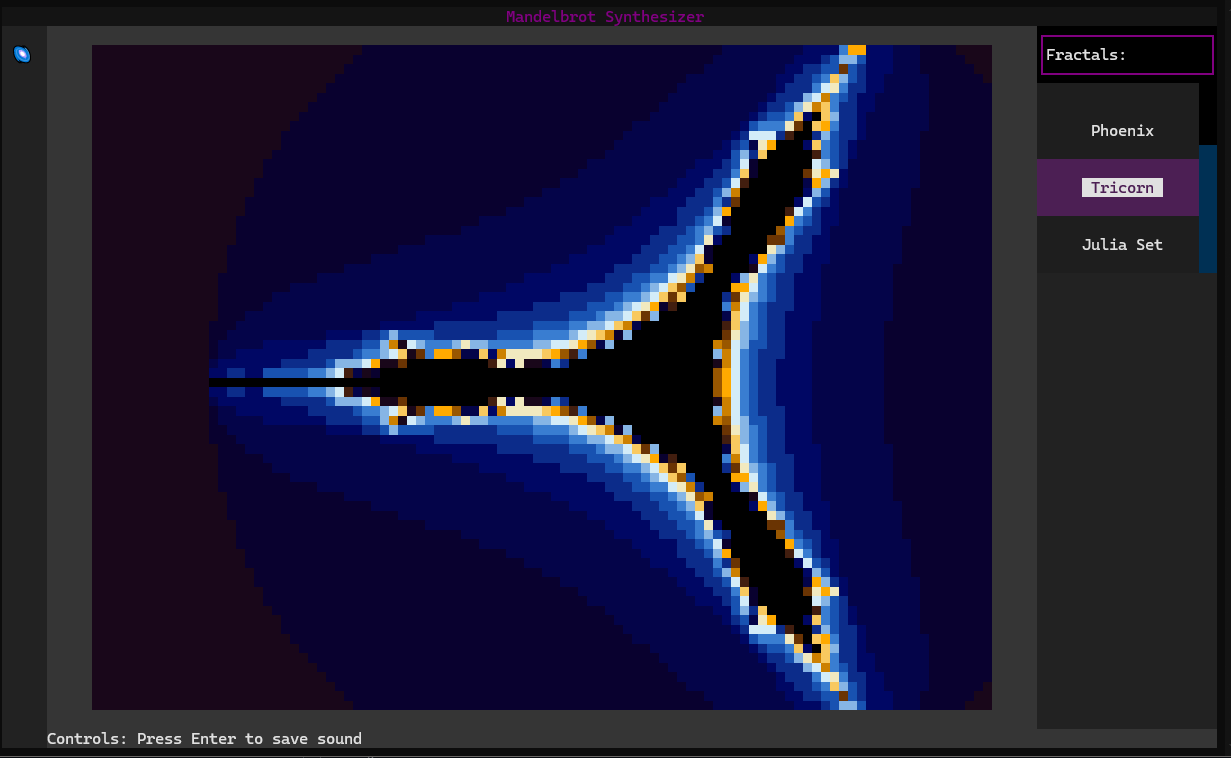
There's a sidebar on the right containing buttons for all the available fractals, each button is named according to the name of the fractal it's responsible for displaying. By clicking any of these buttons, the viewport would change to host the chosen fractal instead. The fractals are displayed in a blue-brown color theme. You can press any point in the displayed fractal, and a sound would play according to the escape time of that point in the fractal. The escape time is the number of iterations it takes for a point to escape the fractal. The sounds played are different in pitch and volume. which makes them very unique.
2- Melody Maker Windowr
The melody maker window I believe is the most important feature in my application. And it is responsible for playing full melodies from the saved notes. This window has a sidebar on the left containing all the notes in the Library folder that comes pre-installed in the package. You can remove any note by right clicking it, and it will be removed entirely from your device. However, if you choose to left click this note, a bar widget would pop up in the middle of the screen and it'd contain an array of square toggle widgets. These widgets, when left clicked, change their color from grey to indigo, which indicates that they're currently active. If you go to the playback bar at the top. you'd find a play button. By clicking this button, you can play the notes in each active toggle square, resulting in a beautiful melody.
3- Naming Widget Window
When you press V in the Fractal Display Window. The Naming Widget Window pops up. This window is responsible for assigning names to different notes so they can be used later. The Input widget in this window only tolerates letters, numbers, underscores, or hyphens. The input string must begin with a number or exceed 16 characters. If you wish to exit this window, you can press the ESC key. And if you wish to continue press Enter.
Extra: sidebar
The sidebar-located on the left of the screen- contains two buttons. The first button is for the Fractal Display Window window and the second button is for the Melody Maker Window.
Controls
1- Fractal Display Window
Press v to save sound - wasd to pan - PU and PD to zoom
2- Melody Maker Windowr
Left Click to add sound - Right Click to delete sound - Ctrl + Scroll to scroll horizonally - Scroll to scroll vertically
3- Naming Widget Window
Press ESC to exit - Press ENTER to submit
1 maintainer

Metadata
1 maintainer
Release files for mandelbrot-synthesizer 0.1.12
For a detailed explanation of source distributions (sdists) and built distributions (wheels), please see the package formats documentation.
Source distribution (sdist)
| File | Size | Uploaded | |
|---|---|---|---|
| mandelbrot_synthesizer-0.1.12.tar.gz | 8.0 kB | Details |
Built distribution (wheel)
| File | Interpreter | ABI | Platform | Reset |
|---|---|---|---|---|
| mandelbrot_synthesizer-0.1.12-py3-none-any.whl | Python 3 | none | any | Details |
Total release size: 19.5 kB
Release files / mandelbrot_synthesizer-0.1.12.tar.gz
| Download URL | mandelbrot_synthesizer-0.1.12.tar.gz |
|---|---|
| Size | 8.0 kB |
| Tags | Source |
|
SHA-256 checksum How to use checksums |
daf6d4af66fe37497ddda47821f8331b251c3430a01bb9d627848d1a80ce96de
|
|
BLAKE2b-256 checksum How to use checksums |
84c53d717ab06c382d3474f9c4ec04a8c326de6e6f4ee31e019ee1de05ad5f45
|
| Upload date | |
|
Uploaded using Trusted Publishing? What is trusted publishing? |
No |
| Uploaded via |
twine/6.1.0 CPython/3.13.4
|
Release files / mandelbrot_synthesizer-0.1.12-py3-none-any.whl
| Download URL | mandelbrot_synthesizer-0.1.12-py3-none-any.whl |
|---|---|
| Size | 11.4 kB |
| Tags | Python 3 |
|
SHA-256 checksum How to use checksums |
91f743055c9d352e1c6327e22f211c29b659769d4090e12d5d04ffb241a8540c
|
|
BLAKE2b-256 checksum How to use checksums |
d2f55cc381e79331d498a5e5495cd5d9ae4a353bea66175f72486ef5d13b9fb7
|
| Upload date | |
|
Uploaded using Trusted Publishing? What is trusted publishing? |
No |
| Uploaded via |
twine/6.1.0 CPython/3.13.4
|














