
Simple python API to read annotation data of Manga109

Project description
Manga109 API

Simple python API to read annotation data of Manga109.
Manga109 is the largest dataset for manga (Japanese comic) images, that is made publicly available for academic research purpose with proper copyright notation.
To download images/annotations of Manga109, please visit here and send an application via the form. After that, you will receive the password for downloading images (109 titles of manga as jpeg files) and annotations (bounding box coordinates of face, body, frame, and speech balloon with texts, in the form of XML).
This package provides a simple Python API to read annotation data (i.e., parsing XML) with some utility functions such as reading an image.
Links
- Manga109
- Details of annotation data
- The original reference paper for Manga109: [Matsui+, MTAP 2017]
- The paper introducing the annotation data, with the application of object detection (SSD-fork): [Ogawa+, arXiv 2018]
Installing
You can install the package via pip. The library works with Python 3.5+ on linux
pip install manga109api
Example
You can insantiate a parser with the path to the root directory of Manga109. The annotations are available via the parser.
import manga109api
from pprint import pprint

manga109_root_dir = "YOUR_DIR/Manga109_2017_09_28"
p = manga109api.Parser(root_dir=manga109_root_dir)
After parsing, you can see the book titles by p.books:
print(p.books)
# ['ARMS', 'AisazuNihaIrarenai', 'AkkeraKanjinchou', 'Akuhamu', 'AosugiruHaru', ...
Note that all books are parsed by default. If you'd like to parse only some of them, you can specify the book titles, e.g.: p = manga109api.Parser(root_dir=manga109_root_dir, book_titles=["ARMS", "AisazuNihaIrarenai"]), where the selected two books will be parsed.
Here, you can access the annotations by p.annotations:
pprint(p.annotations["ARMS"])
# {'book': {'@title': 'ARMS',
#           'characters': {'character': [{'@id': '00000003', '@name': '女1'},
#                                        {'@id': '00000010', '@name': '男1'},
#                                        {'@id': '00000090', '@name': 'ロボット1'},
#                                        {'@id': '000000fe', '@name': 'エリー'},
#                                        {'@id': '0000010a', '@name': 'ケイト'},
#                                        {'@id': '0000010e', '@name': '大佐'},
# ...
#           'pages': {'page': [{'@height': 1170, '@index': 0, '@width': 1654},
#                              {'@height': 1170, '@index': 1, '@width': 1654},
#                              {'@height': 1170,
#                               '@index': 2,
#                               '@width': 1654,
#                               'body': {'@character': '00000003',
#                                        '@id': '00000002',
#                                        '@xmax': 548,
#                                        '@xmin': 178,
#                                        '@ymax': 965,
#                                        '@ymin': 660},
#                               'face': {'@character': '00000003',
#                                        '@id': '00000004',
#                                        '@xmax': 456,
#                                        '@xmin': 406,
# ...
As can be seen, you can see the parsed result as a dictionary.
The attributes of XML are denoted with an @ symbol.
Note that the parsed result contains some redundant descriptions such as 'pages': {'page': ....
It is because the result is a direct translation from xml to python dict via xmltodict package,
where we decided not to omit any information.
The following example shows the annotations of the 7th page of "ARMS".
pprint(p.annotations["ARMS"]["book"]["pages"]["page"][6])
# {'@height': 1170,
#  '@index': 6,
#  '@width': 1654,
#  'body': [{'@character': '00000010',
#            '@id': '00000057',
#            '@xmax': 1155,
#            '@xmin': 1089,
#            '@ymax': 253,
#            '@ymin': 166},
#           {'@character': '00000003',
#            '@id': '0000005f',
#            '@xmax': 302,
#            '@xmin': 125,
#            '@ymax': 451,
#            '@ymin': 314},
# ...
You can know the path to the original image by the helper function p.img_path().
The 7th page of "ARMS" can be specified by the following code.
print(p.img_path(book="ARMS", index=6))
# YOUR_DIR/Manga109_2017_09_28/images/ARMS/006.jpg
The text data is also available:
pprint([roi["#text"] for roi in p.annotations["ARMS"]["book"]["pages"]["page"][6]["text"]])
# ['どこへ行きやがった!?',
#  'ティーザー=電気ショックによる麻痺銃',
#  'えーいちょろちょろと',
#  'あつっ',
#  'そこだ!',
#  '出て来て正々堂々と戦え!',
#  '!',
#  '私を生捕りにする気!?',
#  '卑怯者っ',
#  'ティーザー!!',
#  'やろォ',
#  'キャア',
#  'あっまた逃げた',
#  'わーっ']
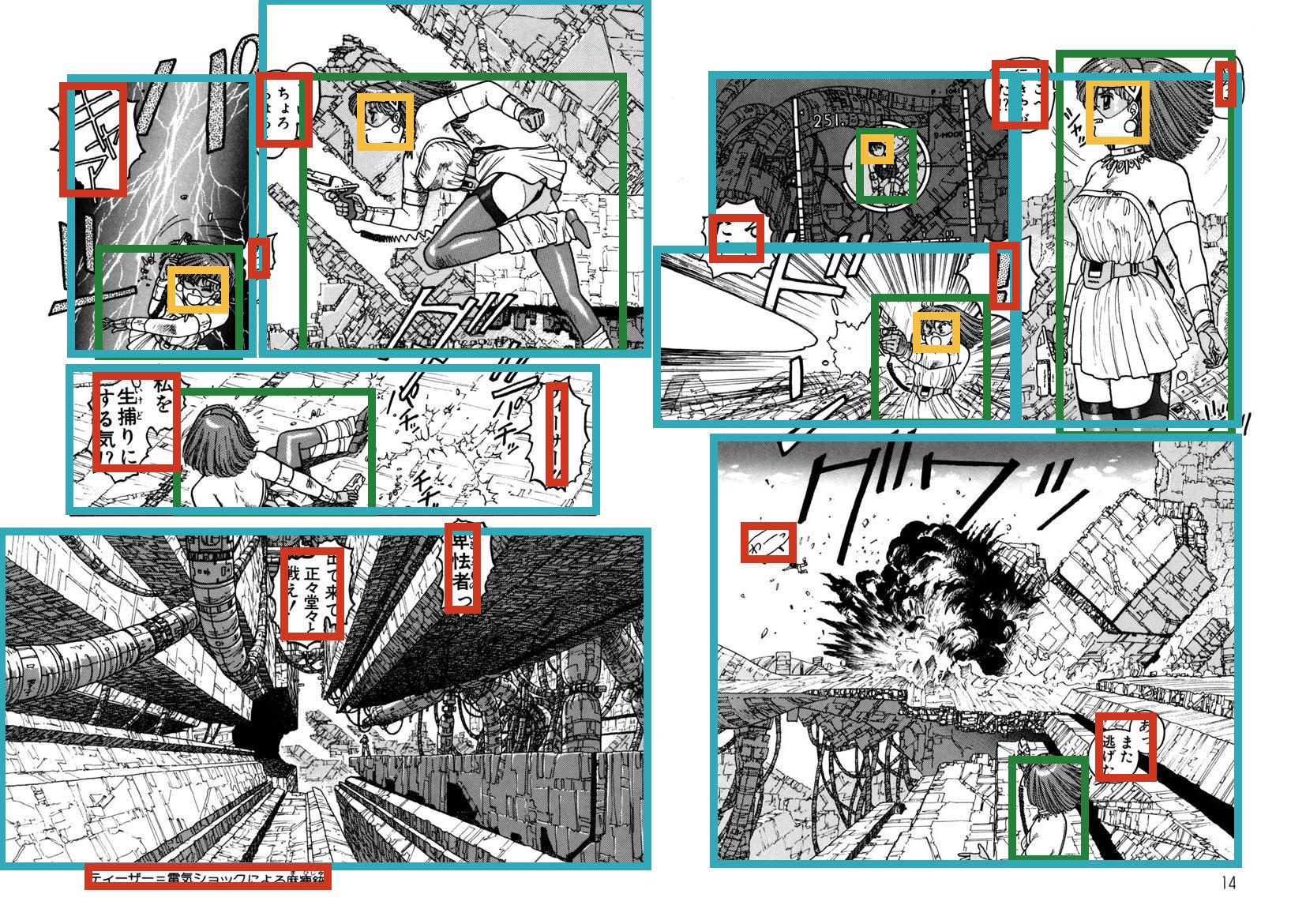
An example of visualization is as follows
from PIL import Image, ImageDraw

def draw_rectangle(img, x0, y0, x1, y1, annotation_type):
    assert annotation_type in ["body", "face", "frame", "text"]
    color = {"body": "#258039", "face": "#f5be41",
             "frame": "#31a9b8", "text": "#cf3721"}[annotation_type]
    width = 10
    draw = ImageDraw.Draw(img)
    draw.line([x0 - width/2, y0, x1 + width/2, y0], fill=color, width=width)
    draw.line([x1, y0, x1, y1], fill=color, width=width)
    draw.line([x1 + width/2, y1, x0 - width/2, y1], fill=color, width=width)
    draw.line([x0, y1, x0, y0], fill=color, width=width)


img = Image.open(p.img_path(book="ARMS", index=6))
for annotation_type in ["body", "face", "frame", "text"]:
    rois = p.annotations["ARMS"]["book"]["pages"]["page"][6][annotation_type]
    for roi in rois:
        draw_rectangle(img, roi["@xmin"], roi["@ymin"], roi["@xmax"], roi["@ymax"], annotation_type)

img.show()
Author
Citation
When you make use of images in Manga109, please cite the following paper:
@article{mtap_matsui_2017,
    author={Yusuke Matsui and Kota Ito and Yuji Aramaki and Azuma Fujimoto and Toru Ogawa and Toshihiko Yamasaki and Kiyoharu Aizawa},
    title={Sketch-based Manga Retrieval using Manga109 Dataset},
    journal={Multimedia Tools and Applications},
    volume={76},
    number={20},
    pages={21811--21838},
    year={2017}
}
When you use annotation data of Manga109, please cite this:
@article{corr_ogawa_2018,
    author={Toru Ogawa and Atsushi Otsubo and Rei Narita and Yusuke Matsui and Toshihiko Yamasaki and Kiyoharu Aizawa},
    title={Object Detection for Comics using Manga109 Annotations},
    journal={CoRR},
    volume={abs/1803.08670},
    year={2018}
}
Release history Release notifications | RSS feed


Download files
Download the file for your platform. If you're not sure which to choose, learn more about installing packages.
Source Distribution
Built Distribution
Filter files by name, interpreter, ABI, and platform.
If you're not sure about the file name format, learn more about wheel file names.
Copy a direct link to the current filters
File details
Details for the file manga109api-0.1.1.tar.gz.
File metadata
- Download URL: manga109api-0.1.1.tar.gz
- Upload date:
- Size: 6.0 kB
- Tags: Source
- Uploaded using Trusted Publishing? No
- Uploaded via: twine/1.11.0 pkginfo/1.4.2 requests/2.19.1 setuptools/40.2.0 requests-toolbelt/0.8.0 tqdm/4.25.0 CPython/3.6.6
File hashes
| Algorithm | Hash digest | |
|---|---|---|
| SHA256 |
18a7428ed51980c77cb28e9909b6aed09f6a7d45d03ca1beb2843b1c91652d32
|
|
| MD5 |
cef3643e604f8fa8959a6995839b8218
|
|
| BLAKE2b-256 |
4a0376324555ce8d78538a497b8254621a6c9a4225df330132d4545f7b55d75e
|
File details
Details for the file manga109api-0.1.1-py3-none-any.whl.
File metadata
- Download URL: manga109api-0.1.1-py3-none-any.whl
- Upload date:
- Size: 5.3 kB
- Tags: Python 3
- Uploaded using Trusted Publishing? No
- Uploaded via: twine/1.11.0 pkginfo/1.4.2 requests/2.19.1 setuptools/40.2.0 requests-toolbelt/0.8.0 tqdm/4.25.0 CPython/3.6.6
File hashes
| Algorithm | Hash digest | |
|---|---|---|
| SHA256 |
475a6065a594d298b5186a0b3bbe97805b15bbd081e726b9772a2b8ecc0ed852
|
|
| MD5 |
dc7c01c005c4a9a2b0fb1b5aaeba58a8
|
|
| BLAKE2b-256 |
580e0d5a2ff34640866cff74c32198779e9dfd78caf7453713e1d850193ac86a
|






