
Python backtesting with a Rust engine. Fast enough to sweep, strict about fills.





Documentation · Quick start · Benchmarks · Correctness · Examples · Website
Manifold-BT is a backtesting library for quantitative research. You describe a strategy once, in a fluent Python DSL, and hand it to the engine: the whole backtest then runs in Rust, signals, fills, fees, slippage, funding and equity included. Python stays out of the hot loop.
- Fast. 10 million bars with a full performance summary in 211 ms, where vectorbt takes 82.2 s. 10,000 parameter sets over 200,000 bars in 3.5 s inside 344 MB. Measured on a standard 4-vCPU GitHub runner, every run linked.
- Checked. Entry price, exit price and exit reason are asserted against vectorbt in CI, on the wheel published to PyPI. A benchmark workload the engines disagree on gets no timing at all.
- Explicit. Every fill rule is written down, pessimistic wherever a choice existed.
pip install manifoldbt
Wheels for Linux (x86_64 and ARM), Windows and macOS on Apple Silicon. No Rust toolchain, no compiler, no account.
Pick your route
| You want to | Go to | Start with |
|---|---|---|
| Run a backtest | Quick start | pip install manifoldbt |
| Have an agent write the strategy | MCP docs | Connect https://mcp.manifoldbt.com/docs/mcp, no key and nothing to install |
| Run the research method with an agent | quant-research-skill | claude plugin marketplace add Jimmy7892/quant-research-skill |
| Read working strategies first | Examples | python examples/13_stochastic_simulation.py |
| Walk through it in the browser | Notebook | Strategy, sweep, walk-forward, Monte Carlo |
| Check our numbers | Performance | Fork the repo and press Run workflow on the benchmark |
Quick start
Two years of hourly Bitcoin, downloaded from Binance's public archive, and an EMA crossover with perpetual-futures fees and slippage. It runs as-is on a fresh install, in a couple of seconds including the download.
import manifoldbt as mbt
from manifoldbt.indicators import close, ema
from manifoldbt.helpers import time_range, Interval, Slippage

# Two years of hourly BTCUSDT from Binance's public archive. No API key.
store = mbt.ingest(provider="binance", symbol="BTCUSDT", symbol_id=1, interval="1h",
                   start="2023-01-01T00:00:00Z", end="2025-01-01T00:00:00Z")

fast, slow = ema(close, 12), ema(close, 26)
strategy = (
    mbt.Strategy.create("ema_cross")
    .signal("fast", fast)
    .signal("slow", slow)
    .size(mbt.when(fast > slow, 0.5, -0.5))   # half the equity, long or short
)

start, end = time_range("2023-01-01", "2025-01-01")
config = mbt.BacktestConfig(
    universe=[1], time_range_start=start, time_range_end=end,
    bar_interval=Interval.hours(1), initial_capital=10_000, warmup_bars=26,
    execution=mbt.ExecutionConfig(allow_short=True),
    fees=mbt.FeeConfig.binance_perps(),
    slippage=Slippage.fixed_bps(2),
)

result = mbt.run(strategy, config, store)
print(result.summary())
Output, trimmed:
Strategy: ema_cross
----------------------------------------
  Total Return               -0.63%
  Sharpe                       0.11
  Max Drawdown              -36.38%
  ...
  Trades
  --------------------------------------
    Total                       605
    Total Fees              2807.07
A losing strategy, and that is the lesson. Remove the fees= and slippage=
lines and the same crossover returns +51.8%: 605 trades paid $2,807 on a
$10,000 account. Costs belong in the first run, not the last.
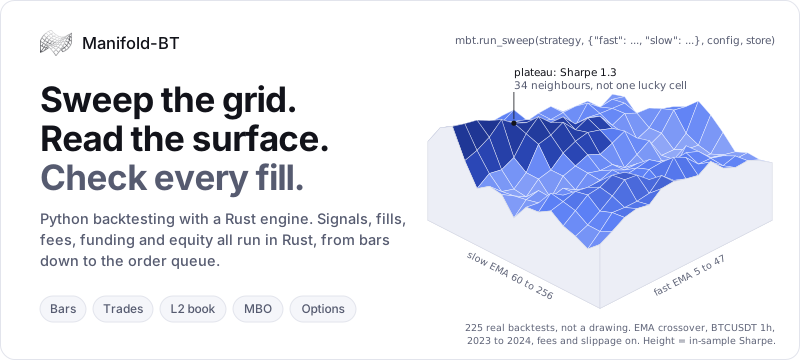
Sweep a grid, read the surface
Replace a number with mbt.param(...) and the strategy becomes a grid. One
call runs every combination in parallel:
# to_df() needs pandas: pip install "manifoldbt[pandas]"
fast = ema(close, mbt.param("fast"))
slow = ema(close, mbt.param("slow"))
strategy = (
    mbt.Strategy.create("ema_grid")
    .signal("fast", fast)
    .signal("slow", slow)
    .size(mbt.when(fast > slow, 0.5, -0.5))
)

sweep = mbt.run_sweep(strategy, {"fast": range(5, 55, 5), "slow": range(60, 260, 20)},
                      config, store)
surface = sweep.to_df(backend="pandas").pivot(
    index="param_fast", columns="param_slow", values="sharpe")
A hundred backtests come back as one table, a row per combination with its
parameters and its metrics. Read the shape rather than the maximum: a lone
peak in a flat field is usually a fitted accident, a broad plateau is a
candidate. Then take the candidate to walk-forward
and Monte Carlo.
With the [plot] extra, sweep.plot_metric("sharpe") draws the heatmap.
Performance
Every number in this section comes from a benchmark that runs in public CI on a standard GitHub runner. It installs each engine from PyPI the way a user would, generates its own data, checks that the engines produced the same result, and only then reports how long each took.
SMA crossover with drawdown, Sharpe, Sortino and volatility, 10M bars
  Manifold-BT  ▏                                                  0.21 s
  raptorbt     ▊                                                   1.2 s
  vectorbt     ████████████████████████████████████████████████   82.2 s

Parameter sweep, 10,000 combinations over 200,000 bars
  Manifold-BT  █▍                                                  3.5 s
  raptorbt     ████████████████████████████████████████████████   127.8 s
  vectorbt     not run: it materialises every combination, this grid needs tens of GB
Run 42444246865:
Linux x86_64, 4 vCPU, Python 3.12, manifoldbt 0.33.0, vectorbt 0.28.4,
raptorbt 0.9.0. Seven interleaved repetitions, medians
reported; the ratio is the median of the per-repetition ratios. All five rows below agree with vectorbt exactly (relative tolerance 1e-9).
These figures are regenerated from the latest published run at each release; the
newest run is always the one on manifoldbt.com/benchmarks, read from
results/latest.json.
| Workload | Bars | Manifold-BT | vectorbt | raptorbt |
|---|---|---|---|---|
| SMA 30/150 crossover | 10M | 198 ms | 20.7 s (×104.0) | 1.22 s (×6.1) |
| ...plus drawdown, Sharpe, Sortino, volatility | 10M | 211 ms | 82.2 s (×391) | 1.22 s (×5.8) |
| ...with a 5 bps fee and 2 bps slippage | 10M | 203 ms | 21.4 s (×105.7) | not supported |
| EMA 12/26 + RSI(14) filter, 5 bps fee | 1M | 37 ms | 1.93 s (×51.1) | not supported |
| Five assets in one book, 5 bps fee | 1M | 131 ms | 2.05 s (×15.7) | not supported |
The second row is the one worth reading twice. A performance summary costs Manifold-BT nothing measurable, because it computes one during the run whether you read it or not. vectorbt defers the equity curve until a risk metric asks for it, then has to build one, and that costs it over a minute on this data. "Not supported" means raptorbt has no way to express the workload (fixed quantity sizing, a multi-asset book); the benchmark prints the reason instead of an empty cell.
Parameter sweeps
| Bars | Combinations | Manifold-BT | vectorbt | raptorbt |
|---|---|---|---|---|
| 20,000 | 5,000 | 0.24 s, 38 MB | 4.12 s, 2.5 GB | 5.15 s, 37 MB |
| 20,000 | 20,000 | 0.90 s, 80 MB | not run | 20.3 s, 63 MB |
| 200,000 | 10,000 | 3.53 s, 344 MB | not run | 128 s, 370 MB |
| 200,000 | 150,000 | 73.0 s, 834 MB | not run | not run |
Past a certain grid the question stops being speed. vectorbt materialises the simulation per combination, 1.57 MB of it at 20,000 bars, so the larger grids would ask the runner for tens of gigabytes. Each sweep is checked for parity before it is timed: every combination against raptorbt, and against vectorbt on the full grid where it fits, or on a 250-combination anchor grid where it does not. The sweep job runs with a paid licence, since Community sweeps stop at 256 combinations.
Where it does not win
- On a single backtest, the gap to raptorbt is about 4×, not orders of magnitude. Both are compiled engines; the large ratios in the first table are against vectorbt. The ×22 to ×36 on sweeps is a different story: raptorbt has no fan-out API, so its sweep is a Python loop paying a full backtest per combination.
- Multi-asset is the smallest lead over vectorbt (×15.7). Broadcasting a column per asset is close to free for vectorbt, while walking five books is not free for anything.
- On a stop-loss/take-profit bracket, raptorbt comes closest (×1.2 at 1M bars, ×2.8 at 10M). Deciding which side triggers first inside a bar is a sequential walk in both engines. That workload is also not in the table above: the engines disagree on whether to re-enter on the bar a bracket closes, so its timing sits in the benchmark's annex with the cause written down.
Reproduce any of it: fork the repository and press Run workflow on
the benchmark,
or run benchmarks/vs_vectorbt/
locally. The method, the parity gate and the known divergences are in
its README.
Each release re-runs it, and the latest results are on
manifoldbt.com/benchmarks.
Against an event-driven engine the comparison is only an order of magnitude:
backtrader runs an EMA(12/26) + RSI(14) strategy on 500K 1-minute bars in
46.9 s against 13 ms here
(benchmarks/bench_vs_competitors.py,
median of 3, on a developer machine). It stays out of the CI suite because its
fills differ, and the parity gate publishes no timing for engines that did not
do the same work.
Correctness
Speed is worth nothing if the fills are wrong. Everything in this section is a
test in this repository, and it runs in CI against the wheel published on
PyPI, not against the source, on Python 3.9 to 3.13. No licence is configured
in that job on purpose, so what it exercises is the experience of someone who
has just run pip install manifoldbt, and the run prints which tests skipped
rather than showing a green tick that hides them.
Fill-level parity with vectorbt.
test_parity_vectorbt.py
checks where a trade actually filled and why it exited, not a summary
statistic. Each scenario is a short series built to produce one clean round
trip, and the entry price, exit price, exit reason and final return are all
asserted against vectorbt: market take-profit, market stop-loss,
stop-loss/take-profit brackets, shorts and trailing stops. A further scenario
pins the fee arithmetic across two round trips.
Resting limit entries have no vectorbt equivalent to compare against. They are pinned instead by a NumPy model that computes the fill from raw OHLC with no call into the engine. That catches an implementation drifting away from the documented rule; it does not independently prove the rule is right, because the rule was measured from the engine before being re-implemented.
Look-ahead. Regression tests in
python/tests/,
the strictest of which corrupts every bar after a cut point, re-runs, and
requires the equity before that point to come back bit-identical: any
decision that read a future bar moves the prefix.
Execution semantics
These rules are pinned by tests. They are written out so you can check them against the wheel you installed rather than take them on faith. Where a choice was available, the pessimistic one was taken.
| Situation | What the engine does |
|---|---|
| Stop-loss and take-profit both touched in the same bar | The stop wins. The path within a bar is unknown, so the unfavourable outcome is assumed. |
| Price gaps through a stop | Fills at the bar's open, not at the stop price. A stop at 100 on a bar opening at 95 fills at 95. |
| A limit entry is never reached | It expires at the end of its good-till window without filling. |
| A limit entry is immediate-or-cancel | It is cancelled, and will not fill on a later bar that would have triggered it. |
| A stop-limit's stop level is touched | The order arms and then rests at its limit, which may never fill. |
| An order is too large for the bar | It fills over several bars at the configured participation rate, and the partial position is bracketed while it fills. |
| Trailing stops | Never trigger on the bar they ratchet on, which would require reading the intra-bar path. |
| An execution-price expression evaluates to NaN | Falls back to the close and warns, rather than dropping the trade silently. |
| A short option's maintenance margin exceeds equity | The position is force-closed on that bar. |
A leveraged position's equity reaches its maintenance margin (cfg.liquidation) |
The book is liquidated inside the bar, at the liquidation price; a stop placed before that price fires first. |
| Fees, funding and borrow rates | Resolved per symbol, so venues inside one portfolio keep their own rates. |
Prices and margin. Prices are used as the data source supplies them: Yahoo
defaults to dividend-adjusted (dataset="raw" opts out) and splits follow the
provider. Margin force-close applies to short options; leveraged spot and
perpetual positions are held as sized, so leverage limits belong in the
strategy.
Independent verification is welcome, and a reproduction showing a fill this engine gets wrong is the most useful report this project can receive.
Look-ahead
mbt.detect_lookahead (Pro) re-runs a strategy over different windows and
compares the trades they have in common. That isolates bias coming from the
engine or from a strategy's own use of time. It is a check on one strategy, not
a proof: the regression tests in Correctness cover the engine,
and the rest of this section is what the comparison cannot see.
One shape of leak is invisible to that comparison by construction: a signal
that reads a fixed number of bars ahead (close.lead(1), or a column
precomputed with future bars and imported as data). Bar T sees the same T+1 in
every window, so the re-runs report PASS next to a Sharpe in the hundreds. The
detector therefore also walks the strategy's expressions and fails any explicit
lead(), naming the signal. For an implicit one, the check belongs to the
pipeline that built the column: perturb the raw data after some bar K, rebuild
the column from it, and require the equity up to K to be bit-identical.
Perturbing the bars alone leaves a precomputed column untouched and sees
nothing.
A parameter derived from the data before the backtest is a different
question: a threshold computed over the whole history in a notebook is the same
number in every run, so no re-run can weigh it. Re-derive it on the window under
test.
examples/25_lookahead_trap.py
runs every one of these checks on the same strategy and prints what each
concludes, so the difference is visible rather than asserted.
What you can build
Data. Built-in connectors, all returning a store ready for mbt.run:
Binance, Bybit, Hyperliquid, dYdX, Bitstamp, Deribit, Yahoo Finance, Dukascopy
and Polymarket on every tier, London Strategic Edge on every tier with your own free
key, Databento and Massive with Pro. Or bring your own CSV
(standard, MetaTrader 4 and MetaTrader 5 layouts are detected):
store = mbt.import_csv("EURUSD_1m.csv", symbol="EURUSD", symbol_id=1,
                       interval="1m", asset_class="forex")

# Stocks, ETFs, indices, FX and futures from Yahoo Finance, no API key
store = mbt.ingest(provider="yahoo", symbol="AAPL", symbol_id=1, interval="1d",
                   asset_class="equity",
                   start="2015-01-01T00:00:00Z", end="2026-01-01T00:00:00Z")
Yahoo prices are dividend-adjusted, like yfinance's auto_adjust=True; pass
dataset="raw" for unadjusted quotes. Deribit option contracts carry their
strike, expiry and settlement into the store and settle at intrinsic value on
the expiration bar.
Signals. Over 100 indicator functions and 38 candlestick patterns, from moving averages and oscillators to rolling regression, Kalman filters, GARCH, and cross-sectional z-scores and neutralization, all composable with conditions, lags and references to other assets. The ones the library does not ship you can write yourself.
Higher timeframes, without look-ahead. Declare them next to the simulation
timeframe and read them with mbt.tf(...). A higher-timeframe bar only becomes
readable once it has closed. .apply(...) computes an indicator on that
timeframe's own grid, so the period counts in its bars:
from manifoldbt.indicators import close, sma

config = mbt.BacktestConfig(
    ...,
    bar_interval=Interval.minutes(1),                 # simulate on 1m
    extra_timeframes={"1h": Interval.hours(1)},       # also resample to 1h
)
band = mbt.tf("1h").apply(sma(close, 20))             # mean of 20 HOURLY closes
sma(mbt.tf("1h").close, 20) is not the same thing: it smooths the step-held
hourly series over 20 simulation bars.
Sweep a choice, not just a number. mbt.choice(...) makes an expression an
axis of the grid. Each combination resolves to its branch before simulation, so
the branches it did not pick cost nothing:
band = mbt.choice("band", {
    "30m": mbt.tf("30m").apply(sma(close, mbt.param("len"))),
    "1h":  mbt.tf("1h").apply(sma(close, mbt.param("len"))),
})
strategy = (mbt.Strategy.create("band_cross")
            .signal("band", band)
            .size(mbt.when(close > mbt.col("band"), 1.0, 0.0)))
config.extra_timeframes = {"30m": Interval.minutes(30), "1h": Interval.hours(1)}

sweep = mbt.run_sweep(strategy, {"band": ["30m", "1h"], "len": range(10, 210, 10)},
                      config, store)
The same mechanism sweeps which exogenous column to use, which asset to reference, or which indicator to apply.
Execution. Maker and taker fees per venue, perpetual funding, borrow costs, slippage, partial fills at a participation rate, limit, stop and stop-limit entries, brackets and trailing stops, and fills at a price the strategy computes. Simulation on bars from one minute up, or from one second with Pro.
Research. Walk-forward optimization, Monte Carlo resampling, stochastic path simulation (GBM, Heston, Merton jump-diffusion, GARCH with jumps), multi-asset and multi-strategy portfolios, cross-exchange universes, exposure and risk checks, and HTML tearsheets.
Trades and the order book (Researcher). Resolve stops and targets against the individual trades inside each bar instead of assuming the order of high and low, simulate a market maker on the trade clock with a queue and a latency, and reconcile the backtest against the fills a broker actually granted.
Examples
Clone the repository and run one:
python examples/13_stochastic_simulation.py
Most examples backtest real market data, which is not in the repository.
python examples/setup_data.py downloads it once, from free connectors that
need no API key, and
examples/README.md
says which files need it and which run on nothing at all. Charts come from the
optional [plot] extra: without it an example still runs to the end and skips
its chart.
Good places to start: 01 Trend following · 05 Statistical arbitrage · 07 Walk-forward · 25 Look-ahead trap · 26 Fill costs
All 30 examples
| # | Example | What it shows |
|---|---|---|
| 00 | Template | Minimal starting point |
| 01 | Trend Following | EMA crossover, volume filter, stop-loss |
| 02 | Mean Reversion | EMA crossover with parameter sweep |
| 03 | Multi-Asset Momentum | Cross-asset signals |
| 04 | Linear Regression | Regression-based signal |
| 05 | Statistical Arbitrage | Pairs trading, spread z-score |
| 06 | Full Visualization | Tearsheet and charts |
| 07 | Walk-Forward | Out-of-sample validation |
| 08 | 2D Sweep | Parameter grid heatmap |
| 09 | 3D Surface | Parameter surface plot |
| 10 | Monte Carlo | Permutation-based robustness |
| 11 | Portfolio | Multi-strategy portfolio |
| 12 | Diagnostics | Look-ahead and exposure checks |
| 13 | Stochastic Simulation | SDE path simulation (GBM, Heston, ...) |
| 14 | Multi-Timeframe | Combining signals across timeframes |
| 15 | Cross-Exchange | Signal on one venue, execute on another |
| 16 | Exogenous Data | External series (e.g. hashrate) as a signal |
| 17 | Per-Venue Fees | Per-venue funding and borrow costs |
| 18 | CSV Import | Load OHLCV from CSV (standard / MT4 / MT5) |
| 19 | Custom Indicators | Write the ones the library does not ship |
| 20 | Entry Orders | Rest an entry at a price instead of taking the close |
| 21 | Computed Fill Level | Fill at a level the strategy computes |
| 22 | Yahoo Equities | Stocks, ETFs, indices, FX and futures |
| 23 | Crypto Options | Deribit contracts that actually expire |
| 24 | Option Spread | A bull call spread, held to expiration |
| 25 | Look-Ahead Trap | Which audit answers which question |
| 26 | Fill Costs | The same signal filled four ways, and what each costs |
| 27 | Bars vs Tape | A bracket resolved on the candle and on the trades inside it (Researcher) |
| 28 | Trade-Clock Market Maker | Queue, latency, and what each fill cost (Researcher) |
| 29 | Reconcile Live Fills | A broker's own fills against the backtest of the same days (Researcher) |
Installation options
pip install manifoldbt              # engine only: backtests, sweeps, metrics
pip install manifoldbt[pandas]      # + DataFrame output
pip install manifoldbt[plot]        # + interactive charts and native windows (show=True)
pip install manifoldbt[all]         # everything: plots, windows, PNG export, pandas/polars
pip install manifoldbt[gpu]         # + NVIDIA runtime compiler, for device="cuda"
The base install stays light (no browser, no GUI) for scripts, servers and CI.
[plot] adds plotly and a native window backend; [all] also pulls kaleido
for static PNG/SVG export, which bundles a headless Chromium.
The Linux and Windows x86_64 wheels already carry the CUDA kernels, so [gpu]
only adds the NVIDIA runtime compiler (~180 MB) that compiles them on your
machine. Skip it if you already have a CUDA toolkit installed. An NVIDIA driver
is required, and GPU acceleration is a Researcher feature; everything else runs
at full speed on the CPU.
Staying up to date. manifoldbt asks PyPI once a day, in the background,
whether a newer release exists, and prints a one-line notice under the banner
when one does. It never delays an import (the notice is the previous run's
answer, read from a local cache) and the request is a plain GET of a public
JSON document. Set MANIFOLDBT_NO_UPDATE_CHECK=1 to turn it off, or call
mbt.check_for_update() to ask on demand.
Quiet imports. The banner and the update notice go to stderr, so piping or
capturing a script's stdout gets only what the script prints. They are coloured
only on a terminal and never when NO_COLOR is set; MANIFOLDBT_QUIET=1
silences both.
Community, Pro and Researcher
Single backtests are free and run at full speed, with no run limit and no account. The paid tiers add scale and depth. See pricing.
| Community | Pro | Researcher | |
|---|---|---|---|
Single backtests (mbt.run) |
Unlimited, full speed | Unlimited | Unlimited |
| Parameter sweeps and batches | Up to 256 backtests per sweep | Unlimited | Unlimited |
Simulation resolution (bar_interval) |
1 minute and coarser | Down to 1 second | Down to 1 second |
| Output resolution | Daily | Down to 1 second | Down to 1 second |
| Monte Carlo | 1,000 simulations | Unlimited | Unlimited |
| Walk-forward optimization | - | Yes | Yes |
Look-ahead detection (detect_lookahead) |
- | Yes | Yes |
Exposure and risk checks (risk_check) |
Yes | Yes | Yes |
| Cross-exchange universes | - | Yes | Yes |
| Free connectors and CSV import | Yes | Yes | Yes |
| Databento and Massive connectors | - | Yes | Yes |
| Tearsheets and export | Yes | Yes | Yes |
GPU acceleration (device="cuda") |
- | - | Yes |
| Trade tape, order book, queue and latency | - | - | Yes |
Documentation and community
- API reference, indicator list, configuration guide: manifoldbt.com/documentation
- Writing strategies, from the first signal to the tape: docs/strategy-authoring.md
- Questions, ideas, or a backtest to share: Discord (each page has its own invite link; they all lead to the same server)
- Found a fill the engine gets wrong? Open an issue with a reproduction. It is the most useful report this project can receive.
License
Two licences, one for each layer.
- The code in this repository, the Python package, the examples, the tests and the benchmarks, is open source under Apache 2.0.
- The compiled Rust engine inside the wheels published on PyPI (the
manifoldbt._nativemodule) is proprietary, see LICENSE-ENGINE. Its source is not published. It is free to use, including commercially inside your own firm and on your own infrastructure; reselling it, offering it as a paid hosted service or reverse engineering it is not permitted.
1 maintainer

Metadata
1 maintainer
Release files for manifoldbt 0.34.0
For a detailed explanation of source distributions (sdists) and built distributions (wheels), please see the package formats documentation.
Built distributions (wheels)
| File | Actions Reset | |||
|---|---|---|---|---|
| manifoldbt-0.34.0-cp39-abi3-win_amd64.whl | CPython 3.9 | abi3 | Windows x86-64 | Details for manifoldbt-0.34.0-cp39-abi3-win_amd64.whl |
| manifoldbt-0.34.0-cp39-abi3-musllinux_1_2_x86_64.whl | CPython 3.9 | abi3 | Linux musl 1.2+ x86-64 | Details for manifoldbt-0.34.0-cp39-abi3-musllinux_1_2_x86_64.whl |
| manifoldbt-0.34.0-cp39-abi3-musllinux_1_2_aarch64.whl | CPython 3.9 | abi3 | Linux musl 1.2+ ARM64 | Details for manifoldbt-0.34.0-cp39-abi3-musllinux_1_2_aarch64.whl |
| manifoldbt-0.34.0-cp39-abi3-manylinux_2_28_x86_64.whl | CPython 3.9 | abi3 | Linux glibc 2.28+ x86-64 | Details for manifoldbt-0.34.0-cp39-abi3-manylinux_2_28_x86_64.whl |
| manifoldbt-0.34.0-cp39-abi3-manylinux_2_28_aarch64.whl | CPython 3.9 | abi3 | Linux glibc 2.28+ ARM64 | Details for manifoldbt-0.34.0-cp39-abi3-manylinux_2_28_aarch64.whl |
| manifoldbt-0.34.0-cp39-abi3-macosx_11_0_arm64.whl | CPython 3.9 | abi3 | macOS 11.0+ ARM64 | Details for manifoldbt-0.34.0-cp39-abi3-macosx_11_0_arm64.whl |
Total release size: 79.3 MB
Release files / manifoldbt-0.34.0-cp39-abi3-win_amd64.whl
| Download URL | manifoldbt-0.34.0-cp39-abi3-win_amd64.whl |
|---|---|
| Size | 15.3 MB |
| Tags | CPython 3.9 Windows x86-64 abi3 |
|
SHA-256 checksum How to use checksums |
8ae2dd05c8414905a686d26cacd1077ffc84790c36c57f46f265a33879c990dd
|
|
BLAKE2b-256 checksum How to use checksums |
6e83fdbb340d3444aae5a6e51f84d60f819ccdb63edd40951b32185f96385bec
|
| Upload date | |
|
Uploaded using Trusted Publishing? What is trusted publishing? |
No |
| Uploaded via |
twine/7.0.0 CPython/3.13.16
|
Release files / manifoldbt-0.34.0-cp39-abi3-musllinux_1_2_x86_64.whl
| Download URL | manifoldbt-0.34.0-cp39-abi3-musllinux_1_2_x86_64.whl |
|---|---|
| Size | 12.7 MB |
| Tags | CPython 3.9 Linux musl 1.2+ x86-64 abi3 |
|
SHA-256 checksum How to use checksums |
119b776879963cf93900ad65e2f82a749e163514fd961c96d01649ff32a9ea26
|
|
BLAKE2b-256 checksum How to use checksums |
0cc3758f6e10b4d30ce41b2bb8c94a325023fc588e9d72319547899025968d21
|
| Upload date | |
|
Uploaded using Trusted Publishing? What is trusted publishing? |
No |
| Uploaded via |
twine/7.0.0 CPython/3.13.16
|
Release files / manifoldbt-0.34.0-cp39-abi3-musllinux_1_2_aarch64.whl
| Download URL | manifoldbt-0.34.0-cp39-abi3-musllinux_1_2_aarch64.whl |
|---|---|
| Size | 11.6 MB |
| Tags | CPython 3.9 Linux musl 1.2+ ARM64 abi3 |
|
SHA-256 checksum How to use checksums |
3f733c03969b82437759322a606ccd20225f001eaa14c76da13114539788468b
|
|
BLAKE2b-256 checksum How to use checksums |
c8239e91e16cdbfb06ba4bc7686240c40d7cff1f6ac381c0a94210f174818db8
|
| Upload date | |
|
Uploaded using Trusted Publishing? What is trusted publishing? |
No |
| Uploaded via |
twine/7.0.0 CPython/3.13.16
|
Release files / manifoldbt-0.34.0-cp39-abi3-manylinux_2_28_x86_64.whl
| Download URL | manifoldbt-0.34.0-cp39-abi3-manylinux_2_28_x86_64.whl |
|---|---|
| Size | 15.0 MB |
| Tags | CPython 3.9 Linux glibc 2.28+ x86-64 abi3 |
|
SHA-256 checksum How to use checksums |
df0f459fad80bdca2d159487d2f7f0fe8bc37f881c42fbbdcbb2522a8bbd203e
|
|
BLAKE2b-256 checksum How to use checksums |
64db3c6c3ea6a2b465e9858194cd7b3a5707bca20a99f8d0265ce144cdf1bc3c
|
| Upload date | |
|
Uploaded using Trusted Publishing? What is trusted publishing? |
No |
| Uploaded via |
twine/7.0.0 CPython/3.13.16
|
Release files / manifoldbt-0.34.0-cp39-abi3-manylinux_2_28_aarch64.whl
| Download URL | manifoldbt-0.34.0-cp39-abi3-manylinux_2_28_aarch64.whl |
|---|---|
| Size | 13.7 MB |
| Tags | CPython 3.9 Linux glibc 2.28+ ARM64 abi3 |
|
SHA-256 checksum How to use checksums |
f36829c41fd99d748d9de049c7f718b6d2708d00d48f158720902ad155fe0c06
|
|
BLAKE2b-256 checksum How to use checksums |
3ebc4e160f3d0573803240aebdb4f9a464c0252c67c5739a764ceee44c1b45bd
|
| Upload date | |
|
Uploaded using Trusted Publishing? What is trusted publishing? |
No |
| Uploaded via |
twine/7.0.0 CPython/3.13.16
|
Release files / manifoldbt-0.34.0-cp39-abi3-macosx_11_0_arm64.whl
| Download URL | manifoldbt-0.34.0-cp39-abi3-macosx_11_0_arm64.whl |
|---|---|
| Size | 11.0 MB |
| Tags | CPython 3.9 abi3 macOS 11.0+ ARM64 |
|
SHA-256 checksum How to use checksums |
ca40148146ce1b7b9fa63c3023e84a0860f848fcff5733fcc37a2c563b136ab3
|
|
BLAKE2b-256 checksum How to use checksums |
eff6a3df6a85536001b658ea0774105815b8dd777d00d9d974ac6332f0bcaa8f
|
| Upload date | |
|
Uploaded using Trusted Publishing? What is trusted publishing? |
No |
| Uploaded via |
twine/7.0.0 CPython/3.13.16
|
Security for manifoldbt 0.34.0
Provenance
Provenance describes where a file came from. On PyPI, provenance is shared via attestations, which provide a verifiable record of the build or publishing details. View details, limitations and caveats.
No provenance found
None of the files in this release were uploaded with provenance metadata.
A note on package security
PyPI is a repository for distributing packages, not a service for auditing them. While third-party security researchers and our staff do their best to detect and remove malicious packages, PyPI cannot guarantee the quality, security or suitability of any given package.
To learn more about protecting yourself from malicious actors, visit our package security documentation.














