
MANIM AUTOMATA
A Manim plugin that allows you to generate scenes with Finite State Machines and their inputs. The plugin will automatically generate these animations with minimal setup from the user.
This plugin has been funded by the University of Leeds.
YOUTUBE VIDEO EXAMPLE
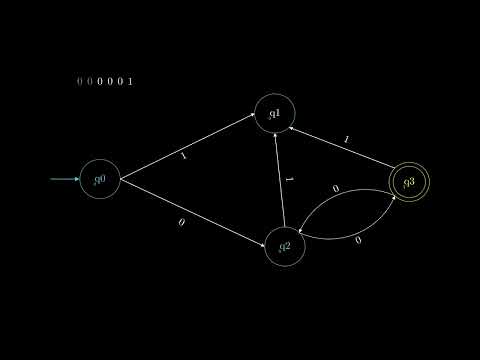
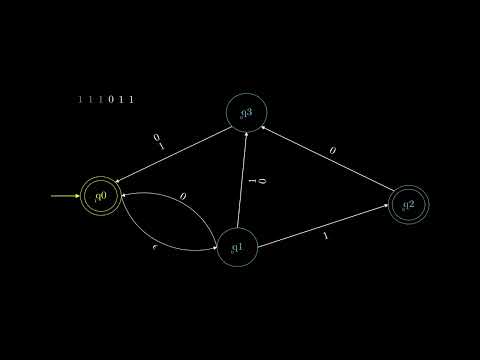
Notes
The manim-automata plugin currently relies on JFLAP files, future updates will enable the user to create automata without JFLAP. JFLAP is software for experimenting with formal languages topics.
Installation
To install manim-automata plugin run:
pip install manim-automata
To see which version of manim-automata you have:
manim-automata
or
pip list
Importing
To use manim-automata in your project, you can:
- Add
from manim_automata import *to your script. Once manim-automata has been imported, you can use the ManimAutomata class to create automata.
How To Use
class Automaton(MovingCameraScene):
    def construct(self):
        manim_automaton = ManimAutomaton(xml_file='your_jff_file.jff')

        #Adjust camera frame to fit ManimAutomaton in scene
        self.camera.frame_width = manim_automaton.width + 10
        self.camera.frame_height = manim_automaton.height + 10
        self.camera.frame.move_to(manim_automaton)


        #Create an mobject version of input for the manim_automaton
        automaton_input = manim_automaton.construct_automaton_input("110011")

        #Position automaton_input on the screen to avoid overlapping.
        automaton_input.shift(LEFT * 2)
        automaton_input.shift(UP * 10)

        self.play(
                DrawBorderThenFill(manim_automaton),
                FadeIn(automaton_input)
            )

        # Play all the animations generate from .play_string()
        for sequence in manim_automaton.play_string(automaton_input):
            for step in sequence:
                self.play(step, run_time=1)
To run the code and generate the video, run:
- manim -pql <name_of_script.py> Automaton
run with -pqh instead of -pql to have highquality version
Examples
The Github page for this plugin has a directory called manim_automata_examples. You can download these and play around with them.
You can run each file using these commands:
- manim -pql examples.py FiniteStateAutomatonExample
- manim -pql examples.py NonFiniteStateAutomatonExample
- manim -pql examples.py PushDownAutomatonExample
Writing Custom Animations
Create a new file called custom_manim_animations.py (can be called anything). In this file write:
import Manim
from manim_automata import ManimAnimations

class CustomManimAnimations(ManimAnimations):

    def __init__(self) -> None:
        super().__init__()
In your manim-automaton file create an instance of your new custom manim animations class, like so:
import Manim
from .custom_manim_animations import CustomManimAnimations

class Automaton(MovingCameraScene):
    def construct(self):
        manim_animations_instance = CustomManimAnimations()

        manim_automaton = ManimAutomaton(xml_file='example_machine.jff', manim_animations=manim_animations_instance)
        ...
Now that everything is setup, you'll be able to override the methods in ManimAnimations in your own class. Go to the github repository of this project, then to custom_animations_help to find a file that has all the animation methods that can be overriden.
1 maintainer

Release files for manim-automata 0.2.14
For a detailed explanation of source distributions (sdists) and built distributions (wheels), please see the package formats documentation.
Source distribution (sdist)
| File | Size | Uploaded | |
|---|---|---|---|
| manim_automata-0.2.14.tar.gz | 39.8 kB | Details |
Built distribution (wheel)
| File | Interpreter | ABI | Platform | Reset |
|---|---|---|---|---|
| manim_automata-0.2.14-py3-none-any.whl | Python 3 | none | any | Details |
Total release size: 66.3 kB
Release files / manim_automata-0.2.14.tar.gz
| Download URL | manim_automata-0.2.14.tar.gz |
|---|---|
| Size | 39.8 kB |
| Tags | Source |
|
SHA-256 checksum How to use checksums |
3e9636d2f6d674b6762611e18ce399a3f476932f3931dc2593efd0e47764c55a
|
|
BLAKE2b-256 checksum How to use checksums |
ad6f44b29373b532cc57b3e2f835010468ddd3cbe448548ac297215b373e2625
|
| Upload date | |
|
Uploaded using Trusted Publishing? What is trusted publishing? |
No |
| Uploaded via |
poetry/1.3.1 CPython/3.11.1 Linux/5.15.0-1024-azure
|
Release files / manim_automata-0.2.14-py3-none-any.whl
| Download URL | manim_automata-0.2.14-py3-none-any.whl |
|---|---|
| Size | 26.5 kB |
| Tags | Python 3 |
|
SHA-256 checksum How to use checksums |
ac21797f9454c2857cd872d64ae1a6da6c4698dfcc39330b3db745629ad85937
|
|
BLAKE2b-256 checksum How to use checksums |
73ed0c825599604e341241fb7867627c4b287b113aa161136b1167ec3054357e
|
| Upload date | |
|
Uploaded using Trusted Publishing? What is trusted publishing? |
No |
| Uploaded via |
poetry/1.3.1 CPython/3.11.1 Linux/5.15.0-1024-azure
|














