
Animated visual captcha generation library using Manim.

Project description
Manim-Captcha

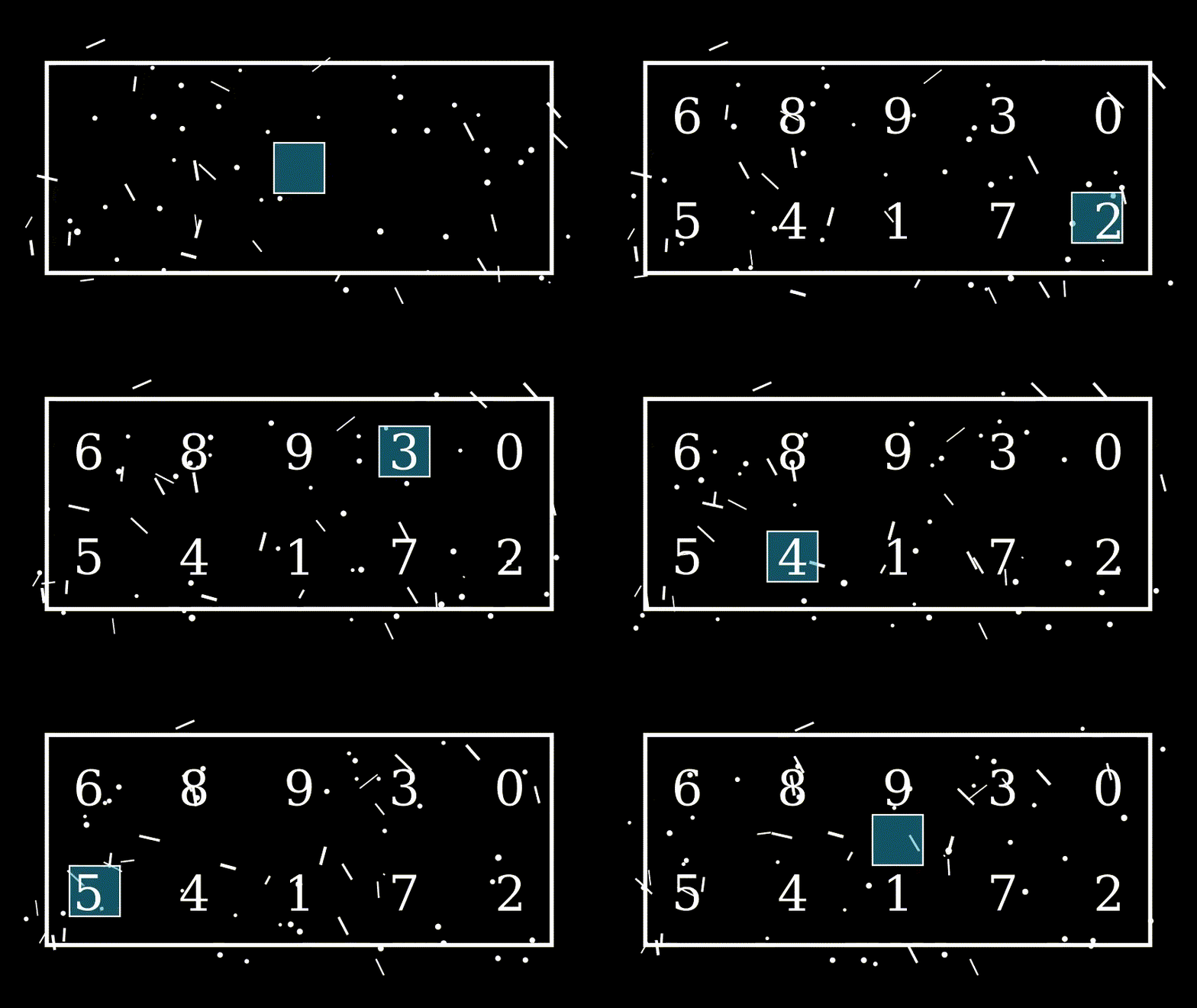

Overview
Animated visual captcha generation library using Manim Framework.
Traditional CAPTCHAs are static images. Manim-Captcha generates animated visual challenges (e.g., moving selectors, distributed numbers, dynamic noise).
This library offers:
- A "Captcha Generator" that allows to request generation of captcha files.
- A "Captcha Automatic Generator" for async operation that acts as a background process to automatically generate captcha files in the filesystem for a custom interval and keeping a maximum number of captchas files (file rotation).
- Some builtin captchas animations that you can select to use.
- Kind of "plugin" based system were you can provide any external custom Manim captcha animation script (scene) and make the library use it.
- Easy way to pass custom properties to the captcha scenes for customization (like scenes).
Table of Contents
Requirements
The manim-captcha library requires python 3 (tested with v3.12), Manim Community framework, and the corresponding requirements for Manim (like Cairo and Pango libraries).
Installation
Note: The next installation instructions are for Debian based Linux systems.
From a command line, install the different requirements:
sudo apt-get update
sudo apt-get install build-essential make python3 python3-dev python3-pip
sudo apt-get install libcairo2-dev libpango1.0-dev
The library has been published to pypi so can be easily installed via pip:
pip install manim-captcha
Usage
Basic captcha generator:
from manim_captcha.generator import CaptchaGenerator
from manim_captcha.scenes import CaptchaScene
from pathlib import Path

generator = CaptchaGenerator()

captcha = generator.generate(
    code="1234",
    scene=CaptchaScene.CIRCLE_NUMS,
    out_dir=Path("./captchas"),
    properties={
        "theme": "dark",
        "noise": True
    }
)

if captcha.error:
    print("Fail to create the captcha:")
    print(captcha.error_info)
else:
    print("Captcha successfully created")
    print(f"  Code: \"{captcha.code}\"")
    print(f"  File: {captcha.file}")
print("")
Async and non-blocking automatic captcha generator:
import asyncio
import logging
from manim_captcha.auto_generator import CaptchaAutoGenerator
from pathlib import Path

logging.basicConfig(
    format='%(asctime)s - %(name)s - %(levelname)s - %(message)s',
    level=logging.INFO
)
logger = logging.getLogger(__name__)

async def main():
    # Setup the CaptchaAutoGenerator
    MAX_NUM_CAPTCHAS = 5
    TIME_GEN_INTERVAL_S = 10
    OUT_DIR = Path("./captchas")
    auto_generator = CaptchaAutoGenerator(
        OUT_DIR, TIME_GEN_INTERVAL_S, MAX_NUM_CAPTCHAS)
    # Start the generator process
    start_success = await auto_generator.start()
    if not start_success:
        logger.error("Fail to Start CaptchaAutoGenerator")
        return
    # Wait and get some captchas during 1 minute
    TIME_CHECK = 60
    time_pass_s = 0
    run = True
    while run:
        # Show number of captchas availables
        num_captchas = auto_generator.num_captchas()
        logger.info("Num Captchas Availables: %d", num_captchas)
        # Try to get a captcha
        captcha = auto_generator.get_captcha()
        if not captcha.error:
            logger.info("Captcha retrieved:")
            logger.info("  Code: \"%s\"", captcha.code)
            logger.info("  File: %s", str(captcha.file))
        await asyncio.sleep(TIME_GEN_INTERVAL_S)
        # Check if check end time has arrive to exit the loop
        time_pass_s = time_pass_s + TIME_GEN_INTERVAL_S
        if time_pass_s >= TIME_CHECK:
            run = False
    # Stop the generator process
    await auto_generator.stop()

if __name__ == '__main__':
    asyncio.run(main())
Note: You can find some extra usages in the examples/ directory.
Library Development
For library development, to ease project setup and installation of all the requirements, a Makefile and some bash scripts are provided for Linux systems based on Debian.
Setup the project (this will install all system requirements and creates a python virtual environment):
make setup
Extra actions can be performed through make, just run make without argments to see the usage help:
make

Usage:
  setup: Setup Project and install requirements
  test: Run project tests
  check_code_style: Run Code Style Checks
  check_static_types: Run Static Types Checks
  install: Install local package in edit mode
  publish: Publish the library to pypi
Now open any code editor (i.e. vscode) withing the python environment and start coding!


Download files
Download the file for your platform. If you're not sure which to choose, learn more about installing packages.
Source Distribution
Built Distribution
Filter files by name, interpreter, ABI, and platform.
If you're not sure about the file name format, learn more about wheel file names.
Copy a direct link to the current filters
File details
Details for the file manim_captcha-1.0.0.tar.gz.
File metadata
- Download URL: manim_captcha-1.0.0.tar.gz
- Upload date:
- Size: 15.1 kB
- Tags: Source
- Uploaded using Trusted Publishing? No
- Uploaded via: twine/6.2.0 CPython/3.12.3
File hashes
| Algorithm | Hash digest | |
|---|---|---|
| SHA256 |
506d5db111084f0aabe2c8996e780000c13a30ae2a25aaa7358b59babae7d4ff
|
|
| MD5 |
63fc703cd53307b92018dbd2531a91a9
|
|
| BLAKE2b-256 |
eda82050044ab42629180dc832d02c94c66ec31ff9c190a9213083a3c0b17823
|
File details
Details for the file manim_captcha-1.0.0-py3-none-any.whl.
File metadata
- Download URL: manim_captcha-1.0.0-py3-none-any.whl
- Upload date:
- Size: 18.1 kB
- Tags: Python 3
- Uploaded using Trusted Publishing? No
- Uploaded via: twine/6.2.0 CPython/3.12.3
File hashes
| Algorithm | Hash digest | |
|---|---|---|
| SHA256 |
28d2e0c7fa1b2cf0b24a523912884d34ae38ceb40ce865f25b6803e35d29be34
|
|
| MD5 |
b4f8d7ed211fe8d149cd31552678b2a7
|
|
| BLAKE2b-256 |
26ccd7ff793f8d8a688b81653003401478d2273ef5d2a3470050e955765bc183
|






