
About this Project
This poject contains a Python Module that provides allows theming of Manim projects with QR Codes.
Installation
Install the package with pip:
pip install manim-qr-codes
Minimal Example
NOTE: Please make sure you have manim installed and running on your machine
Below is a minimal example of how to use the Module.
import manim as m

from manim_qr_codes.qr import qr_code


class MyQrCodeScene(m.Scene):

    def construct(self):

        qr_code_without_icon = qr_code("https://fishshell.com")
        qr_code_with_icon = qr_code(
            payload="https://fishshell.com",
            icon='terminal',
            icon_size=6
        )

        qr_code_group = m.VGroup(
            qr_code_without_icon,
            qr_code_with_icon).arrange(m.RIGHT, buff=0.75)

        label = m.Text("https://fishshell.com")
        label.to_edge(m.UP, buff=0.75)

        self.add(qr_code_group, label)


if __name__ == '__main__':
    import os
    from pathlib import Path

    FLAGS = "-pqm -s"
    SCENE = "MyQrCodeScene"

    file_path = Path(__file__).resolve()
    os.system(f"manim {Path(__file__).resolve()} {SCENE} {FLAGS}")
This should yield a Scene that looks like so:
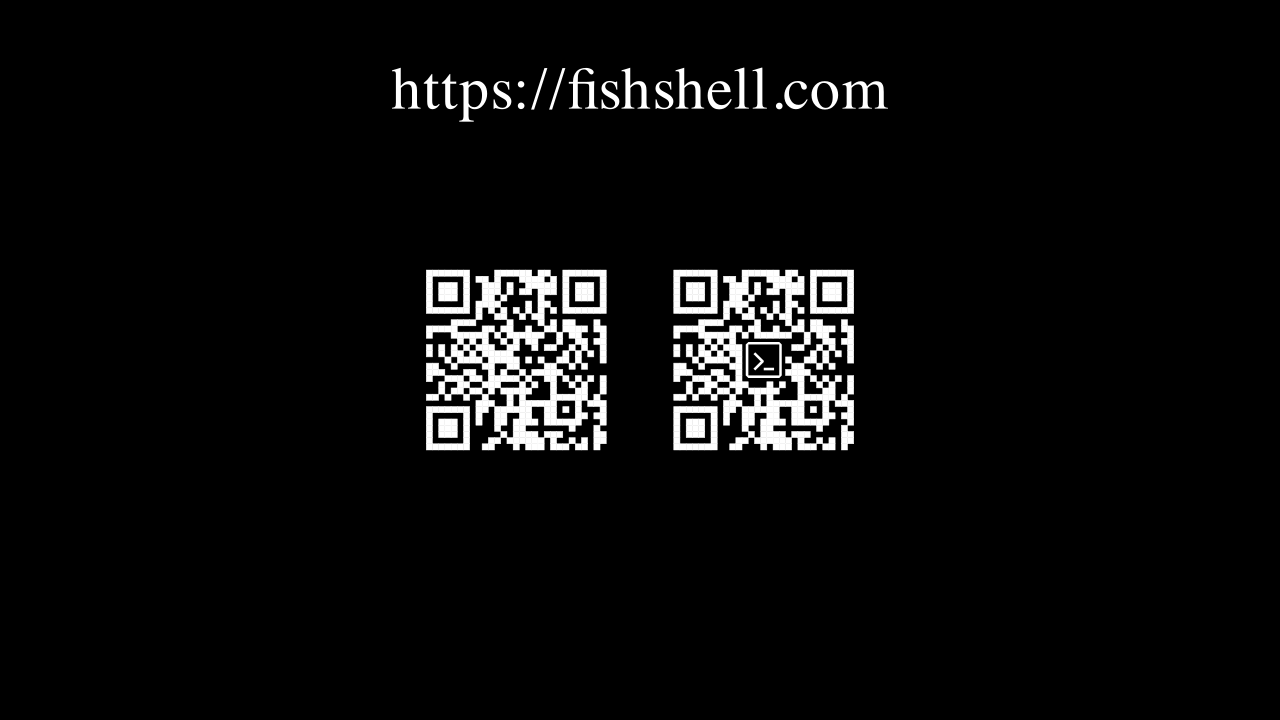
Documentation
This project uses sphinx for generating the documentation.
It also uses a lot of sphinx extensions to make the documentation more readable and interactive.
For example the extension myst-parser is used to enable markdown support in the documentation (instead of the usual .rst-files).
It also uses the sphinx-autobuild extension to automatically rebuild the documentation when changes are made.
By running the following command, the documentation will be automatically built and served, when changes are made (make sure to run this command in the root directory of the project):
sphinx-autobuild ./docs/source/ ./docs/build/html/
If sphinx extensions were added the requirements_dev.txt file needs to be updated.
These are the requirements, that readthedocs uses to build the documentation.
The file can be updated using this command:
poetry export -f requirements.txt --output requirements.txt --with dev
This project features most of the extensions featured in this Tutorial: Document Your Scientific Project With Markdown, Sphinx, and Read the Docs | PyData Global 2021.
1 maintainer

Metadata
1 maintainer
Release files for manim-qr-codes 0.1.0
For a detailed explanation of source distributions (sdists) and built distributions (wheels), please see the package formats documentation.
Source distribution (sdist)
| File | Size | Uploaded | Provenance | Actions |
|---|---|---|---|---|
| manim_qr_codes-0.1.0.tar.gz | 8.5 kB | Without provenance | Details for manim_qr_codes-0.1.0.tar.gz |
Built distribution (wheel)
| File | Interpreter | ABI | Platform | Actions Reset |
|---|---|---|---|---|
| manim_qr_codes-0.1.0-py3-none-any.whl | Python 3 | none | any | Details for manim_qr_codes-0.1.0-py3-none-any.whl |
Total release size: 18.2 kB
Release files / manim_qr_codes-0.1.0.tar.gz
| Download URL | manim_qr_codes-0.1.0.tar.gz |
|---|---|
| Size | 8.5 kB |
| Tags | Source |
|
SHA-256 checksum How to use checksums |
50c90927d82b881f76c1c452d0b2f720837965a3c090f37b3459d7e2e7fb05fa
|
|
BLAKE2b-256 checksum How to use checksums |
3c65d31431d9de1338e6f7dcade1bc58aa6e552890f8a5ce4c4ac90e20627c6d
|
| Upload date | |
|
Uploaded using Trusted Publishing? What is trusted publishing? |
No |
| Uploaded via |
twine/6.1.0 CPython/3.13.3
|
Release files / manim_qr_codes-0.1.0-py3-none-any.whl
| Download URL | manim_qr_codes-0.1.0-py3-none-any.whl |
|---|---|
| Size | 9.7 kB |
| Tags | Python 3 |
|
SHA-256 checksum How to use checksums |
d43370da18041a0d61008be6b59bdece2e088f82d8fb43265b50240addb27683
|
|
BLAKE2b-256 checksum How to use checksums |
8eb0abf5554d2acf48200e578c65358752358dce4a836ab61fa91ce899aea38a
|
| Upload date | |
|
Uploaded using Trusted Publishing? What is trusted publishing? |
No |
| Uploaded via |
twine/6.1.0 CPython/3.13.3
|
Security for manim-qr-codes 0.1.0
Provenance
Provenance describes where a file came from. On PyPI, provenance is shared via attestations, which provide a verifiable record of the build or publishing details. View details, limitations and caveats.
No provenance found
None of the files in this release were uploaded with provenance metadata.
A note on package security
PyPI is a repository for distributing packages, not a service for auditing them. While third-party security researchers and our staff do their best to detect and remove malicious packages, PyPI cannot guarantee the quality, security or suitability of any given package.
To learn more about protecting yourself from malicious actors, visit our package security documentation.













