
This release is a pre-release and may not be stable for production use.










An animation engine for explanatory math videos
Manim is an animation engine for explanatory math videos. It's used to create precise animations programmatically, as demonstrated in the videos of 3Blue1Brown.
Table of Contents:
Installation
Manim requires a few dependencies that must be installed prior to using it. If you want to try it out first before installing it locally, you can do so in our online Jupyter environment.
For local installation, please visit the Documentation and follow the appropriate instructions for your operating system.
Usage
Manim is an extremely versatile package. The following is an example Scene you can construct:
from manim import *


class SquareToCircle(Scene):
    def construct(self):
        circle = Circle()
        square = Square()
        square.flip(RIGHT)
        square.rotate(-3 * TAU / 8)
        circle.set_fill(PINK, opacity=0.5)

        self.play(Create(square))
        self.play(Transform(square, circle))
        self.play(FadeOut(square))
In order to view the output of this scene, save the code in a file called example.py. Then, run the following in a terminal window:
manim -p -ql example.py SquareToCircle
You should see your native video player program pop up and play a simple scene in which a square is transformed into a circle. You may find some more simple examples within this GitHub repository. You can also visit the official gallery for more advanced examples.
Manim also ships with a %%manim IPython magic which allows to use it conveniently in JupyterLab (as well as classic Jupyter) notebooks. See the
corresponding documentation for some guidance and
try it out online.
Command line arguments
The general usage of Manim is as follows:
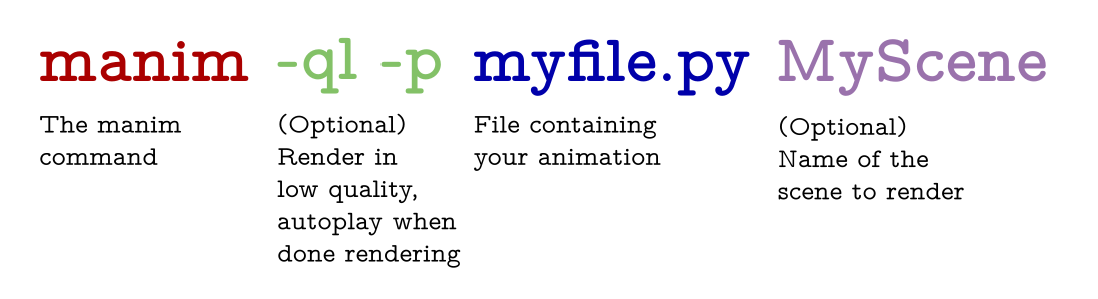
The -p flag in the command above is for previewing, meaning the video file will automatically open when it is done rendering. The -ql flag is for a faster rendering at a lower quality.
Some other useful flags include:
-sto skip to the end and just show the final frame.-n <number>to skip ahead to then'th animation of a scene.-fshow the file in the file browser.
For a thorough list of command line arguments, visit the documentation.
Documentation
Documentation is in progress at ReadTheDocs.
Docker
The community also maintains a docker image (manimcommunity/manim), which can be found on DockerHub.
Instructions on how to install and use it can be found in our documentation.
Help with Manim
If you need help installing or using Manim, feel free to reach out to our Discord Server or Reddit Community. If you would like to submit a bug report or feature request, please open an issue.
Contributing
Contributions to Manim are always welcome. In particular, there is a dire need for tests and documentation. For contribution guidelines, please see the documentation.
However, please note that Manim is currently undergoing a major refactor. In general, contributions implementing new features will not be accepted in this period. The contribution guide may become outdated quickly; we highly recommend joining our Discord server to discuss any potential contributions and keep up to date with the latest developments.
Most developers on the project use uv for management. You'll want to have uv installed and available in your environment.
Learn more about uv at its documentation and find out how to install manim with uv at the manim dev-installation guide in the manim documentation.
How to Cite Manim
We acknowledge the importance of good software to support research, and we note that research becomes more valuable when it is communicated effectively. To demonstrate the value of Manim, we ask that you cite Manim in your work. Currently, the best way to cite Manim is to go to our repository page (if you aren't already) and click the "cite this repository" button on the right sidebar. This will generate a citation in your preferred format, and will also integrate well with citation managers.
Code of Conduct
Our full code of conduct, and how we enforce it, can be read on our website.
License
The software is double-licensed under the MIT license, with copyright by 3blue1brown LLC (see LICENSE), and copyright by Manim Community Developers (see LICENSE.community).
3 maintainers


Metadata
3 maintainers
Release files for manim 0.30.0a1
For a detailed explanation of source distributions (sdists) and built distributions (wheels), please see the package formats documentation.
Source distribution (sdist)
| File | Size | Uploaded | Provenance | Actions |
|---|---|---|---|---|
| manim-0.30.0a1.tar.gz | 644.2 kB | Without provenance | Details for manim-0.30.0a1.tar.gz |
Built distribution (wheel)
| File | Interpreter | ABI | Platform | Actions Reset |
|---|---|---|---|---|
| manim-0.30.0a1-py3-none-any.whl | Python 3 | none | any | Details for manim-0.30.0a1-py3-none-any.whl |
Total release size: 1.4 MB
Release files / manim-0.30.0a1.tar.gz
| Download URL | manim-0.30.0a1.tar.gz |
|---|---|
| Size | 644.2 kB |
| Tags | Source |
|
SHA-256 checksum How to use checksums |
18299a91186e3a8a468cfd10c9a551bc0b0ff5b666220741c8792e4c47c970e8
|
|
BLAKE2b-256 checksum How to use checksums |
8119022a7191f017f94a7718a43d884cee47e6d379b9d9ce44b3fdf7c1d4a075
|
| Upload date | |
|
Uploaded using Trusted Publishing? What is trusted publishing? |
Yes |
| Uploaded via |
uv/0.13.9 {"installer":{"name":"uv","version":"0.13.9","subcommand":["publish"]},"python":null,"implementation":{"name":null,"version":null},"distro":{"name":"Ubuntu","version":"26.04","id":"resolute","libc":null},"system":{"name":null,"release":null},"cpu":null,"openssl_version":null,"setuptools_version":null,"rustc_version":null,"ci":true}
|
Release files / manim-0.30.0a1-py3-none-any.whl
| Download URL | manim-0.30.0a1-py3-none-any.whl |
|---|---|
| Size | 737.4 kB |
| Tags | Python 3 |
|
SHA-256 checksum How to use checksums |
55e662fb26b3433dc6c23a246e5226a78719d39a7bf2742aa591ee10b7d24474
|
|
BLAKE2b-256 checksum How to use checksums |
37525ba34748fac4a1ef4bf10e93f40269162133eae67d0d7af96ed62bcb8334
|
| Upload date | |
|
Uploaded using Trusted Publishing? What is trusted publishing? |
Yes |
| Uploaded via |
uv/0.13.9 {"installer":{"name":"uv","version":"0.13.9","subcommand":["publish"]},"python":null,"implementation":{"name":null,"version":null},"distro":{"name":"Ubuntu","version":"26.04","id":"resolute","libc":null},"system":{"name":null,"release":null},"cpu":null,"openssl_version":null,"setuptools_version":null,"rustc_version":null,"ci":true}
|
Security for manim 0.30.0a1
Provenance
Provenance describes where a file came from. On PyPI, provenance is shared via attestations, which provide a verifiable record of the build or publishing details. View details, limitations and caveats.
No provenance found
None of the files in this release were uploaded with provenance metadata.
A note on package security
PyPI is a repository for distributing packages, not a service for auditing them. While third-party security researchers and our staff do their best to detect and remove malicious packages, PyPI cannot guarantee the quality, security or suitability of any given package.
To learn more about protecting yourself from malicious actors, visit our package security documentation.














