
manini






Manini (MAchiNe INference & CorrectIon) is thought as a tool to boost the collaborative contribution of end-users to the assessment of deep learning model during their testing phase. It is a user-Friendly plugin that enables to manually correct the result of an inference of deep learning model by an end-user. The plugin covers the following informational tasks: segmentation, classification and object detection.
White paper
Herearii Metuarea, David Rousseau. Toward more collaborative deep learning project management in plant phenotyping.
ESS Open Archive . October 31, 2023. DOI: 10.22541/essoar.169876925.51005273/v1
This plugin was written by Herearii Metuarea, PHENET engineer at LARIS (French laboratory located in Angers, France) in Imhorphen team (bioimaging research group lead) under the supervision by David Rousseau (Full professor). This plugin was designed in the context of the european project INVITE and PHENET.

This napari plugin was generated with Cookiecutter using @napari's cookiecutter-napari-plugin template.
Installation
You can install manini via pip:
pip install manini
To install latest development version :
pip install git+https://github.com/hereariim/manini.git
Description
This plugin is a tool to perform image inference The inference is open to the model for image segmentation (binary or multiclass), image classification and object detection. The dimension of image should be the same size with the input of model. Currently compatible with tensorflow h5 models. In this format, the h5 file must contain all the elements of the model (architecture, weights, etc). several ongoing developments feel free to contact us if you have some request.
Contact
Imhorphen team, bioimaging research group 42 rue George Morel, Angers, France
- Pr David Rousseau, david.rousseau@univ-angers.fr
- Herearii Metuarea, herearii.metuarea@univ-angers.fr
Scheme
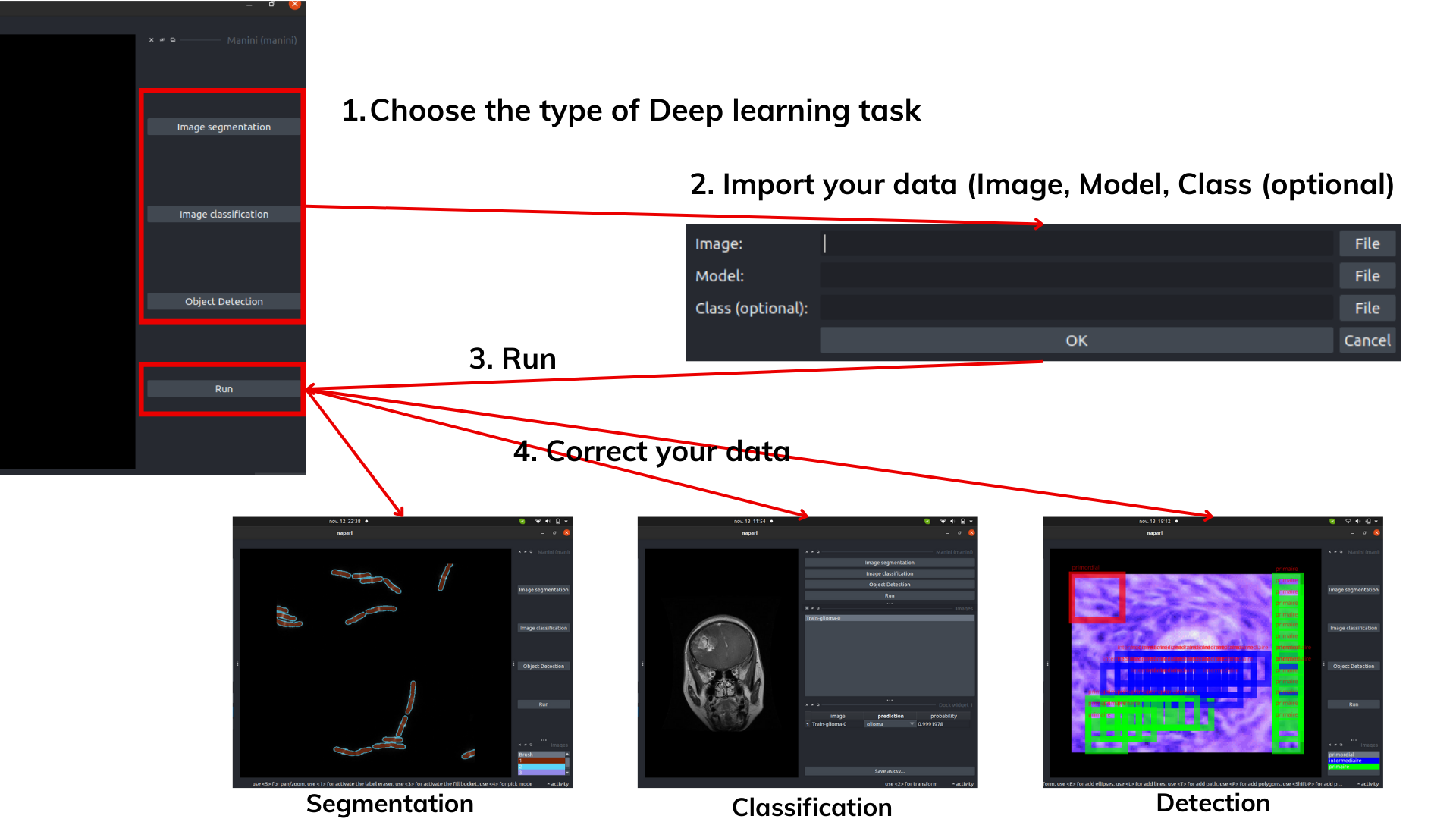
Input
The user must deposit two items (+1 optional item).
- A compressed file (.zip) containing the images in RGB
.
└── input.zip
    ├── im_1.JPG
    ├── im_2.JPG
    ├── im_3.JPG
    ...
    └── im_n.JPG
- A tensorflow h5 file (.h5) which is the segmentation model
- A text file (.txt) containing the names of the classes (optional)
The Ok button is used to validate the imported elements. The Run button is used to launch the segmentation.
Process
Correction is made by selecting some classes displayed in a widget :
-
Paint panel for image segmentation
-
Table for image classification
-
Bounding box panel for object detection
Output
Segmentation + Detection
The plugin suggest 'Export' widget. When user select image and mask, the Save button allows you to obtain data in a compressed file. This file contains folders containing the images and their mask.
Classification
The Save button allows you to obtain a csv file. This file is the table on which the user had made his modifications.
Tutorial
Please, you can learn better if you watch a video tutorial below: (link will be presented soon)
Presentation video of the context where the plugin was developped : MANINI Napari Plugin Part 1
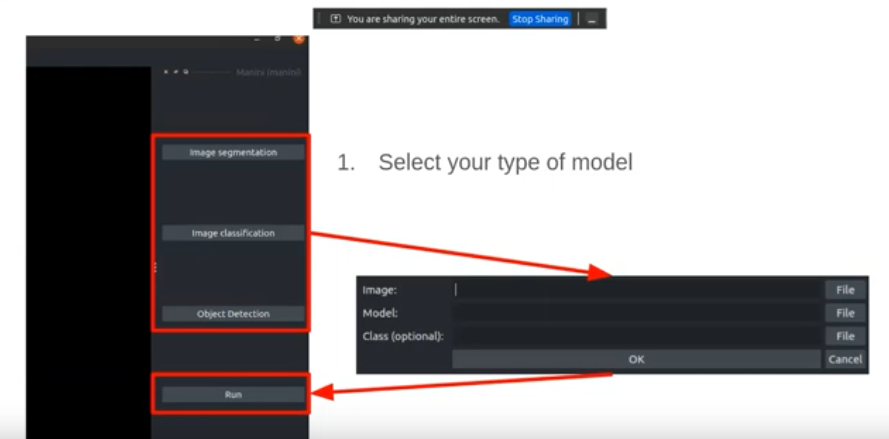
Tutorial video to get started : MANINI Napari Plugin Part 2
License
Distributed under the terms of the BSD-3 license, "manini" is free and open source software
Issues
If you encounter any problems, please file an issue along with a detailed description.
1 maintainer

Metadata
1 maintainer
Release files for manini 0.0.7
For a detailed explanation of source distributions (sdists) and built distributions (wheels), please see the package formats documentation.
Source distribution (sdist)
| File | Size | Uploaded | Provenance | |
|---|---|---|---|---|
| manini-0.0.7.tar.gz | 21.5 kB | Without provenance | Details |
Built distribution (wheel)
| File | Interpreter | ABI | Platform | Reset |
|---|---|---|---|---|
| manini-0.0.7-py3-none-any.whl | Python 3 | none | any | Details |
Total release size: 39.1 kB
Release files / manini-0.0.7.tar.gz
| Download URL | manini-0.0.7.tar.gz |
|---|---|
| Size | 21.5 kB |
| Tags | Source |
|
SHA-256 checksum How to use checksums |
0e4140f68016edbef63cfd397bee3c788ac676a06b5b65aec01b72f8126891f9
|
|
BLAKE2b-256 checksum How to use checksums |
02b9bfbf6e65ca245ebb1783abc48f955936911ba9de547862256c5a6d615049
|
| Upload date | |
|
Uploaded using Trusted Publishing? What is trusted publishing? |
No |
| Uploaded via |
twine/4.0.2 CPython/3.9.12
|
Release files / manini-0.0.7-py3-none-any.whl
| Download URL | manini-0.0.7-py3-none-any.whl |
|---|---|
| Size | 17.6 kB |
| Tags | Python 3 |
|
SHA-256 checksum How to use checksums |
39a46f4bb8ab2f4869acfb97f152f3ade5c22bfc15582a3d2400780c936f09ea
|
|
BLAKE2b-256 checksum How to use checksums |
55b57fe72fe77f1fbebf874729e4ccc8f29e298626cc51a0312076b70e687db4
|
| Upload date | |
|
Uploaded using Trusted Publishing? What is trusted publishing? |
No |
| Uploaded via |
twine/4.0.2 CPython/3.9.12
|
Security for manini 0.0.7
Provenance
Provenance describes where a file came from. On PyPI, provenance is shared via attestations, which provide a verifiable record of the build or publishing details. View details, limitations and caveats.
No provenance found
None of the files in this release were uploaded with provenance metadata.
A note on package security
PyPI is a repository for distributing packages, not a service for auditing them. While third-party security researchers and our staff do their best to detect and remove malicious packages, PyPI cannot guarantee the quality, security or suitability of any given package.














