
A clean, corporate Sphinx theme based on Bulma/SASS — no NPM required.

Project description
Manticore Sphinx Theme 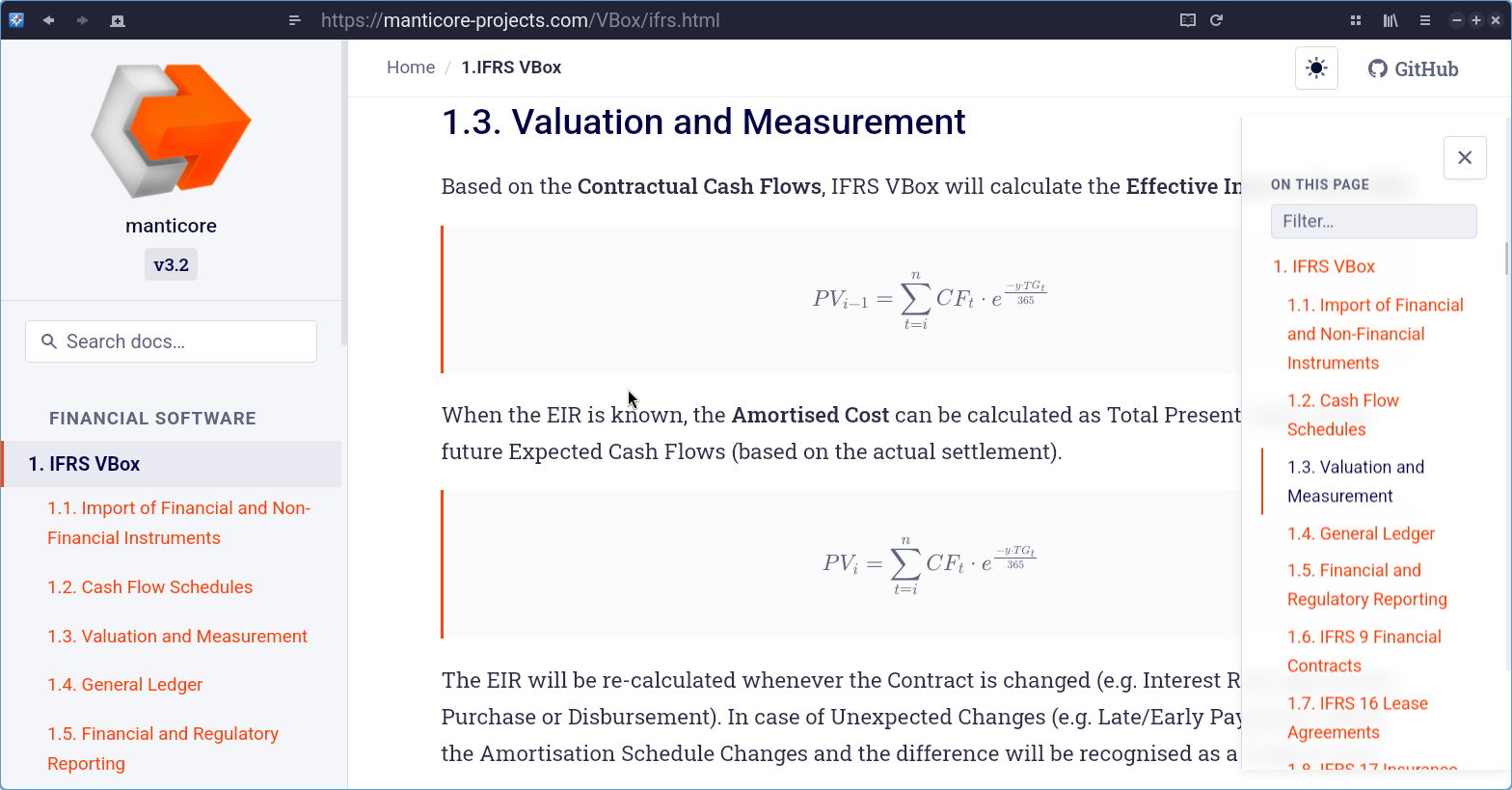
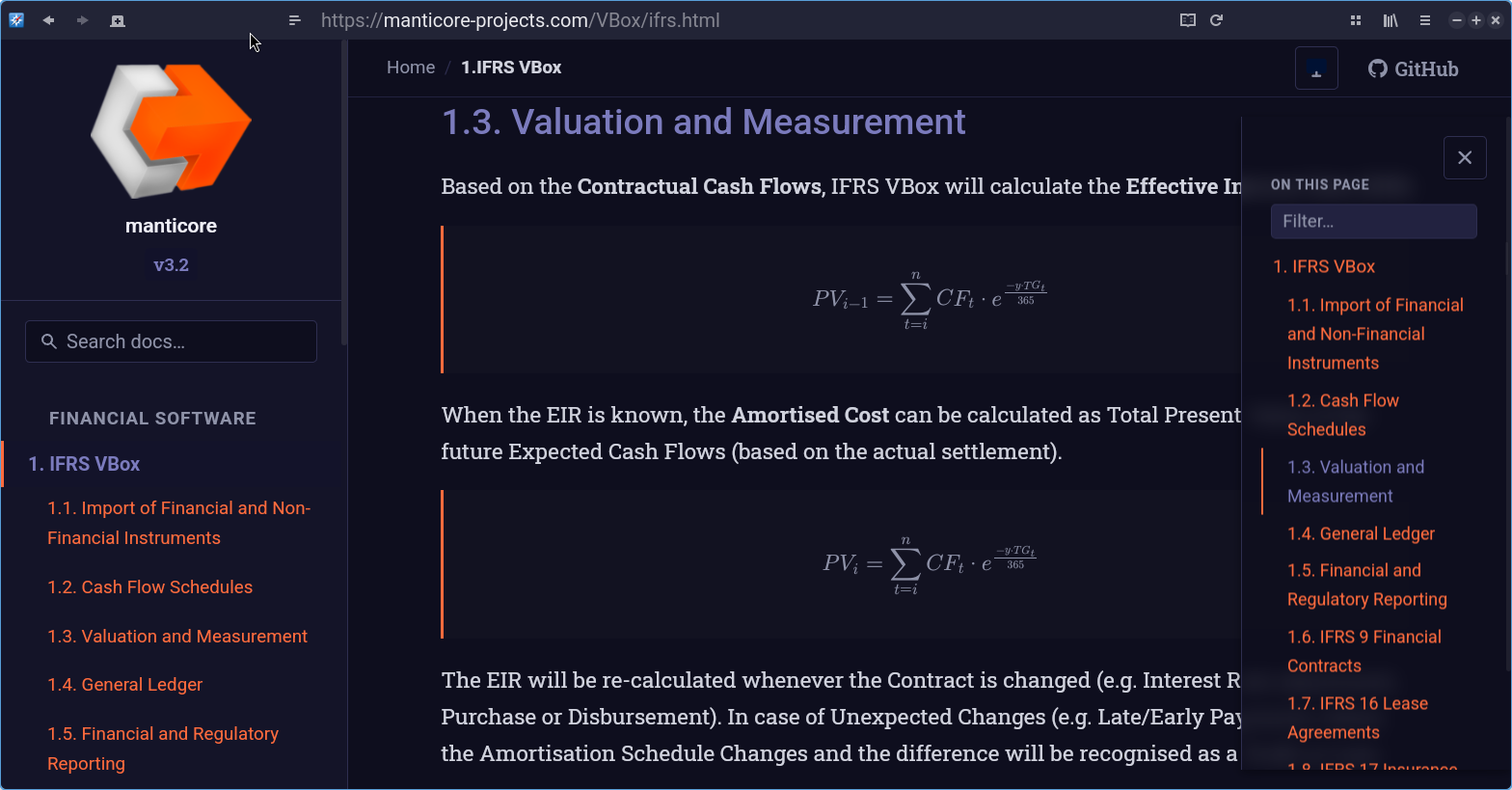
A clean, elegant documentation theme for Sphinx 7+ built on Bulma CSS / SASS — with zero NPM or Node.js dependencies.
Designed for corporate software documentation, it provides an RTD-style layout with a fixed sidebar, on-page table of contents, breadcrumbs, prev/next navigation, and a fully responsive mobile experience.
Features
- Bulma-based — uses Bulma's SASS architecture for consistent, modern styling
- No NPM required — compiles with Python
libsassor standalonedart-sass - RTD-style layout — fixed sidebar, scrollable content, right-rail TOC
- Corporate design — professional colour palette, clean typography (Source Sans 3 + JetBrains Mono)
- Fully responsive — mobile sidebar, touch-friendly, print stylesheet
- Customisable — override colours and fonts via
html_theme_optionsor SASS variables - Accessible — ARIA landmarks, keyboard navigation, skip links
- Lightweight JS — vanilla JavaScript for sidebar toggle, scroll-spy, and keyboard shortcuts
- Sphinx 7+ / 9.x compatible — uses the standard theme API
Quick Start
Install
pip install -e .
Use in your Sphinx project
In conf.py:
html_theme = "manticore_sphinx_theme"

html_theme_options = {
    "logo": "logo.svg",                  # optional
    "logo_alt": "My Project",
    "color_primary": "#1e3a5f",
    "color_accent": "#0077b6",
    "repo_url": "https://github.com/myorg/myproject",
    "repo_name": "GitHub",
}
Build docs
make docs          # compiles CSS then builds HTML (requires sphinx)
make docs-live     # live-reload with sphinx-autobuild
Development
Full dev setup
make dev # installs deps, compiles CSS, installs theme
CSS compilation
The default build is standalone — no Bulma download required.
All SCSS uses modern @use / @forward syntax (Dart Sass 2+/3+ compatible).
make css           # standalone build (no Bulma fetch needed)
make css-min       # minified variant
make css-watch     # watch mode (dart-sass only)
make css-bulma     # optional: compile WITH Bulma utilities layer
The css-bulma target downloads Bulma 0.9.4 SASS sources and layers them
underneath the theme. Since Bulma 0.9.x uses @import internally, the
Makefile passes --silence-deprecation=import to dart-sass automatically.
Project structure
manticore-sphinx-theme/
├── Makefile                    # Build system
├── pyproject.toml              # Package metadata
├── manticore_sphinx_theme/
│   ├── __init__.py             # Sphinx theme registration
│   ├── theme.conf              # Theme configuration
│   ├── layout.html             # Main Jinja2 template
│   └── static/
│       ├── sass/               # SCSS source files
│       │   ├── theme.scss              # Main entry (standalone)
│       │   ├── theme-with-bulma.scss   # Optional Bulma integration
│       │   ├── _variables.scss         # Design tokens
│       │   ├── _base.scss              # Reset & typography
│       │   ├── _layout.scss            # Grid scaffolding
│       │   ├── _sidebar.scss           # Left navigation
│       │   ├── _toc.scss               # On-page TOC
│       │   ├── _code.scss              # Code blocks
│       │   ├── _admonitions.scss       # Notes, warnings, tips
│       │   ├── _content.scss           # Sphinx domains & API docs
│       │   ├── _footer.scss            # Footer & pagination
│       │   └── _responsive.scss        # Breakpoints & print
│       ├── css/
│       │   └── theme.css               # Pre-compiled CSS (shipped)
│       └── js/
│           └── theme.js                # Vanilla JS (sidebar, scroll-spy)
└── docs/                       # Sample documentation
    ├── conf.py
    ├── index.rst
    └── ...
Customisation
Via html_theme_options
| Option | Default | Description |
|---|---|---|
color_primary |
#1e3a5f |
Primary brand colour |
color_accent |
#0077b6 |
Accent / link colour |
color_sidebar_bg |
#f5f7fa |
Sidebar background |
navigation_depth |
4 |
Sidebar tree depth |
show_breadcrumbs |
True |
Breadcrumb trail |
content_max_width |
52rem |
Content column max width |
Via SASS
For deeper changes, override _variables.scss and recompile:
make css # recompile after editing SASS
Requirements
- Python 3.9+
- Sphinx 7.0+ (tested through 9.2)
- For SASS compilation:
dart-sass2.x+ (recommended) orlibsass(Python) - All SCSS uses modern
@use/@forward— fully Dart Sass 3.x compatible - No NPM, Node.js, or webpack required
License
MIT
Release history Release notifications | RSS feed


Download files
Download the file for your platform. If you're not sure which to choose, learn more about installing packages.
Source Distribution
Built Distribution
Filter files by name, interpreter, ABI, and platform.
If you're not sure about the file name format, learn more about wheel file names.
Copy a direct link to the current filters
File details
Details for the file manticore_sphinx_theme-1.0.1.tar.gz.
File metadata
- Download URL: manticore_sphinx_theme-1.0.1.tar.gz
- Upload date:
- Size: 47.8 kB
- Tags: Source
- Uploaded using Trusted Publishing? No
- Uploaded via: twine/6.2.0 CPython/3.14.3
File hashes
| Algorithm | Hash digest | |
|---|---|---|
| SHA256 |
5f2169f1b88b66bd057c4d44721d58edfba21759c2c66112587a89010e45533c
|
|
| MD5 |
26cc34eee220a10d106f2b48c1f41c8d
|
|
| BLAKE2b-256 |
9ad21124ec39f41319f9d88a07a26c1a8ac100b38fd563ce0b89ee3884622e2a
|
File details
Details for the file manticore_sphinx_theme-1.0.1-py3-none-any.whl.
File metadata
- Download URL: manticore_sphinx_theme-1.0.1-py3-none-any.whl
- Upload date:
- Size: 54.4 kB
- Tags: Python 3
- Uploaded using Trusted Publishing? No
- Uploaded via: twine/6.2.0 CPython/3.14.3
File hashes
| Algorithm | Hash digest | |
|---|---|---|
| SHA256 |
0b8de7295ab6e05f567b0b41b5cf1c00a2fdb0efd254250f1223c21ba8477665
|
|
| MD5 |
fc10bf056f7ef41fcd3fd79e33eed11e
|
|
| BLAKE2b-256 |
b85318e11fc699952984ec863b4bb2989f52a71c74969a723eff0cb1d2fdbe33
|






