
Mantium Client




A Python client library for Mantium services.
Prerequisites
Before you start working with this client, there are a few steps you need to complete. These prerequisites will help ensure that you can seamlessly interact with Mantium's functionalities.
1. Request Beta Access
Firstly, you need to sign up for beta access. Visit the Mantium Beta Signup page, fill in the necessary details, and submit your form to request beta access. Once your request has been approved, you'll be granted access to create an account and explore Mantium's extensive range of features.
2. Create an Application
After creating an account and logging in, your next step is to create an application. Mantium offers a variety of pre-made templates to simplify this process. For example, you might choose the Recipe Management template.
When you create an application from a pre-made template, two key steps will occur:
- You will upload files or connect to a data source such as Notion or Slack. This is where the application will pull content from.
- The content provided by you will be pre-processed, vectorized, and then stored in a Redis vector database.
After performing these steps, you can engage with your data in a meaningful way through the application you've just created.
3. Enable API Access
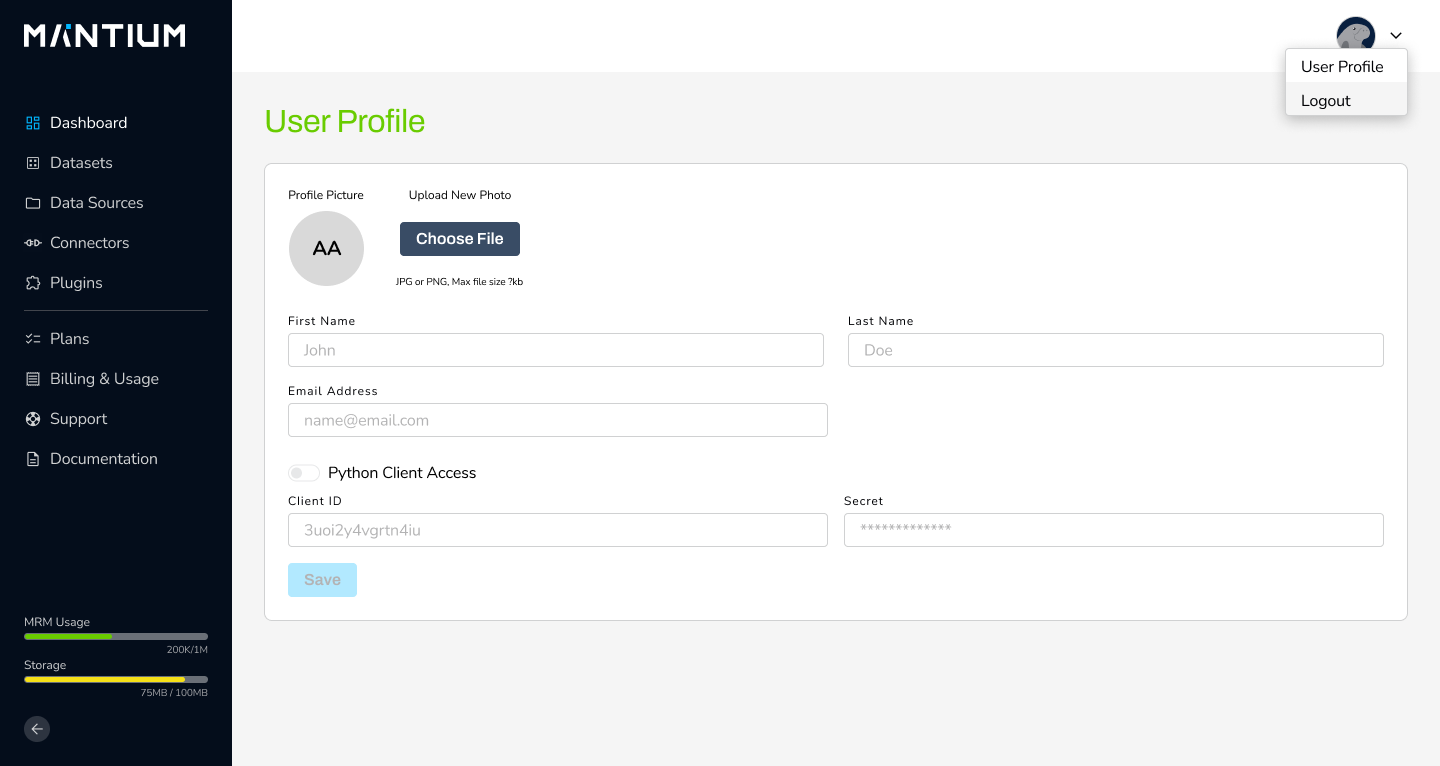
From your dashboard or main menu, locate and click on the User Profile section.
Within your user profile, there's an option to enable Python Client Access. This step is vital as it unlocks the interface that the client will use to communicate with your application:
4. Client ID and Client Secret
Upon enabling API access, Mantium will present a Client ID and Client Secret. These unique identifiers authenticate your client's requests to the Mantium application. Please record them carefully. You will need to use them with the MantiumClient, as shown in the Usage section below.
Installation
Use the package manager pip to install this client.
pip install mantium-client
Usage
from mantium_spec.api.applications_api import ApplicationsApi
from mantium_client.api_client import MantiumClient

client = MantiumClient(client_id=client_id, client_secret=client_secret)
apps_api = ApplicationsApi(client)

# returns a list of applications
apps_api.list_applications()

# returns an application's details
apps_api.get_application_detail(application_id)

# query an application
query_request = {'query': 'What should I have for dinner tonight?'}
return apps_api.query_application(application_id, query_request)
Available API Endpoints
Please see the PyPI-hosted mantium-spec package for details on API endpoints available through the ApplicationsApi class.
License
Development
This is only necessary if you want to develop in this project.
We use poetry for dependency management.
pip install poetry
poetry install --with dev,test --verbose
1 maintainer

Metadata
1 maintainer
Release files for mantium-client 0.1.7
For a detailed explanation of source distributions (sdists) and built distributions (wheels), please see the package formats documentation.
Source distribution (sdist)
| File | Size | Uploaded | Provenance | |
|---|---|---|---|---|
| mantium_client-0.1.7.tar.gz | 9.7 kB | Without provenance | Details |
Built distribution (wheel)
| File | Interpreter | ABI | Platform | Reset |
|---|---|---|---|---|
| mantium_client-0.1.7-py3-none-any.whl | Python 3 | none | any | Details |
Total release size: 21.4 kB
Release files / mantium_client-0.1.7.tar.gz
| Download URL | mantium_client-0.1.7.tar.gz |
|---|---|
| Size | 9.7 kB |
| Tags | Source |
|
SHA-256 checksum How to use checksums |
f8e309eb094d550e53b57ed8217d2411152985fe7889c550c486877e9dca3aba
|
|
BLAKE2b-256 checksum How to use checksums |
c4454fea51ffab4024c9a3040af837a01eaf910a5385f7bff3a03ae81cc86137
|
| Upload date | |
|
Uploaded using Trusted Publishing? What is trusted publishing? |
Yes |
| Uploaded via |
twine/4.0.2 CPython/3.11.6
|
Release files / mantium_client-0.1.7-py3-none-any.whl
| Download URL | mantium_client-0.1.7-py3-none-any.whl |
|---|---|
| Size | 11.7 kB |
| Tags | Python 3 |
|
SHA-256 checksum How to use checksums |
c2351afdf0ddc9b4492fed9f021e3a5f2603188c2d65138ccf970fe1caae94e7
|
|
BLAKE2b-256 checksum How to use checksums |
13449cc1b1565fa0c3f905bca85c6fac4ea4949c2952052beba0a55ae08ff7df
|
| Upload date | |
|
Uploaded using Trusted Publishing? What is trusted publishing? |
Yes |
| Uploaded via |
twine/4.0.2 CPython/3.11.6
|
Security for mantium-client 0.1.7
Provenance
Provenance describes where a file came from. On PyPI, provenance is shared via attestations, which provide a verifiable record of the build or publishing details. View details, limitations and caveats.
No provenance found
None of the files in this release were uploaded with provenance metadata.
A note on package security
PyPI is a repository for distributing packages, not a service for auditing them. While third-party security researchers and our staff do their best to detect and remove malicious packages, PyPI cannot guarantee the quality, security or suitability of any given package.














