

mapcv
Turn imagery and labels into ready-to-train remote-sensing datasets, fast.








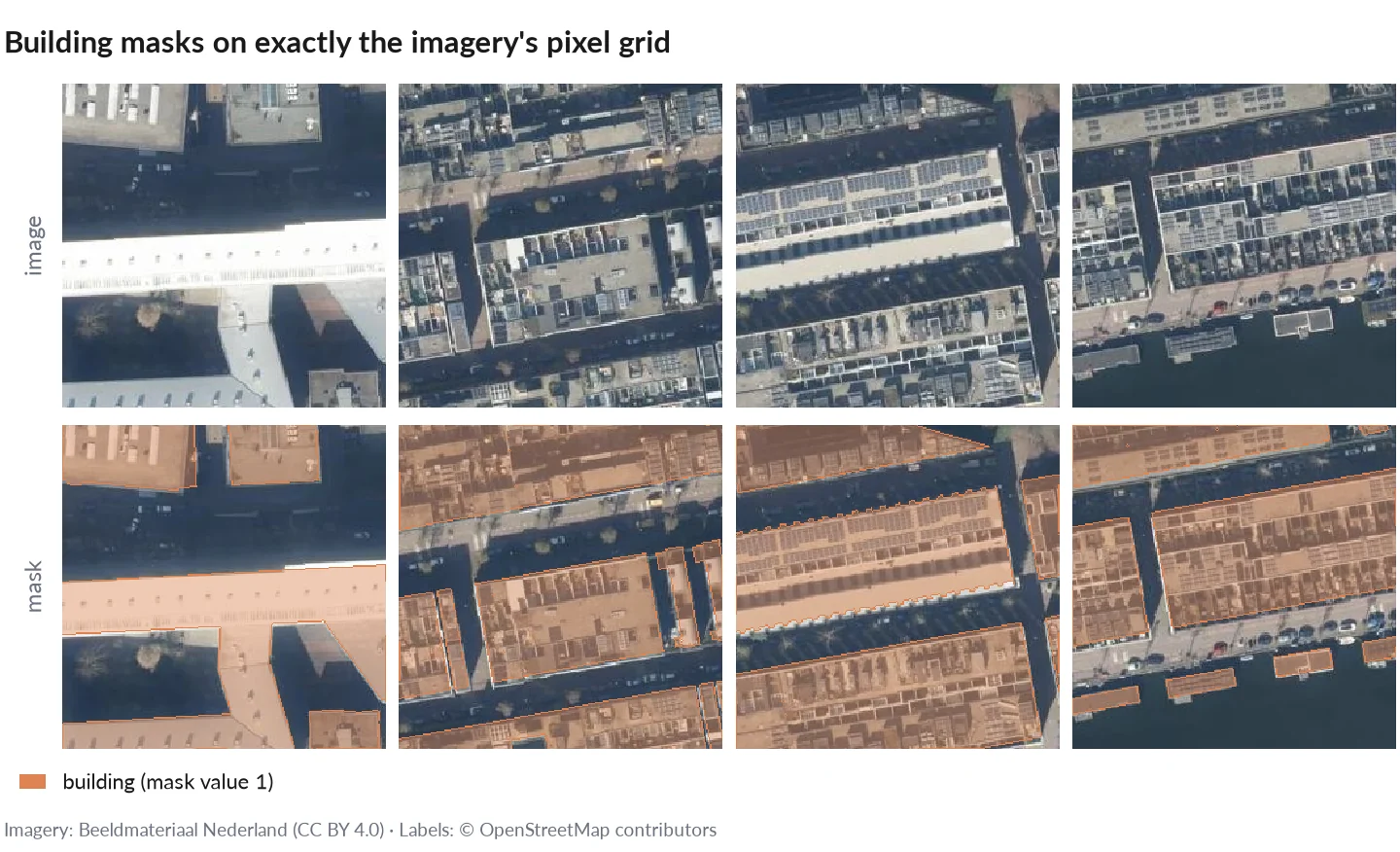
Patches and building masks made by mapcv. Imagery: Beeldmateriaal Nederland (CC BY 4.0); labels: © OpenStreetMap contributors.
Statement of Need
Building a machine-learning dataset from geospatial data usually means a one-off script: fetch or read imagery, burn label polygons, cut patches, split. Done carefully, it handles coordinate systems, pixel-centre rules, NoData, memory, crashes and spatial leakage between train and test; done quickly, it silently gets them wrong. Existing geospatial tools are analysis-first or sample data at training time. mapcv is data-creation-first: one YAML config, and the result is plain files on disk, checked against reference implementations.
- Imagery: XYZ tiles, your own GeoTIFF/COG (local,
https://,s3://), Sentinel-2 (EOPF Zarr, or COGs found in a STAC catalog, with cloud masking), Google Earth Engine; several sources on one grid. - Labels: GeoJSON, KML, GeoPackage, Shapefile, GeoParquet, OpenStreetMap, or a label raster.
- Tasks: semantic segmentation, object detection (COCO/YOLO), instance segmentation (COCO RLE), patch classification, change detection and regression.
- Output: PNG/JPEG/GeoTIFF/NPY patches, a manifest, leakage-safe splits, and exports to Hugging Face Parquet, WebDataset, Zarr and TerraTorch;
mapcv.data.MapcvDatasetloads any of them for PyTorch. - Correct and fast: masks follow GDAL's exact rules; a careful rasterio script, GDAL's tools and leafmap produce the same patches, 1.5–34× more slowly (benchmarks). Interrupted runs resume byte for byte; memory stays bounded on any region size.
Why not a script, TorchGeo, Raster Vision or geoai? See Why mapcv.
Installation
pip install mapcv
Requires Python 3.10 or newer. One pre-built wheel per platform (Linux x86-64 and aarch64 with glibc or musl, macOS, Windows) covers every supported Python version; other platforms build from source and need a Rust toolchain.
Optional extras: mapcv[zarr] (Sentinel-2 EOPF Zarr, Python 3.10–3.13), mapcv[gee] (Google Earth Engine), mapcv[parquet] (GeoParquet labels), mapcv[export] (Hugging Face Parquet) and mapcv[mcp] (the MCP server for AI agents). XYZ tiles, GeoTIFF/COG and STAC need none of them.
Quick start
1. Scaffold a config file
mapcv init my_dataset.yaml
In a terminal this asks a few questions (imagery, area, labels, patches) and writes a working config; mapcv init my_dataset.yaml --template xyz writes a commented example to fill in instead. Everything else has sensible defaults.
Note: XYZ sources must return standard 256x256 pixel tiles. mapcv does not provide imagery; see PROVIDERS.md for how it treats imagery and how to credit each source.
2. Generate the dataset
mapcv generate my_dataset.yaml
This fetches tiles, rasterizes labels, extracts patches, and writes everything to the output directory specified in your config.
3. Re-split an existing dataset (optional)
mapcv split ./output --test-ratio 0.15 --val-ratio 0.10
Re-runs the train/val/test split from the existing manifest.json without re-downloading anything.
4. Prepare it for training and sharing (optional)
mapcv stats ./output     # per-band mean/std and class weights over train → stats.json
mapcv card ./output      # README.md dataset card with Hugging Face metadata
mapcv verify ./output --write-checksums
Bring your own imagery
Your own GeoTIFF or Cloud Optimized GeoTIFF (a local file, an https:// URL, a public s3:// object, or a glob pattern such as tiles/*.tif that reads a folder of local tiles as one mosaic) can be the imagery; no tile server is involved. mapcv reads it directly, keeps its CRS, pixel grid, bands and data type, and reprojects the labels onto it. Patches can be written as PNG/JPEG (8-bit RGB), NPY or georeferenced GeoTIFF.
imagery:
  type: geotiff
  path: ortho/scene.tif      # or https://.../scene.tif, s3://bucket/scene.tif, or tiles/*.tif (a mosaic)
  # bands: [1, 2, 3]         # 1-based, default: all
  # overview: 0              # reduced-resolution level
  # nodata: 0                # override the file's NoData
Sentinel-2 can come from an EOPF Zarr product (type: eopf_zarr) or be found for your region and dates in a STAC catalog (type: stac_cog, with SCL cloud masking); Earth Engine images use imagery.earth_engine. Every option: configuration reference.
AI agents
pip install "mapcv[mcp]" adds mapcv mcp, an MCP server that lets Claude Code, Claude Desktop, Cursor or VS Code inspect labels, validate, plan and generate datasets. It is read-only by default, confined to one folder (--root), and refuses large jobs until you confirm them. In Claude Code, /plugin marketplace add tahamukhtar20/mapcv then /plugin install mapcv@mapcv also installs the agent skill. See Use mapcv with AI agents.
Documentation
Full documentation including configuration reference, CLI reference, and API reference is available at tahamukhtar20.github.io/mapcv.
Contributing
Contributions are welcome. Please review the Contributing Guide and Code of Conduct before opening a pull request.
Citation
If mapcv helped your work, please cite it. The DOI 10.5281/zenodo.23149438 covers every release and always resolves to the latest one:
@software{mukhtar_mapcv,
  author  = {Mukhtar, Muhammad Taha},
  title   = {mapcv: computer-vision datasets from map imagery and geospatial labels},
  year    = {2026},
  doi     = {10.5281/zenodo.23149438},
  url     = {https://github.com/tahamukhtar20/mapcv},
  license = {MIT}
}
GitHub's "Cite this repository" button gives the same from CITATION.cff. See Citing mapcv for the DOI of a single version and for crediting the data sources.
Author
Muhammad Taha Mukhtar · tahamukhtar20+mapcv@gmail.com
License
This project is licensed under the MIT License — see the LICENSE file for details.
1 maintainer

Metadata
1 maintainer
Release files for mapcv 0.3.0
For a detailed explanation of source distributions (sdists) and built distributions (wheels), please see the package formats documentation.
Source distribution (sdist)
| File | Size | Uploaded | |
|---|---|---|---|
| mapcv-0.3.0.tar.gz | 1.0 MB | Details |
Built distributions (wheels)
| File | Reset | |||
|---|---|---|---|---|
| mapcv-0.3.0-cp310-abi3-win_amd64.whl | CPython 3.10 | abi3 | Windows x86-64 | Details |
| mapcv-0.3.0-cp310-abi3-musllinux_1_2_x86_64.whl | CPython 3.10 | abi3 | Linux musl 1.2+ x86-64 | Details |
| mapcv-0.3.0-cp310-abi3-musllinux_1_2_aarch64.whl | CPython 3.10 | abi3 | Linux musl 1.2+ ARM64 | Details |
| mapcv-0.3.0-cp310-abi3-manylinux_2_17_x86_64.manylinux2014_x86_64.whl | CPython 3.10 | abi3 | Linux glibc 2.17+ x86-64 | Details |
| mapcv-0.3.0-cp310-abi3-manylinux_2_17_aarch64.manylinux2014_aarch64.whl | CPython 3.10 | abi3 | Linux glibc 2.17+ ARM64 | Details |
| mapcv-0.3.0-cp310-abi3-macosx_10_12_x86_64.macosx_11_0_arm64.macosx_10_12_universal2.whl | CPython 3.10 | abi3 | macOS 10.12+ universal2 (ARM64, x86-64), macOS 11.0+ ARM64, macOS 10.12+ x86-64 | Details |
Total release size: 24.2 MB
Release files / mapcv-0.3.0.tar.gz
| Download URL | mapcv-0.3.0.tar.gz |
|---|---|
| Size | 1.0 MB |
| Tags | Source |
|
SHA-256 checksum How to use checksums |
76fff24576ae85a47d5568d065a2e53ab6278dffe1bc2621ea2050be961c3344
|
|
BLAKE2b-256 checksum How to use checksums |
7c3c6dd2da4d90484fe472c4a023b95b759641ecedeb333fe0a0736b4a17163a
|
| Upload date | |
|
Uploaded using Trusted Publishing? What is trusted publishing? |
Yes |
| Uploaded via |
twine/7.0.0 CPython/3.13.14
|
Provenance
Provenance describes where a file came from. On PyPI, provenance is shared via attestations, which provide a verifiable record of the build or publishing details. View details, limitations and caveats.


PyPI Publish Attestation
PyPI verified that this artifact, at this checksum, originated from the publisher listed below.
Signed by GitHub Actions, verified by PyPI on Oct 13, 2026.
Transparency logRelease files / mapcv-0.3.0-cp310-abi3-win_amd64.whl
| Download URL | mapcv-0.3.0-cp310-abi3-win_amd64.whl |
|---|---|
| Size | 3.2 MB |
| Tags | CPython 3.10 Windows x86-64 abi3 |
|
SHA-256 checksum How to use checksums |
d8438cf72ac69d52af6dd45055f02901769a725a77e959fee7a181cae83233cf
|
|
BLAKE2b-256 checksum How to use checksums |
bc1a49821b1ab1d5fd079140668a9d241bf515a0eda3f3475863b08b6830bcfc
|
| Upload date | |
|
Uploaded using Trusted Publishing? What is trusted publishing? |
Yes |
| Uploaded via |
twine/7.0.0 CPython/3.13.14
|
Provenance
Provenance describes where a file came from. On PyPI, provenance is shared via attestations, which provide a verifiable record of the build or publishing details. View details, limitations and caveats.
PyPI Publish Attestation
PyPI verified that this artifact, at this checksum, originated from the publisher listed below.
Signed by GitHub Actions, verified by PyPI on Oct 13, 2026.
Transparency logRelease files / mapcv-0.3.0-cp310-abi3-musllinux_1_2_x86_64.whl
| Download URL | mapcv-0.3.0-cp310-abi3-musllinux_1_2_x86_64.whl |
|---|---|
| Size | 3.7 MB |
| Tags | CPython 3.10 Linux musl 1.2+ x86-64 abi3 |
|
SHA-256 checksum How to use checksums |
1a9e91f24673dfce1384a8fdbae0d8024a20584f024d70891aeb142f945d08ed
|
|
BLAKE2b-256 checksum How to use checksums |
1d49ce1f424a74105dfdc8063f3d30ddb6c0d74935f2a2da36918f6769e95f3d
|
| Upload date | |
|
Uploaded using Trusted Publishing? What is trusted publishing? |
Yes |
| Uploaded via |
twine/7.0.0 CPython/3.13.14
|
Provenance
Provenance describes where a file came from. On PyPI, provenance is shared via attestations, which provide a verifiable record of the build or publishing details. View details, limitations and caveats.
PyPI Publish Attestation
PyPI verified that this artifact, at this checksum, originated from the publisher listed below.
Signed by GitHub Actions, verified by PyPI on Oct 13, 2026.
Transparency logRelease files / mapcv-0.3.0-cp310-abi3-musllinux_1_2_aarch64.whl
| Download URL | mapcv-0.3.0-cp310-abi3-musllinux_1_2_aarch64.whl |
|---|---|
| Size | 3.4 MB |
| Tags | CPython 3.10 Linux musl 1.2+ ARM64 abi3 |
|
SHA-256 checksum How to use checksums |
a355b6938a00d70de37c73ead4a9d99310b46c52fa959298fe597cca896e0a5e
|
|
BLAKE2b-256 checksum How to use checksums |
88ec7247d92723cfb49743d7171839b59bd427a1c697d4728e8f3ec87f1b2f71
|
| Upload date | |
|
Uploaded using Trusted Publishing? What is trusted publishing? |
Yes |
| Uploaded via |
twine/7.0.0 CPython/3.13.14
|
Provenance
Provenance describes where a file came from. On PyPI, provenance is shared via attestations, which provide a verifiable record of the build or publishing details. View details, limitations and caveats.
PyPI Publish Attestation
PyPI verified that this artifact, at this checksum, originated from the publisher listed below.
Signed by GitHub Actions, verified by PyPI on Oct 13, 2026.
Transparency logRelease files / mapcv-0.3.0-cp310-abi3-manylinux_2_17_x86_64.manylinux2014_x86_64.whl
| Download URL | mapcv-0.3.0-cp310-abi3-manylinux_2_17_x86_64.manylinux2014_x86_64.whl |
|---|---|
| Size | 3.5 MB |
| Tags | CPython 3.10 Linux glibc 2.17+ x86-64 abi3 |
|
SHA-256 checksum How to use checksums |
ba18ca68eae3bc7e4858a991a1ccd986bd51ad5127b55f6ceb837d58181067b8
|
|
BLAKE2b-256 checksum How to use checksums |
b3df96a47ed0a759ae4281cd671fcbe7cd153f5a551eecb0f6388ed84cb0ab10
|
| Upload date | |
|
Uploaded using Trusted Publishing? What is trusted publishing? |
Yes |
| Uploaded via |
twine/7.0.0 CPython/3.13.14
|
Provenance
Provenance describes where a file came from. On PyPI, provenance is shared via attestations, which provide a verifiable record of the build or publishing details. View details, limitations and caveats.
PyPI Publish Attestation
PyPI verified that this artifact, at this checksum, originated from the publisher listed below.
Signed by GitHub Actions, verified by PyPI on Oct 13, 2026.
Transparency logRelease files / mapcv-0.3.0-cp310-abi3-manylinux_2_17_aarch64.manylinux2014_aarch64.whl
| Download URL | mapcv-0.3.0-cp310-abi3-manylinux_2_17_aarch64.manylinux2014_aarch64.whl |
|---|---|
| Size | 3.2 MB |
| Tags | CPython 3.10 Linux glibc 2.17+ ARM64 abi3 |
|
SHA-256 checksum How to use checksums |
78fefa187fee27848474f1d6f5a00e8fbcfce28cc1c1fbbeb7b2d16dad4db00b
|
|
BLAKE2b-256 checksum How to use checksums |
b9f00bfd2e90c990b9e4e1b58c5d78995b938b3a284a526436b0808fb79590a9
|
| Upload date | |
|
Uploaded using Trusted Publishing? What is trusted publishing? |
Yes |
| Uploaded via |
twine/7.0.0 CPython/3.13.14
|
Provenance
Provenance describes where a file came from. On PyPI, provenance is shared via attestations, which provide a verifiable record of the build or publishing details. View details, limitations and caveats.
PyPI Publish Attestation
PyPI verified that this artifact, at this checksum, originated from the publisher listed below.
Signed by GitHub Actions, verified by PyPI on Oct 13, 2026.
Transparency logRelease files / mapcv-0.3.0-cp310-abi3-macosx_10_12_x86_64.macosx_11_0_arm64.macosx_10_12_universal2.whl
| Download URL | mapcv-0.3.0-cp310-abi3-macosx_10_12_x86_64.macosx_11_0_arm64.macosx_10_12_universal2.whl |
|---|---|
| Size | 6.2 MB |
| Tags | CPython 3.10 abi3 macOS 10.12+ universal2 (ARM64, x86-64) macOS 10.12+ x86-64 macOS 11.0+ ARM64 |
|
SHA-256 checksum How to use checksums |
0d9a0763b866e26a47e17b2e9424ce4c92417bee59f8246d51bf5fe8c1e34408
|
|
BLAKE2b-256 checksum How to use checksums |
05d483867ab4e8dc95cacb4f54ee8d368cb9b69f636fef64ce07a63ece792396
|
| Upload date | |
|
Uploaded using Trusted Publishing? What is trusted publishing? |
Yes |
| Uploaded via |
twine/7.0.0 CPython/3.13.14
|
Provenance
Provenance describes where a file came from. On PyPI, provenance is shared via attestations, which provide a verifiable record of the build or publishing details. View details, limitations and caveats.
PyPI Publish Attestation
PyPI verified that this artifact, at this checksum, originated from the publisher listed below.
Signed by GitHub Actions, verified by PyPI on Oct 13, 2026.
Transparency log













