
MapExtrackt


Convolutional Neural Networks Are Beautiful
We all take our eyes for granted, we glance at an object for an instant and our brains can identify with ease. However distorted the information may be, we do a pretty good job at it.
Low light, obscured vision, poor eyesight... There are a myriad of situations where conditions are poor but still we manage to understand what an object is. Context helps, but we humans were created with sight in mind.
Computers have a harder time, but modern advances with convolutional neural networks are making this task a reality.
Computers are amazing, the neural networks and maps they create are beautiful.
Why not have an explore?
MapExtrakt makes viewing feature maps a breeze.
Catch a glimpse of how a computer can see.
MapExtrakt Usage
First import your model
import torchvision
model = torchvision.models.vgg19(pretrained=True)
Import MapExtract's Feature Extractor and load in the model
from MapExtrackt import FeatureExtractor
fe = FeatureExtractor(model)
Set image to be analysed - input can be PIL Image, Numpy array or filepath. We are using the path
fe.set_image("pug.jpg")
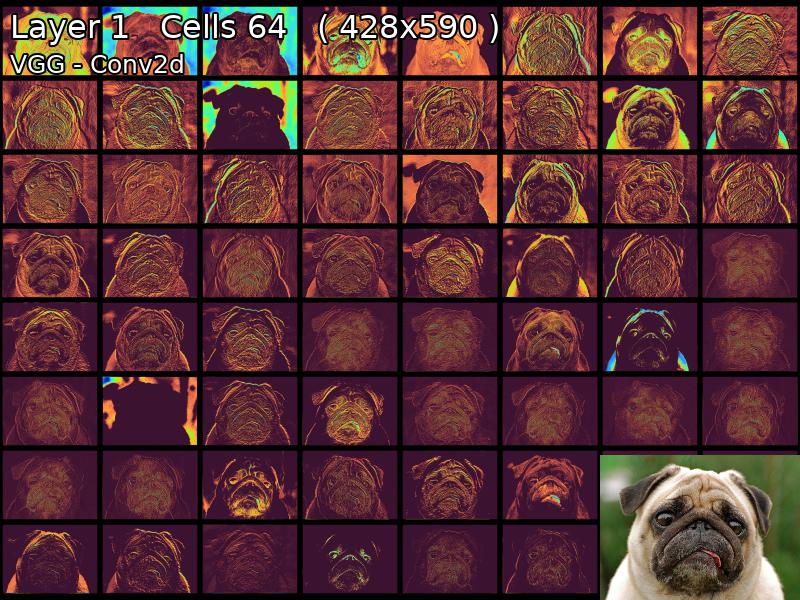
View Layers
fe.display_from_map(layer_no=1)
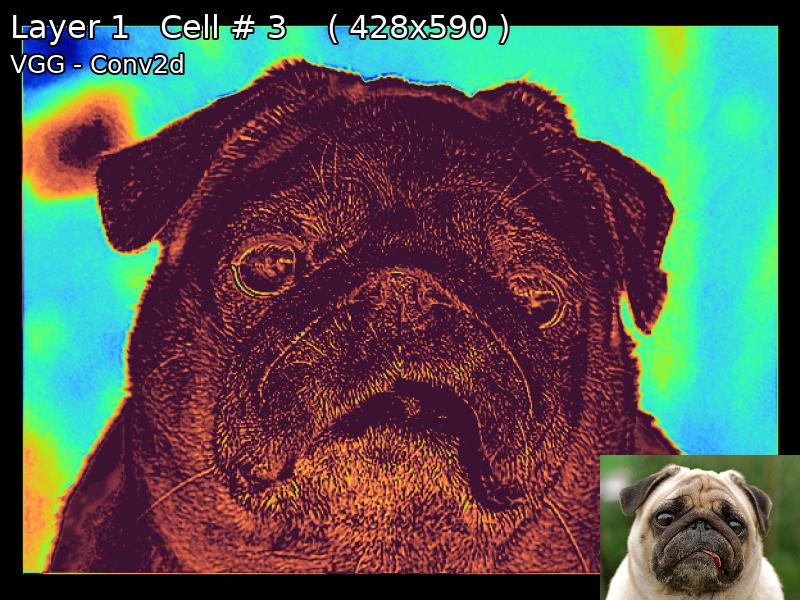
View Single Cells At a Time
fe.display_from_map(layer_no=2, cell_no=4)
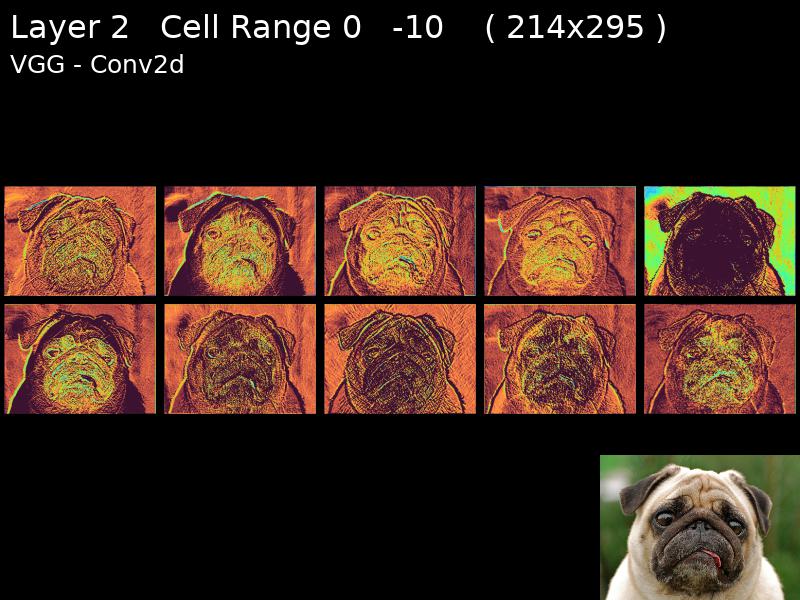
Slice the class to get a range of cells (Layer 2 Cells 0-9)
fe[2,0:10]
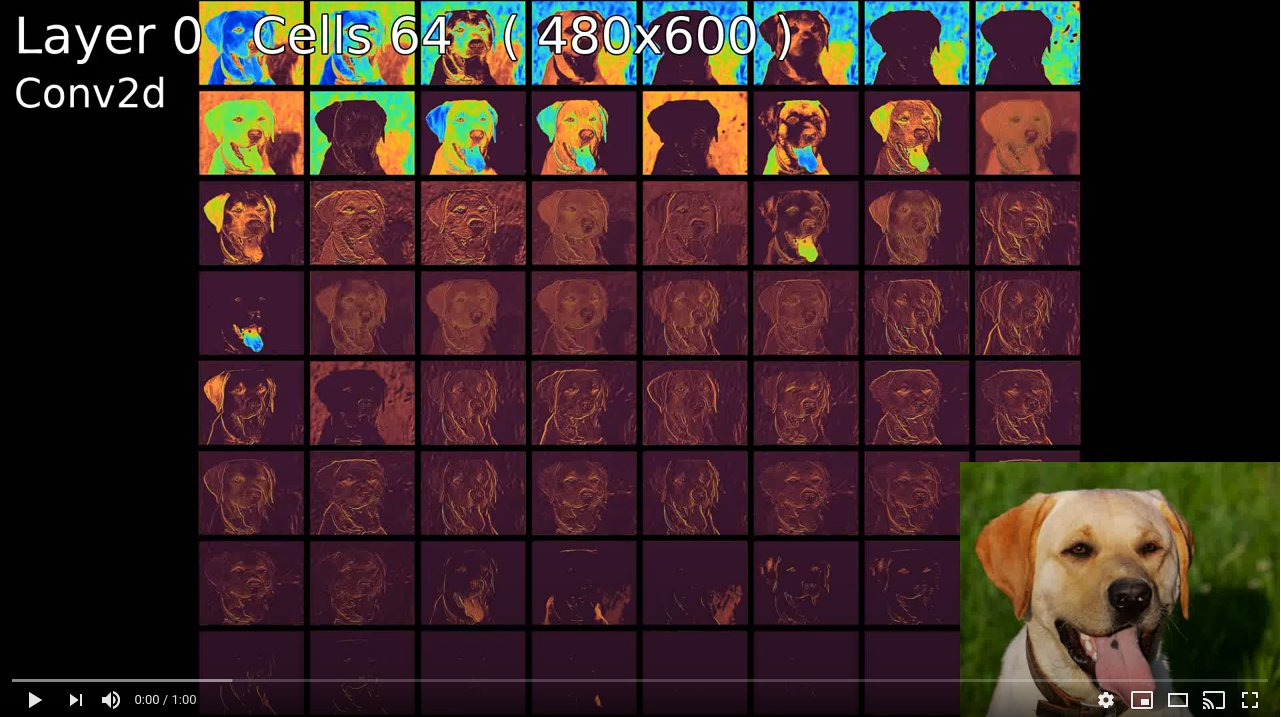
Or Export Layers To Video
fe.write_video(out_size=(1200,800), file_name="output.avi", time_for_layer=60, transition_perc_layer=0.2)
More Examples
For LOTS more - view the jupyter notebook.
Installation
It's as easy as PyPI
pip install mapextrackt
or build from source in terminal
git clone https://github.com/lewis-morris/mapextrackt &&\
cd mapextrackt &&\
pip install -e .
Todo List
- Add the ability to slice the class i.e FeatureExtractor[1,3]
- Show parameters on the image
- Fix video generation
- Enable individual cells to be added to video
- Add video parameters such as duration in seconds.
- Clean up code
- Make speed improvements
Author
Created by me, initially to view the outputs for my own pleasure.
If anyone has any suggestions or requests please send them over I'd be more than happy to consider.
1 maintainer

Metadata
1 maintainer
Release files for mapextrackt 0.4.8.6
For a detailed explanation of source distributions (sdists) and built distributions (wheels), please see the package formats documentation.
Source distribution (sdist)
| File | Size | Uploaded | |
|---|---|---|---|
| mapextrackt-0.4.8.6.tar.gz | 11.9 kB | Details |
Built distributions (wheels)
| File | Interpreter | ABI | Platform | Reset |
|---|---|---|---|---|
| mapextrackt-0.4.8.6-py3.7.egg | Legacy Egg format | - | - | Details |
| mapextrackt-0.4.8.6-py3-none-any.whl | Python 3 | none | any | Details |
Total release size: 50.5 kB
Release files / mapextrackt-0.4.8.6.tar.gz
| Download URL | mapextrackt-0.4.8.6.tar.gz |
|---|---|
| Size | 11.9 kB |
| Tags | Source |
|
SHA-256 checksum How to use checksums |
a2ec8a82b85a6c7d8dc56e1277efbca0a8eb2b825edf69823e1e0b5bac553b2c
|
|
BLAKE2b-256 checksum How to use checksums |
49e760d2137b020a23f275b48ee441974887c4915d3150b436fe8284e2457c74
|
| Upload date | |
|
Uploaded using Trusted Publishing? What is trusted publishing? |
No |
| Uploaded via |
twine/3.1.1 pkginfo/1.4.2 requests/2.22.0 setuptools/45.2.0 requests-toolbelt/0.8.0 tqdm/4.30.0 CPython/3.8.5
|
Release files / mapextrackt-0.4.8.6-py3.7.egg
| Download URL | mapextrackt-0.4.8.6-py3.7.egg |
|---|---|
| Size | 25.3 kB |
| Tags | Egg |
|
SHA-256 checksum How to use checksums |
ac93605beaf05aaa3dc83367b5a88ea6768cb289e9aeadac2e454c0c9d246a7a
|
|
BLAKE2b-256 checksum How to use checksums |
226294904a071d639354810a89f35432ced5cb73d52067555153e83cd94fa5c7
|
| Upload date | |
|
Uploaded using Trusted Publishing? What is trusted publishing? |
No |
| Uploaded via |
twine/3.1.1 pkginfo/1.4.2 requests/2.22.0 setuptools/45.2.0 requests-toolbelt/0.8.0 tqdm/4.30.0 CPython/3.8.5
|
Release files / mapextrackt-0.4.8.6-py3-none-any.whl
| Download URL | mapextrackt-0.4.8.6-py3-none-any.whl |
|---|---|
| Size | 13.4 kB |
| Tags | Python 3 |
|
SHA-256 checksum How to use checksums |
9294c5d6981895ceb0c3c214c754c5424c92e0ec6b07121f979570df7cf63eaa
|
|
BLAKE2b-256 checksum How to use checksums |
9e0e5246b16a87a568d09b483c0818881500abff7a0080018c08d6a96ce2a15d
|
| Upload date | |
|
Uploaded using Trusted Publishing? What is trusted publishing? |
No |
| Uploaded via |
twine/3.1.1 pkginfo/1.4.2 requests/2.22.0 setuptools/45.2.0 requests-toolbelt/0.8.0 tqdm/4.30.0 CPython/3.8.5
|














