
mappyfile-colors


A mappyfile plugin to standardise and convert colors used in a Mapfile. Features include:
conversion between RGB and HEX colors
harmonise all colors in a Mapfile to either RGB or hex values
add human readable color names as comments
add color names to RGB color ranges as comments (not currently possible for HEX color ranges)
Python2 and 3 compatible
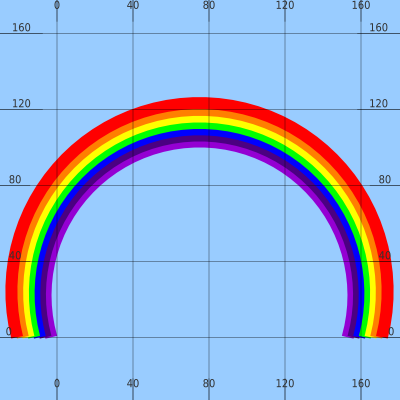
See example.map and rainbow_classes.txt for the Mapfile to generate the above image.
Installation
pip install mappyfile-colorsNote installing the mappyfile-colors plugin will automatically install the following dependencies:
mappyfile
webcolors
Online Demo
Go to the online mappyfile demo at http://mappyfile.geographika.net/
Select the “Rainbow colors” map
Open “Settings”, the mappyfile-colors Plugin Settings section allows conversion to RGB and HEX, and to include color names as comments in the Mapfile output
Click the Format button
Usage
To use the colors plugin, import, and then pass in a custom ColorsTransformer. Two additional parameters can also be passed to the mappyfile.loads function:
include_color_names - set to True to add color names as comments (default is False)
conversion_type - a parameter to convert colors within a Mapfile, either import ConversionType or use an integer value to set the conversion:
NO_CONVERSION = 0
TO_RGB = 1
TO_HEX = 2
A sample script to convert RGB to HEX colors, and include the color names is shown below.
import mappyfile
from mappyfile.plugins import mappyfile_colors
from mappyfile_colors import ColorsTransformer, ConversionType

s = """
CLASS
    STYLE
        COLOR 184 134 11
        OUTLINECOLOR 0 0 255
        WIDTH 3
    END
END
"""

d = mappyfile.loads(s, include_color_names=True, transformer_class=ColorsTransformer, conversion_type=ConversionType.TO_HEX)
print(mappyfile.dumps(d))
This will output the following:
CLASS
    STYLE
        COLOR "#b8860b" # darkgoldenrod
        OUTLINECOLOR "#0000ff" # blue
        WIDTH 3
    END
END
See the test_plugin.py for further examples.
Color Factory
The plugin also includes a ColorFactory class to return unique colors from color palettes. This can be useful for generating MapServer classes based on unique values. Basic usage is shown below:
color_factory = mappyfile_colors.ColorFactory()
print(color_factory.palette_names)
clrs = color_factory.get_colors(palette_name="maximum_contrast")  # returns an iterator
print(next(clrs))1 maintainer

Metadata
1 maintainer
Release files for mappyfile-colors 1.0.0
For a detailed explanation of source distributions (sdists) and built distributions (wheels), please see the package formats documentation.
Source distribution (sdist)
| File | Size | Uploaded | Provenance | Actions |
|---|---|---|---|---|
| mappyfile_colors-1.0.0.tar.gz | 8.3 kB | Without provenance | Details for mappyfile_colors-1.0.0.tar.gz |
Built distribution (wheel)
| File | Interpreter | ABI | Platform | Actions Reset |
|---|---|---|---|---|
| mappyfile_colors-1.0.0-py2.py3-none-any.whl | Python 2, Python 3 | none | any | Details for mappyfile_colors-1.0.0-py2.py3-none-any.whl |
Total release size: 14.4 kB
Release files / mappyfile_colors-1.0.0.tar.gz
| Download URL | mappyfile_colors-1.0.0.tar.gz |
|---|---|
| Size | 8.3 kB |
| Tags | Source |
|
SHA-256 checksum How to use checksums |
47edf0d4e646bd0c1a24f38032b00c3ff97606690a501f95a43adfb437c505c6
|
|
BLAKE2b-256 checksum How to use checksums |
fb9e8112dc52845fc3f72916d64818f33aca4a462636a68fe4b02f140b000f4c
|
| Upload date | |
|
Uploaded using Trusted Publishing? What is trusted publishing? |
No |
| Uploaded via |
twine/5.0.0 CPython/3.12.3
|
Release files / mappyfile_colors-1.0.0-py2.py3-none-any.whl
| Download URL | mappyfile_colors-1.0.0-py2.py3-none-any.whl |
|---|---|
| Size | 6.2 kB |
| Tags | Python 2 Python 3 |
|
SHA-256 checksum How to use checksums |
e77488df75da9125f4672bed05e6e3dd44a072df73e2afe5e4c3996b3c1271b7
|
|
BLAKE2b-256 checksum How to use checksums |
d5b6f20ba06d4d4982b93519e888685887fe98f404f0f5a97445efb512914988
|
| Upload date | |
|
Uploaded using Trusted Publishing? What is trusted publishing? |
No |
| Uploaded via |
twine/5.0.0 CPython/3.12.3
|
Security for mappyfile-colors 1.0.0
Provenance
Provenance describes where a file came from. On PyPI, provenance is shared via attestations, which provide a verifiable record of the build or publishing details. View details, limitations and caveats.
No provenance found
None of the files in this release were uploaded with provenance metadata.
A note on package security
PyPI is a repository for distributing packages, not a service for auditing them. While third-party security researchers and our staff do their best to detect and remove malicious packages, PyPI cannot guarantee the quality, security or suitability of any given package.
To learn more about protecting yourself from malicious actors, visit our package security documentation.














