

MapsTorch
MapsTorch is a differentiable modeling package for automating X-ray fluorescence (XRF) analysis. It combines the physics-based MAPS model with PyTorch's automatic differentiation framework.
Key features:
- Parameter optimization for XRF spectrum fitting
- Element selection decision support
- Integration with existing XRF-Maps workflows
See paper for technical details.
Get Started
Python 3.10 or newer is required. The core engine supports NumPy 2 and needs only NumPy, PyTorch, h5py, and tqdm:
pip install mapstorch
Optional tools are available as extras:
pip install 'mapstorch[plot]'    # Matplotlib plots and SciencePlots styles
pip install 'mapstorch[widget]'  # Notebook widgets
pip install 'mapstorch[apps]'    # Apps and scripts, including plots and widgets
pip install 'mapstorch[all]'     # All optional tools
Develop with Pixi
We keep the development environment reproducible with Pixi. Once Pixi is installed:
- Resolve the environment:
pixi install - Enter the shell:
pixi shell - Install MapsTorch in editable mode:
pixi run install
After that you can run examples or scripts in the Pixi shell, e.g. python scripts/fit_spec.py -h or marimo run apps/guess_elements.py.
Prepare Data
MapsTorch works with HDF5 files produced by XRFMaps. The HDF5 file must contain:
- Spectra volume data in
MAPS/mca_arrgroup - Integrated spectra array in
MAPS/int_specgroup
For numpy array data, use the create_dataset function in mapstorch.io:
def create_dataset(
    spec_vol,
    energy_dim,
    output_path,
    fit_elems=None,
    dtype=np.float32,
    compression="gzip",
    compression_opts=4,
):
    """Create an HDF5 file compatible with read_dataset function.

    Args:
        spec_vol: 3D numpy array or path to .npy file containing spectral volume
        energy_dim: Which dimension (0,1,2) contains the energy channels
        output_path: Path where to save the HDF5 file
        fit_elems: Optional list of element names
        dtype: numpy dtype for data storage (e.g. np.float32, np.float16). Default: np.float32
        compression: Compression filter to use. Options: 'gzip', 'lzf', None. Default: 'gzip'
        compression_opts: Compression settings. For 'gzip', this is the compression level (0-9). Default: 4
    """
Interactive Apps
We provide marimo notebooks in the apps folder that can be run as web apps (download the notebooks and run them in a Python environment with mapstorch installed):
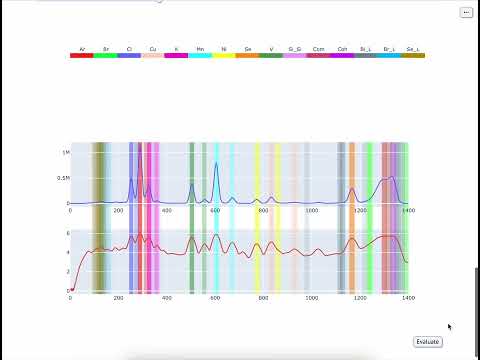
Guess elements:
marimo run guess_elements.py
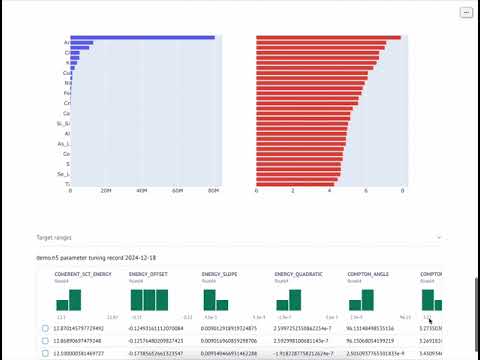
Optimize parameters:
marimo run optimize_parameters.py
Example Scripts
The scripts folder contains example scripts like fit_spec.py for fitting integrated spectra. Usage:
python fit_spec.py DATASET.h5 -e 12.0
If you have an override parameters file:
python fit_spec.py DATASET.h5 -e 12.0 --override_params_file parameters_override.txt
For all options:
python scripts/fit_spec.py -h
Contact
- Bug reports and feature requests: Open GitHub Issues
- Contributions: Fork repository, create branch, submit pull request
- XRF analysis help: Contact xyin@anl.gov or aglowacki@anl.gov
Acknowledgement
This research used resources of the Advanced Photon Source, an U.S. Department of Energy (DOE) Office of Science User Facility operated for the DOE Office of Science by Argonne National Laboratory under Contract No. DE-AC02-06CH11357. The authors acknowledge funding support from Argonne LDRD 2023-0049.
1 maintainer

Metadata
1 maintainer
Release files for mapstorch 0.0.2
For a detailed explanation of source distributions (sdists) and built distributions (wheels), please see the package formats documentation.
Source distribution (sdist)
| File | Size | Uploaded | Provenance | Actions |
|---|---|---|---|---|
| mapstorch-0.0.2.tar.gz | 413.7 kB | Without provenance | Details for mapstorch-0.0.2.tar.gz |
Built distribution (wheel)
| File | Interpreter | ABI | Platform | Actions Reset |
|---|---|---|---|---|
| mapstorch-0.0.2-py3-none-any.whl | Python 3 | none | any | Details for mapstorch-0.0.2-py3-none-any.whl |
Total release size: 824.6 kB
Release files / mapstorch-0.0.2.tar.gz
| Download URL | mapstorch-0.0.2.tar.gz |
|---|---|
| Size | 413.7 kB |
| Tags | Source |
|
SHA-256 checksum How to use checksums |
35a3131cec77cbc4ac3b865c3d99068f1d69c43d4bf587e8ed9e4335910c79fe
|
|
BLAKE2b-256 checksum How to use checksums |
aa7e09696a82aca28398b30de67d7cf08ea2d9cdb739dca2fa0dcfac19e74099
|
| Upload date | |
|
Uploaded using Trusted Publishing? What is trusted publishing? |
No |
| Uploaded via |
twine/7.0.0 CPython/3.12.15
|
Release files / mapstorch-0.0.2-py3-none-any.whl
| Download URL | mapstorch-0.0.2-py3-none-any.whl |
|---|---|
| Size | 410.9 kB |
| Tags | Python 3 |
|
SHA-256 checksum How to use checksums |
94797d656fc13fba86bc801c31e1d3476c20b457f7ddc8d7dc54858d4cffcbea
|
|
BLAKE2b-256 checksum How to use checksums |
a2abce9f395f89fd916bad054eaec645f401a798ecf8a55648de3cfce9327265
|
| Upload date | |
|
Uploaded using Trusted Publishing? What is trusted publishing? |
No |
| Uploaded via |
twine/7.0.0 CPython/3.12.15
|
Security for mapstorch 0.0.2
Provenance
Provenance describes where a file came from. On PyPI, provenance is shared via attestations, which provide a verifiable record of the build or publishing details. View details, limitations and caveats.
No provenance found
None of the files in this release were uploaded with provenance metadata.
A note on package security
PyPI is a repository for distributing packages, not a service for auditing them. While third-party security researchers and our staff do their best to detect and remove malicious packages, PyPI cannot guarantee the quality, security or suitability of any given package.
To learn more about protecting yourself from malicious actors, visit our package security documentation.














