
Mapsy Project
Overview
Mapsy is a Python library designed easily render static maps in python. It is designed to be simple to use and easy to integrate with existing codebases. The library supports rendering background, tiled raster, filled polygon, and other layers on the map. It directly supports geometric primitives, allowing users to directly render shapely geometries.
Input data must be in the EPSG:4326 - WGS84 projection.
Supported Layer Types
| type | status | description | data source |
|---|---|---|---|
BackgroundLayer |
✅ | renders a simple background with a single color | Color |
TiledRasterLayer |
✅ | renders a tiled raster layer can can load xyz tiles | xyz via http(s) |
FillLayer |
✅ | renders a fill layer for polygons | Polygon and MultiPolygon |
LineLayer |
✅ | renders a line layer that draw LineStrings | LineString and MultiLineString |
CircleLayer |
✅ | renders a circle layer for Points | Point and MultiPoint |
SymbolLayer |
✅ | renders a symbol and/or text for points | Point and MultiPoint |
Attribution |
✅ | an attribution | str and list[str] |
Installation
You can simply install the library using pip:
pip install mapsy
IMPORTANT: This library uses Cairo. You will have to install cairo with your package manager of choice.
on mac
brew install cairo
Usage
The Mapsy library is designed to be simple to use. The following sections provide examples of how to create a map with different layers. Note that in almost all cases you would have to add an attribution layer to the map. For example, if you use OpenStreetMap tiles, you would have to add the OpenStreetMap attribution to the map. This is not done automatically!
Creating a simple Map
Here is an example of how to create a simple map with a tiled raster layer:
import mapsy

my_map = mapsy.Map()
tile_layer = mapsy.TiledRasterLayer(
    [
        "https://tile.openstreetmap.org/{z}/{x}/{y}.png",
    ]
)
my_map.add_layer(tile_layer)
my_map.add_layer(mapsy.Attribution("© OpenStreetMap contributors"))

surf = my_map.render(
    mapsy.FixedScreenSize(
        mapsy.Box.from_lng_lat(5.988, 47.302, 15.016, 54.983), mapsy.ScreenSize(512, 512)
    )
)
surf.write_to_png("my_map.png")
Layers
Background Layer
A background layer provides a solid color background for the map.
background_layer = mapsy.BackgroundLayer(mapsy.Color(1, 1, 1))
my_map.add_layer(background_layer)
Tiled Raster Layer
A tiled raster layer allows the use of map tiles from sources like OpenStreetMap.
tile_layer = mapsy.TiledRasterLayer(
    [
        "https://tile.openstreetmap.org/{z}/{x}/{y}.png",
    ]
)
my_map.add_layer(tile_layer)
Fill Layer
A fill layer can be used to add filled polygons with customizable colors and borders.
from shapely.geometry import shape

polygon = shape(json)
fill_layer = mapsy.FillLayer(
    [
        mapsy.FillItem(
            geometry=polygon,
            fill_color=mapsy.Color(0.5, 0.5, 0.5, 0.3),
            line_color=mapsy.Color(0, 0, 0),
            line_width=2,
        )
    ]
)
my_map.add_layer(fill_layer)
Line Layer
A line layer can be used to show LineStrings on the map
from shapely.geometry import shape

line = shape(json)
fill_layer = mapsy.LineLayer(
    [
        mapsy.LineItem(
            geometry=line,
            join=mapsy.LineJoin.round,
            cap=mapsy.LineCap.round
            width=12,
            outline_width=3,
            outline_color=Colors.BLACK,
        )
    ]
)
my_map.add_layer(fill_layer)
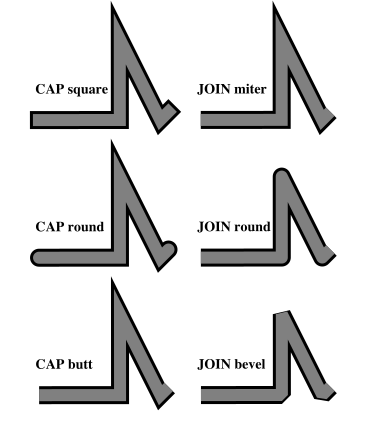
The LineItem options cap and join lead to the following results:
Circle Layer
A circle layer can be used to show Points on the map
from shapely.geometry import shape

point = shape(json)
circle_layer = mapsy.CircleLayer(
    [
        mapsy.CircleItem(
            geometry=point,
            fill_color=mapsy.Color(0.5, 0.5, 0.5, 0.3),
            line_color=mapsy.Color(0, 0, 0),
            line_width=2,
            radius=10,
        )
    ]
)
my_map.add_layer(circle_layer)
Symbol Layer
A symbol layer can be used to show Points on the map. You can load custom icons by using the mapsy.Icon.from_path class method.
Limitations
- The text is not automatically placed relative to the symbol. You have to calculate the position yourself.
- No collision detection is implemented. If you place multiple symbols with text on top of each other, the text and symbols will overlap. This might get added in the future, but is somewhat complicated to implement.
from shapely.geometry import shape

point = shape(json)
symbol_layer = mapsy.SymbolLayer(
    [
        mapsy.SymbolItem(
            geometry=point,
            icon=mapsy.Icons.PIN_24,
            text="Hello World",
            text_offset=(0, 16)
        )
    ]
)
my_map.add_layer(symbol_layer)
You can set the anchor of the text with the text_anchor parameter. The default is mapsy.TextAnchor.BOTTOM_LEFT. The following options are available:
 |
 |
 |
 |
 |
 |
 |
 |
 |
Attribution
An attribution layer can be used to add attribution to the map. This is important if you use tiles from a public source like OpenStreetMap.
attribution = mapsy.Attribution("© OpenStreetMap contributors")
my_map.add_layer(attribution)
Testing
The project includes unit tests to ensure the functionality of various components. To run the tests, use the following command:
pytest
Note that if you have a different cairo version installed some tests might fail. This is due to the fact that the tests compare the rendered images with reference images. If you have a different cairo version installed, the images might look slightly different.
Output Example
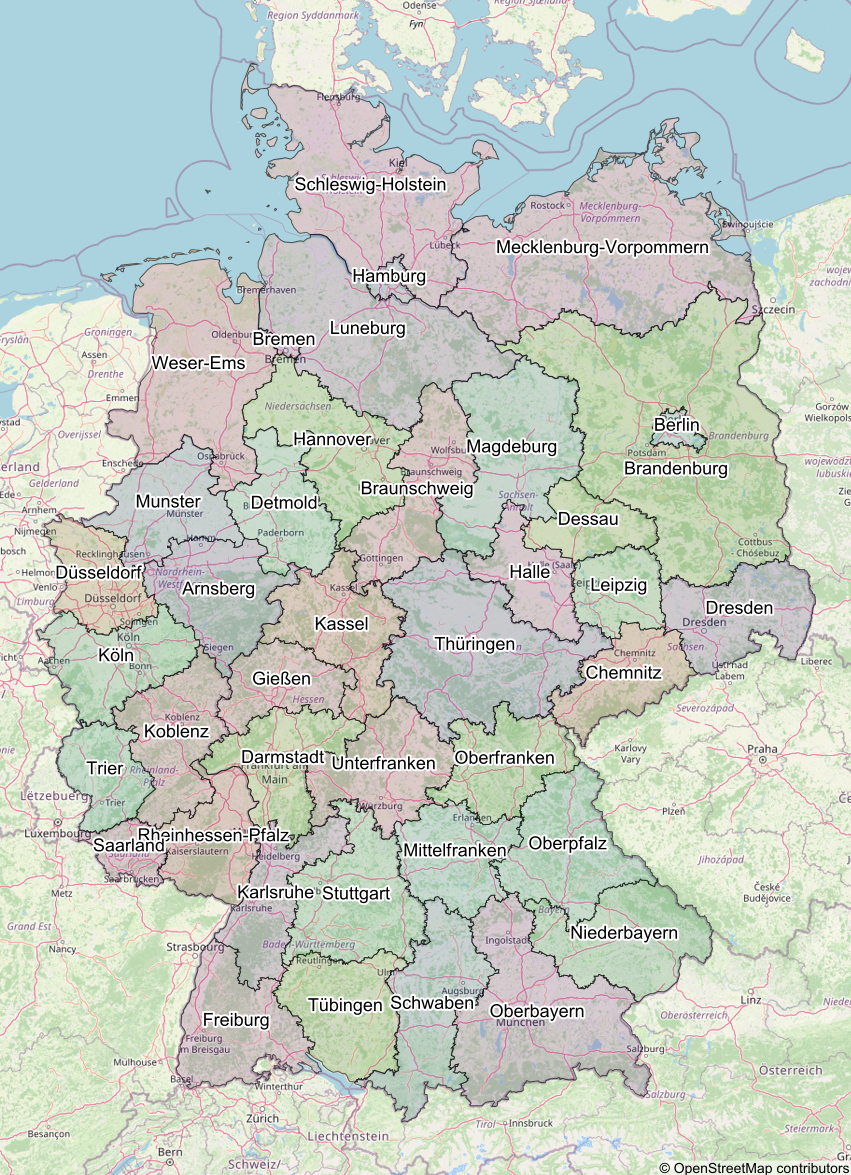
The image below is an example of a map created using the Mapsy library:
License
This project is licensed under the MIT License.
Contributing
Contributions are welcome! Please submit a pull request or open an issue for any changes or suggestions.
1 maintainer

Metadata
1 maintainer
Release files for mapsy 0.3.3
For a detailed explanation of source distributions (sdists) and built distributions (wheels), please see the package formats documentation.
Source distribution (sdist)
| File | Size | Uploaded | |
|---|---|---|---|
| mapsy-0.3.3.tar.gz | 20.4 kB | Details |
Built distribution (wheel)
| File | Interpreter | ABI | Platform | Reset |
|---|---|---|---|---|
| mapsy-0.3.3-py3-none-any.whl | Python 3 | none | any | Details |
Total release size: 47.0 kB
Release files / mapsy-0.3.3.tar.gz
| Download URL | mapsy-0.3.3.tar.gz |
|---|---|
| Size | 20.4 kB |
| Tags | Source |
|
SHA-256 checksum How to use checksums |
66c395c237cc8d1e34acb5c8a4385f96ff897bcdc783761c005d43decfbe9f1c
|
|
BLAKE2b-256 checksum How to use checksums |
8ede2bce81cf98fc5e4b65880e5ebdbd9da29ca8dcc1f1d9ea1df9e91fd2cf2b
|
| Upload date | |
|
Uploaded using Trusted Publishing? What is trusted publishing? |
No |
| Uploaded via |
uv/0.10.2 {"installer":{"name":"uv","version":"0.10.2","subcommand":["publish"]},"python":null,"implementation":{"name":null,"version":null},"distro":null,"system":{"name":null,"release":null},"cpu":null,"openssl_version":null,"setuptools_version":null,"rustc_version":null,"ci":null}
|
Release files / mapsy-0.3.3-py3-none-any.whl
| Download URL | mapsy-0.3.3-py3-none-any.whl |
|---|---|
| Size | 26.5 kB |
| Tags | Python 3 |
|
SHA-256 checksum How to use checksums |
157de309b5af3e058452eb282edefd3ee8e5e5575d11a973131aece00b515d54
|
|
BLAKE2b-256 checksum How to use checksums |
212400bfa782f49699a375760a866074dbf82a5a794924fcdfd638de07fe8193
|
| Upload date | |
|
Uploaded using Trusted Publishing? What is trusted publishing? |
No |
| Uploaded via |
uv/0.10.2 {"installer":{"name":"uv","version":"0.10.2","subcommand":["publish"]},"python":null,"implementation":{"name":null,"version":null},"distro":null,"system":{"name":null,"release":null},"cpu":null,"openssl_version":null,"setuptools_version":null,"rustc_version":null,"ci":null}
|














