
margin-notes




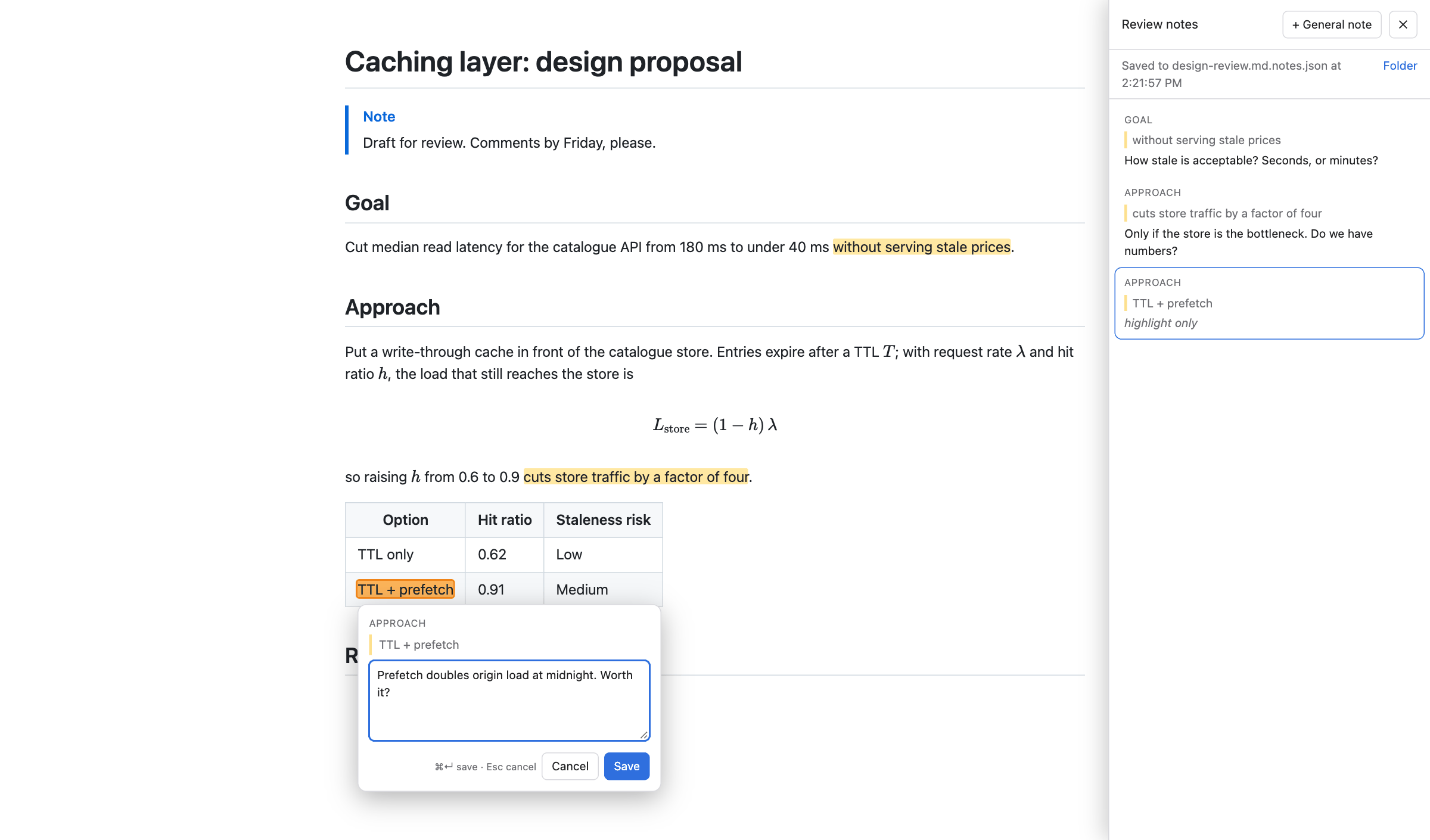
Review HTML and Markdown documents in your browser. Select a passage, leave a comment, and the notes save as JSON next to the document, ready for a person or an LLM agent to act on.
It replaces python -m http.server when the reason you're serving a folder is to read and
critique what's in it.
uvx margin-notes                     # browse the current folder
uvx margin-notes docs/design.md      # open one document
uvx margin-notes ~/reports --host 0.0.0.0 --port 9000
What it does
- Any folder. A listing shows Markdown and HTML documents first, with a count of the notes on each. Other files (images, PDFs, data) are served as-is, so relative links and images work.
- HTML is served unchanged with a small review overlay added. Its own scripts and styles still run.
- Markdown is rendered GitHub-style: tables, task lists, footnotes, definition lists, heading
anchors, front matter (
title:becomes the page title), alerts (> [!NOTE],[!TIP],[!IMPORTANT],[!WARNING],[!CAUTION]), Pygments syntax highlighting, light and dark themes.- Math with MathJax:
$inline$,$$display$$and```mathfences. MathJax only loads on pages that contain math, so prices like$5 and $10are left alone. - Diagrams in
```mermaidfences. - Add
?raw=1to any document URL to get the source.
- Math with MathJax:
- Reviewing: select text and click 💬 Comment. ⌘↵ saves and Esc cancels. Click a highlight to edit or delete it. Notes (bottom right) lists every note in document order and has + General note for comments about the whole document. Every change saves immediately.
MathJax and mermaid load from jsDelivr, so math and diagrams need internet access. Everything else works offline.
The notes file
report.md gets report.md.notes.json beside it. Using the full filename keeps report.md and
report.html in one folder from sharing a file.
{
  "about": "Review notes on report.md. Notes are in document order. ...",
  "document": "report.md",
  "document_path": "/abs/path/report.md",
  "document_sha256": "…",
  "updated_at": "2026-11-17T13:43:20-08:00",
  "notes": [
    {
      "id": "nmwl7ygt5zh7r",
      "quote": "links five constants",
      "section": "Euler and friends",
      "comment": "which five?",
      "created_at": "2026-11-17T13:43:19-08:00",
      "updated_at": "2026-11-17T13:43:20-08:00",
      "anchor": { "exact": "links five constants", "prefix": "…", "suffix": "…", "start": 35 }
    }
  ]
}
quoteis the highlighted text andsectionis the nearest heading above it. A note with a nullquoteis a general comment.anchorre-finds the highlight using the exact text and its surroundings. A highlight whose text has since been edited out shows as not found in the notes panel.aboutdescribes the format in plain words, so an agent handed the file needs no other instructions.- If
document_sha256no longer matches the file, the document changed after the review. - Deleting the last note removes the file.
Several people can review the same document at once. Each save changes one note on the server, so reviewers don't overwrite each other.
Options
margin-notes [PATH] [--host HOST] [-p PORT] [--no-open] [--version]
| Option | Default | |
|---|---|---|
PATH |
. |
A folder to browse, or a document to open |
--host |
127.0.0.1 |
0.0.0.0 makes it reachable from your network |
-p, --port |
8765 |
The first port to try; it moves up if that one is busy |
--no-open |
Don't open a browser |
Security: there is no authentication. Bound to anything other than localhost, anyone who can
reach the port can read every file under the folder and add notes. Dotfiles and dot-directories
(.git, .env) are never served, and nothing outside the folder is reachable, including
through symlinks.
Development
uv sync --all-groups
uv run pytest                     # unit tests, plus browser tests when Playwright has a browser
uv run playwright install chromium  # once, if you have no Chrome or Chromium
uv run pytest -m "not browser"    # skip the browser tests
uv run ruff check && uv run ruff format --check
uv run margin-notes .             # try it on this repository
The browser tests (tests/test_browser.py) drive the overlay in Chromium through Playwright:
selecting text, anchoring repeated phrases, editing, deleting, general notes, and highlights
that no longer match. They need no network.
Releasing
-
Optional dry run: run the Release workflow by hand from the Actions tab. It builds and publishes to TestPyPI. Check the page, then run the uploaded wheel. Only the wheel comes from TestPyPI; its dependencies come from PyPI, because TestPyPI holds unrelated packages under real names (such as a broken
fastapi 1.0):uvx --refresh --from "margin-notes @ $(curl -s https://test.pypi.org/pypi/margin-notes/json \ | python3 -c 'import json,sys; print(next(u["url"] for u in json.load(sys.stdin)["urls"] if u["filename"].endswith(".whl")))')" \ margin-notes --version
-
Bump
__version__insrc/margin_notes/__init__.pyand add a section toCHANGELOG.md. -
Commit, then tag and push:
git tag v0.1.0 && git push --tags. -
.github/workflows/release.ymlchecks that the tag matches the version, runs the tests, builds, and publishes to PyPI.
Both indexes publish through trusted publishers, so no token lives in GitHub. Set each up once,
for repository jbn/margin-notes and workflow release.yml: at
https://test.pypi.org/manage/account/publishing/ with environment testpypi, and at
https://pypi.org/manage/account/publishing/ with environment pypi.
To publish from your own machine instead, run uv build && uv publish.
1 maintainer

Metadata
1 maintainer
Release files for margin-notes 0.1.0
For a detailed explanation of source distributions (sdists) and built distributions (wheels), please see the package formats documentation.
Source distribution (sdist)
| File | Size | Uploaded | Provenance | Actions |
|---|---|---|---|---|
| margin_notes-0.1.0.tar.gz | 30.1 kB | With provenance | Details for margin_notes-0.1.0.tar.gz |
Built distribution (wheel)
| File | Interpreter | ABI | Platform | Actions Reset |
|---|---|---|---|---|
| margin_notes-0.1.0-py3-none-any.whl | Python 3 | none | any | Details for margin_notes-0.1.0-py3-none-any.whl |
Total release size: 53.5 kB
Release files / margin_notes-0.1.0.tar.gz
| Download URL | margin_notes-0.1.0.tar.gz |
|---|---|
| Size | 30.1 kB |
| Tags | Source |
|
SHA-256 checksum How to use checksums |
8caa2a31efde4c8b77350e9d049a240ad8c725f1bb8b613483434fe3b432dc5c
|
|
BLAKE2b-256 checksum How to use checksums |
76c494a7edcaf8b06c1735ea3504d8d86ff23216996438fa4e62e19df2670770
|
| Upload date | |
|
Uploaded using Trusted Publishing? What is trusted publishing? |
Yes |
| Uploaded via |
twine/7.0.0 CPython/3.13.16
|
Provenance
Provenance describes where a file came from. On PyPI, provenance is shared via attestations, which provide a verifiable record of the build or publishing details. View details, limitations and caveats.


PyPI Publish Attestation
PyPI verified that this artifact, at this checksum, originated from the publisher listed below.
Signed by GitHub Actions, verified by PyPI on Nov 18, 2026.
Transparency logRelease files / margin_notes-0.1.0-py3-none-any.whl
| Download URL | margin_notes-0.1.0-py3-none-any.whl |
|---|---|
| Size | 23.4 kB |
| Tags | Python 3 |
|
SHA-256 checksum How to use checksums |
14b27aaf5aaa1f0c72280cd45c1ac7c5a2adcdd33aaa09e45edcb077404a1c57
|
|
BLAKE2b-256 checksum How to use checksums |
d4ee96028fffaeffac657854548f4ca3475aed789ca326d9bc4b69cc52b1326b
|
| Upload date | |
|
Uploaded using Trusted Publishing? What is trusted publishing? |
Yes |
| Uploaded via |
twine/7.0.0 CPython/3.13.16
|
Provenance
Provenance describes where a file came from. On PyPI, provenance is shared via attestations, which provide a verifiable record of the build or publishing details. View details, limitations and caveats.
PyPI Publish Attestation
PyPI verified that this artifact, at this checksum, originated from the publisher listed below.
Signed by GitHub Actions, verified by PyPI on Nov 18, 2026.
Transparency logSecurity for margin-notes 0.1.0
Provenance
Provenance describes where a file came from. On PyPI, provenance is shared via attestations, which provide a verifiable record of the build or publishing details. View details, limitations and caveats.
Full provenance
Both files in this release have been uploaded with provenance metadata.
Attestation for margin_notes-0.1.0.tar.gz
PyPI Publish Attestation
PyPI verified that this artifact, at this checksum, originated from the publisher listed below.
Signed by GitHub Actions, verified by PyPI on Nov 18, 2026.
Transparency logA note on package security
PyPI is a repository for distributing packages, not a service for auditing them. While third-party security researchers and our staff do their best to detect and remove malicious packages, PyPI cannot guarantee the quality, security or suitability of any given package.
To learn more about protecting yourself from malicious actors, visit our package security documentation.














