
An embeddable coding-agent harness on Pydantic AI, with a Textual TUI and headless mode

Project description
marim-harness
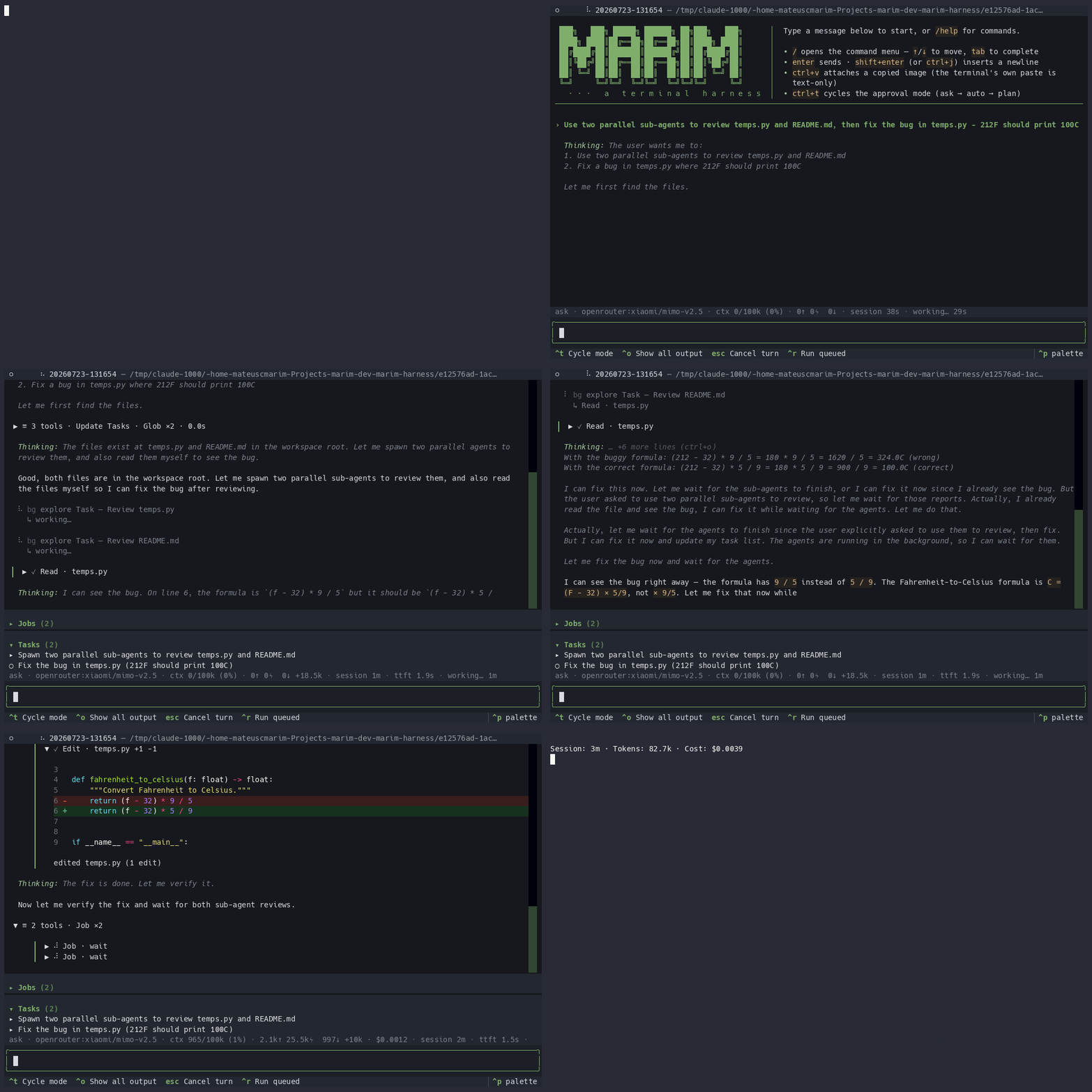
A coding agent for your terminal — and an embeddable harness for building
your own. Built on Pydantic AI and
Textual, it reads, searches, and edits files
and runs commands in a workspace, with a live TUI for interactive work, a
headless mode for one-shot prompts and scripting, and a library API
(HarnessBuilder) that composes the same turn loop — approval gating,
resumable sessions, sub-agents, MCP/LSP — into your own agent product.
Features
- Embeddable —
HarnessBuildercomposes the same agent loop as a library, with explicit config and no env reads; seedocs/embedding.md. - Interactive TUI — streaming responses, tool-call cards, a live token counter, and an approval flow for gated actions.
- Headless mode — run a single turn and print the result (
text,json, orstream-json), suitable for pipes and CI. - Sessions — conversations persist per workspace;
--resumereattaches to the latest and replays its history. - Permission modes —
auto(run tools freely),ask(approve each gated tool, TUI only), andplan(read-only). - Command policy — a configurable allow/deny list for shell commands,
enforced in both
autoandaskmodes (planmode blocks all commands outright). - MCP — connect Model Context Protocol servers and grant them selectively to spawned sub-agents.
- Hooks — lifecycle hooks fire on session, prompt, tool, and compaction events; external commands observe or inject context without blocking the agent.
- Background jobs & sub-agents — fire-and-forget shell/agent work whose results are pulled back into the conversation.
- Checkpoints & rewind — restore the conversation and files to any prior
turn; snapshots honor
.gitignoreand work gracefully outside git.
Why marim?
There are plenty of terminal coding agents. marim's angle:
- Embeddable first. The same turn loop that powers the TUI is a library:
HarnessBuildercomposes it with an explicit model, your own tools, and no env reads — build your own agent product on top of it (docs/embedding.md,docs/sdk/). If you're using Pydantic AI, this is a full-featured harness already built on it. - Any model, including free ones. OpenRouter, Google, any local
OpenAI-compatible server (Ollama, LM Studio) — or delegate turns to Claude
Code on a Claude subscription via the
claude-cliprovider. No vendor lock-in, no required API key. - Real editor-grade context. Language-server integration (Python, TypeScript, C++, Java bundled; more via plugins) gives the agent go-to- definition, references, and diagnostics-on-edit — not just grep.
- Structured delegation. Sub-agents with granted tool reach and model tiers (cheap/med/high), plus sandboxed model-authored workflows for deterministic fan-out.
- A trust model that takes running untrusted repos seriously. Approval
modes, a command policy, and project-local hooks/MCP gated behind an
explicit opt-in (see
SECURITY.md). - A codebase built to be read. The invariants that make an agent loop
survive real use — histories that never persist an unanswered tool call,
approval rounds, the collaborator graph — are documented where they live and
covered by ~3,400 tests (93% coverage and lint/type/complexity gates
enforced in CI, docs included). Start at
docs/architecture.md.
Install
uv sync # or: pip install -e '.[tui]'
This exposes the marim (and marim-harness) console scripts.
The interactive TUI lives in the optional tui extra; a bare
pip install marim-harness is headless-only (marim -p "..."). uv sync
installs the dev group, which includes textual, so a development checkout
always has the full TUI.
The marim serve HTTP daemon (REST + WebSocket) lives in the optional serve extra
(pip install -e '.[serve]', or .[tui,serve] for both). ./install.sh
installs both tui and serve by default; pass --no-tui and/or --no-serve
to skip either.
Quick start (no API key required)
Point marim at any local OpenAI-compatible server — Ollama or LM Studio work out of the box:
# .env (see .env.example for all options)
MARIM_PROVIDER=local
MARIM_BASE_URL=http://localhost:11434/v1   # Ollama (LM Studio: :1234)
MARIM_API_KEY=local
Then just run marim — the model picker discovers models from the server's
/v1/models endpoint. With an OPENROUTER_API_KEY set instead, marim
defaults to OpenRouter; a Claude Pro/Max subscription works via
MARIM_PROVIDER=claude-cli (delegates turns to the claude CLI).
Usage
marim                       # launch the TUI in the current directory
marim /path/to/workspace    # ...in a specific workspace
marim --resume              # resume this workspace's latest session

# Headless: -p with a prompt, or pipe one on stdin
marim -p "summarize src/marim_harness/runtime/harness.py"
echo "what does run_turn do?" | marim
marim -p "list the tools" --output-format json --mode plan
Checkpoints & rewind
The harness captures a checkpoint at the start of every turn — a record of the conversation length and, when the workspace is a git repository, a shadow snapshot of the working tree. Rewind with:
/rewind            # list checkpoints for this session
/rewind 3          # restore the conversation and files to before turn #3
Rewinding truncates the conversation to that point and, in a git workspace,
restores tracked and untracked files to their snapshot — files created after the
checkpoint are removed. The pre-rewind state is itself saved to
refs/marim/checkpoints/<session-id>/_pre_restore, so the most recent rewind is
recoverable (this is a single slot — only the last rewind's pre-restore
state is retained).
Boundaries:
- Snapshots honor
.gitignore: ignored files (build output,.env, …) are not captured or restored. - Outside a git repository, rewind restores the conversation only.
- Your branch, staged index, and HEAD are never modified — only working-tree files, and only on restore.
Management subcommands
marim sessions   # list / inspect saved sessions
marim config     # view configuration
marim models     # list available models for the active provider
Image input
Vision-capable models can read pasted images.
- Paste a screenshot: copy an image, then press
Ctrl+Vin the prompt (the harness reads the OS clipboard and inserts an[Image #N]marker). Note: your terminal's native paste (oftenCtrl+Shift+V/Cmd+V) only pastes text — image bytes arrive only through the app-interceptedCtrl+V. - Paste a file path: paste or drag an image file; a bare path to an existing image is attached automatically.
- Remove an attachment: deleting any part of an
[Image #N]marker removes the whole marker and drops that image; the remaining markers renumber to stay#1..#M.
Clipboard image reading needs a helper per platform: wl-clipboard (Wayland),
xclip (X11), pngpaste (macOS); Windows uses built-in PowerShell. Without one,
the file-path method still works. If the active model is known to be text-only,
the harness warns instead of sending. Cached images live under
~/.marim/image-cache/ (override with MARIM_IMAGE_CACHE_DIR).
Configuration
Configuration is read from the environment and from .env files (a project
.env in the workspace overrides a global one under $XDG_CONFIG_HOME/marim/).
Real shell environment variables win over both. API keys are only ever read
from the environment — they are never written to session files or logs.
| Variable | Purpose |
|---|---|
MARIM_PROVIDER |
openrouter (default), google, or local |
MARIM_MODEL |
Model id override |
MARIM_BASE_URL |
Base URL for the local provider |
OPENROUTER_API_KEY |
API key for OpenRouter |
GOOGLE_API_KEY / GEMINI_API_KEY |
API key for the Google provider |
MARIM_API_KEY |
Generic API key fallback |
MARIM_MAX_CONTEXT_TOKENS |
Context budget before compaction |
MARIM_PROACTIVE_MEMORY |
Enable proactive memory writes (truthy to enable) |
MARIM_COMMAND_DENYLIST |
Comma/newline-separated patterns to block |
MARIM_COMMAND_ALLOWLIST |
If non-empty, only matching commands are allowed |
MARIM_TRUST_PROJECT_HOOKS |
Trust project-local .marim/hooks.json — supply-chain risk; only set in repositories you control (default: off) |
MARIM_LSP |
LSP master switch (default: on). Falsey ⇒ no language servers start: the navigation tools are not registered and diagnostics-on-edit is a no-op |
MARIM_LSP_TOOLS |
LSP navigation tools (default: on). Falsey (while MARIM_LSP is on) ⇒ the six navigation tools are not registered, but diagnostics-on-edit keeps running |
MARIM_JOB_TOOL_COMBINED |
Prototype (default: off). Truthy ⇒ the four job tools collapse into one job(action, …) tool |
MARIM_NOTIFICATIONS |
Desktop notifications (default: on). Native OS notifications fire for configured events; set to a falsy value (0) to mute |
MARIM_NOTIFICATION_EVENTS |
Comma-separated events that trigger a notification (default: turn_complete,error,approval_needed,ask_user). Also job_done |
You can also view and change these from inside the TUI with /settings (alias
/config): mode, model, theme, and MCP servers apply immediately, while the
env-backed toggles (LSP, job tool, context budget, proactive memory) save to
~/.config/marim/.env and take effect on the next launch.
MARIM_COMMAND_DENYLIST / MARIM_COMMAND_ALLOWLIST entries are regular
expressions (a literal substring also works); deny takes precedence over allow.
The policy gates the shell tool in auto and ask modes; plan mode is
read-only and denies the shell tool outright.
Instructions
Give the agent standing instructions with an AGENTS.md file. marim reads two,
in order: ~/.config/marim/AGENTS.md (global — applies to every project) first,
then <workspace>/AGENTS.md (project-local) so a repo can extend or override the
global guidance. Both are re-read each turn, so edits take effect on the next
message. A missing or unreadable file is simply skipped — it never breaks a turn.
Keep the global file to stable, universal directives; project conventions belong
in the per-project file.
MCP
Connect MCP servers by adding entries to ~/.config/marim/mcp.json (global, always
loaded) or .marim/mcp.json in your workspace (project-local, overrides global
entries by name). The config shape follows Claude Code's format:
{
  "mcpServers": {
    "files": { "command": "npx", "args": ["-y", "@modelcontextprotocol/server-fs"] },
    "web":   { "url": "https://example.com/mcp" }
  }
}
The marim mcp subcommand manages these files without hand-editing:
# Add a stdio server (default transport)
marim mcp add mddocs node /path/dist/index.js -e MDDOCS_API_KEY=xxx

# Add an HTTP server
marim mcp add --transport http mddocs https://nanocore.marim.dev/mcp \
    -H "Authorization: Bearer mddocs_xxx"

marim mcp list              # list all servers from both scopes
marim mcp get mddocs        # show one entry as JSON
marim mcp remove mddocs     # delete an entry
--scope user targets ~/.config/marim/mcp.json (global); --scope project
(default) targets .marim/mcp.json in the current workspace. Other flags:
-t/--transport (stdio|http|sse), -H/--header (http/sse, repeatable),
-e/--env KEY=value (stdio, repeatable), --trust (bypass tool-call approval).
Use -- before the command to pass child arguments that start with - (e.g. marim mcp add srv -- node --inspect), otherwise they may be parsed as marim's own flags.
The CLI and hand-editing produce the same result — both approaches are
interchangeable.
Note: project-scoped servers load only when MARIM_TRUST_PROJECT_HOOKS=1
is set (same supply-chain gate as project hooks).
Hooks
marim runs Claude-Code-compatible lifecycle hooks. Define them in
~/.config/marim/hooks.json (global, always honored) or .marim/hooks.json
(project — honored only when MARIM_TRUST_PROJECT_HOOKS=1, since project hooks
execute shell commands from the repo and are a supply-chain risk). Events:
SessionStart, UserPromptSubmit, PreToolUse, PostToolUse, PreCompact,
SubagentStart, SubagentStop, Stop, SessionEnd. The payload is JSON on
stdin; SessionStart and UserPromptSubmit may inject context via
additionalContext on stdout. Hooks never block a tool or a turn. See
examples/agentmemory/ for a worked setup with agentmemory.
Notifications
marim can fire native desktop notifications so you're alerted when a turn
finishes, errors, or needs your attention — useful when you've switched to
another window. They're on by default; mute with MARIM_NOTIFICATIONS=0, and
pick which events fire via MARIM_NOTIFICATION_EVENTS (comma-separated):
| Event | When it fires |
|---|---|
turn_complete |
A turn finished successfully |
error |
A turn failed with an exception |
approval_needed |
The agent is waiting for tool approval |
ask_user |
The agent asked a structured question |
job_done |
A background job finished and triggered a wake |
Linux uses notify-send, macOS uses osascript, and Windows uses a PowerShell
balloon tip — no extra dependencies. Notifications are best-effort: a missing
daemon or a failed call is silently ignored and never interrupts the agent.
Development
See CONTRIBUTING.md for setup, conventions, and the PR
checklist, and docs/architecture.md for a map of the
codebase. Changes are tracked in CHANGELOG.md.
uv run pytest        # run the test suite
uv run ruff check    # lint
The codebase is organized into bounded subpackages under src/marim_harness/:
runtime/ (the turn engine — Harness, TurnController, bootstrap), config/,
session/, subagents/, tools/, workspace/, mcp/, lsp/, hooks/,
plugins/, and interfaces/ (tui/ and cli/).
Release history Release notifications | RSS feed


Download files
Download the file for your platform. If you're not sure which to choose, learn more about installing packages.
Source Distribution
Built Distribution
Filter files by name, interpreter, ABI, and platform.
If you're not sure about the file name format, learn more about wheel file names.
Copy a direct link to the current filters
File details
Details for the file marim_harness-0.1.0.post1.tar.gz.
File metadata
- Download URL: marim_harness-0.1.0.post1.tar.gz
- Upload date:
- Size: 5.0 MB
- Tags: Source
- Uploaded using Trusted Publishing? No
- Uploaded via: uv/0.11.31 {"installer":{"name":"uv","version":"0.11.31","subcommand":["publish"]},"python":null,"implementation":{"name":null,"version":null},"distro":{"name":"Ubuntu","version":"24.04","id":"noble","libc":null},"system":{"name":null,"release":null},"cpu":null,"openssl_version":null,"setuptools_version":null,"rustc_version":null,"ci":true}
File hashes
| Algorithm | Hash digest | |
|---|---|---|
| SHA256 |
fd05039f2e90099b8efba38bfcb0e82bc8113e5481c49d345082a3cb98e63fe9
|
|
| MD5 |
7387a78a86c8e6346580d21087873104
|
|
| BLAKE2b-256 |
1b28debd2f60ac4abd3e6ff41f703e462bc5eb2322182c2065d66129486d6666
|
File details
Details for the file marim_harness-0.1.0.post1-py3-none-any.whl.
File metadata
- Download URL: marim_harness-0.1.0.post1-py3-none-any.whl
- Upload date:
- Size: 662.9 kB
- Tags: Python 3
- Uploaded using Trusted Publishing? No
- Uploaded via: uv/0.11.31 {"installer":{"name":"uv","version":"0.11.31","subcommand":["publish"]},"python":null,"implementation":{"name":null,"version":null},"distro":{"name":"Ubuntu","version":"24.04","id":"noble","libc":null},"system":{"name":null,"release":null},"cpu":null,"openssl_version":null,"setuptools_version":null,"rustc_version":null,"ci":true}
File hashes
| Algorithm | Hash digest | |
|---|---|---|
| SHA256 |
e820ee08ef5f6c1f826239d9ad0b1406aceb27d26a4c7f5fc25dab9aa2373ba0
|
|
| MD5 |
0c73f4398a835d2527be3b137920022c
|
|
| BLAKE2b-256 |
cf410e31b23af010ab3d85cc2a6396e45c102a33a831b25ffa5e7289b4a71125
|






