
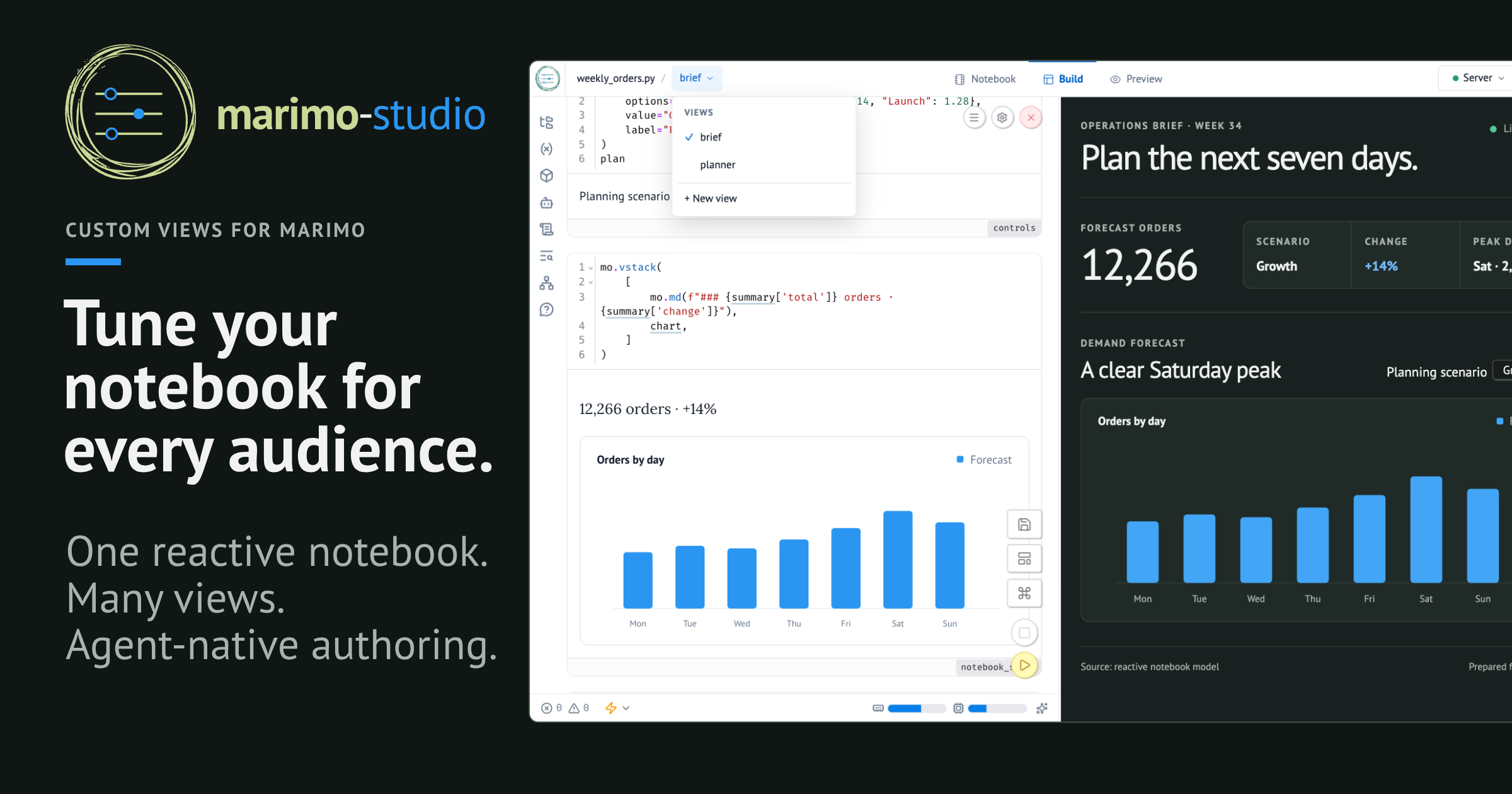
Tune your notebook for every audience.
Marimo Studio turns one reactive, reproducible marimo notebook into custom web views for different audiences. The notebook owns data access, transformations, metrics, controls, and domain decisions. Each view owns page structure, styles, and browser logic in ordinary HTML, CSS, and JavaScript files. People and coding agents can shape the interface while the analytical logic continues to evolve in one place.
From a repository checkout, open the revenue forecast in Studio:
uvx --with marimo-studio marimo edit examples/analysis.py --sandbox
Choose Build to work on the notebook and view together. Serve the finished view with the same Marimo application:
uvx --with marimo-studio marimo run examples/analysis.py --sandbox
Studio runs inside Marimo and uses its kernels, sessions, authentication, routing, controls, and output renderers. Select complete cell output, one Python object rendered by Marimo, or a JSON-compatible browser value:
<marimo-cell name="controls"></marimo-cell>
<marimo-output value="revenue_table"></marimo-output>
<time mo-value="report.updated_at"></time>
Read the Marimo Studio documentation to create views, project notebook results, work with coding agents, and choose a runtime.
License
Marimo Studio is licensed under the Apache License 2.0.


Release files for marimo-studio 0.0.5
For a detailed explanation of source distributions (sdists) and built distributions (wheels), please see the package formats documentation.
Source distribution (sdist)
| File | Size | Uploaded | |
|---|---|---|---|
| marimo_studio-0.0.5.tar.gz | 6.5 MB | Details |
Built distribution (wheel)
| File | Interpreter | ABI | Platform | Reset |
|---|---|---|---|---|
| marimo_studio-0.0.5-py3-none-any.whl | Python 3 | none | any | Details |
Total release size:13.2 MB
Release files / marimo_studio-0.0.5.tar.gz
| Download URL | marimo_studio-0.0.5.tar.gz |
|---|---|
| Size | 6.5 MB |
| Tags | Source |
|
SHA-256 checksum How to use checksums |
c1ff7f29ce732c35ebdf66f1c6747b2dce10a50baf81843fd486d08a6ed1fc6a
|
|
BLAKE2b-256 checksum How to use checksums |
26fdbe1b35701428ab2991013e254ff19cda23913c433d6c483e1a58e7fd994f
|
| Upload date | |
|
Uploaded using Trusted Publishing? What is trusted publishing? |
Yes |
| Uploaded via |
uv/0.12.3 {"installer":{"name":"uv","version":"0.12.3","subcommand":["publish"]},"python":null,"implementation":{"name":null,"version":null},"distro":{"name":"Ubuntu","version":"24.04","id":"noble","libc":null},"system":{"name":null,"release":null},"cpu":null,"openssl_version":null,"setuptools_version":null,"rustc_version":null,"ci":true}
|
Release files / marimo_studio-0.0.5-py3-none-any.whl
| Download URL | marimo_studio-0.0.5-py3-none-any.whl |
|---|---|
| Size | 6.7 MB |
| Tags | Python 3 |
|
SHA-256 checksum How to use checksums |
124313dced4ea0819142b76f37db50bc66f94646f5eff9856410538b0195e4dc
|
|
BLAKE2b-256 checksum How to use checksums |
883aa2e540aba070d95e3a7642ff3a7880d46a7f99d03b8e14e629467ffa0d6e
|
| Upload date | |
|
Uploaded using Trusted Publishing? What is trusted publishing? |
Yes |
| Uploaded via |
uv/0.12.3 {"installer":{"name":"uv","version":"0.12.3","subcommand":["publish"]},"python":null,"implementation":{"name":null,"version":null},"distro":{"name":"Ubuntu","version":"24.04","id":"noble","libc":null},"system":{"name":null,"release":null},"cpu":null,"openssl_version":null,"setuptools_version":null,"rustc_version":null,"ci":true}
|














