
marimo-toml-editor
An interactive TOML config editor widget for Jupyter and marimo notebooks — built with anywidget.
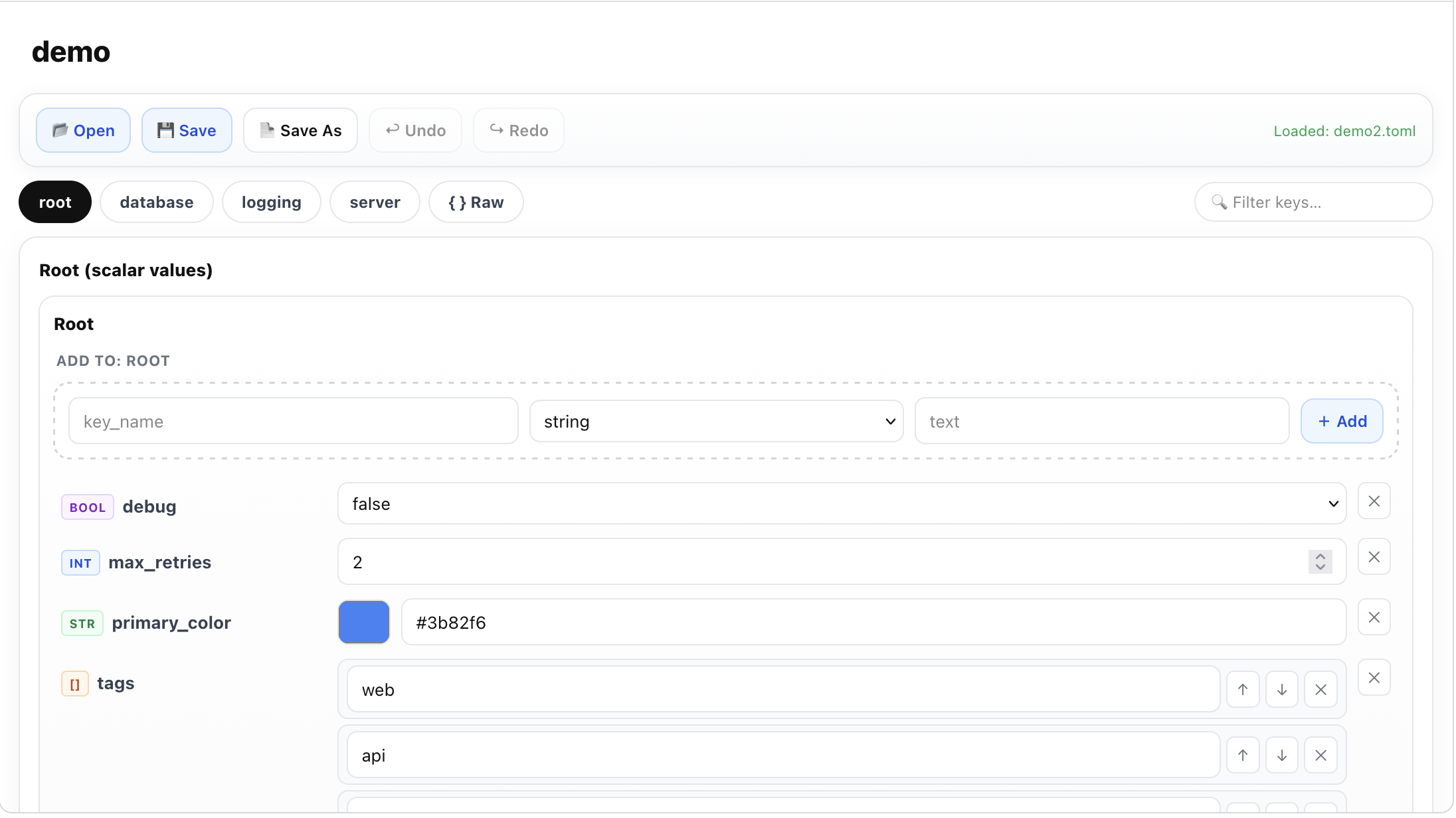
Features
- 🗂 Tab-per-table navigation — each top-level TOML table is a tab
- ✏️ Type-aware editors — strings, numbers, booleans (toggle), colors (color picker + hex field)
- 📋 Rich list editor — per-item rows with reorder (↑↓) and delete
- 🪆 Inline dict editor — shallow nested tables rendered as compact key-value rows
- 🏷 Type badges — each key shows its type at a glance (
str,int,bool,[],{}) - 🔍 Search / filter — filter keys within a tab
- ↩ Undo / Redo — full history
- 💾 Save to disk — requires
tomli-w - 🌗 Light + dark mode — follows system preference
Install
pip install marimo-toml-editor          # read-only
pip install "marimo-toml-editor[save]"  # with save support (tomli-w)
Usage
In marimo
import marimo as mo
from marimo_toml_editor import TomlConfigEditor

editor = mo.ui.anywidget(TomlConfigEditor("config.toml"))
editor
Access the current data reactively:
editor.value["data"] # dict with the current TOML contents
In Jupyter
from marimo_toml_editor import TomlConfigEditor

w = TomlConfigEditor("config.toml")
w
Start from a dict (no file)
from marimo_toml_editor import TomlConfigEditor

w = TomlConfigEditor()
w.data = {
    "title": "My App",
    "debug": False,
    "server": {"host": "0.0.0.0", "port": 8080},
    "tags": ["web", "api"],
}
API
| Attribute | Type | Description |
|---|---|---|
data |
dict |
Current TOML data (synced) |
path |
str |
File path (synced) |
name |
str |
Display name (synced) |
status |
str |
Last operation status message |
| Method | Description |
|---|---|
load(path) |
Load a TOML file |
save(path?) |
Save to disk (requires tomli-w) |
Development
git clone https://github.com/javirm3/marimo-toml-editor
cd marimo-toml-editor
uv run marimo edit examples/demo.py
License
MIT
1 maintainer

Metadata
1 maintainer
Release files for marimo-toml-editor 0.1.1
For a detailed explanation of source distributions (sdists) and built distributions (wheels), please see the package formats documentation.
Source distribution (sdist)
| File | Size | Uploaded | |
|---|---|---|---|
| marimo_toml_editor-0.1.1.tar.gz | 8.9 MB | Details |
Built distribution (wheel)
| File | Interpreter | ABI | Platform | Reset |
|---|---|---|---|---|
| marimo_toml_editor-0.1.1-py3-none-any.whl | Python 3 | none | any | Details |
Total release size: 8.9 MB
Release files / marimo_toml_editor-0.1.1.tar.gz
| Download URL | marimo_toml_editor-0.1.1.tar.gz |
|---|---|
| Size | 8.9 MB |
| Tags | Source |
|
SHA-256 checksum How to use checksums |
93862f48ef07f32341f07d08d93803b5ead96be4ae3701307c37f51e1f9b68ff
|
|
BLAKE2b-256 checksum How to use checksums |
214376853ee8cdf6de8c491f5b8a767c26bf487f67dc78554bc4b285fad7f4d2
|
| Upload date | |
|
Uploaded using Trusted Publishing? What is trusted publishing? |
Yes |
| Uploaded via |
twine/6.1.0 CPython/3.13.7
|
Provenance
Provenance describes where a file came from. On PyPI, provenance is shared via attestations, which provide a verifiable record of the build or publishing details. View details, limitations and caveats.


PyPI Publish Attestation
PyPI verified that this artifact, at this checksum, originated from the publisher listed below.
Signed by GitHub Actions, verified by PyPI on Feb 22, 2026.
Transparency logRelease files / marimo_toml_editor-0.1.1-py3-none-any.whl
| Download URL | marimo_toml_editor-0.1.1-py3-none-any.whl |
|---|---|
| Size | 16.6 kB |
| Tags | Python 3 |
|
SHA-256 checksum How to use checksums |
b90875293d8b9957d54feb98b6c00127ae82565b8114adba882b9e3de6506fef
|
|
BLAKE2b-256 checksum How to use checksums |
a4e0e727cec5113a0b3d111c9b3bd4b43dcd50a65bb00a9264858ed570e102a8
|
| Upload date | |
|
Uploaded using Trusted Publishing? What is trusted publishing? |
Yes |
| Uploaded via |
twine/6.1.0 CPython/3.13.7
|
Provenance
Provenance describes where a file came from. On PyPI, provenance is shared via attestations, which provide a verifiable record of the build or publishing details. View details, limitations and caveats.
PyPI Publish Attestation
PyPI verified that this artifact, at this checksum, originated from the publisher listed below.
Signed by GitHub Actions, verified by PyPI on Feb 22, 2026.
Transparency log













