
markdown-badges




A Python-Markdown extension that renders small inline badges from a !name keyword: priority, status, or brand. Works in Zensical, MkDocs, or plain Python-Markdown. The badge ships its own inline styles, so no external CSS is required.
Why?
This is not a replacement for admonitions / callouts (!!! warning, > [!NOTE]). Those wrap a block of explanatory text. Badges are the opposite: tiny inline pills you can drop anywhere, but that fit especially nicely into a list item, todo, or table cell, so status or severity is scannable at a glance without turning the line into a block. The intended usage is exactly that split: reach for a callout when you have a paragraph to say, and reach for a badge to mark some rows.
Badges
Write !name anywhere (prose, headings, table cells, list items) and it renders as a small inline pill:
This migration is !critical and blocks the release.

## !high Rotate the keys
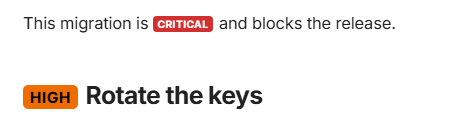
Only a name in scope matches, so an ordinary !, !important, or !highest in text is never touched. To write a name literally, escape it (\!high) or put it in a code span (`!high`).
Badge types
Every badge belongs to one of three types.
| Type | Meaning | Examples |
|---|---|---|
priority |
Carries a severity rank, from least to most severe. Only this type is considered by priority_of and rank_of. |
!trivial !low !medium !high !critical !blocker |
status |
Says where an item sits in a workflow. No rank. | !todo !wip !review !blocked !approved !done !onhold !experimental !deprecated |
branding |
A brand mark. Most carry a logo inlined as a data: URI, so a page makes no network request for it; aws is a plain colour with no logo, because no CC0 AWS mark exists and the badge text already reads AWS. |
!gitlab !github !claude !docker !aws |
Catalogue
Every badge above ships with the package and is active out of the box, no config required.
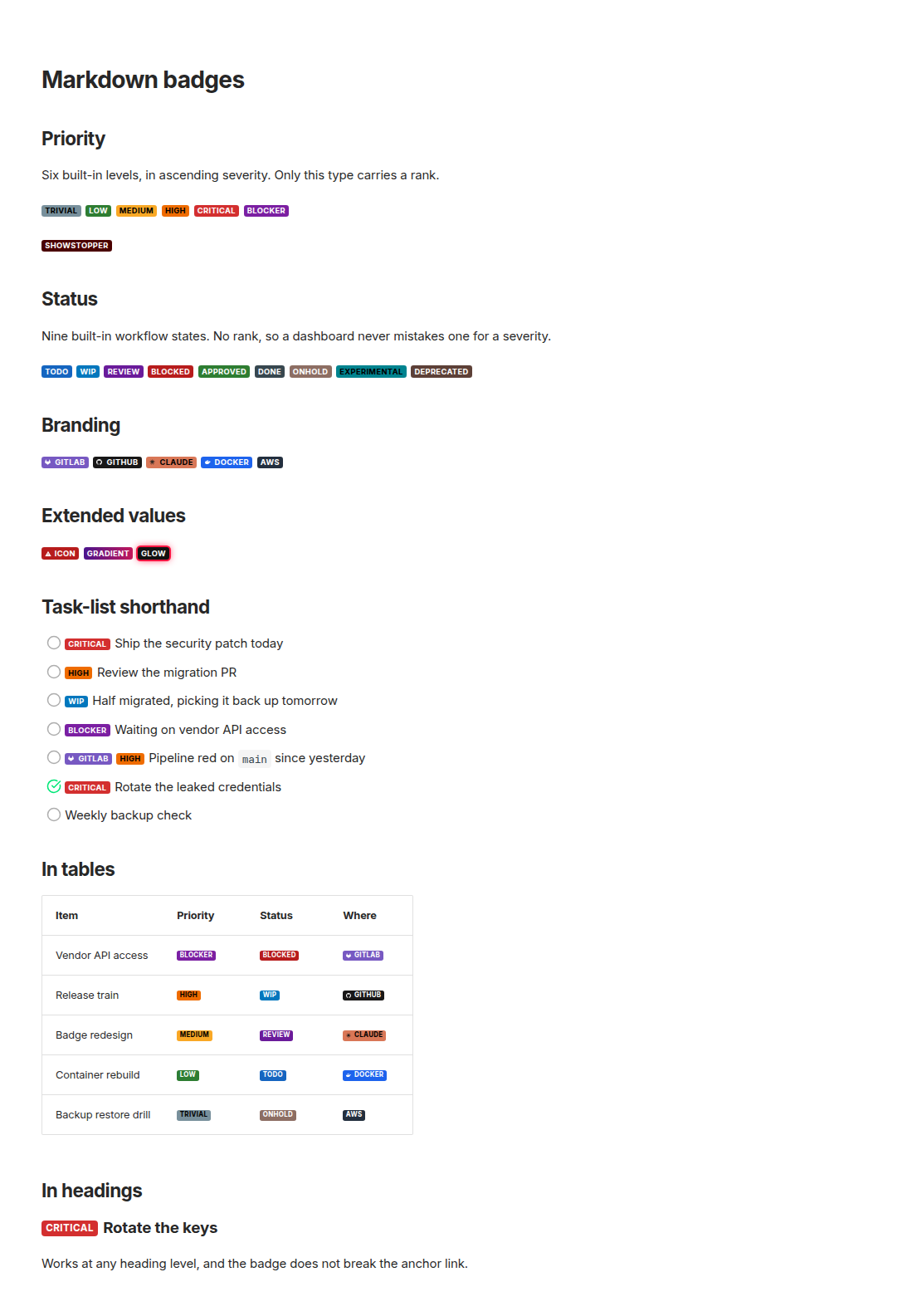
Full list with keyword, value, and resolved text colour: docs/badges.md.
Narrowing the catalogue
The catalogue option is a list of type names, defaulting to all three (priority, status, branding). Pass a subset to load fewer of them, or [] to disable the catalogue entirely.
# zensical.toml
[project.markdown_extensions.markdown_badges]
catalogue = ["priority", "status"]   # drop the branding badges
# plain Python-Markdown
from markdown_badges import MarkdownBadgesExtension
markdown.markdown(text, extensions=[MarkdownBadgesExtension(catalogue=["priority", "status"])])
Adding and recolouring badges
The badges option is a mapping of type name to a name -> value map, merged over the catalogue: an existing name is recoloured in place, keeping its position and its type, and a new name is inserted after the last badge of its own type, so a new priority outranks every catalogue priority.
[project.markdown_extensions.markdown_badges.badges.priority]
showstopper = "#000000"   # a new priority, ranked above every catalogue one
critical    = "#8e0000"   # an existing name: recolours it, keeping its rank
from markdown_badges import MarkdownBadgesExtension
markdown.markdown(text, extensions=[MarkdownBadgesExtension(badges={"priority": {"blocker": "#7b1fa2"}})])
Colors may be 3-, 4-, 6-, or 8-digit hex (#7b1fa2, #eee, #eeeeeeff) or a common CSS name (red, yellow, rebeccapurple); the badge text color auto-contrasts against them. Any alpha channel is ignored for the contrast calculation.
Extended values
A badge value becomes the badge's background-color, so anything after a ; becomes a further declaration on that badge. Use it to give a badge an icon, a gradient, or a shadow, with no site CSS:
[project.markdown_extensions.markdown_badges.badges.status]
# A background image, plus the padding that makes room for it.
icon = "#b71c1c;background-image:url('data:image/svg+xml,…');background-repeat:no-repeat;background-position:0.4em center;background-size:0.85em;padding-left:1.7em"
# A gradient instead of a flat fill.
gradient = "#4a148c;background-image:linear-gradient(90deg,#4a148c,#c2185b)"
# A colored ring and halo.
glow = "#111;box-shadow:0 0 0 2px #ff1744,0 0 10px #ff1744"
The contrast calculation reads the leading colour, up to the first ;, so the badge text stays legible against the base you picked.
Custom logo badges
Inline a single-path logo as a data: URI and you get a brand badge that costs no network request. Pick the base colour and the logo fill together: the badge text colour is chosen from the base, so a white mark needs a base dark enough to resolve to white text, and a dark mark needs a light one.
import urllib.parse

svg = "<svg xmlns='http://www.w3.org/2000/svg' viewBox='0 0 24 24' fill='#fff'><path d='M0 0h24v24H0z'/></svg>"
uri = "data:image/svg+xml," + urllib.parse.quote(svg, safe="")
value = f"#0052cc;background-image:url('{uri}');background-repeat:no-repeat;background-position:0.45em center;background-size:0.8em;padding-left:1.75em"
Put the resulting value under badges.branding (or any type) with the name you want the keyword to use, for example badges={"branding": {"jira": value}}. For the recipe used to build the shipped branding badges, including the SVG-encoding helper, see _icon_value in src/markdown_badges/catalogue.py.
Task-list shorthand
Not built in by default. The shorthand option maps any task-list marker to any badge name, so you can pick your own markers, or restore the old ! / !! behaviour:
[project.markdown_extensions.markdown_badges.shorthand]
"!" = "high"
"!!" = "critical"
- [ ] !blocker Waiting on vendor API access
- [ ] !! Ship the security patch today
- [ ] ! Review the migration PR
- [ ] !medium Update the runbook
- [ ] !low Tidy up log formatting
- [x] !! Rotate the leaked credentials
- [ ] Weekly backup check
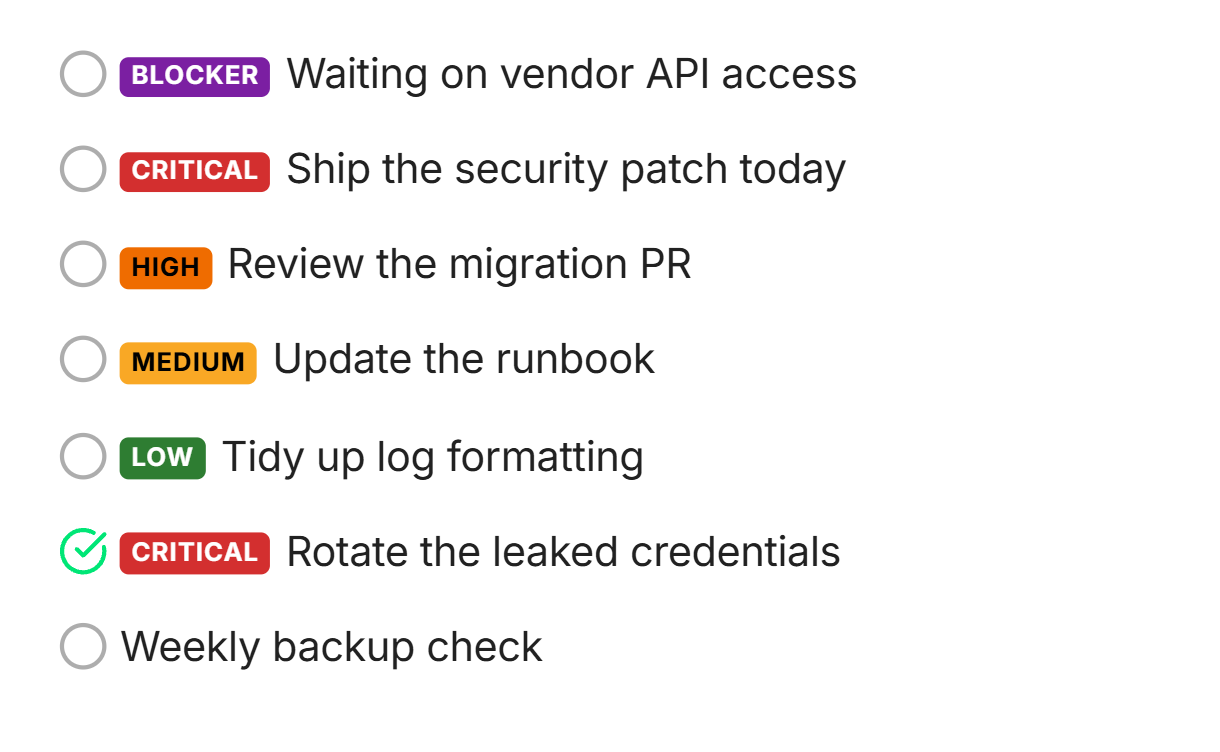
The marker must come right after the checkbox and be followed by a space, so - [ ] !important note is left untouched. Works with -, *, + bullets and both [ ] / [x] states. Requires pymdownx.tasklist to be enabled alongside this extension.
Reusing the parser
badges_in, priority_of, and rank_of are exposed for tools that aggregate or filter task items (for example a todo dashboard). Each takes an optional Mapping[str, Badge] argument, defaulting to the whole catalogue; pass the result of resolve_badges or catalogue_for to match your own config instead.
from markdown_badges import badges_in, priority_of, rank_of

badges_in("!blocker vendor waiting !wip")   # -> [Badge(name="blocker", ...), Badge(name="wip", ...)]
priority_of("ping !high vendor")            # -> "high"
priority_of("weekly backup")                # -> None (no priority badge)
rank_of("blocker")                          # -> 5 (severity index among priority badges)
rank_of("wip")                              # -> -1 (not a priority badge)
badges_in returns every badge found in the text, of any type, in document order. priority_of returns the name of the highest-ranked priority badge found, or None; status and branding badges are ignored. rank_of gives a badge's severity index among the priority badges, or -1 if it has none.
[!NOTE] These are plain-text scans, not a Markdown parse. Unlike the rendered badge, a keyword inside a code span or escaped as
\!highstill counts.
Install & enable
uv add markdown-badges
(or pip install markdown-badges)
Zensical (zensical.toml):
[project.markdown_extensions.markdown_badges]
Plain Python-Markdown:
markdown.markdown(text, extensions=["markdown_badges"])
Add pymdownx.tasklist to extensions too if you enable the shorthand option. The badge renders as <span class="badge badge--<name>" style="...">...</span>. The badge classes are kept for optional site-side overriding, but no CSS is needed by default.
Migrating from 0.2.0
The package was renamed from markdown-priority-badges to markdown-badges, and the config and API changed along with it: see MIGRATING.md.
1 maintainer

Metadata
1 maintainer
Release files for markdown-badges 1.0.0
For a detailed explanation of source distributions (sdists) and built distributions (wheels), please see the package formats documentation.
Source distribution (sdist)
| File | Size | Uploaded | |
|---|---|---|---|
| markdown_badges-1.0.0.tar.gz | 307.5 kB | Details |
Built distribution (wheel)
| File | Interpreter | ABI | Platform | Reset |
|---|---|---|---|---|
| markdown_badges-1.0.0-py3-none-any.whl | Python 3 | none | any | Details |
Total release size: 323.2 kB
Release files / markdown_badges-1.0.0.tar.gz
| Download URL | markdown_badges-1.0.0.tar.gz |
|---|---|
| Size | 307.5 kB |
| Tags | Source |
|
SHA-256 checksum How to use checksums |
d5896925175f602909bcbd9062a0d91b12d35d4c11e5aa549a2ac4a156276d54
|
|
BLAKE2b-256 checksum How to use checksums |
bd20b69f473cf6bcb36248115570237615662507e81818f3f8b92169c585cb92
|
| Upload date | |
|
Uploaded using Trusted Publishing? What is trusted publishing? |
Yes |
| Uploaded via |
twine/7.0.0 CPython/3.13.14
|
Provenance
Provenance describes where a file came from. On PyPI, provenance is shared via attestations, which provide a verifiable record of the build or publishing details. View details, limitations and caveats.


PyPI Publish Attestation
PyPI verified that this artifact, at this checksum, originated from the publisher listed below.
Signed by GitHub Actions, verified by PyPI on Sep 9, 2026.
Transparency logRelease files / markdown_badges-1.0.0-py3-none-any.whl
| Download URL | markdown_badges-1.0.0-py3-none-any.whl |
|---|---|
| Size | 15.7 kB |
| Tags | Python 3 |
|
SHA-256 checksum How to use checksums |
04fb78ad5980423c79bf265a5e653901880f3a0c3c09ee7cab7c65777085902a
|
|
BLAKE2b-256 checksum How to use checksums |
a19ebb22239b197f4ffd6e4cff31f839745fd6ed3a0fdc0d920e6f18ce926f80
|
| Upload date | |
|
Uploaded using Trusted Publishing? What is trusted publishing? |
Yes |
| Uploaded via |
twine/7.0.0 CPython/3.13.14
|
Provenance
Provenance describes where a file came from. On PyPI, provenance is shared via attestations, which provide a verifiable record of the build or publishing details. View details, limitations and caveats.
PyPI Publish Attestation
PyPI verified that this artifact, at this checksum, originated from the publisher listed below.
Signed by GitHub Actions, verified by PyPI on Sep 9, 2026.
Transparency log













